
struts2 UI标签 和 主题
四、Struts2的UI标签和主题
1、Struts2中UI标签的优势
自动的数据回显和错误提示功能
自带的简单样式和排版
2、表单标签的通用属性
说明:UI标签中value的取值一般都是字符串。
2.1、UI标签的通用属性
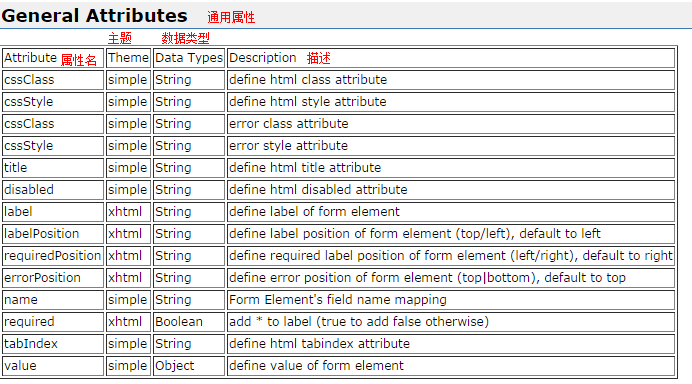
2.2、关于checkboxlist的使用:
 /**

  * s:checkboxlist标签的使用

  * @author zhy

  *

  */

 public class Demo6Action extends ActionSupport {

     //初始化表单用的爱好列表

     private String[] hobbyarr = new String[]{"吃饭","睡觉","写代码"};

     //用户提交表单时的数据封装到此属性中

     private String hobby;

     public String save(){

         System.out.println(hobby);

         return null;

     }

     public String[] getHobbyarr() {

         return hobbyarr;

     }

     public void setHobbyarr(String[] hobbyarr) {

         this.hobbyarr = hobbyarr;

     }

     public String getHobby() {

         return hobby;

     }

     public void setHobby(String hobby) {

         this.hobby = hobby;

     }

 }
动作类
 <%@ page language="java" import="java.util.*" pageEncoding="UTF-8"%>

 <%@ taglib uri="/struts-tags" prefix="s" %>

 <!DOCTYPE HTML PUBLIC "-//W3C//DTD HTML 4.01 Transitional//EN">

 <html>

   <head>

     <title>checkboxlist标签的使用</title>

   </head>

   <body>

       <s:form action="save">

           <%--checkboxlist:是在表单中生成一些复选框。list的取值是一个OGNL表达式 --%>

           <s:checkboxlist name="hobby" list="hobbyarr"></s:checkboxlist>

           <s:submit value="提交"/>

       </s:form>

       <%-- <s:debug/> --%>

   </body>

 </html>
checkbox.jsp
2.3、UI标签的小案例以及模型驱动的分析
 package com.itheima.web.action;

 import com.itheima.domain.Customer;

 import com.opensymphony.xwork2.ActionSupport;

 import com.opensymphony.xwork2.ModelDriven;

 /**

  * 表单的一个小例子

  * @author zhy

  *

  */

 public class Demo7Action extends ActionSupport implements ModelDriven<Customer> {

     //定义一个模型,注意,必须自己实例化

     private Customer customer = new Customer();

     public Customer getModel() {

         return customer;

     }

     public String save(){

         System.out.println(customer);

         return null;

     }

     public Customer getCustomer() {

         return customer;

     }

     public void setCustomer(Customer customer) {

         this.customer = customer;

     }

 }
DemoAction7.java
 public class Customer implements Serializable{

     private String name;

     private String password;

     private boolean married;

     private String hobby;

     private String city;

     private String description;

     private String gender;

     public String getName() {

         return name;

     }

     public void setName(String name) {

         this.name = name;

     }

     public String getPassword() {

         return password;

     }

     public void setPassword(String password) {

         this.password = password;

     }

     public boolean isMarried() {

         return married;

     }

     public void setMarried(boolean married) {

         this.married = married;

     }

     public String getHobby() {

         return hobby;

     }

     public void setHobby(String hobby) {

         this.hobby = hobby;

     }

     public String getCity() {

         return city;

     }

     public void setCity(String city) {

         this.city = city;

     }

     public String getDescription() {

         return description;

     }

     public void setDescription(String description) {

         this.description = description;

     }

     public String getGender() {

         return gender;

     }

     public void setGender(String gender) {

         this.gender = gender;

     }

     @Override

     public String toString() {

         return "Customer [name=" + name + ", password=" + password

                 + ", married=" + married + ", hobby=" + hobby + ", city="

                 + city + ", description=" + description + ", gender=" + gender

                 + "]";

     }

 }
实例类
     <s:form action="saveCustomer">

          <s:textfield name="name" label="用户名" />

          <s:password name="password" label="密码" />

          <s:checkbox name="married" label="已婚" value="true" />

          <s:checkboxlist name="hobby" list="{'摄影','旅行','足球'}" label="爱好" />

          <s:select name="city" label="故乡"  list="#{'BJ':'北京','SH':'上海','SZ':'苏州'}" headerKey="" headerValue="---请选择---"/>

          <s:textarea name="description" label="个人介绍" rows="5"  cols="25" />

          <s:radio name="gender" list="#{'male':'男','female':'女'}" label="性别" value="'male'" /><%--value是一个OGNL表达式 --%>

          <s:submit value="提交" theme="simple"/><s:reset value="重置" theme="simple" />

      </s:form>
Demo7.jsp
3、UI标签的模板(主题)
3.1、struts2中默认主题
默认主题的名称是XHTML,都是在struts的默认属性文件中定义着:default.properties
3.2、更改默认主题
a、更改表单某个元素的默认主题:使用的是表单元素的theme属性。
s:submit value="提交" theme="simple"/><s:reset value="重置" theme="simple" />
b、更改表单所有主题:使用的是form标签的theme属性。
     <s:form action="saveCustomer" theme="simple">

           <s:textfield name="name" label="用户名" />

           <s:password name="password" label="密码" />

           <s:checkbox name="married" label="已婚" value="true" />

           <s:checkboxlist name="hobby" list="{'摄影','旅行','足球'}" label="爱好" />

           <s:select name="city" label="故乡"  list="#{'BJ':'北京','SH':'上海','SZ':'苏州'}" headerKey="" headerValue="---请选择---"/>

           <s:textarea name="description" label="个人介绍" rows="5"  cols="25" />

           <s:radio name="gender" list="#{'male':'男','female':'女'}" label="性别" value="'male'" /><%--value是一个OGNL表达式 --%>

           <s:submit value="提交" theme="simple"/><s:reset value="重置" theme="simple" />

       </s:form>
c、更改全站所有表单主题:是在struts.xml配置文件中,覆盖原有主题的设置。
<constant name="struts.ui.theme" value="simple" />
struts2 UI标签 和 主题的更多相关文章
- 【Java EE 学习 36】【struts2】【struts2系统验证】【struts2 ognl值栈】【struts2 ongl标签】【struts2 UI标签】【struts2模型驱动和令牌机制】
一.struts2系统验证 1.基于struts2系统验证的方式实际上就是通过配置xml文件的方式达到验证的目的. 2.实际上系统校验的方法和手工校验的方法在底层的基本实现是相同的.但是使用系统校验的 ...
- Struts2 UI标签
表单标签的共同属性(该属性只在没有使用 simple 主题时才可以使用) form 标签 用来呈现 HTML 语言中的表单元素 默认情况下, form 标签将被呈现为一个表格形式的 HTML 表单. ...
- 二十四、Struts2中的UI标签
二十四.Struts2中的UI标签 Struts2中UI标签的优势: 数据回显 页面布局和排版(Freemark),struts2提供了一些常用的排版(主题:xhtml默认 simple ajax) ...
- Struts2第十一篇【简单UI标签、数据回显】
Struts2UI标签 Sturts2为了简化我们的开发,也为我们提供了UI标签-也就是显示页面的标签-.. 但是呢,Struts2是服务端的框架,因此使用页面的标签是需要在服务器端解析然后再被浏览器 ...
- Struts2【UI标签、数据回显、资源国际化】
Struts2UI标签 Sturts2为了简化我们的开发,也为我们提供了UI标签...也就是显示页面的标签..... 但是呢,Struts2是服务端的框架,因此使用页面的标签是需要在服务器端解析然后再 ...
- 解决struts2中UI标签出现的问题: The Struts dispatcher cannot be found
解决struts2中UI标签出现的问题: The Struts dispatcher cannot be found 异常信息: The Struts dispatcher cannot be fou ...
- struts2中如何使用主题theme
一.什么是主题? 主题就是一种风格化标签,能够让所有UI标签能够产生同样的视觉效果而归集到一起的一组模板,即风格相近的模板被打包为一个主题 二.struts2提供的主题有哪些呢?struts2中如何修 ...
- Struts2的模板和主题theme及自定义theme的使用
Struts2的模板和主题theme及自定义theme 标签: struts2 2016-03-29 11:22 190人阅读 评论(0) 收藏 举报 分类: javaweb(8) Struts2 ...
- Struts2常用标签
Struts2常用标签总结 一 介绍 1.Struts2的作用 Struts2标签库提供了主题.模板支持,极大地简化了视图页面的编写,而且,struts2的主题.模板都提供了很好的扩展性.实现了更好的 ...
随机推荐
- iview render bug & vue namespace bug
iview render bug https://codepen.io/xgqfrms/pen/gyGjKP https://codepen.io/xgqfrms/full/gyGjKP bug &l ...
- Python——tkinter操作
一.创建单选框 form tkinter import * #创建窗口体 window = tk() #初始化组合件绑定 w1 = IntVar() #设置初始选择项1 w1.set(1) def O ...
- LODOP打印css样式rgba显示黑色区块
当LODOP打印html超文本出现问题的时候,要删减排查一下样式,查看Lodop传入的内部的html超文本和样式,可查看本博客另一篇博文:删减发现有问题的样式,并解决该问题,尽量使用通用的css样式, ...
- spawn
转载:http://motioo.blog.163.com/blog/static/117718291200954102830215/ 并行计算使用的节点数在开始运行程序时进行指定. 学习了FFT之后 ...
- Data Science With R In Visual Studio
R Projects Similar to Python, when we installed the data science tools we get an “R” section in our ...
- UVA 11988 Beiju Text
https://vjudge.net/problem/UVA-11988 题目 你有一个破损的键盘.键盘上所有的键都可以正常工作,但有时候Home键或者End键会自动按下.你并不知道键盘存在这一问题, ...
- Nginx用户权限验证管理
首先需要编译进--with-http_request_model 配置指令:auth_request url | off; #url是指上游服务器地址 context: http/location 备 ...
- Codeforces Round #488 Div. 1
A:枚举每个点判断是否同时在两个正方形中即可. #include<iostream> #include<cstdio> #include<cmath> #inclu ...
- HDU 4256 翻译罗马数字
参考自:https://www.cnblogs.com/ECJTUACM-873284962/p/6414173.html The Famous Clock Time Limit: 2000/1000 ...
- 一种HBase表数据迁移方法的优化
1.背景调研: 目前存在的hbase数据迁移主要分如下几类: 根据上图,可以看出: 其实主要分为两种方式:(1)hadoop层:因为hbase底层是基于hdfs存储的,所以可以通过把hdfs上的数据拷 ...