
微信小程序-基于canvas画画涂鸦
一、前期准备工作
软件环境:微信开发者工具
官方下载地址:https://mp.weixin.qq.com/debug/wxadoc/dev/devtools/download.html
1、基本需求。
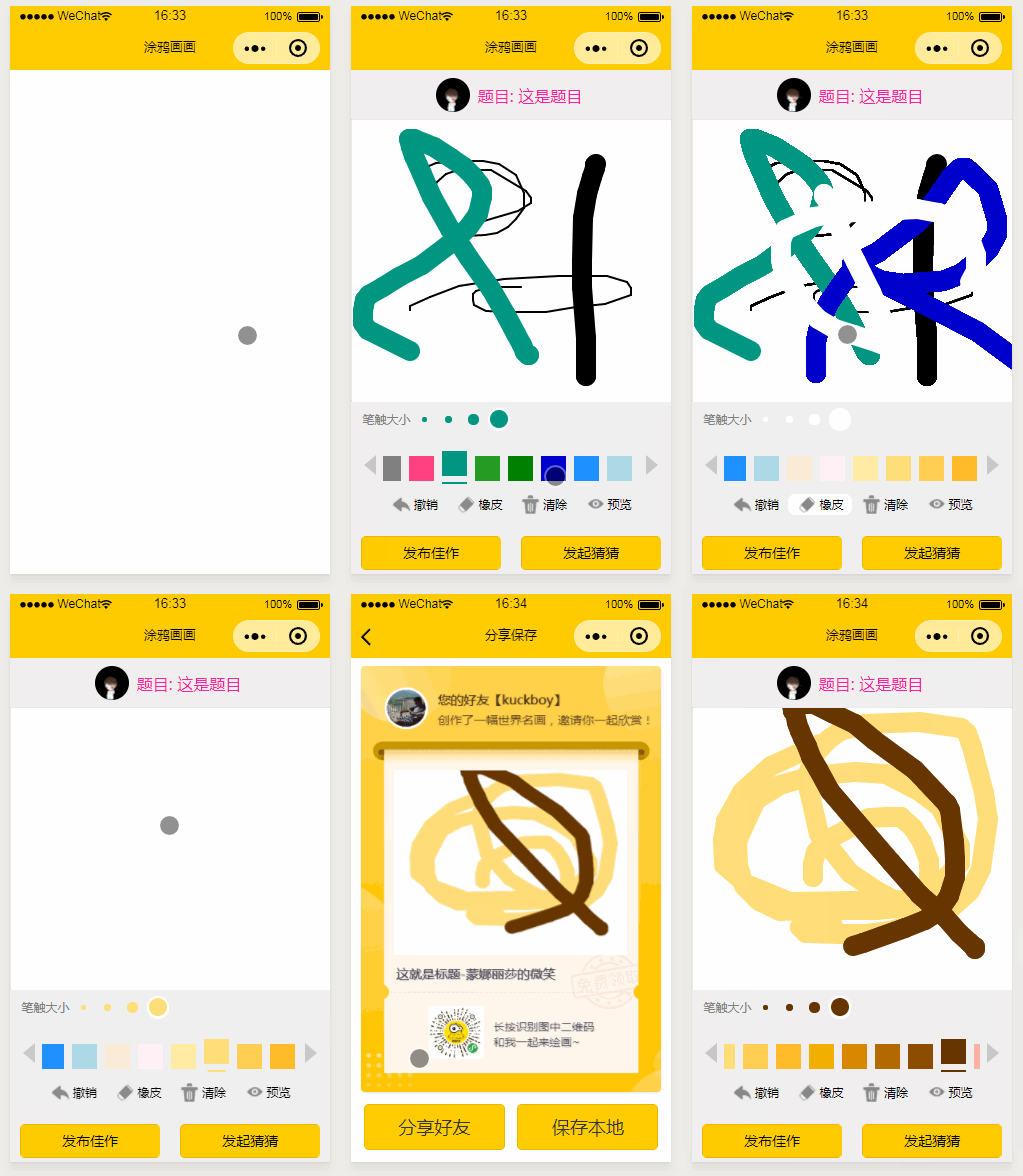
- 实现用户自定画笔大小
- 实现用户自定色彩
- 实现用户动画撤回之前的操作
- 实现生成分享海报
- 实现用户预览画作,清除画布
2、案例目录结构
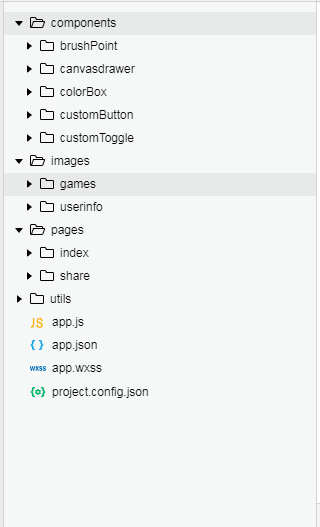
二、程序实现具体步骤
1.index.wxml代码
<view class="option-panel">

    <view class="option-row" id="firstRow">

      <view class="width-container">

        <text>笔触大小</text>

        <block wx:for="{{lineWidthArr.length}}" wx:key="index">

          <brush-point class="brush-point" radius="{{lineWidthArr[index]}}" data-index="{{index}}" selected="{{index === curWidthIndex}}" bind:select="clickChangeWidth" color="{{currentColor}}"></brush-point>

        </block>

      </view>

    </view>

    <view class="option-row" id="secondRow">

      <view class="color-slecotr-left"></view>

      <scroll-view scroll-x="true">

        <block wx:for="{{avaliableColors}}" wx:key="index">

          <color-box class="color-box" data-color="{{avaliableColors[index]}}" selected="{{avaliableColors[index]===currentColor}}" bind:select="clickChangeColor"></color-box>

        </block>

      </scroll-view>

      <view class="color-slecotr-right"></view>

    </view>

    <view class="option-row" id="thirdRow">

      <view class="tool-container">

      <custom-button class="icon-text"

          imgUrl="/images/games/common/btn_back.png"

          bind:clickEvent="clickFallback"

          text="撤销"

          width="100%">

        </custom-button>

        <custom-toggle class="icon-text"

          imgUrl="/images/games/common/btn_erase.png"

          selected="{{bgColor===currentColor}}"

          bind:clickEvent="clickErase"

          text="橡皮"

          width="100%">

        </custom-toggle>

        <custom-button class="icon-text"

          imgUrl="/images/games/common/btn_tranCan.png"

          bind:clickEvent="clickClearAll"

          text="清除"

          width="100%">

        </custom-button>

        <custom-button class="icon-text"

          imgUrl="/images/games/common/btn_pageview.png"

          bind:clickEvent="pageView"

          text="预览"

          width="100%">

        </custom-button>

      </view>

    </view>

    <view class="option-row" id="forthRow">

      <button type="primary" class="share-btn" bindtap='goRelease'>发布佳作</button>

      <button type="primary" class="share-btn" bindtap='clickShare'>发起猜猜</button>

    </view>

  </view>

</view>
2.index.wxss代码
page{

  height: 100%;

  width:100%;

}

.container {

  height: 100%;

  display: flex;

  flex-direction: column;

  align-items: center;

  justify-content: space-between;

  box-sizing: border-box;

}

/* 显示的题目 */

.container .question {

  width: 100%;

  height: 10%;

  background: #f0efef;

  display: flex;

  flex-direction: row;

  justify-content: center;

  align-items: center;

  color: #fb21a1;

  box-shadow: 2rpx 5rpx 2rpx silver;

}

/* 刷新按钮 */

.container .question .userinfo-avatar {

  height: 80rpx;

  width: 80rpx;

  border-radius: 50%;

  overflow: hidden;

}

.container .question text {

  margin: auto 10rpx auto 20rpx;

}

.container .question .refresh-btn {

  width: 50rpx;

  height: 50rpx;

  transform: scaleX(-1);

}

/* 中间画板 */

.container .palette {

  width: 100%;

  height: 56%;

  display: flex;

  justify-content: center;

  align-items: center;

  box-shadow: 2rpx 5rpx 2rpx silver;

}
3.index.js逻辑代码
a.UI事件动画部分的功能实现
/*--------------------- UI事件 --------------------------------------------------- */

  // 绘制开始 手指开始按到屏幕上

  touchStart: function (e) {

    this.lineBegin(e.touches[0].x, e.touches[0].y)

    curDrawArr.push({

      x: e.touches[0].x,

      y: e.touches[0].y

    });

  },

  // 绘制中 手指在屏幕上移动

  touchMove: function (e) {

    if (begin) {

      this.lineAddPoint(e.touches[0].x, e.touches[0].y);

      this.draw(true);

      curDrawArr.push({

        x: e.touches[0].x,

        y: e.touches[0].y

      });

    }

  },

  // 绘制结束 手指抬起

  touchEnd: function () {

    drawInfos.push({

      drawArr: curDrawArr,

      color: this.data.currentColor,

      lineWidth: this.data.lineWidthArr[this.data.curWidthIndex],

    });

    curDrawArr = [];

    this.lineEnd();

  },
b.设置线条颜色,设置线条宽度,开始绘制线条,绘制线条中间添加点,等操作...
 // 设置线条颜色

  setCurrentColor: function (color) {

    this.data.currentColor = color;

    this.context.strokeStyle = color;

    this.setData({

      currentColor: color

    });

  },

  // 设置线条宽度

  setLineWidthByIndex: function (index) {

    let width = this.data.lineWidthArr[index];

    this.context.setLineWidth(width);

    this.setData({

      curWidthIndex: index

    });

  },

  // 开始绘制线条

  lineBegin: function (x, y) {

    begin = true;

    this.context.beginPath()

    startX = x;

    startY = y;

    this.context.moveTo(startX, startY)

    this.lineAddPoint(x, y);

  },

  // 绘制线条中间添加点

  lineAddPoint: function (x, y) {

    this.context.moveTo(startX, startY)

    this.context.lineTo(x, y)

    this.context.stroke();

    startX = x;

    startY = y;

  },

  // 绘制线条结束

  lineEnd: function () {

    this.context.closePath();

    begin = false;

  },

  // 根据保存的绘制信息重新绘制

  reDraw: function () {

    this.init();

    this.fillBackground(this.context);

    // this.draw(false);

    for (var i = 0; i < drawInfos.length; i++) {

      this.context.strokeStyle = drawInfos[i].color;

      this.context.setLineWidth(drawInfos[i].lineWidth);

      let drawArr = drawInfos[i].drawArr;

      this.lineBegin(drawArr[0].x, drawArr[0].y)

      for (var j = 1; j < drawArr.length; j++) {

        this.lineAddPoint(drawArr[j].x, drawArr[j].y);

        // this.draw(true);

      }

      this.lineEnd();

    }

    this.draw();

  },

  // 将canvas导出为临时图像文件

  // canvasId: 要导出的canvas的id

  // cb: 回调函数

  store: function (canvasId, cb) {

    wx.canvasToTempFilePath({

      destWidth: 400,

      destHeight: 300,

      canvasId: canvasId,

      success: function (res) {

        typeof (cb) == 'function' && cb(res.tempFilePath);

      },

      fail: function (res) {

        console.log("store fail");

        console.log(res);

      }

    })

  },
三、案例运行效果图
四、总结与备注
暂无微信小程序-基于canvas画画涂鸦
注:本文著作权归作者,由demo大师代发,拒绝转载,转载需要作者授权
微信小程序-基于canvas画画涂鸦的更多相关文章
- 微信小程序 在canvas画布上划动,页面禁止滑动
要实现微信小程序 在canvas画布上划动,页面禁止滑动,不仅要设置disable-scroll="true",还要要给canvas绑定一个触摸事件才能生效. <canvas ...
- 微信小程序基于swiper组件的tab切换
代码地址如下:http://www.demodashi.com/demo/14010.html 一.前期准备工作 软件环境:微信开发者工具 官方下载地址:https://mp.weixin.qq.co ...
- 微信小程序基于scroll-view实现锚点定位
代码地址如下:http://www.demodashi.com/demo/14009.html 一.前期准备工作 软件环境:微信开发者工具 官方下载地址:https://mp.weixin.qq.co ...
- 关于微信小程序前端Canvas组件教程
关于微信小程序前端Canvas组件教程 微信小程序Canvas接口函数 上述为微信小程序Canvas的内部接口,通过熟练使用Canvas,即可画出较为美观的前端页面.下面是使用微信小程序画图的一些 ...
- 微信小程序-基于高德地图API实现天气组件(动态效果)
微信小程序-基于高德地图API实现天气组件(动态效果) 在社区翻腾了许久,没有找到合适的天气插件.迫不得已,只好借鉴互联网上的web项目,手动迁移到小程序中使用.现在分享到互联网社区中,帮助后续有 ...
- 微信小程序--基于ColorUI构建皮皮虾短视频去水印组件(仅供学习使用)
微信小程序--基于ColorUI构建皮皮虾短视频去水印组件(仅供学习使用) 没错,我是皮友,我想学习舞蹈(/doge)和瑜伽 ,要无水印的那种有助于我加深学习. 1.组件效果展示 2.组件引入准备 h ...
- 微信小程序 -- 基于 movable-view 实现拖拽排序
微信小程序 -- 基于 movable-view 实现拖拽排序 项目基于colorui样式组件 ColorUI组件库 (color-ui.com) 1.实现效果 2. 设计思路 movable-vie ...
- 关于微信小程序使用canvas生成图片,内容图片跨域的问题
最近有个项目是保存为名片(图片),让用户发送给朋友或朋友圈,找了很多方案都不适用,绞尽脑汁之后还是选了使用canvas,但是用这玩意儿生成图片最大的缺点就是,如果你的内容中有图片,并且这个图片是通过外 ...
- 微信小程序使用canvas绘制图片的注意事项
1.单位换算问题,canvas的尺寸单位是px,所以单位需要做个换算,可以通过wx.getSystemInfo获取屏幕宽高(单位是px),微信小程序无论什么机型,屏幕宽度都是750rpx,因此可以做个 ...
随机推荐
- C#编程(八)--------- Main函数
Main()方法. C#程序是以Main()开始执行的,这个方法必须是类或结构的静态方法,并且其返回类型必须是int或者void. 虽然显示指定public修饰符很常见,但是我们也可以把该方法标记为p ...
- 【docker-compose】使用docker-compose部署运行spring boot+mysql 【处理容器的时区问题】【详解】【福利:使用docker-compose构建 wordpress+mysql】
==================================================================================================== ...
- 【java】将字符串的首字母大写
工具方法: public static void main(String[] args) { System.out.println(upperCaseFirst("barer")) ...
- [翻译] ObjectAL for iPhone and Mac(持续更新)
ObjectAL for iPhone and Mac https://github.com/kstenerud/ObjectAL-for-iPhone 以后补上使用教程 Mac and iOS Au ...
- VirtualBox 快捷键
VirtualBox 的 Host 键是哪一个? 默认的 Host = Right Ctrl 组合键,意思是键盘上两个 “Ctrl”中右边的那个.键盘上是没有 “Right”这个键的,刚开始不明白,后 ...
- 常用数据类型对应字节数,int长度
常用数据类型对应字节数: 这两台机器,前者32位,后者64位,测试了以下数据类型的长度: 前者: ,, 后者: ,, 不是说int会变吗,为何变得是long? 还有如果要写个通用的程序,订死必须用4个 ...
- 3D屏保: 彩色盘子
一个彩色盘子的屏保 记得小时候在电视上看过一个科普节目,由多个颜色组成的盘子,如果快速旋转起来,会看上去是白色的.于是我就写了这个屏保程序,但发现在计算机上模拟并不是这样的. "RollPl ...
- Informatica 常用组件Filter之二 过滤条件
过滤条件可以使用转换语言输入.过滤条件是返回 TRUE 或 FALSE 的表达式.例如,如果您要过滤出员工薪水低于 $30,000 的行,可输入以下条件: SALARY > 30000 可以使用 ...
- 第四章 mybatis批量insert
批量插入sql语句: INSERT INTO table (field1,field2,field3) VALUES ('a',"b","c"), ('a',& ...
- iOS开发-图片查看(ScrollView+UIPageControl)
上周没事写了一个简单的图片查看,上次的查看只用到了一个UIImageView,不断的替换背景图片,实现图片之间的切换.通过ScrollView可以很简单的是实现图片之间的查看,设置setPagingE ...