
PyQt5教程——菜单和工具栏(3)
PyQt5中的菜单和工具栏
在这部分的PyQt5教程中,我们将创建菜单和工具栏。菜单式位于菜单栏的一组命令操作。工具栏是应用窗体中由按钮和一些常规命令操作组成的组件。
主窗口
QMainWindow类提供了一个应用主窗口。默认创建一个拥有状态栏、工具栏和菜单栏的经典应用窗口骨架。
状态栏
状态栏是用来显示状态信息的组件。
#!/usr/bin/python3

# -*- coding: utf-8 -*-

"""

ZetCode PyQt5 tutorial

This program creates a statusbar.

author: Jan Bodnar

website: zetcode.com

last edited: January 2015

"""

import sys

from PyQt5.QtWidgets import QMainWindow, QApplication

class Example(QMainWindow):

    def __init__(self):

        super().__init__()

        self.initUI()

    def initUI(self):

        self.statusBar().showMessage('Ready')

        self.setGeometry(300, 300, 250, 150)

        self.setWindowTitle('Statusbar')

        self.show()

if __name__ == '__main__':

    app = QApplication(sys.argv)

    ex = Example()

    sys.exit(app.exec_())
状态栏又QMainWindow组件帮助创建完成(依赖于QMainWindow组件)。
self.statusBar().showMessage('Ready')
为了得到状态栏,我们调用了QtGui.QMainWindow类的statusBar()方法。第一次调用这个方法创建了一个状态栏。随后方法返回状态栏对象。然后用showMessage()方法在状态栏上显示一些信息。
菜单栏
菜单栏是GUI应用的常规组成部分。是位于各种菜单中的一组命令操作(Mac OS 对待菜单栏有些不同。为了获得全平台一致的效果,我们可以在代码中加入一行:menubar.setNativeMenuBar(False))。
#!/usr/bin/python3

# -*- coding: utf-8 -*-

"""

ZetCode PyQt5 tutorial

This program creates a menubar. The

menubar has one menu with an exit action.

author: Jan Bodnar

website: zetcode.com

last edited: January 2015

"""

import sys

from PyQt5.QtWidgets import QMainWindow, QAction, qApp, QApplication

from PyQt5.QtGui import QIcon

class Example(QMainWindow):

    def __init__(self):

        super().__init__()

        self.initUI()

    def initUI(self):

        exitAction = QAction(QIcon('exit.png'), '&Exit', self)

        exitAction.setShortcut('Ctrl+Q')

        exitAction.setStatusTip('Exit application')

        exitAction.triggered.connect(qApp.quit)

        self.statusBar()

        menubar = self.menuBar()

        fileMenu = menubar.addMenu('&File')

        fileMenu.addAction(exitAction)

        self.setGeometry(300, 300, 300, 200)

        self.setWindowTitle('Menubar')

        self.show()

if __name__ == '__main__':

    app = QApplication(sys.argv)

    ex = Example()

    sys.exit(app.exec_())
在上面的例子中,我们创建了有一个菜单项的菜单栏。这个菜单项包含一个选中后中断应用的动作。
exitAction = QAction(QIcon('exit.png'), '&Exit', self)

exitAction.setShortcut('Ctrl+Q')

exitAction.setStatusTip('Exit application')
QAction是一个用于菜单栏、工具栏或自定义快捷键的抽象动作行为。在上面的三行中,我们创建了一个有指定图标和文本为'Exit'的标签。另外,还为这个动作定义了一个快捷键。第三行创建一个当我们鼠标浮于菜单项之上就会显示的一个状态提示。
exitAction.triggered.connect(qApp.quit)
当我们选中特定的动作,一个触发信号会被发射。信号连接到QApplication组件的quit()方法。这样就中断了应用。
menubar = self.menuBar()

fileMenu = menubar.addMenu('&File')

fileMenu.addAction(exitAction)
menuBar()方法创建了一个菜单栏。我们创建一个file菜单,然后将退出动作添加到file菜单中。
工具栏
菜单可以集成所有命令,这样我们可以在应用中使用这些被集成的命令。工具栏提供了一个快速访问常用命令的方式。
#!/usr/bin/python3

# -*- coding: utf-8 -*-

"""

ZetCode PyQt5 tutorial

This program creates a toolbar.

The toolbar has one action, which

terminates the application, if triggered.

author: Jan Bodnar

website: zetcode.com

last edited: January 2015

"""

import sys

from PyQt5.QtWidgets import QMainWindow, QAction, qApp, QApplication

from PyQt5.QtGui import QIcon

class Example(QMainWindow):

    def __init__(self):

        super().__init__()

        self.initUI()

    def initUI(self):

        exitAction = QAction(QIcon('exit24.png'), 'Exit', self)

        exitAction.setShortcut('Ctrl+Q')

        exitAction.triggered.connect(qApp.quit)

        self.toolbar = self.addToolBar('Exit')

        self.toolbar.addAction(exitAction)

        self.setGeometry(300, 300, 300, 200)

        self.setWindowTitle('Toolbar')

        self.show()

if __name__ == '__main__':

    app = QApplication(sys.argv)

    ex = Example()

    sys.exit(app.exec_())
上述例子中,我们创建了一个简单的工具栏。工具栏有一个动作,当这个退出动作被触发时应用将会被中断。
exitAction = QAction(QIcon('exit24.png'), 'Exit', self)

exitAction.setShortcut('Ctrl+Q')

exitAction.triggered.connect(qApp.quit)
我们创建了一个动作对象,和之前菜单栏中的部分代码相似。这个动作有一个标签,图标和快捷键。并且将QtGui.QMainWindow的quit()方法连接到了触发信号上。
self.toolbar = self.addToolBar('Exit')

self.toolbar.addAction(exitAction)
这里我们创建了一个工具栏,并且在其中插入一个动作对象。
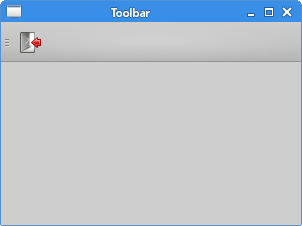 Figure: Toolbar
将几个组件放在一起使用
在上面的例子中,我们创建了菜单栏、工具栏和状态栏。下面我们将创建一个中心组件。
#!/usr/bin/python3

# -*- coding: utf-8 -*-

"""

ZetCode PyQt5 tutorial

This program creates a skeleton of

a classic GUI application with a menubar,

toolbar, statusbar, and a central widget.

author: Jan Bodnar

website: zetcode.com

last edited: January 2015

"""

import sys

from PyQt5.QtWidgets import QMainWindow, QTextEdit, QAction, QApplication

from PyQt5.QtGui import QIcon

class Example(QMainWindow):

    def __init__(self):

        super().__init__()

        self.initUI()

    def initUI(self):

        textEdit = QTextEdit()

        self.setCentralWidget(textEdit)

        exitAction = QAction(QIcon('exit24.png'), 'Exit', self)

        exitAction.setShortcut('Ctrl+Q')

        exitAction.setStatusTip('Exit application')

        exitAction.triggered.connect(self.close)

        self.statusBar()

        menubar = self.menuBar()

        fileMenu = menubar.addMenu('&File')

        fileMenu.addAction(exitAction)

        toolbar = self.addToolBar('Exit')

        toolbar.addAction(exitAction)

        self.setGeometry(300, 300, 350, 250)

        self.setWindowTitle('Main window')

        self.show()

if __name__ == '__main__':

    app = QApplication(sys.argv)

    ex = Example()

    sys.exit(app.exec_())
事例代码创建了一个带有菜单栏、工具栏和状态栏的经典GUI应用骨架。
textEdit = QTextEdit()

self.setCentralWidget(textEdit)
在这里我们创建了一个文本编辑框组件。我们将它设置成QMainWindow的中心组件。中心组件占据了所有剩下的空间。
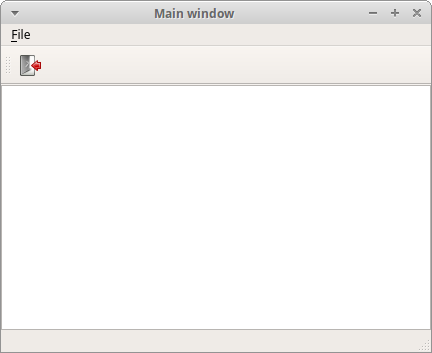 Figure: Main window
在这个部分的PyQt5教程中,我们使用了菜单、工具栏、状态栏和一个应用主窗口。
PyQt5教程——菜单和工具栏(3)的更多相关文章
- pyqt5 -——菜单和工具栏
一. 状态栏 # -*- coding: utf-8 -*-# @Time : 2018/12/22 12:37# @Author : Bo# @Email : mat_wu@163.com# @Fi ...
- 在PyQt中构建 Python 菜单栏、菜单和工具栏
摘要:菜单.工具栏和状态栏是大多数GUI 应用程序的常见且重要的图形组件.您可以使用它们为您的用户提供一种快速访问应用程序选项和功能的方法. 本文分享自华为云社区<Python 和 PyQt:创 ...
- 菜单工具栏wxPython菜单与工具栏基础示例
这两天一直在学习菜单工具栏之类的问题,上午正好有机会和大家讨论一下. 1.基本的api介绍 Package wx :: Class Menu Type Menu Method Summary Menu ...
- PyQt5教程——对话框(6)
PyQt5中的对话框 对话框窗口或对话框是大多数主流GUI应用不可缺少的部分.对话是两个或更多人之间的会话.在计算机应用中,对话框是一个用来和应用对话的窗口.对话框可以用来输入数据,修改数据,改变应用 ...
- GEF入门实例_总结_03_显示菜单和工具栏
一.前言 本文承接上一节: GEF入门实例_总结_02_新建初始RCP空项目 这一节,我们来给我们的插件加上菜单. 二.基础知识 1.action bar.menubar.coolbar 含义 a ...
- WinForm 菜单和工具栏
菜单和工具栏: 1.MenuStrip:顶部菜单 优先级最高,默认在最顶部 (1)分割线:a.打一个减号 “-” b.右键插入Separator (2)点击事件:每 ...
- WinForm菜单和工具栏
菜单和工具栏: 1.MenuStrip - 顶部菜单栏分割线:1输入- 2.右键插入 |SpearTOR 快捷键设置:每一个项右键属性的最下面可以设置快捷键不管选项隐藏还是菜单隐藏,快捷键都管用 2. ...
- Windows系统:桌面,开始菜单和工具栏都不见了
win7桌面,开始菜单和工具栏都不见了 ctrl+alt+del 打开任务管理器 然后文件-运行 --- 输入框里输入 explorer.exe 其实就是打开系统文件夹下的(大约是‘windows ...
- winform(多窗体、菜单和工具栏)
一.多窗体 1.哪个是主窗体 利用From1的button将From2打开 private void button1_Click(object sender, EventArgs e) { Form2 ...
随机推荐
- MYSQL-5.5.37-win32.msi 这个版本得程序包谁有吗 可以给我一下吗?
之前下载了这个版本得mysql 但是跟服务器链接不上 后来我就卸载了 但由于卸载不干净 现在又删了注册表 好像把这个程序包得什么文件删除了 现在提示配置文件错误 所以有这个程序包得 ...
- .Net高级技术——IDisposable
IDisposable概述 GC(垃圾收集器)只能回收托管(Managed)内存资源,对于数据库连接.文件句柄.Socket连接等这些资源(非托管资源,UnManaged)就无能为例,必须程序员自己控 ...
- Using Windows Server 2012 Backup for Hyper-V Virtual Machines. Error 80780176 - The specified component was not reported by the VSS writer.
https://social.technet.microsoft.com/Forums/windowsserver/en-US/1a1e0066-f421-43d6-970b-1e20e674cdf9 ...
- C#程序集系列01,用记事本编写C#,IL代码,用DOS命令编译程序集,运行程序
本篇主要体验:编写C#,IL代码,用"VS2012开发人员命令提示"编译成程序集,并运行程序. □ C#文件编译为程序集 →在F盘创建as文件夹→在as文件夹下创建MyClass. ...
- C#位运算符的基本用法
位运算符包括:| 按位或 OR,& 按位与 AND,^ 按位异或 XOR,~ 取反 NOT,<< 左移 Left Shift,>> 右移 Right Shift,等等. ...
- 【C#高级编程】笔记之核心C#
Main()方法 每一个C#可执行文件(如控制台程序.Windows程序和Windows服务)都必须有一个入口点——Main()方法(注意M大写). 这个方法必须是类或静态方法,并且返回类型必须是in ...
- Spring注解方式实现任务调度【官方文档翻译】
原文:http://docs.spring.io/spring/docs/4.0.1.BUILD-SNAPSHOT/javadoc-api/ 注解类型:EnableScheduling @Target ...
- Android图片加载框架最全解析(一),Glide的基本用法
现在Android上的图片加载框架非常成熟,从最早的老牌图片加载框架UniversalImageLoader,到后来Google推出的Volley,再到后来的新兴军Glide和Picasso,当然还有 ...
- 《CWNA官方学习指南(第3版):认证无线网络管理员PW0-105》
<CWNA官方学习指南(第3版):认证无线网络管理员PW0-105> 基本信息 原书名:CWNA: Certified Wireless Network Administrator Off ...
- 从volatile说到i++的线程安全问题
简介 volatile关键字保证了在多线程环境下,被修饰的变量在别修改后会马上同步到主存,这样该线程对这个变量的修改就是对所有其他线程可见的,其他线程能够马上读到这个修改后值. Thread的本地内存 ...