
miniblink+golang开发windows gui应用
golang的优点自不必说了,这么好的语言怎么能缺少界面库呢?所以我使用miniblink开发了一个可以用html,css,js开发界面的浏览器,通过它你能为你的golang开发简单的界面。说白了其实就是轻量级浏览器,暂且叫它browser吧,多轻呢,哈哈只有6.8M大小。点这里下载
怎么使用呢?
1 首先建立golang服务了,可以是http rpc socket websocket等
2 用html,js,css写好界面,用browser打开它与golang通信
3 当然browser也可以自定义界面
命令行调用browser
browser.exe --url=http://127.0.0.1 --custom-ui=2 或
browser.exe --url=D:\index.html --ico=D:\favicon.ico
命令行参数:
--url 打开页面的地址(必传)
--width 窗口的款(可选)
--height 窗口的高(可选)
--top 窗口距屏幕上边的距离(可选)
--left 窗口距屏幕下边的距离(可选)
--max 是否最大化,1是 0否(可选)
--full-screen 是否全屏,1是 0否(可选)
--custom-ui 是否用户自定义ui,1是 0否 2带阴影(可选)
--ico 指定ico路径,默认读取网页的favicon(可选
自定义界面需要自己写代码,注意最大化,最小化和关闭按钮js调用
<!doctype html>

<html>

<meta http-equiv="Content-Type" content="text/html; charset=utf-8" />

<style>

html,body{

	margin:0;

	background:#fff;

	height:100%;

}

*:not(input,textarea) {

    -webkit-user-select: none;

}

/*标题栏*/

#header{

	position:absolute;

	top:0px;

	left:0px;

	height:28px;

	width:100%;

	background:rgb(52,152,220);

	cursor:default;

}

/*中间内容栏*/

#container{

	box-sizing:border-box;/*使高度包含padding*/

	height:100%;

	width:100%;

	padding-top:28px;

	padding-bottom:35px;

	margin:0 auto;

	overflow:auto;

}

/*底栏*/

#footer {

    height:35px;

    width:100%;

    position: absolute;

    bottom:0;

    left:0;

    z-index:100;

    background:rgb(239,237,238);

	text-align:right;

	padding:3px 5px;

	box-sizing:border-box;

}

/*中间内容栏 左侧列*/

#container .lside{

	height:100%;

	width:150px;

	float:left;

	background:rgb(110,179,210);

}

/*中间内容栏 右侧列*/

#container .rside{

	height:100%;

	margin-left:150px;

	background:#FFF;

	padding:20px;

	box-sizing:border-box;

}

#footer button{

	padding:4px 13px;

	font-size:12px;

	background:rgb(27,174,93);

	color:white;

	border:0;

}

#footer button:hover {

	background:rgb(33,127,188);

	box-shadow: 0 0 5px rgba(81, 203, 238, 1);

	cursor:pointer;

}

#footer button:active {

	background:rgb(20,110,170);

	cursor:pointer;

}

#header .title-bar{

    margin-right:75px;

    padding-left:10px;

    height:28px;

    line-height: 28px;

    font-size:9pt;

    color:#eee;

}

#header .ctrls{

	width:75px;

	height:28px;

	float:right;

}

#header .ctrls a{

	display:block;

	float:left;

	height:14px;

	font-family:"Marlett";

	font-size:14px;

	padding:4px;

	color:#fff;

	cursor:default;

}

#header .ctrls a[id]:hover{

    background:#6ebccf;

}

#header .ctrls a[id]:active{

    background:#FF0000;

}

</style>

<body>

	<div id="header">

		<div class="ctrls">

			<a id="window-min" onclick="external.hitmin()">0</a>

        	<a id="window-max" onclick="this.innerText = external.hitmax()?'2':'1';">1</a>

        	<a id="window-close" onclick="external.close()">r</a>

		</div>

		<div class="title-bar" onmousedown="external.hitCaption()"> <span class=title> 我的软件 </span></div>

	</div>

	<div id="container">

    <div class="lside"> </div>

    <div class="rside"> 当前时间:<?= time() ?> </div>

    </div>

    <div id="footer">

    	<button onclick="javascript:alert('哈哈哈^_^')">哈哈哈^_^</button>

    </div>

</body>

</html>
golang端代码,这里以httpserver为例,注意必须等待browser的执行,这样当关闭browser的时候,golang server也关闭了
func main() {

	http.HandleFunc("/", func(writer http.ResponseWriter, request *http.Request) {

		reader, _ := os.OpenFile("\ui.html", os.O_RDONLY, 0666)

		defer reader.Close()

		contents, _ := ioutil.ReadAll(reader)

		_,_=fmt.Fprintf(writer, string(contents))

	})

	server := &http.Server{

		Addr:    ":8081",

		Handler: http.TimeoutHandler(http.DefaultServeMux, time.Second*30, "http server timeout"),

	}

	//start browser

	startSuccess := true

	time.AfterFunc(time.Millisecond * 200, func() {

		if !startSuccess {

			return

		}

		cmd := exec.Command("d:\\bin\\browser.exe", "--url=http://127.0.0.1:8081")

		_ = cmd.Start()

		_= cmd.Wait()

		_=server.Shutdown(nil)

	})

	//start server

	err := server.ListenAndServe()

	if err != nil {

		startSuccess = false

		log.Fatal("server ListenAndServe: ", err)

	}

}
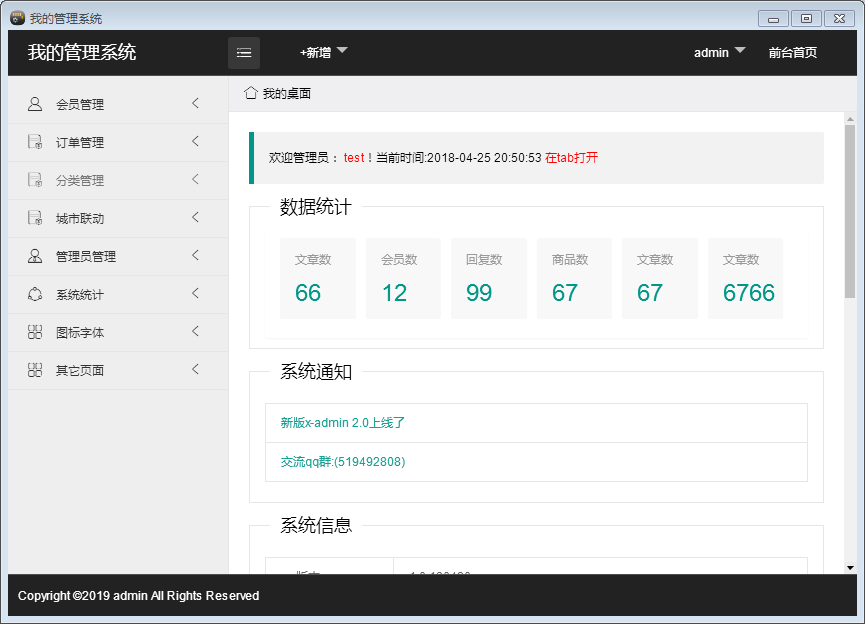
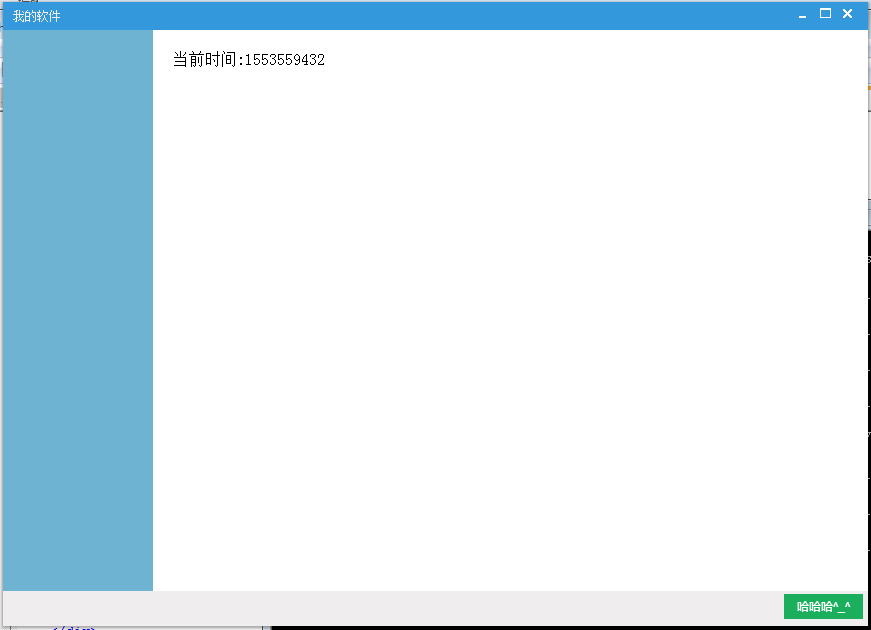
最终效果图:
miniblink+golang开发windows gui应用的更多相关文章
- 用Nim语言开发windows GUI图形界面程序
前言 本文得到了“樂師”的大力支持, 我们一起调试程序到深夜,要是没有他的帮忙, 我不知道要多久才能迈过这道坎, 另外“归心”还有其他人也提供了帮助, 他们都来自于QQ群:“Nim开发集中营”4693 ...
- golang在Windows下Sublime Text开发调试环境的配置
一.前言 近期本人有工作调动,进入了一个全新的领域[golang]服务端开发.在此写下本文,希望给那些没接触过golang开发调试环境及还在犹豫选择那家golang IDE而纠结的朋友们一点点帮助,如 ...
- Windows下visual studio code搭建golang开发环境
Windows下visual studio code搭建golang开发环境 序幕 其实环境搭建没什么难的,但是遇到一些问题,主要是有些网站资源访问不了(如:golang.org),导致一些包无法安装 ...
- Windows GUI代码与Windows消息问题调试利器
Windows GUI代码与Windows消息问题调试利器 记得很久前有这么一种说法: 人类区别于动物的标准就是工具的使用.同样在软件开发这个行业里面,对于工具的使用也是高手和入门级选手的主要区别,高 ...
- WPF会重写Windows GUI的历史吗?
原文地址:http://tech.it168.com/zx/2007-09-15/200709141320653.shtml 你可能对微软的.NET框架3.0版本的最近的一次更新感到有点奇怪.主版本指 ...
- VS IDE环境下,windows GUI(Qt MFC,win32)使用控制台实时打印调试信息
在工程属性的页面下,点击Build Events,在Build Events下点击Post-Build Event. 然后再Command Line里面输入以下命令: editbin /SUBSYST ...
- golang 在 windows 下编译出 linux 二进制可执行文件的软件套装合集 [go 1.7.3环境]
golang 很好用,不过要把工具链弄完整. 要不你会发现怎么不能编译跨平台的呀? 怎么写代码没提示啊? ... 这一整套弄下来并不容易. 所以精心准备了一套工具方便大家使用. 软件列表如图. 安装顺 ...
- 开源自己用python封装的一个Windows GUI(UI Automation)自动化工具,支持MFC,Windows Forms,WPF,Metro,Qt
首先,大家可以看下这个链接 Windows GUI自动化测试技术的比较和展望 . 这篇文章介绍了Windows中GUI自动化的三种技术:Windows API, MSAA - Microsoft Ac ...
- Go语言开发Windows应用
Go语言开发Windows应用 当第一次看到Go程序在windows平台生成可执行的exe文件,就宣告了windows应用也一定是Go语言的战场.Go不是脚本语言,但却有着脚本语言的轻便简单的特性.相 ...
随机推荐
- 【BZOJ5281】Talent Show(分数规划)
[BZOJ5281]Talent Show(分数规划) 题面 BZOJ 洛谷 题解 二分答案直接就是裸的分数规划,直接跑背包判断是否可行即可. #include<iostream> #in ...
- 【poj3415】 Common Substrings
http://poj.org/problem?id=3415 (题目链接) 题意 给定两个字符串 A 和 B,求长度不小于 k 的公共子串的个数(可以相同). Solution 后缀数组论文题... ...
- java旋转图片
/** * 旋转角度 * @param src 源图片 * @param angel 角度 * @return 目标图片 */ public static BufferedImage rotate(I ...
- bzoj 3195 [Jxoi2012]奇怪的道路
3195: [Jxoi2012]奇怪的道路 Description 小宇从历史书上了解到一个古老的文明.这个文明在各个方面高度发达,交通方面也不例外.考古学家已经知道,这个文明在全盛时期有n座城市,编 ...
- Eclipse中创建java类的时候自动设置作者信息和创建时间
window—>preferences—>Java—>Code Stype—>Code Templates Code—>New Java files 点击Edit ${f ...
- 「Django」浏览+1的操作
适应于网页.文章等浏览次数统计 1.Models设置:添加viewed方法 class NewsTitle(models.Model): title = models.CharField(max_le ...
- Codeforces Round #519 题解
A. Elections 题意概述 给出 \(a_1, \ldots, a_n\),求最小的 \(k (k \ge \max a_i)\), 使得 \(\sum_{i=1}^n a_i < \s ...
- 【转载】视频CDN技术原理与流程说明
视频CDN专为移动互联网视频内容分发量身定做的一套自主研发的分布式平台,该平台以深圳为中心,分布在全国各地BGP机房的服务器为边缘节点,汇聚中国电信.中国联通.中国移动.中国教育网等运营商网络资源,构 ...
- [整理].net中的延迟初始化器
LazyInitializer类 private void EnsureInitialized() { LazyInitializer.EnsureInitialized(ref _initializ ...
- Wireshark按照域名过滤
HTTP协议 http.host == "http://baidu.net" DNS协议 dns.qry.name=="www.baidu.com"