
android中shape的使用(android:angle小解)
本文参考http://kofi1122.blog.51cto.com/2815761/521605和http://blog.csdn.net/qizi329/article/details/6309819
转自:http://www.cnblogs.com/xiaoQLu/archive/2011/09/14/2176359.html
<shape>
<!-- 实心 -->
<solid android:color="#ff9d77"/>
<!-- 渐变 -->
<gradient
android:startColor="#ff8c00"
android:endColor="#FFFFFF"
android:angle="270" />
<!-- 描边 -->
<stroke
android:width="2dp"
android:color="#dcdcdc" />
<!-- 圆角 -->
<corners
android:radius="2dp" />
<padding
android:left="10dp"
android:top="10dp"
android:right="10dp"
android:bottom="10dp" />
</shape>
solid:实心,就是填充的意思
android:color指定填充的颜色
gradient:渐变
android:startColor和android:endColor分别为起始和结束颜色,android:angle是渐变角度,必须为45的整数倍。
另外渐变默认的模式为android:type="linear",即线性渐变,可以指定渐变为径向渐变,android:type="radial",径向渐变需要指定半径android:gradientRadius="50"。
android:angle网上有各种说法,这里,我说说自己的实验结果,渐变的时候,最原始的,即android:angle=“0”时,是从左到右,按照开始颜色到结束颜色来渲染的,android:angle=“90”是从下到上来渲染的,android:angle=“270”是从上到下来渲染的,android:angle=“180”是从右到左来渲染的,android:angle=“360”和android:angle=“0”是一样的,所以这里应该是这样的,渲染时按照最原始的渲染色板(把控件内部看作一块可以绕中心旋转的板子)围绕控件中心来逆时针旋转相应的度数,即android:angle里面的值就是所需要旋转的角度,只是这个旋转角度必须是45的整数倍
stroke:描边
android:width="2dp" 描边的宽度,android:color 描边的颜色。
我们还可以把描边弄成虚线的形式,设置方式为:
android:dashWidth="5dp"
android:dashGap="3dp"
其中android:dashWidth表示'-'这样一个横线的宽度,android:dashGap表示之间隔开的距离。
corners:圆角
android:radius为角的弧度,值越大角越圆。
我们还可以把四个角设定成不同的角度,方法为:
<corners
android:topRightRadius="20dp" 右上角
android:bottomLeftRadius="20dp" 右下角
android:topLeftRadius="1dp" 左上角
android:bottomRightRadius="0dp" 左下角
/>
这里有个地方需要注意,bottomLeftRadius是右下角,而不是左下角,这个不要记错了。
还有网上看到有人说设置成0dp无效,不过我在测试中发现是可以的,我用的是2.2,可能修复了这个问题吧,如果无效的话那就只能设成1dp了。
padding:间隔
中间文字距离边框的间隔。
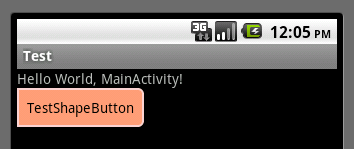
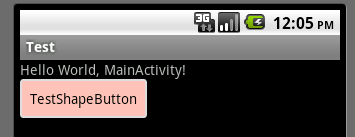
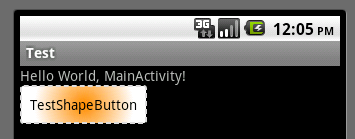
大体的就是这样,以下是一个使用的具体示例:用在Selector中作为Button的背景,分别定义了按钮的一般状态、获得焦点状态和按下时的状态,具体代码如下:
main.xml:
<Button
android:layout_width="wrap_content"
android:layout_height="wrap_content"
android:text="TestShapeButton"
android:background="@drawable/button_selector"
/>
button_selector.xml:
<?xml version="1.0" encoding="utf-8"?>
<selector
xmlns:android="http://schemas.android.com/apk/res/android">
<item android:state_pressed="true" >
<shape>
<!-- 渐变 -->
<gradient
android:startColor="#ff8c00"
android:endColor="#FFFFFF"
android:type="radial"
android:gradientRadius="50" />
<!-- 描边 -->
<stroke
android:width="2dp"
android:color="#dcdcdc"
android:dashWidth="5dp"
android:dashGap="3dp" />
<!-- 圆角 -->
<corners
android:radius="2dp" />
<padding
android:left="10dp"
android:top="10dp"
android:right="10dp"
android:bottom="10dp" />
</shape>
</item>
<item android:state_focused="true" >
<shape>
<gradient
android:startColor="#ffc2b7"
android:endColor="#ffc2b7"
android:angle="270" />
<stroke
android:width="2dp"
android:color="#dcdcdc" />
<corners
android:radius="2dp" />
<padding
android:left="10dp"
android:top="10dp"
android:right="10dp"
android:bottom="10dp" />
</shape>
</item>
<item>
<shape>
<solid android:color="#ff9d77"/>
<stroke
android:width="2dp"
android:color="#fad3cf" />
<corners
android:topRightRadius="5dp"
android:bottomLeftRadius="5dp"
android:topLeftRadius="0dp"
android:bottomRightRadius="0dp"
/>
<padding
android:left="10dp"
android:top="10dp"
android:right="10dp"
android:bottom="10dp" />
</shape>
</item>
</selector>
运行效果如下图:
一般状态:
获得焦点状态:
按下状态:
android中shape的使用(android:angle小解)的更多相关文章
- Android中shape属性详解
一.简单使用 刚开始,就先不讲一堆标签的意义及用法,先简单看看shape标签怎么用. 1.新建shape文件 首先在res/drawable文件夹下,新建一个文件,命名为:shape_radius.x ...
- Android 中shape的使用(圆角矩形)
一.在res/drawable文件夹下创建一个名为gradient_box的xml文件: <?xml version="1.0" encoding="utf-8&q ...
- 转 Android中shape中的属性大全
<shape> <!-- 实心 --> <solid android:color="#ff9d77"/&g ...
- 【Android 界面效果19】Android中shape的使用
Android中常常使用shape来定义控件的一些显示属性,今天看了一些shape的使用,对shape有了大体的了解,稍作总结: 先看下面的代码: <shape> ...
- Android 中 shape 图形的使用
转载于:http://kofi1122.blog.51cto.com/2815761/521605 Android中常常使用shape来定义控件的一些显示属性,今天看了一些shape的使用,对shap ...
- Android中shape中的属性大全
---恢复内容开始--- <shape> <!-- 实心 --> <solid android:color="#ff9d77"/> <!- ...
- android中shape的属性
<shape> <!– 实心 –> <solid android:color=”#ff9d77″/> <!– 渐变 –> <gradient an ...
- Android中shape的使用 (转载)
转自:http://blog.csdn.net/ekeuy/article/details/12349853 在看很多开源代码中都使用到了shape,我看代码的时候一般都一带而过了,没有仔细去研究,这 ...
- android中shape 的使用
android 开发中 对于 shape 和 selector的使用,一直都不是很熟练, 记录一下.便于以后参考. 举个项目中例子图 对于上面的2个radiobutton ,背景我们可以让美工做一个. ...
随机推荐
- 配置tomcat、nginx实现反向代理(需操作)
配置tomcat.nginx实现反向代理现在我想通过nginx访问tomcat 这就要我们去修改nginx的核心配置文件,在其目录下的conf文件夹下的nginx.conf文件,那么首先我们就要了解该 ...
- Python基础笔记:list和tuple
list 与 tuple 就类似于C语言中的数组,list 与 tuple 的区别就是list 可修改,而tuple不可修改: list用法示例: >>> s=[] >> ...
- 一百零四、SAP中ALV事件之十六,让ALV表格能点击修改
一.上一篇我们写到生产的ALV表格,但是表格内容不支持修改,如果我们需要修改下图的数量,需要怎么操作呢 二.代码如下,设置 ls_fieldcat-edit = 'X'. "允许编辑. ...
- 157-PHP strrchr函数输出最后一次出现字母p的位置到字符串结尾的所有字符串
<?php $str='PHP is a very good programming language!'; //定义一个字符串 echo strrchr($str,'o'); //输出最后一次 ...
- 如何在Windows系统下使用you-get下载网上的媒体资源
关于you-get的专业介绍可以点击这个链接:中文说明 1,首先你要在你的电脑上安装python环境 Windows系统下: 首先,你需要去官网下载相应的版本: 也可以下载我网盘里的(注意看好自己的电 ...
- Centos7.4 Storm2.0.0 + Zookeeper3.5.5 高可用集群搭建
想了下还是把kafka集群和storm集群分开比较好 集群规划: Nimbus Supervisor storm01 √ √ storm02 √(备份) √ storm03 √ 准备工作 老样子复制三 ...
- 箭头函数this
箭头函数的this值是由包含它的函数(非箭头函数)来决定的,与包含的函数的this指向一致,如果包裹它的不是函数(直到找到最外层)则this指向全局对象 并且箭头函数的this是固定的,由定义它时所在 ...
- 【LGR-(-8)】洛谷入门赛 #5 题解
比赛链接 9道题. 注:题目名称中链接为题目链接,题号中链接为比赛内链接 题目编号 洛谷题号 题目名称 题目难度 A P5713 [深基3.例5]洛谷团队系统 \(\color{red}{入门}\) ...
- 一、VIP课程:互联网工程专题 05-快速掌握Jenkins原理与核心功能
第五课:快速掌握jenkins核心功能.docx 2.164 (2019-02) and newer: Java 8 or Java 11 一.jenkins 概述与环境配置 知识点: 关于可持续化集 ...
- P2057 [SHOI2007]善意的投票 / [JLOI2010]冠军调查
P2057 [SHOI2007]善意的投票 / [JLOI2010]冠军调查 拿来练网络流的qwq 思路:如果i不同意,连边(i,t,1),否则连边(s,i,1).好朋友x,y间连边(x,y,1)(y ...