
Python django 安装 mysqlclient 失败
使用命令安装失败:
C:\Program Files (x86)\Python\Python37-\Scripts>pip3..exe install mysqlclient

Collecting mysqlclient

  Using cached https://files.pythonhosted.org/packages/f4/f1/3bb6f64ca7a429729413e6556b7ba5976df06019a5245a43d36032f1061e/mysqlclient-1.4.2.post1.tar.gz

Installing collected packages: mysqlclient

  Running setup.py install for mysqlclient ... error

    ERROR: Complete output from command 'c:\program files (x86)\python\python37-32\python.exe' -u -c 'import setuptools, tokenize;__file__='"'"'C:\\Users\\Wayde\\AppData\\Local\\Temp\\pip-install-q0t7bxx3\\mysqlclient\\setup.py'"'"';f=getattr(tokenize, '"'"'open'"'"', open)(__file__);code=f.read().replace('"'"'\r\n'"'"', '"'"'\n'"'"');f.close();exec(compile(code, __file__, '"'"'exec'"'"'))' install --record 'C:\Users\Wayde\AppData\Local\Temp\pip-record-6afkxr9m\install-record.txt' --single-version-externally-managed --compile:

    ERROR: running install

    running build

    running build_py

    creating build

    creating build\lib.win32-3.7

    creating build\lib.win32-3.7\MySQLdb

    copying MySQLdb\__init__.py -> build\lib.win32-3.7\MySQLdb

    copying MySQLdb\_exceptions.py -> build\lib.win32-3.7\MySQLdb

    copying MySQLdb\compat.py -> build\lib.win32-3.7\MySQLdb

    copying MySQLdb\connections.py -> build\lib.win32-3.7\MySQLdb

    copying MySQLdb\converters.py -> build\lib.win32-3.7\MySQLdb

    copying MySQLdb\cursors.py -> build\lib.win32-3.7\MySQLdb

    copying MySQLdb\release.py -> build\lib.win32-3.7\MySQLdb

    copying MySQLdb\times.py -> build\lib.win32-3.7\MySQLdb

    creating build\lib.win32-3.7\MySQLdb\constants

    copying MySQLdb\constants\__init__.py -> build\lib.win32-3.7\MySQLdb\constants

    copying MySQLdb\constants\CLIENT.py -> build\lib.win32-3.7\MySQLdb\constants

    copying MySQLdb\constants\CR.py -> build\lib.win32-3.7\MySQLdb\constants

    copying MySQLdb\constants\ER.py -> build\lib.win32-3.7\MySQLdb\constants

    copying MySQLdb\constants\FIELD_TYPE.py -> build\lib.win32-3.7\MySQLdb\constants

    copying MySQLdb\constants\FLAG.py -> build\lib.win32-3.7\MySQLdb\constants

    running build_ext

    building 'MySQLdb._mysql' extension

    creating build\temp.win32-3.7

    creating build\temp.win32-3.7\Release

    creating build\temp.win32-3.7\Release\MySQLdb

    C:\Program Files (x86)\Microsoft Visual Studio\\Professional\VC\Tools\MSVC\14.16.\bin\HostX86\x86\cl.exe /c /nologo /Ox /W3 /GL /DNDEBUG /MD -Dversion_info=(,,,'post',) -D__version__=1.4..post1 "-IC:\Program Files (x86)\MySQL\MySQL Connector C 6.1\include\mariadb" "-Ic:\program files (x86)\python\python37-32\include" "-Ic:\program files (x86)\python\python37-32\include" "-IC:\Program Files (x86)\Microsoft Visual Studio\2017\Professional\VC\Tools\MSVC\14.16.27023\ATLMFC\include" "-IC:\Program Files (x86)\Microsoft Visual Studio\2017\Professional\VC\Tools\MSVC\14.16.27023\include" "-IC:\Program Files (x86)\Windows Kits\NETFXSDK\4.6.1\include\um" "-IC:\Program Files (x86)\Windows Kits\10\include\10.0.17763.0\ucrt" "-IC:\Program Files (x86)\Windows Kits\10\include\10.0.17763.0\shared" "-IC:\Program Files (x86)\Windows Kits\10\include\10.0.17763.0\um" "-IC:\Program Files (x86)\Windows Kits\10\include\10.0.17763.0\winrt" "-IC:\Program Files (x86)\Windows Kits\10\include\10.0.17763.0\cppwinrt" /TcMySQLdb/_mysql.c /Fobuild\temp.win32-3.7\Release\MySQLdb/_mysql.obj /Zl /D_CRT_SECURE_NO_WARNINGS

    _mysql.c

    MySQLdb/_mysql.c(): fatal error C1083: 无法打开包括文件: “mysql.h”: No such file or directory

    error: command 'C:\\Program Files (x86)\\Microsoft Visual Studio\\2017\\Professional\\VC\\Tools\\MSVC\\14.16.27023\\bin\\HostX86\\x86\\cl.exe' failed with exit status

    ----------------------------------------

ERROR: Command "'c:\program files (x86)\python\python37-32\python.exe' -u -c 'import setuptools, tokenize;__file__='"'"'C:\\Users\\Wayde\\AppData\\Local\\Temp\\pip-install-q0t7bxx3\\mysqlclient\\setup.py'"'"';f=getattr(tokenize, '"'"'open'"'"', open)(__file__);code=f.read().replace('"'"'\r\n'"'"', '"'"'\n'"'"');f.close();exec(compile(code, __file__, '"'"'exec'"'"'))' install --record 'C:\Users\Wayde\AppData\Local\Temp\pip-record-6afkxr9m\install-record.txt' --single-version-externally-managed --compile" failed with error code  in C:\Users\Wayde\AppData\Local\Temp\pip-install-q0t7bxx3\mysqlclient\
解决方法:
到这个网站下载自己对应的版本到本地,然后进行安装 :
https://www.lfd.uci.edu/~gohlke/pythonlibs/#mysqlclient
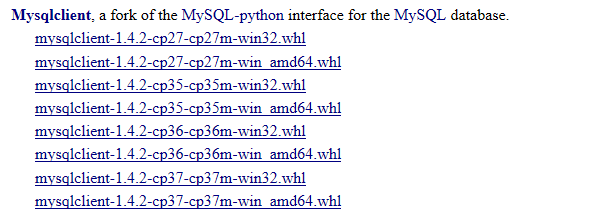
C:\Program Files (x86)\Python\Python37-\Scripts>pip3..exe install F:\Downloads\mysqlclient-1.4.-cp37-cp37m-win32.whl

Processing f:\downloads\mysqlclient-1.4.-cp37-cp37m-win32.whl

Installing collected packages: mysqlclient

Successfully installed mysqlclient-1.4.
安装成功
Python django 安装 mysqlclient 失败的更多相关文章
- Python mac安装mysqlclient的一个bug
这是一个来自mysql官方的bug,反正我是看不懂. shuais-MBP:wxapp dandyzhang$ pipenv install mysqlclient Installing mysqlc ...
- python pip安装lxml失败(转)
今天想要试试beautifulsoup4,安装的时候很顺利,然后就准备安装lxml作为解析器,没想到安装时pip直接给我报了一整页的错误. 解决过程 查看了一下错误提示,其中有如下一段: ****** ...
- 使用pip install mysqlclient命令安装mysqlclient失败?(基于Python)
我们使用Django.flask等来操作MySQL,实际上底层还是通过Python来操作的.因此我们想要用Django来操作MySQL,首先还是需要安装一个驱动程序.在Python3中,驱动程序有多种 ...
- python,django安装
环境:win7 64位 软件:python3.4.3,jdango1.8,PyDev,pymysql0.7 一:安装python 1.安装好python好后,配置环境变量,可以参考其它的博客,本博客只 ...
- 安装mysqlclient失败
环境:python3.6 sudo apt-get install python3.6-dev sudo apt-get install default-libmysqlclient-dev 参考:h ...
- Python Django mysqlclient安装和使用
一.安装mysqlclient 网上看到很过通过命令:pip install mysqlclient 进行安装的教程,但是我却始终安装失败,遇到的错误千奇百怪,后来通过自己下载mysqlclient客 ...
- Python之道1-环境搭建与pycharm的配置django安装及MySQL数据库配置
近期做那个python的开发,今天就来简单的写一下开发路线的安装及配置, 开发路线 Python3.6.1+Pycharm5.0.6+Django1.11+MySQL5.7.18 1-安装Python ...
- (转载)Python之道1-环境搭建与pycharm的配置django安装及MySQL数据库配置
近期做那个python的开发,今天就来简单的写一下开发路线的安装及配置, 开发路线 Python3.6.1+Pycharm5.0.6+Django1.11+MySQL5.7.18 1-安装Python ...
- 解决django项目在ubuntu系统上无法安装mysqlclient
首先我的项目是django2.0,python环境是3.5. 我们在本地开发完django项目了,在本地运行是成功的,然后我们把django项目放到服务器上,运行的时候就出错了. 如图: 我们都知道, ...
随机推荐
- 基于scikitlearn的深度学习环境安装(三)(完整版)
OS Linux Ubuntu14.04 安装 pip (python2.7.9或以上自带pip) sudo apt-get install python-pip pip是python环境下安装包的 ...
- 常见排序的Java实现
插入排序 1.原理:在有序数组中从后向前扫描找到要插入元素的位置,将元素插入进去. 2.步骤:插入元素和依次和前一个元素进行比较,若比前一个元素小就交换位置,否则结束循环. 3.代码: package ...
- Codeforces Round #611 (Div. 3) E
Oh, New Year. The time to gather all your friends and reflect on the heartwarming events of the past ...
- Yar并行的RPC框架的简单使用
前言: RPC,就是Remote Procedure Call的简称呀,翻译成中文就是远程过程调用 RPC要解决的两个问题: 解决分布式系统中,服务之间的调用问题. 远程调用时,要能够像本地调用一样方 ...
- dp-简单迷宫捡金币
链接:https://ac.nowcoder.com/acm/challenge/terminal 吃货LP参加了珠海美食节,每见一家摊位都会大吃一顿,但是如果不加收敛,接下来的日子就只能吃土了,所以 ...
- 苹果应用商店AppStore审核规则指南
http://www.zesmob.com/blog/40161.html 新应用上架苹果AppStore或重大版本更新时,往往会被拒多次,造成审核不通过的原因,主要是因为对苹果应用商店AppStor ...
- 【原】nginx配置文件
一:下载nginx方式 1.yum install nginx 2.源码安装 二:学习网址 nginx documentation — DevDocs 三:配置文件信息 server { listen ...
- Java基础 -5
方法的定义与使用 方法(method)的基本定义 本次方法定义在主类之中并且由主方法直接调用,所以方法的定义语法形式如下: public static 返回值类型 方法名称([参数类型 变量, ... ...
- EC20的指令
AT+QURCCFG="urcport","usbat" :当设置在主串口时且用主串口进行AT交互时开机会收到一串状态的信息,默认USBAT就不会 AT+IPR ...
- springboot 不停服动态更新定时任务时间(转)
转 https://blog.csdn.net/u012129558/article/details/80834303 Spring框架自3.0版本起,自带了任务调度功能,好比是一个轻量级的Quart ...