
Django popup示例
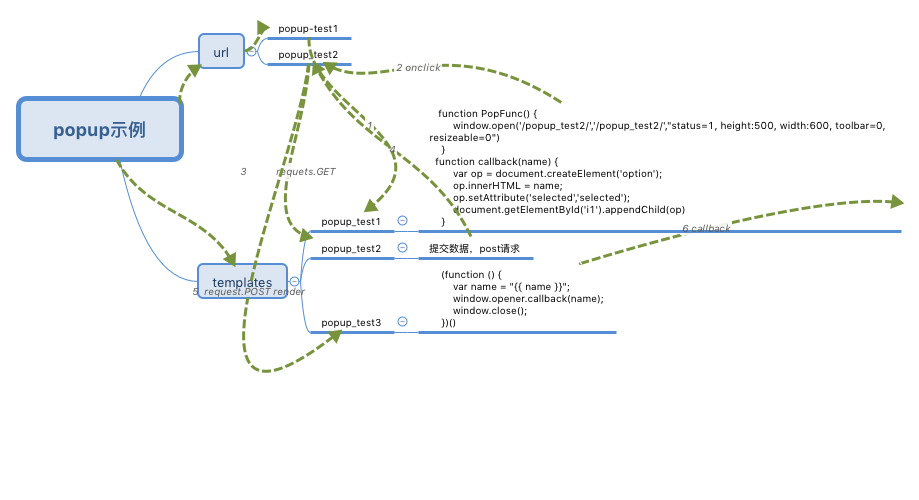
urls.py
urlpatterns = [

    url('popup_test1',views.popup_test1),

    url('popup_test2',views.popup_test2),

    ]
views.py
from django.shortcuts import render

def popup_test1(request):

    return render(request,'popup_test1.html')

def popup_test2(request):

    if request.method == 'GET':

        return render(request, 'popup_test2.html')

    elif request.method == 'POST':

        name= request.POST.get('city')

        return render(request,'popup_test3.html',{'name':name})
popup_test1.html
callback 是回调函数,在数据处理完之后执行
<!DOCTYPE html>

<html lang="en">

<head>

    <meta charset="UTF-8">

    <title>Title</title>

</head>

<body>

<h1>页面</h1>

<select name="" id="i1">

    <option value="">上海</option>

    <option value="">北京</option>

</select>

<input type="button" value="添加" onclick="PopFunc()">

<script>

    function PopFunc() {

        window.open('/popup_test2/','/popup_test2/',"status=1, height:500, width:600, toolbar=0, resizeable=0")

    }

    function callback(name) {

        var op = document.createElement('option');

        op.innerHTML = name;

        op.setAttribute('selected','selected');

        document.getElementById('i1').appendChild(op)

    }

</script>

</body>

</html>
popup_test2.html
<!DOCTYPE html>

<html lang="en">

<head>

    <meta charset="UTF-8">

    <title>Title</title>

</head>

<body>

    <form method="POST">

        {% csrf_token %}

        <input type="text" name="city" />

        <input type="submit" value="提交" />

    </form>

</body>

</html>
popup_test3.html
<!DOCTYPE html>

<html lang="en">

<head>

    <meta charset="UTF-8">

    <title>正在返回</title>

</head>

<body>

<script>

    (function () {

        var name = "{{ name }}";

        window.opener.callback(name);

        window.close();

    })()

</script>

</body>

</html>
Django popup示例的更多相关文章
- 用pycharm开发django项目示例
pycharm开发django工程(一) 在pycharm(企业版)中新建Django工程,注意使用虚拟环境 创建成功后,在pycharm显示的工程目录结构如下: 打开pycharm的Termina ...
- python Django 文件下载示例
from django.http import StreamingHttpResponse#文件流 def big_file_download(request): # do something... ...
- Django小示例
创建项目,在命令行中输入:django-admin startproject mysite 则会创建一个名为mysite的项目.项目结构如下: +mysite |--+ugo | | ...
- 新建Django项目示例--图书管理系统
知识点: Django 1. 安装 1. Django版本 1.11.xx 2. 安装方式 1. 命令行 --> Python环境(双版本,pip的使用) 2. PyCharm安装 2. 创建D ...
- Django搭建示例项目实战与避坑细节
Django 开发项目是很快的,有多快?看完本篇文章,你就知道了. 安装 Django 前提条件:已安装 Python. Django 使用 pip 命令直接就可以安装: pip install dj ...
- django搭建示例-ubantu环境
python3安装--------------------------------------------------------------------------- 最新的django依赖pyth ...
- celery Django 简单示例
一.目录结构 二.创建worker文件夹 __init__.py # -*- coding:utf-8 -*-import osfrom celery import Celery, platforms ...
- python的日志模块:logging;django的日志系统;django日志输出时间修改
Django的log,主要是复用Python标准库中的logging模块,在settings.py中进行配置 源代码 1.__init__.py包含以下类: StreamHandler Formatt ...
- 【python】-- Django 分页 、cookie、Session、CSRF
Django 分页 .cookie.Session.CSRF 一.分页 分页功能在每个网站都是必要的,下面主要介绍两种分页方式: 1.Django内置分页 from django.shortcuts ...
随机推荐
- PHP静态化(非伪静态化)
什么是PHP静态化 PHP静态化的简单理解就是使网站生成页面以静态HTML的形式展现在访客面前,PHP静态化分纯静态化和伪静态化,两者的区别在于PHP生成静态页面的处理机制不同. 为什么要让网页静态化 ...
- hadoop命令运行,去除:WARN util.NativeCodeLoader: Unable to load native-hadoop library for your platform 警告
参照:Hadoop之—— WARN util.NativeCodeLoader: Unable to load native-hadoop library for your platform... 修 ...
- HDU 1890 - Robotic Sort - [splay][区间反转+删除根节点]
题目链接:http://acm.hdu.edu.cn/showproblem.php?pid=1890 Time Limit: 6000/2000 MS (Java/Others) Memory Li ...
- iOS服务器证书不受信任的解决版本
参考文章链接: https://www.cnblogs.com/v-jing/p/6008964.html http://www.cocoachina.com/ios/20151021/13722.h ...
- phpstrom 配置xdebug在vagrant上调试
参数 linux system : centos6. vagrant: PHP: phpstrom:2017.2 步骤1: 安装xdebug扩展(已安装可跳过步骤1),首先去 xdebug官方下载扩展 ...
- 内核futex的BUG导致程序hang死问题排查
https://mp.weixin.qq.com/s/sGS-Kw18sDnGEMfQrbPbVw 内核futex的BUG导致程序hang死问题排查 原创: 王领先 58架构师 今天 近日,Had ...
- C++中的类成员指针
写在前面:本博客为本人原创,严禁任何形式的转载!本博客只允许放在博客园(.cnblogs.com),如果您在其他网站看到这篇博文,请通过下面这个唯一的合法链接转到原文! 本博客全网唯一合法URL:ht ...
- LightOj 1265 - Island of Survival(概率)
题目链接:http://lightoj.com/volume_showproblem.php?problem=1265 题目大意:有一个生存游戏,里面t只老虎,d只鹿,还有一个人,每天都要有两个生物碰 ...
- java-JProfiler(二)-进行本地JVM的性能监控-tomcat
监视本地的Tomcat, 看似是本地,其实JProfiler GUI在一个单独的JVM里启动,他与被监视的目标jvm之间通过socket通讯,目的为了不干扰目标JVM.所以监视本地Tomcat与监视远 ...
- spring boot 使用静态资源
./ 当前目录../ 父级目录/ 根目录 spring boot 打包时: The default includes are as follows: 默认包括的文件 public/**, resour ...