
configparser封装后报错:configparser.NoSectionError: No section: 'LoginElement'
前言
这是目录结构
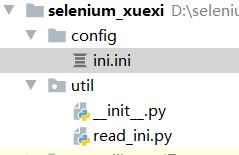
先贴一下源代码
# read_ini.py

import configparser

class ReadIni():

    """读取 ini.ini 配置文件"""

    def __init__(self, file_name=None, note=None):

        if file_name == None:

            file_name = '../config/ini.ini'

        if note == None:

            self.note = 'LoginElement'

        else:

            self.note = note

        self.cf = self.load_file(file_name)

    # 加载文件

    def load_file(self, file_name):

        cf = configparser.ConfigParser()

        cf.read(file_name)

        return cf

    # 获取key

    def get_value(self, key):

        return self.cf.get(self.note, key)
# ini.ini

[LoginElement]

username=name>username

userpassword=name>password

usersubmit=xpath>//*[@id="login-form"]/div[3]/input
在 Python 控制台 运行的代码
from util.read_ini import ReadIni

a = ReadIni()

a.get_value('username')
然后我们会神奇的发现 报了一个错误: configparser.NoSectionError: No section: 'LoginElement'
分析
可以看见报错的信息是没有找到 LoginElement 这个节点,可是ini.ini 这个文件中是有这个节点,为啥找不到了???

然后决定先从第一步开始分析:这个文件有没有加载到(很多时候都是因为文件路径产生的问题)
现在写的是相对路径,先改成绝对路径试下。。。。。
改完路径后你就会发现,你的问题已经解决了
总结
这个问题的原因是因为配置文件没有加载到,在加载文件的时候尽可能的使用 绝对路径,记得格式化文件路径,防止文件路径错误
configparser封装后报错:configparser.NoSectionError: No section: 'LoginElement'的更多相关文章
- python 读取配置文件总是报错 configparser.NoSectionError: No section:
本文为作者原创,禁止转载,违者必究法律责任!!! python 读取配置文件总是报错 configparser.NoSectionError: No section: 无论是 python2的版本,还 ...
- zabbix安装unixODBC配置完之后报错
zabbix安装unixODBC配置完之后报错 libmysqlclient_16 not defined in file libmysqlclient_r.so.16 分析 我没有使用centos6 ...
- 我用VS2012在Nuget中安装Signalr之后报错
我用VS2012在Nuget中安装Signalr之后报错 “/”应用程序中的服务器错误. The following errors occurred while attempting to load ...
- 服务器的SVN项目版本较低,check out 下来后报错
check out下来后报错提示: svn: E155036: Please see the 'svn upgrade' commandsvn: E155036: Working copy '/hom ...
- 项目导入之后报错:The import javax.servlet cannot be resolved
项目导入之后报错:The import javax.servlet cannot be resolved 解决方法:在Eclipse中,右击项目,选择Build Path->configure ...
- Android 加了自定义Application后报错 Unable to instantiate activity ComponentInfo ClassNotFoundException
在Android自定义一个类继承集成Application后,并在AndroidManifest.xml里面配置了application的name属性为该类名称后报错: Unable to insta ...
- maven项目检出后报错(包括编译报错和运行报错)的常见检查处理方式
maven项目检出后报错(包括编译报错和运行报错)的常见检查处理方式: 1.更改项目的jdk为我们安装的jdk2.更改build配置里的 output folder 目录为 xxx项目名/target ...
- 解决mac安装homebrew后报错-bash: brew: command not found
解决mac安装homebrew后报错-bash: brew: command not found 参照官网上很简单的一句安装命令, /usr/bin/ruby -e "$(curl ...
- 【Devops】【docker】【CI/CD】jenkins源码管理,添加SSH地址后报错+Jenkins构建报错:Please make sure you have the correct access rights and the repository exists.
jenkins源码管理,添加SSH地址后报错: Could not read from remote repository. Please make sure you have the correct ...
- git添加公钥后报错sign_and_send_pubkey: signing failed: agent refused operation
在服务器添加完公钥后报错 sign_and_send_pubkey: signing failed: agent refused operation 解决方案: eval "$(ssh-ag ...
随机推荐
- 最经典的TCP性能问题
目录 问题描述 问题的原因 什么是delay ack 什么是Nagle算法 如果client启用Nagle,并且server端启用了delay ack会有什么后果呢? 再来看一个经典例子和数据分析 回 ...
- C++ STL 容器 list类型
C++ STL 容器 list类型 list对于异常支持很好,要么成功,要么不会发生什么事情 以下是 std::list 在异常处理方面表现良好的几个原因: 动态内存管理:std::list 使用动态 ...
- immutable 不可改变的 mut ≈ to move = to change - 单词学习
immutable im-不,非 + mut-改变 + -able. im 通 in able 有能力的 重点是 mut 的含义是 to change t 就是to mu 就是 change (*拉丁 ...
- JavaFx 圆形头像实现
原文:JavaFx 圆形头像实现 - Stars-One的杂货小窝 本文基于TornadoFx框架进行编写,封装工具代码是kotlin版本 圆形头像框组件封装成了stars-one/common-co ...
- Github+picGo搭建图床(搭配Typora)
使用Github+picGo搭建图床,保姆级教程来了 - 转载自知乎 (zhihu.com) 1. 注册一个Github账号 首先你需要一个github账号,如果没有的话,先注册. github官网地 ...
- display标签简介
下面是网友总结的display标签的优缺点: 1. 分页 如果想对代码分页,只需在display:table标签中添加一项pagesize="每页显示行数" 2. 对列排序 dis ...
- IValueConverter的基础用法
1.我们在做工控项目的时候通常设置配方的上下限 这个时候要求OK数在上下限范围之内,否则NG 首先我们绑定一个简单的List用来展示数据,我这里用学生Age来展示 <ListView Items ...
- 记录--为什么 export 导出一个字面量会报错,而使用 export default 就不会报错?
这里给大家分享我在网上总结出来的一些知识,希望对大家有所帮助 核心 其实总的来说就是 export 导出的是变量的句柄(或者说符号绑定.近似于 C 语言里面的指针,C++里面的变量别名),而 expo ...
- 替换Spring容器中已经存在的Bean
一.背景 我们在开发的过程中,经常会引入别人写的jar包实现某些功能.而别人的jar包一般都自动注入Spring容器中,假设别人都是通过@Bean或@Component注入的,并且没有加入@Condi ...
- date_histogram,es按照时间分组统计
日期直方图聚合(date_histogram) 与histogram相似,es中内部将日期表示为一个long值,所以有时候可以用histogram来达到相同的目的,但往往没有date_histogra ...