
android -------- ConstraintLayout 约束属性(二)
相对位置属性如下:
layout_constraintLeft_toLeftOf :当前View的左侧和另一个View的左侧位置对齐,与RelativeLayout的alignLeft属性相似
layout_constraintLeft_toRightOf :当前view的左侧会在另一个View的右侧位置 与RelativeLayout的toRightOf属性相似
layout_constraintRight_toLeftOf :当前view的右侧会在另一个View的左侧位置 与RelativeLayout的toLeftOf属性相似
layout_constraintRight_toRightOf :当前View的右侧和另一个View的右侧位置对齐,与RelativeLayout的alignRight属性相似
layout_constraintTop_toTopOf :头部对齐,与alignTop相似
layout_constraintTop_toBottomOf :当前View在另一个View的下侧 与below相似
layout_constraintBottom_toTopOf :当前View在另一个View的上方 与above相似
layout_constraintBottom_toBottomOf :底部对齐,与alignBottom属性相似
layout_constraintBaseline_toBaselineOf :文字底部对齐,与alignBaseLine属性相似
layout_constraintStart_toEndOf :同left_toRightOf
layout_constraintStart_toStartOf :同left_toLeftOf
layout_constraintEnd_toStartOf :同right_toLeftOf
layout_constraintEnd_toEndOf :同right_toRightOf
举例:
<?xml version="1.0" encoding="utf-8"?>

<android.support.constraint.ConstraintLayout xmlns:android="http://schemas.android.com/apk/res/android"

    xmlns:app="http://schemas.android.com/apk/res-auto"

    android:layout_width="match_parent"

    android:layout_height="match_parent">

    <!--当前View的右侧和另一个View的右侧位置对齐,与RelativeLayout的alignLeft属性相似-->

    <Button

        android:id="@+id/btn1"

        android:layout_width="wrap_content"

        android:layout_height="wrap_content"

        android:layout_marginStart="8dp"

        android:text="Button1"

        app:layout_constraintLeft_toLeftOf="parent" />

    <Button

        android:layout_width="wrap_content"

        android:layout_height="wrap_content"

        android:layout_marginLeft="15dp"

        android:text="Button2"

        app:layout_constraintLeft_toRightOf="@id/btn1" />

    <Button

        android:id="@+id/btn2"

        android:layout_width="wrap_content"

        android:layout_height="wrap_content"

        android:layout_marginRight="15dp"

        android:layout_marginTop="56dp"

        android:text="Button3"

        app:layout_constraintRight_toRightOf="parent"

        app:layout_constraintTop_toTopOf="parent" />

    <Button

        android:layout_width="wrap_content"

        android:layout_height="wrap_content"

        android:layout_marginTop="56dp"

        android:text="Button4"

        app:layout_constraintTop_toTopOf="parent" />

    <Button

        android:id="@+id/btn3"

        android:layout_width="wrap_content"

        android:layout_height="wrap_content"

        android:text="底部左下角"

        app:layout_constraintBottom_toBottomOf="parent" />

    <Button

        android:layout_width="wrap_content"

        android:layout_height="wrap_content"

        android:layout_marginBottom="8dp"

        android:layout_marginEnd="8dp"

        android:text="底部右下角"

        app:layout_constraintBottom_toBottomOf="parent"

        app:layout_constraintEnd_toEndOf="parent" />

</android.support.constraint.ConstraintLayout>
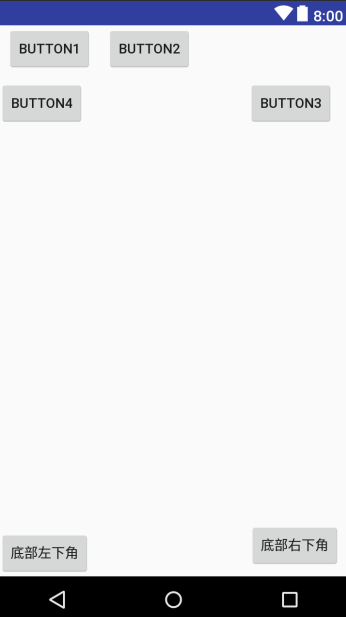
效果图:
layout_constraintBaseline_toBaselineOf (View A 内部文字与 View B 内部文字对齐)
举例:
<?xml version="1.0" encoding="utf-8"?>

<android.support.constraint.ConstraintLayout xmlns:android="http://schemas.android.com/apk/res/android"

    xmlns:app="http://schemas.android.com/apk/res-auto"

    android:layout_width="match_parent"

    android:layout_height="match_parent">

    <Button

        android:id="@+id/btn1"

        android:layout_width="wrap_content"

        android:layout_height="wrap_content"

        android:layout_marginBottom="8dp"

        android:text="Button1" />

    <Button

        android:id="@+id/btn2"

        android:layout_width="wrap_content"

        android:layout_height="wrap_content"

        android:layout_marginRight="15dp"

        android:layout_marginTop="56dp"

        android:text="Button3"

        app:layout_constraintRight_toRightOf="parent"

        app:layout_constraintTop_toTopOf="parent" />

    <!--底部 当前View在另一个View的下侧 与below相似-->

    <Button

        android:id="@+id/mmmna"

        android:layout_width="wrap_content"

        android:layout_height="wrap_content"

        android:layout_marginEnd="15dp"

        android:text="Buttonnnnnnnnnn1"

        app:layout_constraintRight_toRightOf="parent"

        app:layout_constraintTop_toBottomOf="@+id/btn2" />

    <!--layout_constraintTop_toTopOf :头部对齐,与alignTop相似-->

    <Button

        android:id="@+id/btn3"

        android:layout_width="wrap_content"

        android:layout_height="wrap_content"

        android:text="Buttonnnnnnnnnn2"

        app:layout_constraintTop_toTopOf="@+id/btn2" />

    <Button

        android:id="@+id/button7"

        android:layout_width="wrap_content"

        android:layout_height="wrap_content"

        android:layout_marginBottom="8dp"

        android:text="Button"

        app:layout_constraintBottom_toBottomOf="parent" />

    <!--layout_constraintBottom_toBottomOf底部对齐-->

    <Button

        android:id="@+id/button8"

        android:layout_width="wrap_content"

        android:layout_height="wrap_content"

        android:layout_marginBottom="8dp"

        android:layout_marginEnd="8dp"

        android:text="Button"

        app:layout_constraintBottom_toBottomOf="parent"

        app:layout_constraintEnd_toEndOf="parent" />

    <!--layout_constraintBottom_toTopOf:当前View在另一个View的上方 与above相似-->

    <Button

        android:id="@+id/btn9"

        android:layout_width="wrap_content"

        android:layout_height="wrap_content"

        android:layout_marginBottom="15dp"

        android:layout_marginEnd="5dp"

        android:text="Button"

        app:layout_constraintBottom_toTopOf="@+id/button8"

        app:layout_constraintRight_toRightOf="parent" />

    <!--文字底部对齐,与alignBaseLine属性相似-->

    <Button

        android:layout_width="wrap_content"

        android:layout_height="wrap_content"

        android:text="Buttonmmmmm"

        app:layout_constraintBaseline_toBaselineOf="@+id/btn9" />

</android.support.constraint.ConstraintLayout>
效果图:
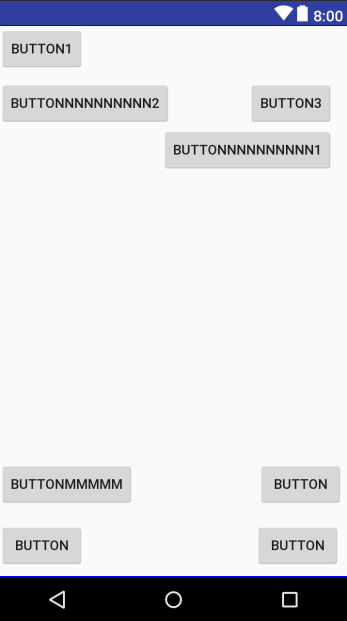
几个属性的联系
android -------- ConstraintLayout 约束属性(二)的更多相关文章
- Android ConstraintLayout约束控件链接整理
Android新特性介绍,ConstraintLayout完全解析 探索Android ConstraintLayout布局 了解使用Android ConstraintLayout
- Android ConstraintLayout 约束布局属性
常用方法总结 layout_constraintTop_toTopOf // 将所需视图的顶部与另一个视图的顶部对齐. layout_constraintTop_toBottomOf // 将所需视图 ...
- android -------- ConstraintLayout Group和goneMargin(五)
前面的文章 ConstraintLayout 介绍 (一) ConstraintLayout约束属性 (二) ConstraintLayout 宽高比和偏移量比(三) ConstraintLayout ...
- android -------- ConstraintLayout Guideline和Barrier(四)
前面的文章 ConstraintLayout 介绍 (一) ConstraintLayout约束属性 (二) ConstraintLayout 宽高比和偏移量比(三) 此博文主要讲解:Guidelin ...
- android -------- ConstraintLayout 宽高比和偏移量比(三)
前面的文章 ConstraintLayout 介绍 (一) ConstraintLayout约束属性 (二) 此博文主要讲解: app:layout_constraintHorizontal_bias ...
- Android Material Design控件使用(一)——ConstraintLayout 约束布局
参考文章: 约束布局ConstraintLayout看这一篇就够了 ConstraintLayout - 属性篇 介绍 Android ConstraintLayout是谷歌推出替代PrecentLa ...
- Android开发实战(二十一):浅谈android:clipChildren属性
实现功能: 1.APP主界面底部模块栏 2.ViewPager一屏多个界面显示 3......... 首先需要了解一下这个属性的意思 ,即 是否允许子View超出父View的返回,有两个值true . ...
- Android ConstraintLayout详解(from jianshu)
Android ConstraintLayout详解 https://www.jianshu.com/p/a8b49ff64cd3 1. 概述 在本篇文章中,你会学习到有关Constraint ...
- android ConstraintLayout布局
解析ConstraintLayout的性能优势 Android新特性介绍,ConstraintLayout完全解析 1.子控件的位置约束属性: layout_constraintRight_toLef ...
随机推荐
- topcoder srm 505 div1
problem1 link 设行数为$n$列数为$m$ 对于任意的两行$r_{1},r_{2}$以及任意的两列$c_{1},c_{2}$所确定的四个格子,只要知道其中的三个就能确定第四个,且必须要三个 ...
- 集训DAYn——组合数学(1)
组合 又到了我们信息老师讲数学课了,吼吼吼 然后数学老师中途探望了一下,哇塞塞,然后他看到黑板上的题,微妙的笑了. 排列: 从n个数中有序的选出m个数的方案数是多少?第一个数有n种取法,第二个数有n- ...
- bzoj4008: [HNOI2015]亚瑟王 dp
题目链接 https://www.lydsy.com/JudgeOnline/problem.php?id=4008 思路 神仙啊 \(f[i][j]表示第i个点有j次机会(不管成功与否)\) \(f ...
- P4246 [SHOI2008]堵塞的交通
思路 同LOJ121 动态图连通性的板子 好像有很神的线段树做法,不会,先码住 代码 #include <cstdio> #include <algorithm> #inclu ...
- 题解——洛谷P3812【模板】线性基
学了下线性基 使用好像并不复杂 打了板子 但是要注意位运算优先级 #include <cstdio> #include <algorithm> #include <cst ...
- MPU6050可以读取ID值,温度值和原始数据值为零问题解决
MPU6050可以读取ID值是0x68,但是读取到的原始数据为零(下面虚拟示波器图中温度值是36.529是单位转换公式中的值被打印出来了,实际值也是零).经论坛搜寻,发现MPU6050出现问题的原因有 ...
- skype for business 无法共享桌面、无法传输图片
以管理员身份运行如下PowerShell命令,清除Skype for Business缓存记录 #以管理员身份运行如下PowerShell命令,清除Skype for Business缓存记录 Sto ...
- .net core 问题:413 Request Entity Too Large nginx
https://stackoverflow.com/questions/38698350/increase-upload-file-size-in-asp-net-core The other ans ...
- mybatis批量更新数据参考
https://blog.csdn.net/xyjawq1/article/details/74129316
- js作用域题目
window.number = 4var obj = { 'number': 4, 'tbl': (function(){ this.number *= 2; console.log(this.num ...