
[Canvas]炸弹人初成版
试玩请点此下载代码,并使用浏览器打开index.html.
用方向键操作小人,空格键放炸弹,把敌人消灭算赢,被炸弹炸中或是碰到敌人算输。
图例:
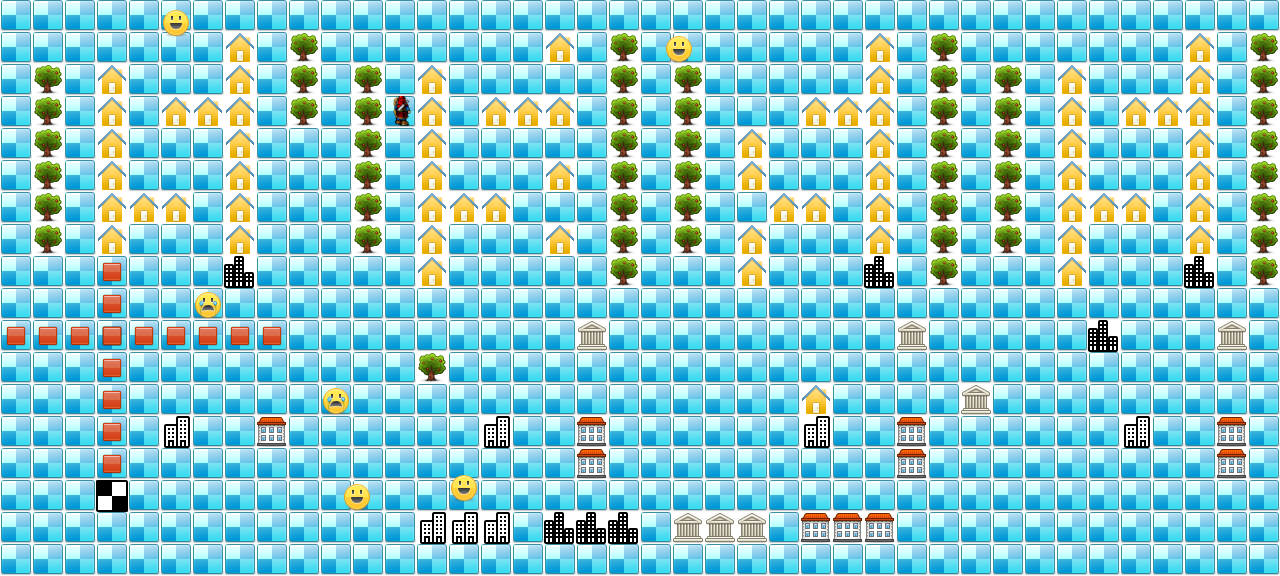
源码:
<!DOCTYPE html>
<html lang="utf-8">
<meta http-equiv="Content-Type" content="text/html; charset=utf-8"/>
<head>
<title>炸弹人初成版 19.3.8 6:41 by:逆火狂飙 horn19782016@163.com</title>
<style>
#canvas{
background:#ffffff;
cursor:pointer;
margin-left:10px;
margin-top:10px;
-webkit-box-shadow:3px 3px 6px rgba(0,0,0,0.5);
-moz-box-shadow:3px 3px 6px rgba(0,0,0,0.5);
box-shadow:3px 3px 6px rgba(0,0,0,0.5);
}
#controls{
margin-top:10px;
margin-left:15px;
}
</style>
</head>
<body onload="init()">
<div id="controls">
<input id='animateBtn' type='button' value='开始'/>
</div>
<canvas id="canvas" width="160px" height="160px" >
出现文字表示你的浏览器不支持HTML5
</canvas>
</body>
</html>
<script type="text/javascript">
<!--
var paused=true;
animateBtn.onclick=function(e){
paused=! paused;
if(paused){
animateBtn.value="开始";
}else{
animateBtn.value="停止";
window.requestAnimationFrame(animate);
}
}
var BL=32; // Block length,边长
var ctx; // 绘图环境
var terrain; // 地形
var hero; // 英雄/主角
var monsterMng; // 怪物管理类
var bombs; // 炸弹数组
var fires; // 火焰数组
function init(){
// init Canvas
var canvas=document.getElementById('canvas');
canvas.width =40*BL;
canvas.height=18*BL;
ctx=canvas.getContext('2d');
terrain=new Terrain();
hero=new Hero();
monsterMng=new MonsterMng();
bombs=new Array();
fires=new Array();
// 响应键盘事件
canvas.addEventListener('keydown', doKeyDown, true);
canvas.focus();
window.addEventListener('keydown', doKeyDown, true);
};
//------------------------------------
// 响应键盘事件
//------------------------------------
function doKeyDown(e) {
var keyID = e.keyCode ? e.keyCode :e.which;
if(keyID === 38 || keyID === 87) { // up arrow and W
hero.move('up');
e.preventDefault();
}
if(keyID === 39 || keyID === 68) { // right arrow and D
hero.move('right');
e.preventDefault();
}
if(keyID === 40 || keyID === 83) { // down arrow and S
hero.move('down');
e.preventDefault();
}
if(keyID === 37 || keyID === 65) { // left arrow and A
hero.move('left');
e.preventDefault();
}
if(keyID === 32 ) { // SpaceBar
var b=new Bomb(hero.x,hero.y,hero.explosionRange);
bombs.push(b);
//console.log('arrows.length='+arrows.length);
e.preventDefault();
}
}
//------------------------------------
// 更新各实例状态
//------------------------------------
function update(){
monsterMng.move();
var heroX=parseInt(hero.x/BL,10);
var heroY=parseInt(hero.y/BL,10);
// 看英雄碰到怪物没
if(monsterMng.isTouched(heroX,heroY)){
hero.setDead();
}
// 清除掉已经爆炸的炸弹 这个地方有问题,可能会删掉后面刚加入的。
/*for(var i=bombs.length-1;i>-1;i--){
var b=bombs[i];
if(b.exploded==true){
bombs.splice(i,1,1);
}
}*/
var explosions=[];
for(var i=0;i<fires.length;i++){
var f=fires[i];
if(f.lifeTime>0){
explosions.push(new Point(f.x,f.y));
}
}
monsterMng.makeDeadInRange(explosions);
hero.makeDeadInRange(explosions);
// 游戏结束条件
if(hero.alive==false){ // 英雄死亡
alert("You lost!");
init();
}
if(monsterMng.noMonster()){ // 怪物全清除
alert("You Win!");
init();
}
}
//------------------------------------
// 在ctx里画出各实例
//------------------------------------
function draw(){
// Clear Canvas
ctx.clearRect(0,0,ctx.canvas.width,ctx.canvas.height);
ctx.fillStyle="#ffffff";
ctx.fillRect(0,0,ctx.canvas.width,ctx.canvas.height);
terrain.paint(ctx); // 画地形
monsterMng.paint(ctx);
hero.paint(ctx); // 画英雄
// 画炸弹
for(var i=0;i<bombs.length;i++){
var b=bombs[i];
b.paint(ctx);
}
// 画火焰
for(var i=0;i<fires.length;i++){
var b=fires[i];
b.paint(ctx);
}
}
//------------------------------------
// 运行动画
//------------------------------------
function animate(){
if(!paused){
update();
draw();
window.requestAnimationFrame(animate); /// 让浏览器自行决定帧速率
}
}
//------------------------------------
// 常规函数:角度得到弧度
//------------------------------------
function getRad(degree){
return degree/180*Math.PI;
}
//------------------------------------
//生成从minNum到maxNum的随机数
//------------------------------------
function randomNum(minNum,maxNum){
switch(arguments.length){
case 1:
return parseInt(Math.random()*minNum+1,10);
break;
case 2:
return parseInt(Math.random()*(maxNum-minNum+1)+minNum,10);
break;
default:
return 0;
break;
}
}
//---------------------------------------------------地形类定义开始------------------------------------------------------------------->>
Terrain=function(){
this.files=["road.png", // 0
"tree.png", // 1
"farmerHouse.png", // 2
"twoBuilding.png", // 3
"threeBuilding.png",// 4
"bank.png", // 5
"villa.png", // 6
"blackWhiteRoad.png",]; // 7
/*this.maps=new Array(
[0,0,0,0,0],
[0,0,1,0,0],
[0,0,0,0,0],
[0,2,0,0,0],
[0,0,0,3,0],
);*/
this.maps=new Array(
[0,0,0,0,0,0,0,0,0,0,0,0,0,0,0,0,0,0,],
[0,0,1,1,1,1,1,1,0,0,0,0,0,0,0,0,0,0,],
[0,0,0,0,0,0,0,0,0,0,0,0,0,0,0,0,0,0,],
[0,0,2,2,2,2,2,2,0,0,0,0,0,0,0,0,0,0,],
[0,0,0,0,0,0,2,0,0,0,0,0,0,0,0,0,0,0,],
[0,0,0,2,0,0,2,0,0,0,0,0,0,3,0,0,0,0,],
[0,0,0,2,0,0,0,0,0,0,0,0,0,0,0,0,0,0,],
[0,2,2,2,2,2,2,2,4,0,0,0,0,0,0,0,0,0,],
[0,0,0,0,0,0,0,0,0,0,0,0,0,6,0,0,0,0,],
[0,1,1,1,0,0,0,0,0,0,0,0,0,0,0,0,0,0,],
[0,0,0,0,0,0,0,0,0,0,0,0,0,0,0,0,0,0,],
[0,0,1,1,1,1,1,1,0,0,0,0,0,0,0,0,0,0,],
[0,0,0,0,0,0,0,0,0,0,0,0,0,0,0,0,0,0,],
[0,0,2,2,2,2,2,2,2,0,0,1,0,0,0,0,3,0,],
[0,0,0,0,0,0,2,0,0,0,0,0,0,0,0,0,3,0,],
[0,0,0,2,0,0,2,0,0,0,0,0,0,3,0,0,3,0,],
[0,0,0,2,0,0,0,0,0,0,0,0,0,0,0,0,0,0,],
[0,2,0,2,0,2,0,2,0,0,0,0,0,0,0,0,4,0,],
[0,0,0,0,0,0,0,0,0,0,5,0,0,6,6,0,4,0,],
[0,1,1,1,1,1,1,1,1,0,0,0,0,0,0,0,4,0,],
[0,0,0,0,0,0,0,0,0,0,0,0,0,0,0,0,0,0,],
[0,0,1,1,1,1,1,1,0,0,0,0,0,0,0,0,5,0,],
[0,0,0,0,0,0,0,0,0,0,0,0,0,0,0,0,5,0,],
[0,0,0,0,2,2,0,2,2,0,0,0,0,0,0,0,5,0,],
[0,0,0,0,0,0,2,0,0,0,0,0,0,0,0,0,0,0,],
[0,0,0,2,0,0,2,0,0,0,0,0,2,3,0,0,6,0,],
[0,0,0,2,0,0,0,0,0,0,0,0,0,0,0,0,6,0,],
[0,2,2,2,2,2,2,2,4,0,0,0,0,0,0,0,6,0,],
[0,0,0,0,0,0,0,0,0,0,5,0,0,6,6,0,0,0,],
[0,1,1,1,1,1,1,1,1,0,0,0,0,0,0,0,0,0,],
[0,0,0,0,0,0,0,0,0,0,0,0,5,0,0,0,0,0,],
[0,0,1,1,1,1,1,1,0,0,0,0,0,0,0,0,0,0,],
[0,0,0,0,0,0,0,0,0,0,0,0,0,0,0,0,0,0,],
[0,0,2,2,2,2,2,2,2,0,0,0,0,0,0,0,0,0,],
[0,0,0,0,0,0,2,0,0,0,4,0,0,0,0,0,0,0,],
[0,0,0,2,0,0,2,0,0,0,0,0,0,3,0,0,0,0,],
[0,0,0,2,0,0,0,0,0,0,0,0,0,0,0,0,0,0,],
[0,2,2,2,2,2,2,2,4,0,0,0,0,0,0,0,0,0,],
[0,0,0,0,0,0,0,0,0,0,5,0,0,6,6,0,0,0,],
[0,1,1,1,1,1,1,1,1,0,0,0,0,0,0,0,0,0,],
);
}
Terrain.prototype={
files:[],
maps:[],
// method
paint:function(ctx){
for(var i=0;i<this.maps.length;i++){
var arr=this.maps[i];
for(var j=0;j<arr.length;j++){
var value=arr[j];
var img=new Image();
img.src=this.files[value];
ctx.drawImage(img,i*BL,j*BL);
}
}
},
// 是否有障碍
hasObstacle:function(i,j){
if(i<0 || i>=this.maps.length){
return true;
}
var arr=this.maps[i];
if(j<0 || j>=arr.length){
return true;
}
var value=arr[j];
if(value==0){
return false;
}else{
return true;
}
},
getValue:function(i,j){
if(i<0 || i>=this.maps.length){
return undefined;
}
var arr=this.maps[i];
if(j<0 || j>=arr.length){
return undefined;
}
var value=arr[j];
return value;
},
setValue:function(i,j,value){
if(i<0 || i>=this.maps.length){
return undefined;
}
var arr=this.maps[i];
if(j<0 || j>=arr.length){
return undefined;
}
arr[j]=value;
},
}
//---------------------------------------------------地形类定义结束-------------------------------------------------------------------<<
//---------------------------------------------------英雄类定义开始------------------------------------------------------------------->>
Hero=function(){
this.pngs=[
{left:0,top:10,width:40,height:40},
{left:0,top:68,width:40,height:40},
{left:0,top:123,width:40,height:40},
{left:0,top:180,width:40,height:40},
];
}
Hero.prototype={
pngs:[],
x:160,
y:160,
xTo:160,
yTo:160,
step:32,
direction:'up', // 面向
alive:true, // 是否活着
explosionRange:5, // 爆炸范围
setDead:function(){
//console.log('Hero dead');
this.alive=false;
},
paint:function(ctx){
var img=new Image();
img.src='bowman.png';
var index=0;
if(this.direction=='up'){
index=3;
}
if(this.direction=='down'){
index=0;
}
if(this.direction=='left'){
index=1;
}
if(this.direction=='right'){
index=2;
}
var pos=this.pngs[index];
ctx.drawImage(img,pos.left,pos.top,pos.width,pos.height,this.x,this.y,32,32);
},
move:function(direction){
this.direction=direction;
if(this.direction=='up'){
this.yTo-=this.step;
}
if(this.direction=='down'){
this.yTo+=this.step;
}
if(this.direction=='left'){
this.xTo-=this.step;
}
if(this.direction=='right'){
this.xTo+=this.step;
}
if(terrain.getValue(this.xTo/this.step,this.yTo/this.step)==0){
this.x=this.xTo;
this.y=this.yTo;
}else{
this.xTo=this.x;
this.yTo=this.y;
}
},
// 爆炸火焰一样对英雄造成伤害
makeDeadInRange:function(explosions){
for(var j=0;j<explosions.length;j++){
var point=explosions[j];
if(this.x==point.x && this.y==point.y){
this.setDead();
}
}
},
}
//---------------------------------------------------英雄类定义结束-------------------------------------------------------------------<<
//---------------------------------------------------点类定义开始------------------------------------------------------------------->>
Point=function(x,y){
this.x=x;
this.y=y;
}
Point.prototype={
x:0, // 横坐标
y:0, // 纵坐标
}
//---------------------------------------------------点类定义结束-------------------------------------------------------------------<<
//---------------------------------------------------怪物类定义开始------------------------------------------------------------------->>
Monster=function(x,y,step,direction){
this.x=x;
this.y=y;
this.step=step;
this.direction=direction;
this.files=["monster.png", // 0
"monsterDead.png", // 1
"monsterUpdated.png", // 2
"monsterUpdatedDead.png",]; // 3
}
Monster.prototype={
x:0, // 横坐标,乘以32等于真正的横坐标
y:0, // 纵坐标,乘以32等于真正的纵坐标
step:1, // 行走速度
direction:'', // 方向
files:[], // 显示图片
alive:true, // 是否活着
thinking:true, // 是否在找路
targetPoint:[],
// 设置死亡
setDead:function(){
this.alive=false;
},
// 移动
move:function(){
if(this.alive){
if(this.thinking==true){
// 思考下一步往哪里走
targetPoint=null;
var emptyPlaces=[];
var monsterX=parseInt(this.x/BL,10);
var monsterY=parseInt(this.y/BL,10);
// 左边方格
if(terrain.hasObstacle(monsterX-1,monsterY)==false){
emptyPlaces.push(new Point(monsterX-1,monsterY));
}
// 右边方格
if(terrain.hasObstacle(monsterX+1,monsterY)==false){
emptyPlaces.push(new Point(monsterX+1,monsterY));
}
// 上边方格
if(terrain.hasObstacle(monsterX,monsterY-1)==false){
emptyPlaces.push(new Point(monsterX,monsterY-1));
}
// 下边方格
if(terrain.hasObstacle(monsterX,monsterY+1)==false){
emptyPlaces.push(new Point(monsterX,monsterY+1));
}
//console.log(emptyPlaces);
var rndSeed=randomNum(0,emptyPlaces.length);
this.targetPoint=emptyPlaces[rndSeed];
//console.log(targetPoint);
if(this.targetPoint!=null){
//console.log(this.targetPoint);
this.thinking=false;
}
}else{
// 思考好了就走
var targetX=this.targetPoint.x*BL;
var targetY=this.targetPoint.y*BL;
//console.log(this.targetPoint,this.x,this.y);
if(targetX==this.x && targetY<this.y){
this.y-=this.step;
}
if(targetX==this.x && targetY>this.y){
this.y+=this.step;
}
if(targetX<this.x && targetY==this.y){
this.x-=this.step;
}
if(targetX>this.x && targetY==this.y){
this.x+=this.step;
}
if(targetX==this.x && targetY==this.y){
this.thinking=true;
}
}
}
},
// 画怪物
paint:function(ctx){
var img=new Image();
if(this.alive==true && this.step==1){
img.src=this.files[0];
}
if(this.alive==false && this.step==1){
img.src=this.files[1];
}
if(this.alive==true && this.step==2){
img.src=this.files[2];
}
if(this.alive==false && this.step==2){
img.src=this.files[3];
}
ctx.drawImage(img,this.x,this.y);
},
}
//---------------------------------------------------怪物类定义结束-------------------------------------------------------------------<<
//---------------------------------------------------怪物管理类定义开始------------------------------------------------------------------->>
MonsterMng=function(){
this.generateMonsters();
}
MonsterMng.prototype={
monsters:[],
// 生成怪物
generateMonsters:function(){
this.monsters=new Array();
this.monsters.push(new Monster(1*BL,1*BL,1,"right"));
this.monsters.push(new Monster(1*BL,10*BL,1,"right"));
this.monsters.push(new Monster(16*BL,16*BL,1,"right"));
this.monsters.push(new Monster(10*BL,13*BL,1,"right"));
this.monsters.push(new Monster(10*BL,10*BL,1,"right"));
this.monsters.push(new Monster(24*BL,1*BL,1,"right"));
},
// 画怪物
paint:function(ctx){
for(var i=0;i<this.monsters.length;i++){
var m=this.monsters[i];
m.paint(ctx);
}
},
// 让怪物移动
move:function(ctx){
for(var i=0;i<this.monsters.length;i++){
var m=this.monsters[i];
m.move();
}
},
// 判断怪物还是否存在
hasMonster:function(){
return true;
},
// 用箭射击怪物
shoot:function(arrowX,arrowY){
for(var i=0;i<this.monsters.length;i++){
var monster=this.monsters[i];
// 变量名不宜太短,词必答意
var monsterX=parseInt(monster.x/BL,10);
var monsterY=parseInt(monster.y/BL,10);
//console.log(arrowX,arrowY,monsterX,monsterY);
if(monsterX==arrowX && monsterY==arrowY && monster.alive==true){
monster.beShooted();
//console.log('shooted',arrowX,arrowY,monsterX,monsterY);
return true;
}
}
return false;
},
// 看英雄是否碰到怪物
isTouched:function(heroX,heroY){
for(var i=0;i<this.monsters.length;i++){
var monster=this.monsters[i];
var monsterX=parseInt(monster.x/BL,10);
var monsterY=parseInt(monster.y/BL,10);
//console.log('isTouched',heroX,heroY,monsterX,monsterY);
if(heroX==monsterX && heroY==monsterY && monster.alive==true){
//console.log('touched',heroX,heroY,monsterX,monsterY);
return true;
}
}
return false;
},
// 看有没有怪物了
noMonster:function(heroX,heroY){
var count=0;
for(var i=0;i<this.monsters.length;i++){
var monster=this.monsters[i];
if(monster.alive){
count++;
}
}
return count==0;
},
makeDeadInRange:function(explosions){
//console.log(explosions);
for(var i=0;i<this.monsters.length;i++){
var monster=this.monsters[i];
if(monster.alive){
for(var j=0;j<explosions.length;j++){
var point=explosions[j];
//console.log(monster.x,monster.y,point.x,point.y);
if(monster.x==point.x && monster.y==point.y){
monster.setDead();
}
}
}
}
},
}
//---------------------------------------------------怪物管理类定义结束-------------------------------------------------------------------<<
//---------------------------------------------------炸弹类定义开始------------------------------------------------------------------->>
Bomb=function(x,y,explosionRange){
this.x=x;
this.y=y;
// 放下炸弹,让其起障碍作用
var bombX=parseInt(this.x/BL,10);
var bombY=parseInt(this.y/BL,10);
terrain.setValue(bombX,bombY,7);
this.explosionRange=explosionRange;
this.files=['bomb1.png','bomb2.png','bomb3.png','bomb4.png'];
}
Bomb.prototype={
x:0, // 横坐标
y:0, // 纵坐标
files:[], // 表现炸弹的图片
level:0, // 等级,越高越解决爆炸
exploded:false, // 是否爆炸
explosionRange:1,// 爆炸范围
// 画炸弹
paint:function(ctx){
if(this.exploded==false){
var img=new Image();
this.level+=0.25;
if(this.level<20){
img.src=this.files[0];
}else if(this.level>=20 && this.level<40){
img.src=this.files[1];
}else if(this.level>=40 && this.level<60){
img.src=this.files[2];
}else if(this.level>=60 && this.level<80){
img.src=this.files[3];
}else if(this.level>=80 && this.level<100){
img.src=this.files[4];
}else if(this.level>=100){
// 起爆
this.exploded=true;
// 爆炸完毕,让其恢复通行
var bombX=parseInt(this.x/BL,10);
var bombY=parseInt(this.y/BL,10);
terrain.setValue(bombX,bombY,0);
// 创建火焰对象
this.makeFire();
}
ctx.drawImage(img,this.x,this.y);
}
},
// 制造火焰
makeFire:function(){
var emptyPlaces=[];
var bombX=parseInt(this.x/BL,10);
var bombY=parseInt(this.y/BL,10);
//console.log(bombX,bombY);
for(var i=0;i<=this.explosionRange;i++){
// 左边方格
if(terrain.hasObstacle(bombX-i,bombY)==false){
emptyPlaces.push(new Point(bombX-i,bombY));
}
// 右边方格
if(terrain.hasObstacle(bombX+i,bombY)==false){
emptyPlaces.push(new Point(bombX+i,bombY));
}
// 上边方格
if(terrain.hasObstacle(bombX,bombY-i)==false){
emptyPlaces.push(new Point(bombX,bombY-i));
}
// 下边方格
if(terrain.hasObstacle(bombX,bombY+i)==false){
emptyPlaces.push(new Point(bombX,bombY+i));
}
}
//console.log(emptyPlaces);
// 添加火焰对象
for(var i=0;i<emptyPlaces.length;i++){
var p=emptyPlaces[i];
var f=new Fire(p.x*BL,p.y*BL);
fires.push(f);
}
},
}
//---------------------------------------------------炸弹类定义结束-------------------------------------------------------------------<<
//---------------------------------------------------火焰类定义开始------------------------------------------------------------------->>
Fire=function(x,y){
this.x=x;
this.y=y;
this.files=['fire1.png','fire2.png'];
}
Fire.prototype={
x:0, // 横坐标
y:0, // 纵坐标
files:[], // 火焰图片
lifeTime:50, // 显示时间
paint:function(ctx){
if(this.lifeTime>0){
this.lifeTime--;
var img=new Image();
if(this.lifeTime>25){
img.src=this.files[0];
}else{
img.src=this.files[1];
}
ctx.drawImage(img,this.x,this.y);
}
},
}
//---------------------------------------------------火焰类定义结束-------------------------------------------------------------------<<
//-->
</script>
2019年3月8日19点54分
[Canvas]炸弹人初成版的更多相关文章
- 用JavaScript将Canvas内容转化成图片的方法
上周我们花了半天时间开发下一个准备放进Mozilla Marketplace的应用.有一个应用现在非常的火热,那就是Instagram,Facebook花了100万美元收购了它.我们也想有100万美元 ...
- 设置canvas的背景成白色
解决方案一:将透明的pixel设成白色 因为png图片的背景都是透明的,所以我们可以寻找透明的pixel,然后将其全部设置成白色,核心代码如下: JavaScript Code复制内容到剪贴板 // ...
- -_-#【Canvas】转成黑白
function drawInBlackAndWhite() { var imagedata = context.getImageData(0, 0, canvas.width, canvas.hei ...
- canvas压缩图片成base64,传到后台解码需要注意的问题
去除压缩完后的头部标志,data:imge一直到,位置,然后看看有没有空格,有的就替换成+号,传送的时候+号被http协议去掉了
- 【JavaScript游戏开发】使用HTML5 canvas开发的网页版中国象棋项目
//V1.0 : 实现棋子的布局,画布及游戏场景的初始化 //V2.0 : 实现棋子的颜色改变 //V3.0 :实现所有象棋的走棋规则 //V4.0 : 实现所有棋子的吃子功能 完整的项目源码已经开源 ...
- Web 版 PowerDesigner (Canvas) 技术
什么是 Canvas? HTML5 的 canvas 元素使用 JavaScript 在网页上绘制图像. 画布是一个矩形区域,您可以控制其每一像素. canvas 拥有多种绘制路径.矩形.圆形. ...
- Android 绿豆蛙版连连看(简陋版)
(里面有六张绿豆蛙的图片) 1.选中会有红色框 2.可以直线连(横竖相邻或是横竖间隔空格) 3.可以拐一次弯连接 4.可以拐两次弯连接 5.连接时会有线显示 6.绿色代表进度条,蓝色代表时间条 imp ...
- UOJ 151 斗地主“加强”版
#151. [NOIP2015]斗地主“加强”版 统计 描述 提交 自定义测试 本题开放Hack 牛牛最近迷上了一种叫斗地主的扑克游戏.斗地主是一种使用黑桃.红心.梅花.方片的A到K加上大小王的共54 ...
- Luogu 2540 斗地主增强版(搜索,动态规划)
Luogu 2540 斗地主增强版(搜索,动态规划) Description 牛牛最近迷上了一种叫斗地主的扑克游戏.斗地主是一种使用黑桃.红心.梅花.方片的A到K加上大小王的共54张牌来进行的扑克牌游 ...
随机推荐
- tomcat 输入学习
Tomcat学习—Tomcat7 修改/webapps/ROOT发布路径(Linux和windows环境) https://blog.csdn.net/u010648555/article/detai ...
- Luogu P3616 【富金森林公园】
我们首先考虑一块石头高度变化对每个高度的查询的答案的影响, 即我们要记录,对于每个高度的查询的答案 所以要离散化高度(不然哪开的下数组啊) 不难发现,一次变化的对于不同高度的影响,对于一段连续高度是相 ...
- 主机可以ping通虚拟机,但是虚拟机ping不通主机的方法(转)
https://blog.csdn.net/hskw444273663/article/details/81301470
- POJ 1995 Raising Modulo Numbers (快速幂)
题意: 思路: 对于每个幂次方,将幂指数的二进制形式表示,从右到左移位,每次底数自乘,循环内每步取模. #include <cstdio> typedef long long LL; LL ...
- python全栈开发day49-jquery的位置信息、事件流、事件对象,事件委托,事件绑定和解绑
一.昨日内容回顾 1. jQuery的属性操作 1) html属性操作:attr 2) DOM属性操作:prop 3) 类样式操作:addClass.removeClass.toggleClas ...
- Python 可命名元祖
import collections MytupleClass = collections.namedtuple('MytupleClass',['x','y','z']) obj = Mytuple ...
- hdu 2844 Coins【多重背包】
题目链接:https://vjudge.net/contest/228640#problem/F 转载于:http://www.voidcn.com/article/p-mxcorksq-gh.htm ...
- Jmeter的安装和启动错误总结,出现unable to access jarfile apachejmeter.jar error value=1错误处理
Jmeter是纯Java开发的, 能够运行Java程序的系统一般都可以运行Jmeter, 如:Windows. Linux. mac等. 由于是由Java开发,所以自然需要jdk环境. Windows ...
- Java包装类及其拆箱装箱
Java包装类,Wrapper~由于在java中,数据类型总共可分为两大种,基本数据类型(值类型)和类类型(引用数据类型).基本类型的数据不是对象,所以对于要将数据类型作为对象来使用的情况,java提 ...
- 获取AFP服务信息
获取AFP服务信息 如果苹果系统开放TCP 548端口,说明其开启了AFP服务.这个时候,可以使用Nmap的afp-serverinfo脚本获取对应的服务信息.获取的信息包括服务名.机器类型.AF ...