
lamp安装总结
1.安装准备
建一个目录用于存放各软件包的压缩文件, 如我把我的源码文件都放在了 /software目录下
切换到/software目录下,执行
wget http://dev.mysql.com/get/Downloads/MySQL-5.0/mysql-5.0.95.tar.gz/from/http://mysql.cdpa.nsysu.edu.tw/ (mysql)
【wget http://mirrors.sohu.com/nginx/nginx-1.9.4.tar.gz (nginx)】
wget http://mirrors.sohu.com/php/php-5.6.9.tar.gz (php)
wget http://mirrors.sohu.com/apache/httpd-2.4.16.tar.gz (Apache)
(上面下载路径有可能没有,则到官网上去下载也是一样的)
用 tar -zxvf 压缩包名 解压相关压缩包
用 yum remove httpd php* 移除已安装的相应包
(可以用rpm -qa|grep php 的方法去查看 若有依赖关系则用rpm -e software 的方式去一个个的卸载)
如果移除不成功则只能rm -rf mysql nginx php zend 的方式来删除安装包
安装相关组件包
yum -y install gcc gcc-c++ libjpeg-devel libpng-devel libtiff-devel fontconfig-devel freetype-devel libXpm-devel gettext-devel openssl-devel libtool-ltdl-devel
二、编译安装 httpd(apache)
在安装 httpd 之前,首先要安装两个依赖包:apr 和 apr-util。apr 是 apache portable runtime 的缩写,是 apache 提供的一个可以跨平台使用的 API。
wget http://archive.apache.org/dist/apr/apr-1.4.5.tar.gz
wget http://archive.apache.org/dist/apr/apr-util-1.3.12.tar.gz
wget http://jaist.dl.sourceforge.net/project/pcre/pcre/8.10/pcre-8.10.zip
若不安装这两个扩展包在编译时会出现configure: error: APR not found . Please read the documentation 的提示
如下
#./configure --prefix……检查编辑环境时出现:
checking for APR... no
configure: error: APR not found . Please read the documentation
解决办法:http://xtony.blog.51cto.com/3964396/836508
1.下载所需软件包:
- wget http://archive.apache.org/dist/apr/apr-1.4.5.tar.gz
- wget http://archive.apache.org/dist/apr/apr-util-1.3.12.tar.gz
- wget http://jaist.dl.sourceforge.net/project/pcre/pcre/8.10/pcre-8.10.zip
2.编译安装:
- yum remove apr-util-devel apr apr-util-mysql apr-docs apr-devel apr-util apr-util-docs
具体步骤如下:
a:解决apr not found问题>>>>>>
- [root@xt test]# tar -zxf apr-1.4.5.tar.gz
- [root@xt test]# cd apr-1.4.5
- [root@xt apr-1.4.5]# ./configure --prefix=/usr/local/apr
- [root@xt apr-1.4.5]# make && make install
b:解决APR-util not found问题>>>>
- [root@xt test]# tar -zxf apr-util-1.3.12.tar.gz
- [root@xt test]# cd apr-util-1.3.12
- [root@xt apr-util-1.3.12]# ./configure --prefix=/usr/local/apr-util --with-apr=/usr/local/apr/bin/apr-1-config
- [root@xt apr-util-1.3.12]# make && make install
c:解决pcre问题>>>>>>>>>
- [root@xt test]#unzip -o pcre-8.10.zip
- [root@xt test]#cd pcre-8.10
- [root@xt pcre-8.10]#./configure --prefix=/usr/local/pcre
- [root@xt pcre-8.10]#make && make install
安装完两个依赖的包,接下来开始编译 httpd:
切换到http的软件包
./configure --prefix=/usr/local/httpd --sysconfdir=/etc/httpd --enable-rewrite --enable-ssl --enable-cgi --enable-mods-shared --enable-mudules=most --with-apr=/usr/local/apr --with-apr-util=/usr/local/apr-util --with-pcre=/usr/local/pcre
具体意思如下:
./configure \
--prefix=/usr/local/httpd \ # 安装目录
--sysconfdir=/etc/httpd \ # 配置文件目录
--enable-rewrite \ # 支持URL重写
--enable-ssl \ # 启用ssl加密功能
--enable-cgi \ # 启用cgi协议
--enable-mods-shared \ # 启用共享模块
--enable-mudules=most \ # 启用大多数模块
--with-apr=/usr/local/apr \ # apr安装目录
--with-apr-util=/usr/local/apr-util # apr-util安装目录
--with-pcre=/usr/local/pcre # pcre安装目录
make && make install
安装完成之后,在 /usr/local/httpd/bin (可以将此目录下的所有文件复制到/usr/bin目录下,方便以后使用)目录下有个 apachectl 脚本,使用 ./apachectl start 命令(或者 service httpd restart)就能够启动服务。配置文件在 /etc/httpd 目录下(用的是/etc/httpd/conf/httpd.conf)。
http://1005969720.blog.51cto.com/9082248/1744424 (配置文件说明)
三、安装 MySQL
cd mysql-5.0.95
./configure --prefix=/usr/local/mysql --without-debug --with-extra-charsets=utf8,gbk --enable-assembler --with-mysqld-ldflags=-all-static --with-client-ldflags=-all-static --with-unix-socket-path=/tmp/mysql.sock --with-ssl
(高版本的要用cmake:
cmake -DCMAKE_INSTALL_PREFIX=/usr/local/mysql -DMYSQL_UNIX_ADDR=/usr/local/mysql/mysql.sock -DDEFAULT_CHARSET=utf8 -DDEFAULT_COLLATION=utf8_general_ci -DWITH_INNOBASE_STORAGE_ENGINE=1 -DWITH_ARCHIVE_STORAGE_ENGINE=1 -DWITH_BLACKHOLE_STORAGE_ENGINE=1 -DMYSQL_DATADIR=/data/mysqldb -DMYSQL_TCP_PORT=3306 -DENABLE_DOWNLOADS=1
)

(--without-debug                              # 取消调试模式提高性能

--with-extra-charsets=utf8,gbk                 # 仅仅指定需要的默认字符集提高性能

--enable-assembler                             # 使用汇编模式提高性能

--with-mysqld-ldflags=-all-static              # 以静态方式编译提高性能

--with-client-ldflags=-all-static

--with-unix-socket-path=/tmp/mysql.sock       # 使用unix socket提高性能

--with-ssl)

make && make install
我的centos5.5在编译的过程中碰到
checking for termcap functions library... configure: error: No curses/termcap library found
解决办法 yum -y install ncurses-devel
安装完成后复制配置文件和启动脚本:
cp support-files/my-medium.cnf  /etc/my.cnf            # 复制配置文件

cp support-files/mysql.server   /etc/init.d/mysqld     # 复制启动脚本

chmod +x /etc/init.d/mysqld                            # 给启动脚本执行权限
(这一步一定要执行,因为mysqld默认没有可执行权限,若不执行则在执行service mysqld start 时会提示这个命令不被允许,或者执行chmod 755 /etc/init.d/mysqld)
为了以后方便我们为所有的二进制可执行文件和动态链接库文件做一个软连接(可不做):
ln -s /usr/local/mysql/bin/*      /usr/local/bin/       # 为可执行的二进制文件做软连接

ln -s /usr/local/mysql/lib/mysql/lib*  /usr/lib/        # 为动态链接库做一个软连接
初始化数据库:
创建mysql用户和组
groupadd mysql
useradd mysql -g mysql
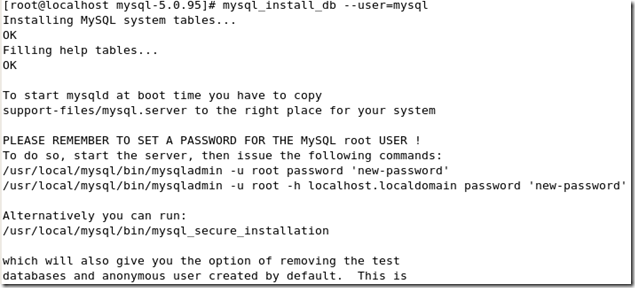
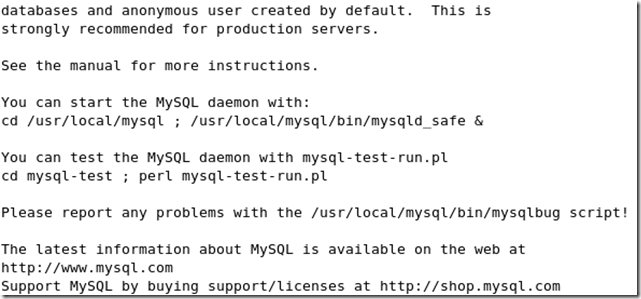
/usr/local/mysql/bin/mysql_install_db --user=mysql# 用MySQL用户安装数据库
截图如下:
启动mysql:
方法很多,如
service mysqld start
/etc/init.d/mysqld start
/etc/rc.d/init.d/mysqld start
如若启动失败可查看这篇博客的解决方案http://zhangge.net/4225.html
如我碰到过

是因为在启动mysql之前没对他进行初始化

/usr/local/mysql/bin/mysql_install_db --user=mysql
这个方法解决了
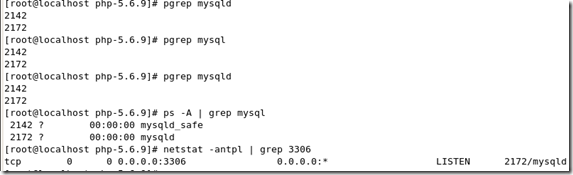
查看是否启动 pgrep mysql 或 netstat -antpl | grep 3306
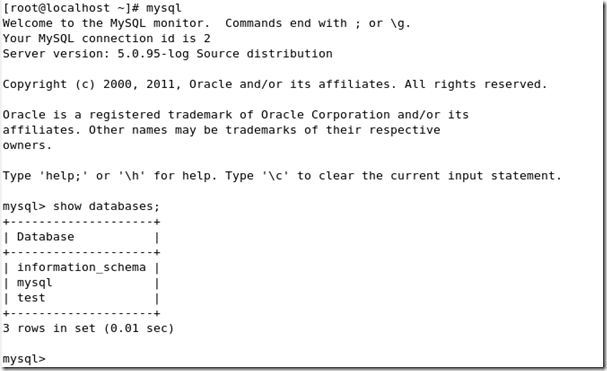
使用mysql:
四、编译安装 PHP
首先得安装php的几个依赖包
yum -y install libmcrypt mhash mcrypt libxml2-devel curl-devel libpng-devel openldap-devel
有可能
CentOS源不能安装libmcrypt-devel,由于版权的原因没有自带mcrypt的包。
有两种方法解决,一种是使用第三方源,这样还可以使用yum来安装,简单方便,坏处是第三方源多少有中不可靠的感觉。
解决办法一
1、安装第三方yum源
wget http://www.atomicorp.com/installers/atomic
sh ./atomic
2、使用yum命令安装
yum install libmcrypt libmcrypt-devel
解决办法二、
使用php mcrypt 前必须先安装Libmcrypt
libmcrypt源码安装方法:
cd /usr/local/src
wget http://softlayer.dl.sourceforge.net/sourceforge/mcrypt/libmcrypt-2.5.8.tar.gz
tar -zxvf libmcrypt-2.5.8.tar.gz
cd /usr/local/src/libmcrypt-2.5.8
./configure --prefix=/usr/local
make
make install
安装libiconv依赖包
#wget http://ftp.gnu.org/pub/gnu/libiconv/libiconv-1.13.1.tar.gz
#tar -zxvf libiconv-1.13.1.tar.gz
#cd libiconv-1.13.1
# ./configure --prefix=/usr/local/libiconv
# make
# make install
如果已经安装就可以不安装了
cd php-5.6.9
./configure --prefix=/usr/local/php --with-mysql=mysqlnd --with-mysqli=mysqlnd --with-pdo-mysql=mysqlnd --with-iconv-dir --with-freetype-dir --with-jpeg-dir --with-png-dir --with-zlib --with-libxml-dir --enable-xml --disable-rpath --enable-bcmath --enable-shmop --enable-sysvsem --enable-inline-optimization --with-curl --with-mcrypt --with-curlwrappers --enable-mbregex --enable-fpm --enable-mbstring --with-gd --enable-gd-native-ttf --with-openssl --with-mhash --enable-pcntl --enable-sockets --with-xmlrpc --enable-zip --enable-soap --without-pear --with-apxs2=/usr/local/httpd/bin/apxs --with-mcrypt --with-config-file-path=/etc --with-config-file-scan-dir=/etc/php.d
make && make install
新版本中添加mysql可以用mysqlnd的方式,如下一种编译参数:
(php --with-mysql=mysqlnd  的讲解 http://blog.163.com/yxba_02/blog/static/187557620160401018458/ )
编译安装php时出现的常见错误:
mcrypt.h not found. Please reinstall libmcrypt
解决办法http://www.nginx.cn/2196.html (类似问题自行百度)
http://lyp.cn/350_how-to-fix-php-compile-errors
http://3550334.blog.51cto.com/3540334/667403
编译完后就得改一些配置了
cpphp.ini-production/etc/php.ini (安装之前查找一下php.ini-production)
编辑 apache 的配置文件 httpd.conf(/etc/httpd/conf/httpd.conf),使支持 php:
# 添加如下两项
AddType application/x-httpd-php .php
AddType application/x-httpd-php-sourece .phps
# 修改
DirectoryIndex index.php index.html
如下:
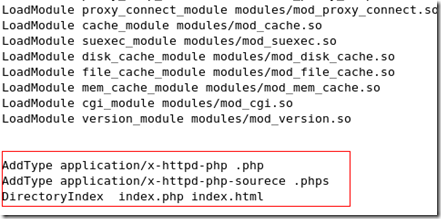
根据自身项目需要更改DocumentRoot和Directory
lamp安装总结的更多相关文章
- LAMP安装各种问题解决方案
LAMP环境配置安装注意安装步骤及说明事项. LAMP安装各种问题解决 1. 访问ftp报错 解决: 关闭selinux vi /etc/selinux/config 内容修改为: selinux=d ...
- CentOS7 lamp安装 centoOS6 lamp
快速lamp安装 How To Install Linux, Apache, MySQL, PHP (LAMP) stack On CentOS 7 Introduction A "LAMP ...
- Linux(lamp安装)
网络配置 1. 配置ip地址和子网掩码 编辑配置文件: > cd /etc/sysconfig/network-scripts > cp ifcfg-eth0 ./ifcfg-eth ...
- HHvm建站环境搭建方法:Nginx,Mariadb,hhvm及lnmp/lamp安装部署
HHVM起源于Facebook公司,是一个开源的PHP虚拟机,使用JIT的编译方式以及其他技术,让PHP代码的执行性能大幅提升.HHVM提升PHP性能的途径,采用的方式就是替代Zend引擎来生成和执行 ...
- lamp 安装 apache
lamp安装 httpd-2.2.4.tar.gz :http://download.csdn.net/detail/wulvla020311/8046141 先检查一下装的东西都在不在:rpm -q ...
- linux基础——文件挂载,lamp安装
一. 文件挂载 lsblk -f 显示文件系统信息 mount -t vfat UUID="ffffffffff" /mnt 挂载到/mnt目录 Linux针对于各式U盘挂载方 ...
- Lamp安装 php-v5.6【ZendGuardLoader】的问题
Lamp安装 php-v5.6[ZendGuardLoader]的问题 标签(空格分隔):php,linux Apache日志: 就这个问题导致无法解析运行php文件.下面是网上找的解决方案 Zend ...
- DigitalOcean 推荐的ubuntu16下LAMP安装过程
LAMP安装过程: How To Install Linux, Apache, MySQL, PHP (LAMP) stack on Ubuntu 16.04 (另一个参考例程:Ubuntu 16.0 ...
- lamp安装
一.简介 什么是LAMPLAMP是一种Web网络应用和开发环境,是Linux, Apache, MySQL, Php/Perl的缩写,每一个字母代表了一个组件,每个组件就其本身而言都是在它所代表的方面 ...
- [转] Ubuntu 12.04下LAMP安装配置 (Linux+Apache+Mysql+PHP)
我是一个Linux新手,想要安装一台Ubuntu 12.04版的Linux服务器,用这台服务器上的LAMP套件来运行我自己的个人网站.LAMP套件就是 “Linux+Apache+Mysql+PHP这 ...
随机推荐
- easyui 日期控件限制起始相差30天
$('#lendDateStart').datebox('calendar').calendar({ validator: function(date){ var endDateStr = $('#l ...
- Problem D: 求(x-y+z)*2
Description 编写一个程序,求解以下三个函数: f(x,y,z)=2*(x-y+z) f(x,y) =2*(x-y) f(x) =2*(x-1) 函数调用格式见append.cc. ...
- poj3080(kmp+枚举)
Blue Jeans Time Limit: 1000MS Memory Limit: 65536K Total Submissions: 20163 Accepted: 8948 Descr ...
- L253 Work and Pleasure
To be really happy and really safe, one ought to have at least two or three hobbies, and they must a ...
- day 34 进程线程排序 抢票 初级生产者消费者
# 实现的内容 模拟购票 20个人买,就有一张购票查,的时候大家都看到,但是购买只能一人购买成功#利用互斥锁# from multiprocessing import Process,Lock# im ...
- WPA3在2018年为无线安全添砖加瓦
Wi-Fi Alliance Announces WPA3, the Successor to Wi-Fi's WPA2 Security Protocol The Wi-Fi Alliance -- ...
- perror strerror使用方法
1. 简介 很多系统函数在错误返回时将错误原因记录在libc定义的全局变量errno中,每种错误原因对应一个错误码. errno在头文件errno.h中声明,是一个整型变量,所有错误码都是正整数.然后 ...
- Linux按照时间顺序列出文件
按照递增时间顺序列出所有文件 ls -ltr -l表示列出长串数据,-t表示按照时间顺序,-r表示将排序的结果反向输出 按照时间递减的顺序列出所有文件 ls -lt
- [LeetCode&Python] Problem 455. Assign Cookies
Assume you are an awesome parent and want to give your children some cookies. But, you should give e ...
- Gym101485: NWERC 2015(队内第6次训练)
A .Assigning Workstations 题意:给定N个人的工作时间和工作时长,我们可以假设有无数台工作机器,如果一台机器超过M时间未使用就会关闭,那么我们怎么安排机器的使用,使得需要开启机 ...