
LAMP安装各种问题解决方案
LAMP环境配置安装注意安装步骤及说明事项。
LAMP安装各种问题解决
1. 访问ftp报错

解决:
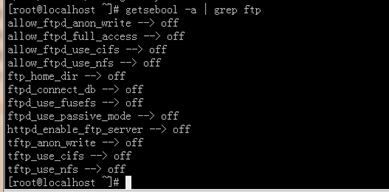
关闭selinux
vi /etc/selinux/config
内容修改为: selinux=disable
之后重启reboot。
下图分别为selinux关闭前 和 关闭后:

2. 依赖软件查询
http://rpmfind.net
一.安装gcc
gcc
cloog-ppl
ppl(libppl.so.7/libppl_c.so.2)
cpp
mpfr(libmpfr.so.1)
gcc-c++
libstdc++-devel
mpfr-2.4.1-6.el6.i686.rpm和ppl-0.10.2-11.el6.i686.rpm
快捷键rz sz:
rz、sz命令没找到?
安装lrzsz即可:
shell># yum -y install lrzsz
二.安装zlib压缩库
shell>## cd /home/jinnan/tar
shell># tar –zxvf zlib-1.2.5.tar.gz
shell># cd zlib-1.2.5
shell># ./configure //这个配置编译命令不要加目录参数
shell># make && make install
三.安装apache
shell># cd /home/jinnan/tar
shell># tar -jxvf httpd-2.2.19.tar.bz2
shell># cd httpd-2.2.19
shell>#./configure --prefix=/usr/local/http2 \
--enable-modules=all \
--enable-mods-shared=all \
--enable-so
shell># make && make install
启动Apache
shell># /usr/local/http2/bin/apachectl start
#测试apache
浏览器打开: http://虚拟机IP
看到 "it works!",即为成功
配置虚拟主机
1)配置host文件
打开C:/windows/system32/drivers/etc/hosts 文件
增加域名记录
如:
192.168.9.38 www.ec1.com
192.168.9.38 www.ec2.com
2) 增加虚拟主机
vi /usr/local/http2/conf/httpd.conf
取消# Include conf/extra/httpd-vhosts.conf
这一行前面的#号
保存退出
vi /usr/local/http2/conf/extra/httpd-vhosts.conf
增加虚拟主机记录
<VirtualHost *:80>
ServerAdmin webmaster@dummy-host.example.com
DocumentRoot "/usr/local/http2/htdocs/ec1"
ServerName www.ec1.com
ServerAlias www.dummy-host.example.com
ErrorLog "logs/dummy-host.example.com-error_log"
CustomLog "logs/dummy-host.example.com-access_log" common
</VirtualHost>
<VirtualHost *:80>
ServerAdmin webmaster@dummy-host2.example.com
DocumentRoot "/usr/local/http2/htdocs/ec2"
ServerName www.ec2.com
ErrorLog "logs/dummy-host2.example.com-error_log"
CustomLog "logs/dummy-host2.example.com-access_log" common
</VirtualHost>
<VirtualHost *:80>
DocumentRoot "/var/www/shop"
ServerName www.ec1.com
</VirtualHost>
注意:/var/www/shop 以上三个目录var www shop 的其他用户必须有x可执行权限



3)
shell># cd /usr/local/http2/htdocs
shell># mkdir ec1 ec2
shell># echo this is ec1.com > ec1/index.html
shell># echo this is ec2.com > ec2/index.html
4)重启apache
/usr/local/http2/bin/apachectl restart
5)浏览器打开www.ec1.com,和www.ec2.com
看到不同的网站内容,虚拟主机创建完毕!
安装图形库,为编译PHP做准备
libxml2-2.7.2.tar.gz
jpegsrc.v8b.tar.gz
libpng-1.4.3.tar.gz
freetype-2.4.1.tar.gz
gd-2.0.35.tar.gz
四.安装libxml2
shell># cd /home/jinnan/tar
shell># tar zxvf libxml2-2.7.2.tar.gz
shell># cd libxml2-2.7.2
shell>#./configure --prefix=/usr/local/libxml2 \
五.安装jpeg8
shell># tar -zxvf jpegsrc.v8b.tar.gz
shell>#./configure --prefix=/usr/local/jpeg \
--enable-shared --enable-static
--enable-shared 把jpeg需要的函数库程序都编译到该软件里边
--enable-static 静态方式函数处理,需要什么函数,马上include来
六.安装libpng
shell># tar zxvf libpng-1.4.3.tar.gz
shell>#./configure #和zlib一样不要带参数,让它默认安装到相应目录
七.安装freetype(字体库)
shell># tar zxvf freetype-2.4.1.tar.gz
shell>#./configure --prefix=/usr/local/freetype
八.安装GD库
shell># tar -zvxf gd-2.0.35.tar.gz
shell># mkdir -p /usr/local/gd
shell>#./configure --prefix=/usr/local/gd \
--with-jpeg=/usr/local/jpeg/ \
--with-freetype=/usr/local/freetype
九.安装 php5
shell># tar -jxvf php-5.3.6.tar.bz2
shell>#./configure --prefix=/usr/local/php \
--with-apxs2=/usr/local/http2/bin/apxs \
--with-freetype-dir=/usr/local/freetype \
--with-zlib --with-libxml-dir=/usr/local/libxml2 \
--with-jpeg-dir=/usr/local/jpeg \
shell># cp php.ini-development /usr/local/php/lib/php.ini
vi /usr/local/http2/conf/httpd.conf
AddType application/x-httpd-php .php
vi /usr/local/apache2/htdocs/index.php
shell># /usr/local/http2/bin/apachectl restart
-
1.安装cmake
shell># tar zxvf cmake-2.8.5.tar.gz
2.编译安装MySQL
shell># tar zxvf mysql-5.5.17.tar.gz
-DCMAKE_INSTALL_PREFIX=/usr/local/mysql \
-DMYSQL_DATADIR=/usr/local/mysql/data \
-DDEFAULT_COLLATION=utf8_general_ci
shell># rpm -ivh ncurses-devel-5.7-3.20090208.el6.i686.rpm
shell># rm -f CMakeCache.txt //删除该文件
shell># cmake 。。。
。。。
//重新cmakeshell># cp support-files/my-medium.cnf /etc/my.cnf
3.配置并初始化MySQL
shell># useradd mysql (该mysql用户会存在于同名的组下)
shell># chmod +x /usr/local/mysql
(数据库用户信息不小心删除光了,删除data目录,从此开始执行以下指令,直至结束)
shell># chown -R mysql.mysql /usr/local/mysql
shell># /usr/local/mysql/scripts/mysql_install_db \
--datadir=/usr/local/mysql/data &
把mysql安装文件(除了data)的主人都改为root,避免数据库恢复为出厂设置。
shell># chown -R root /usr/local/mysql
shell># chown -R mysql /usr/local/mysql/data
shell># /usr/local/mysql/bin/mysqld_safe --user=mysql &
shell># /usr/local/mysql/bin/mysql –u root
mysql> UPDATE user SET Password=password('123456') WHERE user='root';
-
shell># cp 安装包解压目录/support-files/mysql.server /etc/init.d/mysqld
shell># chmod +x /etc/init.d/mysqld
shell># chkconfig --add mysqld
shell># chkconfig mysqld on //设置开机自启动
/usr/local/http2/bin/apachectl start
/usr/local/mysql/bin/mysqld_safe --user=mysql &
[root@localhost httpd-2.2.19]# /usr/local/http2/bin/apachectl restart
httpd not running, trying to start
(98)Address already in use: make_sock: could not bind to address [::]:80
(98)Address already in use: make_sock: could not bind to address 0.0.0.0:80
no listening sockets available, shutting down
[root@localhost httpd-2.2.19]# netstat -lnp|grep 80
tcp 0 0 :::80 :::* LISTEN 28195/httpd
unix 2 [ ACC ] STREAM LISTENING 6580 1957/gpm /dev/gpmctl
unix 2 [ ACC ] STREAM LISTENING 5422 1800/pcscd /var/run/pcscd.comm

[root@localhost httpd-2.2.19]# ps 28195
28195 ? Ss 0:00 /usr/local/http2/bin/httpd -k restart

经过分析知道了80端口被系统的一个进程占用,这个进程是旧的apache服务
[root@localhost httpd-2.2.19]# kill -9 28195
[root@localhost httpd-2.2.19]#

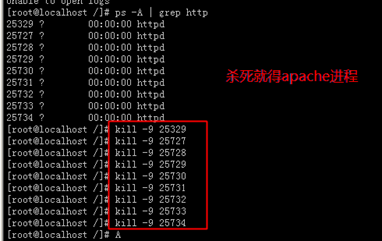
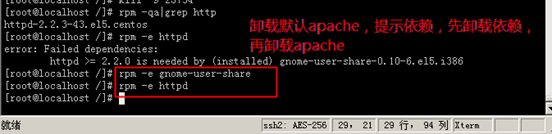
十一.卸载操作系统自带apache


LAMP安装各种问题解决方案的更多相关文章
- HHvm建站环境搭建方法:Nginx,Mariadb,hhvm及lnmp/lamp安装部署
HHVM起源于Facebook公司,是一个开源的PHP虚拟机,使用JIT的编译方式以及其他技术,让PHP代码的执行性能大幅提升.HHVM提升PHP性能的途径,采用的方式就是替代Zend引擎来生成和执行 ...
- Lamp安装 php-v5.6【ZendGuardLoader】的问题
Lamp安装 php-v5.6[ZendGuardLoader]的问题 标签(空格分隔):php,linux Apache日志: 就这个问题导致无法解析运行php文件.下面是网上找的解决方案 Zend ...
- CentOS7 lamp安装 centoOS6 lamp
快速lamp安装 How To Install Linux, Apache, MySQL, PHP (LAMP) stack On CentOS 7 Introduction A "LAMP ...
- 关于MySQL-python-1.2.3.tar.gz安装失败的解决方案
关于MySQL-python-1.2.3.tar.gz安装失败的解决方案 RHEL6.4升级到python2.7.9,然后安装 MySQL-python-1.2.3.tar.gz, 报错.解决错误之后 ...
- Linux(lamp安装)
网络配置 1. 配置ip地址和子网掩码 编辑配置文件: > cd /etc/sysconfig/network-scripts > cp ifcfg-eth0 ./ifcfg-eth ...
- QT5.4.0安装以及与VS2010整合安装---64bit操作系统解决方案
QT5.4.0安装以及与VS2010整合安装---64bit操作系统解决方案 注意,目前QT官网不能下载,必须提供注册,然后才可以下载. 网上不同版本安装的细节有差异,特将我的安装相关操作贴出来,希望 ...
- lamp 安装 apache
lamp安装 httpd-2.2.4.tar.gz :http://download.csdn.net/detail/wulvla020311/8046141 先检查一下装的东西都在不在:rpm -q ...
- linux基础——文件挂载,lamp安装
一. 文件挂载 lsblk -f 显示文件系统信息 mount -t vfat UUID="ffffffffff" /mnt 挂载到/mnt目录 Linux针对于各式U盘挂载方 ...
- iOS7.1企业版发布后用户通过sarafi浏览器安装无效的解决方案
关于iOS7.1企业版发布后,用户通过sarafi浏览器安装无效的解决方案: 通过测试,已经完美解决. 方案一: iOS7.1企业应用无法安装应用程序 因为证书无效的解决方案 http://blog. ...
随机推荐
- linux 下 mysql 安装(不用编译的方式)
环境是centos6.x.相信其他的也大同小异.相对来说这种方式我用的比较多. 一些环境依赖表库: yum install perl yum install libaio 1)下载:在mysql的网站 ...
- PhpSms 稳定可靠的php短信发送库
可能是目前最聪明.优雅的PHP短信发送库了.从此不再为各种原因造成的个别短信发送失败而烦忧! phpsms的任务均衡调度功能由toplan/task-balancer提供. GitHub地址:http ...
- 有时候就是看不进论文-jQuery动画特效篇&MySQL
hi 早上知道新的乱斗模式后,没忍住开了几把,然后就无心论文了...用这个来破吧 1.jQuery -----动画特效----- ----调用show()和hide()方法显示和隐藏元素 show() ...
- MMORPG大型游戏设计与开发(规范)
一件事如果没有规范.章法,那么做这件事起来往往会遇到许多难题,特别是在多人协作的时候,没有到规范通常让每个人多多少少都面临着头疼的困难.举个例子,多个人要做一桌美味的饺子,有买材料.做面皮.弄肉(菜) ...
- C# 事件编程在游戏开发的应用
2D碰撞检测:http://wenku.baidu.com/view/45544cfcfab069dc50220145.html 1.Action System.Action 等于快捷创建一个委托 2 ...
- 奇葩啊,HOLOLENS里模拟器截不了图,后台DEVIE PORTAL可以截
奇葩啊,HOLOLENS里模拟器截不了图,后台DEVIE PORTAL可以截 截屏 https://developer.microsoft.com/en-us/windows/holographic/ ...
- Android驱动入门-LED--HAL硬件抽象层程序设计①
硬件平台: FriendlyARM Tiny4412 Cortex-A9 操作系统: UBUNTU 14.04 LTS 时间:2016-09-21 16:15:26 设计HAL硬件抽象层程序,则需要 ...
- ThreadLocal用法和实现原理
如果你定义了一个单实例的java bean,它有若干属性,但是有一个属性不是线程安全的,比如说HashMap.并且碰巧你并不需要在不同的线程中共享这个属性,也就是说这个属性不存在跨线程的意义.那么你不 ...
- Json数据与Json数据转换
1.json数据 [{\"IS_DISTRIBUTOR_LIMIT\":0,\"PROVISION_PRICE\":null,\"PRO_STATUS ...
- javascript实现优先队列
1.概念 一般情况下从队列中删除元素,都是率先入队的元素.但是有些使用队列的情况不遵循先进先出的原则,这就是插队,这需要使用优选队列的数据结构来进行描述. 从优先队列中删除元素的时候,需要考虑优先级的 ...