
SVG基础绘图实例
SVG可缩放矢量图(Scalable Vector Graphics),是使用 XML 来描述二维图形和绘图程序的语言,图像在放大或改变尺寸的情况下其图形质量不会有所损失,是万维网联盟的标准。
下面整理了一些SVG基础绘图实例:
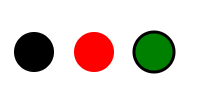
1、圆形
<!--圆-->

<!--<circle>标签的cx、cy、r属性分别为横坐标、纵坐标和半径,单位为像素。-->

<svg width="200" height="100" xmlns="http://www.w3.org/2000/svg" version="1.0">

  <circle cx="30"  cy="50" r="20" />

  <circle cx="90"  cy="50" r="20" fill="red" />

  <circle cx="150" cy="50" r="20" fill="green" stroke="black" stroke-width="3" />

</svg>
<!--viewBox属性,<viewBox>属性的值有四个数字,分别是左上角的横坐标和纵坐标、视口的宽度和高度-->

<svg width="100" height="100" viewBox="0 0 50 50">

  <circle cx="50" cy="50" r="50" />

</svg>

2、椭圆
<!--椭圆-->

<!--<ellipse>的cx属性和cy属性,指定了椭圆中心的横坐标和纵坐标(单位像素);rx属性和ry属性,指定了椭圆横向轴和纵向轴的半径(单位像素)-->

<svg width="100" height="100" xmlns="http://www.w3.org/2000/svg" version="1.0">

  <ellipse cx="50" cy="50" ry="40" rx="20" stroke="black" stroke-width="5" fill="silver"/>

</svg>

3、矩形
<!--矩形-->

<!--<rect>的x属性和y属性,指定了矩形左上角端点的横坐标和纵坐标;width属性和height属性指定了矩形的宽度和高度(单位像素)-->

<svg width="400" height="120" xmlns="http://www.w3.org/2000/svg" version="1.0">

  <rect x="0" y="10" height="100" width="100"/>

  <rect x="110" y="10" height="100" width="100" rx="20" ry="20" fill="red" />

  <rect x="220" y="10" height="100" width="100" fill="none" stroke="black" stroke-width="3" />

</svg>

4、直线
<!--直线-->

<!--<line>标签的x1属性和y1属性,表示线段起点的横坐标和纵坐标;x2属性和y2属性,表示线段终点的横坐标和纵坐标;style属性表示线段的样式。-->

<svg width="150" height="100" xmlns="http://www.w3.org/2000/svg" version="1.0">

  <line x1="0" y1="50" x2="100" y2="50" style="stroke:green;stroke-width:10" stroke-linecap="round" />

</svg>

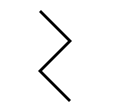
5、折线
<!--折线-->

<!--<polyline>的points属性指定了每个端点的坐标,横坐标与纵坐标之间与逗号分隔,点与点之间用空格分隔。-->

<svg width="100" height="130" xmlns="http://www.w3.org/2000/svg" version="1.0">

  <polyline points="30,30 60,60 30,90 60,120" fill="none" stroke="black" stroke-width="3"/>

</svg>
6、多边形
<!--多边形-->

<!--<polygon>的points属性指定了每个端点的坐标,横坐标与纵坐标之间与逗号分隔,点与点之间用空格分隔。-->

<svg width="550" height="100" xmlns="http://www.w3.org/2000/svg" version="1.0">

  <polygon points="160,10 130,90 200,36 120,36 190,90" style="fill:lime;stroke:purple;stroke-width:3;fill-rule:nonzero;" />

  <polygon points="220,40 250,40 260,10 270,40 300,40 280,60 290,90 260,70 230,90 240,60" stroke="green" fill="transparent" stroke-width="5" />

</svg>

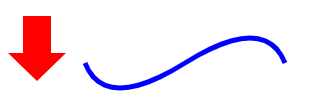
7、路径
<!--路径-->

<!--

    M = moveto(移动到的点的x轴和y轴的坐标)

    L = lineto(需要两个参数,分别是一个点的x轴和y轴坐标,绘制该点到当前位置的直线)

    H = horizontal lineto(绘制水平线)

    V = vertical lineto(绘制垂直线)

    C = curveto(三次贝塞尔曲线)

    S = smooth curveto(简写的三次贝塞尔曲线命令)

    Q = quadratic Bézier curve(二次贝塞尔曲线)

    T = smooth quadratic Bézier curveto(简写的二次贝塞尔曲线命令)

    A = elliptical Arc(弧形命令)

    Z = closepath(闭合)

-->

<svg width="300" height="100" xmlns="http://www.w3.org/2000/svg" version="1.0">

  <path d="M18,3 L46,3 L46,40 L61,40 L32,68 L3,40 L18,40 Z" fill="red"></path>

  <path d="M80,50 Q100,100 180,50 T280,50" fill="none" stroke="blue" stroke-width="5"/>

</svg>
8、文本
<!--文本-->

<!--<text>的x属性和y属性,表示文本区块基线(baseline)起点的横坐标和纵坐标。文字的样式可以用class或style属性指定。-->

<svg width="400" height="100" xmlns="http://www.w3.org/2000/svg" version="1.0">

  <text x="50" y="50" fill="yellow" stroke="black" style="font-size:48px;">Hello World</text>

</svg>

9、复用
<!--复用-->

<!--<use>中x属性和y属性是左上角的坐标-->

<svg width="200" height="100" xmlns="http://www.w3.org/2000/svg" version="1.0">

  <circle id="myCircle" cx="20" cy="50" r="20"/>

  <use href="#myCircle" x="50" y="0" fill="blue" />

  <use href="#myCircle" x="100" y="0" fill="white" stroke="blue" />

</svg>

10、组合复用
<!--组合复用,<g>标签中的代码会显示-->

<svg width="300" height="100" xmlns="http://www.w3.org/2000/svg" version="1.0">

  <g id="myCircle1">

    <text x="25" y="20">圆形</text>

    <circle cx="50" cy="50" r="20"/>

  </g>

  <use href="#myCircle1" x="100" y="0" fill="blue" />

  <use href="#myCircle1" x="200" y="0" fill="white" stroke="blue" />

</svg>

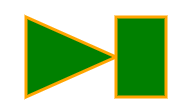
11、自定义形状
<!--自定义形状,<g>标签中的代码不会显示-->

<svg width="300" height="100">

  <defs>

    <g id="myCustomsize">

      <polygon points="10,10 100,50 10,90" />

      <rect x="100" y="10" height="80" width="50"/>

    </g>

  </defs>

  <use href="#myCustomsize" x="100" y="0" fill="green" stroke="orange" stroke-width="3" />

</svg>
12、填充
<!--填充,<pattern>标签用于自定义一个形状,该形状可以被引用来平铺一个区域。-->

<svg width="200" height="200">

  <defs>

    <pattern id="dots" x="0" y="0" width="100" height="100" patternUnits="userSpaceOnUse">

      <circle fill="#bee9e8" cx="50" cy="50" r="35" />

    </pattern>

  </defs>

  <rect x="0" y="0" width="100%" height="100%" fill="url(#dots)" />

</svg>

SVG基础绘图实例的更多相关文章
- HTML5 可缩放矢量图形(1)—SVG基础
参考文档1 SVG基础 SVG介绍 概念:SVG 是使用 XML 来描述二维图形和绘图程序的语言.(理解就是一个在网页上使用笔画图的过程) 什么是SVG SVG 指可伸缩矢量图形 (Scalable ...
- 深入理解 SVG 系列(一) —— SVG 基础
来源:https://segmentfault.com/a/1190000015652209 本系列文章分为三个部分: 第一部分是 SVG 基础. 主要讲 SVG 的一些基础知识,包括 SVG 基本元 ...
- R基础绘图
本节内容 0:小知识 1:绘图系统散点图的特征 2:基础绘图函数 3:基础绘图参数 4:图形设备 5:案例操作5个图形 0:小知识 summary() ## 对数据框或者向量进行描述性数据 read. ...
- QCustomPlot开发笔记(一):QCustomPlot简介、下载以及基础绘图
前言 QCustomPlot开发笔记系列整理集合,这是目前使用最为广泛的Qt图表类(Qt的QWidget代码方向只有QtCharts,Qwt,QCustomPlot),使用多年,系统性的整理,过目 ...
- VB6 GDI+ 入门教程[5] 基础绘图小结
http://vistaswx.com/blog/article/category/tutorial/page/2 VB6 GDI+ 入门教程[5] 基础绘图小结 2009 年 6 月 18 日 4条 ...
- AutoCAD ObjectARX(VC)开发基础与实例教程2014版光盘镜像
AutoCAD ObjectARX(VC)开发基础与实例教程2014,最新版,光盘镜像 作者:张帆 朱文俊 编著 出版社:中国电力出版社 出版时间:2014年6月 点击一下
- SVG基础以及使用Javascript DOM操作SVG
SVG 不依赖分辨率 支持事件处理器 最适合带有大型渲染区域的应用程序(比如谷歌地图) 复杂度高会减慢渲染速度(任何过度使用 DOM 的应用都不快) 不适合游戏应用 Canvas 依赖分辨率 不支持事 ...
- 数据分析与展示——Matplotlib基础绘图函数示例
Matplotlib库入门 Matplotlib基础绘图函数示例 pyplot基础图表函数概述 函数 说明 plt.plot(x,y,fmt, ...) 绘制一个坐标图 plt.boxplot(dat ...
- 基础 jQuery 实例
基础 jQuery 实例 jQuery 原则: 由于 jQuery 是为处理 HTML 事件而特别设计的,那么当您遵循以下原则时,您的代码会更恰当且更易维护: 把所有 jQuery 代码置于事件处理函 ...
随机推荐
- 在Struts2里面嵌入Spring
第一步:在web.xml中增加以下的listener <listener> <listener-class>org.springframework.web.context.Co ...
- mysql中的year(date)和date_format(date,format)的用法
执行:select SYSDATE() from dual; 返回:2017-10-24 13:48:06 执行:select DATE_FORMAT(SYSDATE(),'%Y.%m.%d') fr ...
- 2019-11-1-asp-dotnet-core-简单开发P2P中央服务器
title author date CreateTime categories asp dotnet core 简单开发P2P中央服务器 lindexi 2019-11-01 19:40:33 +08 ...
- cume_dist(),名次分析——-最大排名/总个数
函数:cume_dist() over(order by id) select id,area,score, cume_dist() over(order by id) a, --按ID最大排名/总个 ...
- DRDS 数据恢复重磅发布,全方位保障您的数据安全
背景介绍 数据库存储着企业的核心数据,在企业中占据非常重要的位置,一旦出现SQL注入,数据误删的情况,影响的不仅仅是业务,还会泄露用户的个人信息.因此,数据库的数据安全问题十分重要. 当数据库迁移到云 ...
- @codeforces - 793G@ Oleg and chess
目录 @description - translation@ @solution@ @part - 1@ @part - 2@ @part - 3@ @part - 4@ @accepted code ...
- @总结 - 10@ Miller-Rabin素性测试与Pollard-Rho因数分解
目录 @1 - 素性测试:Miller-Rabin算法@ @1.1 - 算法来源@ @1.2 - 算法描述@ @1.3 - 算法实现@ @2 - 因数分解:Pollard-Rho算法@ @2.0 - ...
- @atcoder - ARC066F@ Contest with Drinks Hard
目录 @description@ @solution@ @accepted code@ @details@ @description@ 给定序列 T1, T2, ... TN,你可以从中选择一些 Ti ...
- @bzoj - 3749@ [POI2015] Łasuchy
目录 @description@ @solution@ @version - 1@ @version - 2@ @accepted code@ @version - 1@ @version - 2@ ...
- angularJS $q
1.$q $q是Angular的一种内置服务,它可以使你异步地执行函数,并且当函数执行完成时它允许你使用函数的返回值(或异常). 2.defer defer的字面意思是延迟, $q.defer() ...