
简单的计时器 (倒计时)--html Demo
<!DOCTYPE html>

<html>

<head>

    <meta http-equiv="Content-type" content="text/html; charset=utf-8" />

    <title>HTML5 Timer</title>

    <script type="text/javascript" src="js/jquery-1.7.2.min.js"></script>

</head>

<body>

    <div style="margin: 20px auto; text-align: center;">

        <div style="padding: 50px;">

            <input type="button" id="btnstart" value="start" />

        </div>

        <canvas id="canvas" width="200" height="200" style="border: 1px solid #000;">Chrome,IE9,IE10,Firefox。</canvas>

        <h2>Please Choose the correct answer:</h2>

        <h3>1: 1+1=?</h3>

        <input type="radio" name="answer" value="1" />1

        <input type="radio" name="answer" value="2" />2

        <input type="radio" name="answer" value="3" />3

        <input type="radio" name="answer" value="4" />4<br />

        <input type="button" id="btnSubmit" value="submit" />

        <div style="padding: 50px;">

            <input type="button" id="btnStop" value="Stop" />

        </div>

    </div>

    <script type="text/javascript">

        $('<audio id="auSound"><source src="sound/wrong_answer_buzzer.mp3" type="audio/mpeg"></audio><audio id="auCorrect"><source src="sound/correct_answer_bell_ring.mp3" type="audio/mpeg"></audio>').appendTo('body');

        var canvas = document.getElementById('canvas');

        var timerId;

        var ctx = canvas.getContext('2d');

        if (ctx) {

            var frameRate = 60;

            function canvObject() {

                this.x = 0;

                this.y = 0;

                this.rotation = 0;

                this.borderWidth = 2;

                this.borderColor = '#000000';

                this.fill = false;

                this.fillColor = '#ff0000';

                this.update = function () {

                    if (!this.ctx) throw new Error('not canvas');

                    var ctx = this.ctx

                    ctx.save();

                    ctx.lineWidth = this.borderWidth;

                    ctx.strokeStyle = this.borderColor;

                    ctx.fillStyle = this.fillColor;

                    ctx.translate(this.x, this.y);

                    if (this.rotation) ctx.rotate(this.rotation * Math.PI / 180);

                    if (this.draw) this.draw(ctx);

                    if (this.fill) ctx.fill();

                    ctx.stroke();

                    ctx.restore();

                }

            };

            function Line() { };

            Line.prototype = new canvObject();

            Line.prototype.fill = false;

            Line.prototype.start = [0, 0];

            Line.prototype.end = [5, 5];

            Line.prototype.draw = function (ctx) {

                ctx.beginPath();

                ctx.moveTo.apply(ctx, this.start);

                ctx.lineTo.apply(ctx, this.end);

                ctx.closePath();

            };

            function Circle() { };

            Circle.prototype = new canvObject();

            Circle.prototype.draw = function (ctx) {

                ctx.beginPath();

                ctx.arc(0, 0, this.radius, 0, 2 * Math.PI, true);

                ctx.closePath();

            };

            var circle = new Circle();

            circle.ctx = ctx;

            circle.x = 100;

            circle.y = 100;

            circle.radius = 90;

            circle.fill = true;

            circle.borderWidth = 6;

            circle.fillColor = '#ffffff';

            var seconds = new Line();

            seconds.ctx = ctx;

            seconds.x = 100;

            seconds.y = 100;

            seconds.borderColor = "#ff0000";

            seconds.borderWidth = 4;

            seconds.rotation = 0;

            seconds.start = [0, 20];

            seconds.end = [0, -80];

            var center = new Circle();

            center.ctx = ctx;

            center.x = 100;

            center.y = 100;

            center.radius = 5;

            center.fill = true;

            center.borderColor = 'orange';

            for (var i = 0, ls = [], cache; i < 12; i++) {

                cache = ls[i] = new Line();

                cache.ctx = ctx;

                cache.x = 100;

                cache.y = 100;

                cache.borderColor = "orange";

                cache.borderWidth = 2;

                cache.rotation = i * 36;

                cache.start = [0, -70];

                cache.end = [0, -80];

            }

            //clear canvas

            ctx.clearRect(0, 0, 200, 200);

            ctx.fillRect(0, 0, 200, 200);

            circle.update();

            for (var i = 0; cache = ls[i++];) cache.update();

            seconds.update();

            center.update();

        } else {

            alert('error');

        }

        $("#btnstart").live("click", function () {

            var number = 0;

            $("input[name=answer]").attr("disabled", false);

            clearInterval(timerId);

            timerId = setInterval(function () {

                if (number == 10) {

                    clearInterval(timerId);

                    $('#auSound')[0].play();

                    $("input[name=answer]").attr("disabled", true);

                }

                ctx.clearRect(0, 0, 200, 200);

                ctx.fillRect(0, 0, 200, 200);

                circle.update();

                for (var i = 0; cache = ls[i++];) cache.update();

                seconds.rotation = (number++) * 6 * 6;

                seconds.update();

                center.update();

            }, 1000);

        })

        $("#btnStop").live("click", function () {

            clearInterval(timerId);

        });

        $("#btnSubmit").live("click", function () {

            clearInterval(timerId);

            if ($(":radio:checked").val() == "2") {

                $('#auCorrect')[0].play();

                alert("correct");

            } else {

                $('#auSound')[0].play();

                alert("wrong");

            }

        });

    </script>

</body>

</html>
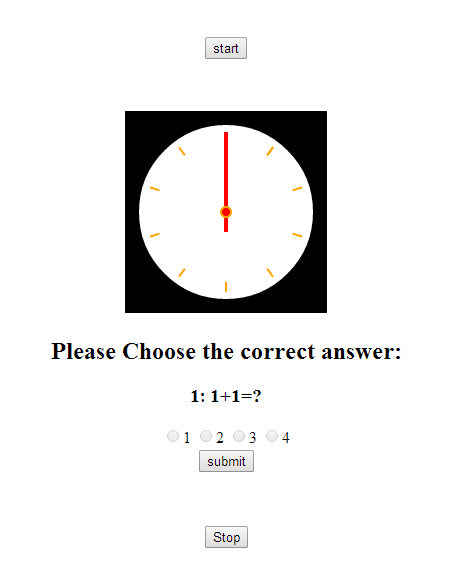
这个计时器如果超过十秒将播放错误声音,如果回答正确,将播放正确声音
这是效果图:
简单的计时器 (倒计时)--html Demo的更多相关文章
- socket.io简单说明及在线抽奖demo
socket.io简单说明及在线抽奖demo socket.io 简介 Socket.IO可以实现实时双向的基于事件的通信. 它适用于各种平台,浏览器或设备,也同样注重可靠性和速度. socket.i ...
- 如何使用AEditor制作一个简单的H5交互页demo
转载自:http://www.alloyteam.com/2015/06/h5-jiao-hu-ye-bian-ji-qi-aeditor-jie-shao/ 本教程演示如何使用AEditor制作一个 ...
- 一个简单的MariaDB认证插件demo
代码地址如下:http://www.demodashi.com/demo/13076.html 一.前言 众所周知(其实可能很多人不知道)MariaDB支持插件认证.在MariaDB中新建用户,常见的 ...
- unity3d之简单的时钟倒计时demo
输入结束时间,开始倒计时,时间差不超过一天,附上代码:(关于个位数显示,加个判断如果小于10 显示的字符串加上0) using System.Collections; using System.Col ...
- 也谈SSO,一个简单实用的单点登录Demo
关于SSO(单点登录),百度百科解释如下 : “SSO英文全称Single Sign On,单点登录.SSO是在多个应用系统中,用户只需要登录一次就可以访问所有相互信任的应用系统.它包括可以将这次主要 ...
- 【Time系列三】简单的计时器(秒表)
之前在 "for与while的洪荒之力" 中介绍到计时器,不过那样弄感觉好麻烦啊, 碰巧昨天学Java的时候,讲到求余可以用来求时间 ! for与while链接: http://w ...
- 一个简单的IM系统(Demo附源码)-- ESFramework 4.0 快速上手(08)
前面的文章已经介绍完了基于ESFramework/ESPlus进行二次开发的所有要点,现在,我们可以开始小试牛刀了. 本文将介绍使用ESFramework的Rapid引擎开发的两个最简单的Demo,E ...
- MySQL两个最简单的delimiter的使用demo
今天复习MySQL,使用的工具是Navicat for MySQL,写了两个简单的delimiter的demo. 第一个,获取当前时间的年月日时分秒格式的时间: delimiter $$ drop f ...
- 毫秒倒计时小Demo
Demo截图: Demo:Demo 上代码: <!DOCTYPE html> <html lang="en"> <head> <meta ...
随机推荐
- [译]Vulkan教程(14)图形管道基础之固定功能
[译]Vulkan教程(14)图形管道基础之固定功能 Fixed functions 固定功能 The older graphics APIs provided default state for m ...
- 解决root无法登陆
今天重装了一下虚拟机,用filezilla往Linux扔文件需要用root的超级权限,但是却不能建立连接,使用账号密码也无法登录root账户 鼓捣好一阵才知道,因为root权限太高了,可以针对root ...
- 01-Java类加载机制详解
类的加载过程 在使用java命令运行主类(main)的时候,首先要通过类加载器将类加载到JVM内存中去.主类在运行过程中如果用到其他的类就会逐步加载这些类.jar包里的类并不是一次性加载的,是使用的时 ...
- windows下的go get 显示进度
我的Go版本是:go1.12.7 1.在你的Go安装目录下找到 D:\Go\src\github.com\tools\godep\vendor\golang.org\x\tools\go\vcs\vs ...
- Locust压测结果准确性验证
最近闲着没事做,就重新研究了一下基于python语言的Locust性能测试框架 发现在压测的过程中,虽然设置了100并发,但是通过实际监控,完全看不到100并发压测的效果 通过代码AOP日志监控接口的 ...
- 应用Tomcat进行多端口域名访问,并配置开启gzip压缩方法
1.除了默认的8080端口以外,我们尝试应用9090端口进行域名访问,打开server.xml 如图: 2.在代码里面进行添加如下9090下面的代码: 如图: 3.用9090端口进行访问 如图: 4. ...
- iOS随记
ios 10 访问设置问题 从ios8之api支持访问设置通过访问UIApplicationOpenSettingsURLString来跳转设置 NSURL*url=[NSURL URLWithStr ...
- TOMCAT 8.5 配置优化以及JVM配置(windows server)
下载官方的tomcat,我这里用的是TOMCAT 8.5.46,然后解压出来,解压后的目录如下图 一.server.xml配置优化 进入conf目录,打开server.xml 文件 1. 找到 < ...
- Saltstack_使用指南12_配置管理-jinja模板
1. 说明 下文的案例是根据上一篇文章进行的修改.因此请优先读取上一章博文内容<Saltstack_使用指南11_配置管理-状态之间依赖关系> 2. 主机规划 salt 版本 [root@ ...
- Hadoop、storm和Spark Streaming简单介绍(非原创)
文章大纲 一.Hadoop是什么二.storm是什么三.Spark Streaming是什么四.Spark与storm比较五.参考文章 一.Hadoop是什么 1. 简介 Hadoop是一个由Ap ...