
【萌狼蓝天】swagger速成
相关链接
编辑器:https://editor.swagger.io/
文档:https://openapi.apifox.cn/
基础信息设置
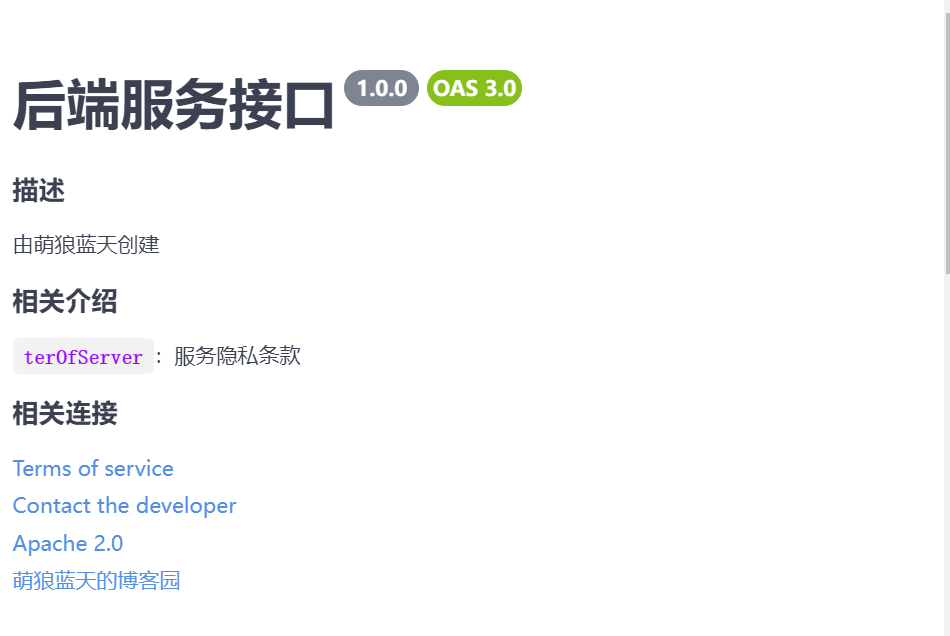
openapi: 3.0.3

info:

  title: 后端服务接口

  description: |-

    ## 描述

    由萌狼蓝天创建

    ## 相关介绍

    `terOfServer`:服务隐私条款

    ## 相关连接

  termsOfService: https://mllt.cc

  contact:

    email: mllt9920@qq.com

  license:

    name: Apache 2.0

    url: https://mllt.cc

  version: 1.0.0

externalDocs:

  description: 萌狼蓝天的博客园

  url: https://cnblogs.com/mllt

servers:

  - url: https://api.mllt.cc/api/v2024
一个简单的例子
openapi: 3.0.3

info:

  title: 后端服务接口

  description: |-

    ## 描述

    由萌狼蓝天创建

    ## 相关介绍

    `terOfServer`:服务隐私条款

    ## 相关连接

  termsOfService: https://mllt.cc

  contact:

    email: mllt9920@qq.com

  license:

    name: Apache 2.0

    url: https://mllt.cc

  version: 1.0.0

externalDocs:

  description: 萌狼蓝天的博客园

  url: https://cnblogs.com/mllt

servers:

  - url: https://api.mllt.cc/api/v2024

tags:

  - name: user

    description: 用户相关接口

    externalDocs:

      description: 接口地址

      url: https://api.mllt.cc/api/user

paths:

  /user/get:

    get:

      tags:

        - 用户列表

      summary: 所有用户

      description: 获取所有的用户信息

      responses:

        '200':

          description: 成功获取所有的用户

          content:

            application/json:

              schema:

                $ref: '#/components/schemas/User'

        '400':

            description: 获取失败,请检查前端

        '500':

            description: 获取失败,请检查后端

        '404':

            description: 获取失败,请检查后端是否正常运行,是否存在跨域问题

  /user/add:

    post:

      tags:

        - 用户新增

      summary: 新增用户

      description: 新增一个用户

      requestBody:

        content:

          application/json:

            schema:

              $ref: '#/components/schemas/User'

      responses:

        '200':

          description: 成功新增用户

          content:

           application/json:

            schema:

              $ref: '#/components/schemas/User'

        '400':

          description: 失败,请检查前端

        '500':

          description: 失败,请检查后端

        '404':

          description: 失败,请检查后端是否正常运行,是否存在跨域问题

components:

  schemas:

    User:

      type: object

      properties:

        id:

          type: integer

          format: int64

          example: 10

        username:

          type: string

          example: 萌狼蓝天

        firstName:

          type: string

          example: 萌狼

        lastName:

          type: string

          example: 蓝天

        email:

          type: string

          example: mllt9920@qq.com

        password:

          type: string

          example: '123456'

        phone:

          type: string

          example: '13140209920'

        userStatus:

          type: integer

          description: User Status

          format: int32

          example: 1

      xml:

        name: user

  requestBodies:

    User:

      description: User对象

      content:

        application/json:

          schema:

            $ref: '#/components/schemas/User'

        application/xml:

          schema:

            $ref: '#/components/schemas/User'

    UserArray:

      description: List of user object

      content:

        application/json:

          schema:

            type: array

            items:

              $ref: '#/components/schemas/User'
借助工具
我个人爱用apifox
apifox支持导出openapi(swagger)-json格式的文件
可以用在线工具转为yaml格式(例如:https://json2yaml.com/)
但是转换后可能会因为有一些地方有问题
比如说没设置字段type的,为null的时候,就会出问题
如果想用工具来写的话,我个人认为应该尽可能的去完整、规范的填写
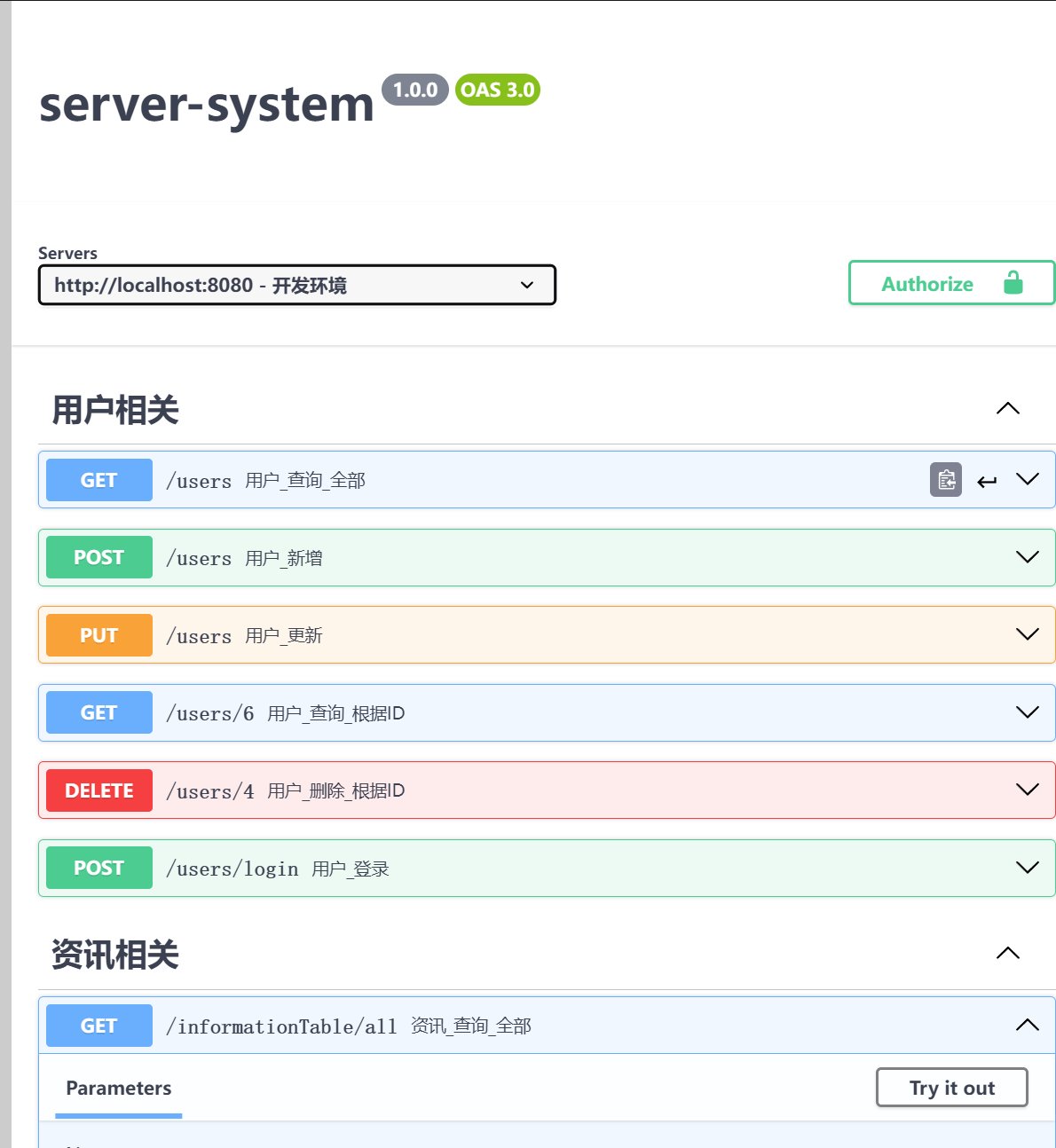
看一看转后的效果
openapi: 3.0.0
info:
title: server-system
description: ''
version: 1.0.0
tags:
- name: 用户相关
- name: 资讯相关
paths:
"/users":
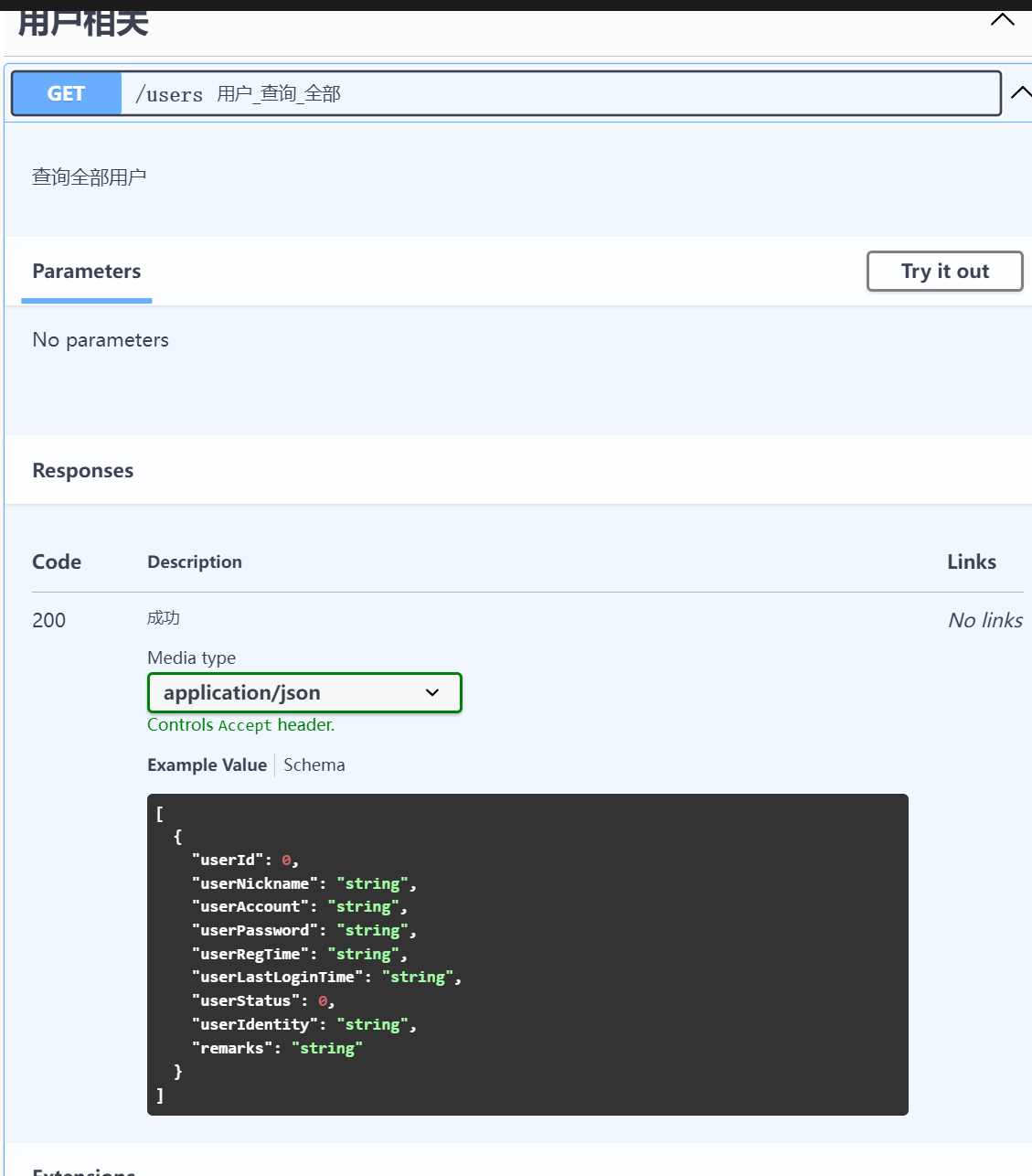
get:
summary: 用户_查询_全部
x-apifox-folder: 用户相关
x-apifox-status: developing
deprecated: false
description: 查询全部用户
tags:
- 用户相关
parameters: []
responses:
'200':
description: 成功
content:
application/json:
schema:
type: array
items:
type: object
properties:
userId:
type: integer
userNickname:
type: string
userAccount:
type: string
userPassword:
type: string
userRegTime:
type: string
userLastLoginTime:
type: string
userStatus:
type: integer
userIdentity:
type: string
remarks:
type: string
required:
- userId
- userNickname
- userAccount
- userPassword
- userRegTime
- userLastLoginTime
- userStatus
- userIdentity
- remarks
x-apifox-orders:
- userId
- userNickname
- userAccount
- userPassword
- userRegTime
- userLastLoginTime
- userStatus
- userIdentity
- remarks
x-apifox-ignore-properties: []
x-run-in-apifox: https://apifox.com/web/project/3965777/apis/api-144831280-run
security: []
post:
summary: 用户_新增
x-apifox-folder: 用户相关
x-apifox-status: developing
deprecated: false
description: ''
tags:
- 用户相关
parameters: []
requestBody:
content:
application/json:
schema:
type: object
properties:
userNickname:
type: string
description: 用户昵称
userAccount:
type: string
description: 用户账号
userPassword:
type: string
description: 用户密码
userIdentity:
type: string
description: 用户身份
remarks:
type: string
description: 备注
required:
- userNickname
- userAccount
- userPassword
- remarks
- userIdentity
x-apifox-orders:
- userNickname
- userAccount
- userPassword
- userIdentity
- remarks
x-apifox-ignore-properties: []
example:
userNickname: JohnDoe
userAccount: johndoe123
userPassword: password123
userIdentity: 测试员
remarks: 测试用户
responses:
'200':
description: 成功
content:
application/json:
schema:
type: object
properties: {}
x-apifox-ignore-properties: []
x-apifox-orders: []
x-run-in-apifox: https://apifox.com/web/project/3965777/apis/api-144847680-run
security: []
put:
summary: 用户_更新
x-apifox-folder: 用户相关
x-apifox-status: developing
deprecated: false
description: ''
tags:
- 用户相关
parameters: []
requestBody:
content:
application/json:
schema:
type: object
properties:
userNickname:
type: string
description: 用户昵称
userPassword:
type: string
description: 用户密码
userIdentity:
type: string
description: 用户身份
remarks:
type: string
description: 备注
userStatus:
type: string
description: 用户状态
userId:
type: string
description: 用户ID
userLoginTime:
type: string
required:
- userId
x-apifox-orders:
- userNickname
- userPassword
- userIdentity
- remarks
- userStatus
- userId
- userLoginTime
x-apifox-ignore-properties: []
example:
userNickname: JohnDoe
userAccount: johndoe123
userPassword: password123
userIdentity: 测试员
remarks: 测试用户
responses:
'200':
description: 成功
content:
application/json:
schema:
type: object
properties: {}
x-apifox-ignore-properties: []
x-apifox-orders: []
x-run-in-apifox: https://apifox.com/web/project/3965777/apis/api-144895492-run
security: []
"/users/6":
get:
summary: 用户_查询_根据ID
x-apifox-folder: 用户相关
x-apifox-status: developing
deprecated: false
description: ''
tags:
- 用户相关
parameters: []
responses:
'200':
description: 成功
content:
application/json:
schema:
type: object
properties: {}
x-apifox-ignore-properties: []
x-apifox-orders: []
x-run-in-apifox: https://apifox.com/web/project/3965777/apis/api-144872718-run
security: []
"/users/4":
delete:
summary: 用户_删除_根据ID
x-apifox-folder: 用户相关
x-apifox-status: developing
deprecated: false
description: ''
tags:
- 用户相关
parameters: []
responses:
'200':
description: 成功
content:
application/json:
schema:
type: object
properties: {}
x-apifox-ignore-properties: []
x-apifox-orders: []
x-run-in-apifox: https://apifox.com/web/project/3965777/apis/api-144891769-run
security: []
"/users/login":
post:
summary: 用户_登录
x-apifox-folder: 用户相关
x-apifox-status: developing
deprecated: false
description: ''
tags:
- 用户相关
parameters:
- name: userAccount
in: query
description: ''
required: false
example: wenjun
schema:
type: string
- name: userPassword
in: query
description: ''
required: false
example: '123456'
schema:
type: string
responses:
'200':
description: 成功
content:
application/json:
schema:
type: object
properties: {}
x-apifox-ignore-properties: []
x-apifox-orders: []
x-run-in-apifox: https://apifox.com/web/project/3965777/apis/api-144929527-run
security: []
"/informationTable/all":
get:
summary: 资讯_查询_全部
x-apifox-folder: 资讯相关
x-apifox-status: developing
deprecated: false
description: ''
tags:
- 资讯相关
parameters: []
responses:
'200':
description: 成功
content:
application/json:
schema:
type: object
properties: {}
x-apifox-ignore-properties: []
x-apifox-orders: []
x-run-in-apifox: https://apifox.com/web/project/3965777/apis/api-145428475-run
security: []
"/informationTable/add":
post:
summary: 资讯_新增
x-apifox-folder: 资讯相关
x-apifox-status: developing
deprecated: false
description: ''
tags:
- 资讯相关
parameters: []
requestBody:
content:
application/json:
schema:
type: object
properties:
title:
type: string
content:
type: string
type:
type: string
attachments:
type: string
creator:
type: string
x-apifox-orders:
- title
- content
- type
- attachments
- creator
required:
- title
- content
- creator
- attachments
- type
x-apifox-ignore-properties: []
responses:
'200':
description: 成功
content:
application/json:
schema:
type: object
properties: {}
x-apifox-ignore-properties: []
x-apifox-orders: []
x-run-in-apifox: https://apifox.com/web/project/3965777/apis/api-145430645-run
security: []
"/informationTable/get/1":
get:
summary: 资讯_查询_根据ID
x-apifox-folder: 资讯相关
x-apifox-status: developing
deprecated: false
description: ''
tags:
- 资讯相关
parameters: []
responses:
'200':
description: 成功
content:
application/json:
schema:
type: object
properties: {}
x-apifox-ignore-properties: []
x-apifox-orders: []
x-run-in-apifox: https://apifox.com/web/project/3965777/apis/api-145430948-run
security: []
"/informationTable/update":
put:
summary: 资讯_更新_根据ID
x-apifox-folder: 资讯相关
x-apifox-status: developing
deprecated: false
description: ''
tags:
- 资讯相关
parameters: []
requestBody:
content:
application/json:
schema:
type: object
properties:
title:
type: string
content:
type: string
type:
type: string
attachments:
type: string
creator:
type: string
id:
type: string
x-apifox-orders:
- title
- content
- type
- attachments
- creator
- id
required:
- title
- content
- creator
- attachments
- type
- id
x-apifox-ignore-properties: []
responses:
'200':
description: 成功
content:
application/json:
schema:
type: object
properties: {}
x-apifox-ignore-properties: []
x-apifox-orders: []
x-run-in-apifox: https://apifox.com/web/project/3965777/apis/api-145430958-run
security: []
"/informationTable/delete/2":
delete:
summary: 资讯_删除
x-apifox-folder: 资讯相关
x-apifox-status: developing
deprecated: false
description: 删除成功code1,当data为1时是有数据成功删除,当data为0时表示数据库根本没这条数据
tags:
- 资讯相关
parameters: []
responses:
'200':
description: 成功
content:
application/json:
schema:
type: object
properties: {}
x-apifox-ignore-properties: []
x-apifox-orders: []
x-run-in-apifox: https://apifox.com/web/project/3965777/apis/api-145431877-run
security: []
"/informationTable/statistics":
get:
summary: 资讯_数据统计
x-apifox-folder: 资讯相关
x-apifox-status: developing
deprecated: false
description: ''
tags:
- 资讯相关
parameters: []
responses:
'200':
description: 成功
content:
application/json:
schema:
type: object
properties: {}
x-apifox-ignore-properties: []
x-apifox-orders: []
x-run-in-apifox: https://apifox.com/web/project/3965777/apis/api-145432712-run
security: []
components:
schemas: {}
securitySchemes: {}
servers:
- url: http://test-cn.your-api-server.com
description: 测试环境
- url: http://localhost:8080
description: 开发环境
- url: http://prod-cn.your-api-server.com
description: 正式环境
个人认为还是可以的。(只是里面似乎夹带了一点apifox的私货啊,算了影响不大)
【萌狼蓝天】swagger速成的更多相关文章
- 【HarmonyOS】【Json解析】ZSON 与 HiJson 使用
HiLog配置 为了方便调试,查看,先设置好Hilog public static final HiLogLabel loglabel = new HiLogLabel(HiLog.LOG_APP,0 ...
- 【HarmonyOS】【DevEco Studio】NOTE04:How to Jump to a Page(页面间的跳转)
页面创建与基本设置 创建页面 创建两个新页面,分别为AbilityPage1.AbilityPage2 设置页面基本内容 以AbilityPage1为例 导包 import com.example.m ...
- 【HarmonyOS】【DevEco Studio】NOTE02 :Create a “Hello World ”Application
Author:萌狼蓝天 StudyTime:2021/12/06 Version:3.0 Beta1 包结构 src | --> resource 资源文件目录 | --> layout/ ...
- 【Linux】【CentOS】【FTP】FTP服务器安装与配置(vsftpd、lftp)
[初次学习.配置的笔记,如有不当,欢迎在评论区纠正 -- 萌狼蓝天 @ 2021-12-02] 基本概念 FTP访问方式 实体账号:本地账户 来宾账户:guest 匿名登录:anonymous fp ...
- 【Linux】【专项突破】Linux重定向与管道
[专项突破]Linux重定向与管道 This article is written by Xrilang(Chinese Name:萌狼蓝天) If you want find me ,You can ...
- 【Linux】【RedHat】下载 安装 注册
RedHat 下载 安装 注册 记录 因为找入口太麻烦了,所以写了篇博文记录下来大致入口@萌狼蓝天 注册 点击进入注册地址(https://www.redhat.com/wapps/ugc/regis ...
- 【JavaWeb】【JSP】JSP传值到Servlet后端为NULL的问题
JSP传值到Servlet后端为NULL的问题 哔哩哔哩@萌狼蓝天 博客:萌狼工作室-博客园 联系QQ:#3447902411# | 仅限技术交流可添加 | 添加请说明你的方向和来意 1.目标文件路径 ...
- 【Linux】【CentOS7】免密登录突然失效
[报错解决]免密登录突然失效 哔哩哔哩 萌狼蓝天 博客:萌狼工作室-博客园 [问题描述] 原本配置好了的免密登录,今天启动hadoop发现免密登录失效了 [解决方案] 1.切换到管理员模式,进入配置文 ...
- 【Spark】【复习】Spark入门考前概念相关题复习
Spark考前概念相关题复习 AUthor:萌狼蓝天 哔哩哔哩:萌狼蓝天 博客园:我的文章 - 萌狼蓝天 博客:萌狼工作室 - 萌狼蓝天 (mllt.cc) 选择题 Hadoop 1.HADOOP的三 ...
- 【Spark】【RDD】初次学习RDD 笔记 汇总
RDD Author:萌狼蓝天 [哔哩哔哩]萌狼蓝天 [博客]https://mllt.cc [博客园]萌狼蓝天 - 博客园 [微信公众号]mllt9920 [学习交流QQ群]238948804 目录 ...
随机推荐
- USB总线-Linux内核USB3.0主机控制器驱动框架分析(十二)
1.概述 如下图所示,Linux内核中USB主机体系结构由五部分组成,分别为Application Software.USB Class Driver.USB Core((USB Driver).US ...
- 对于ChannelNet的一点理解
主要是为了个人理解,做个笔记 1.Pytorch代码 2.论文出处 3.详细介绍 这篇论文在2018年发出来,而ShuffleNet是从2017年由旷视发出来.起初了解shufflenet的提出,主要 ...
- MobileNet V2中InvertedResidual实现
1.为了方便理解其本身结构,找到源码理解一下. 2.论文地址:http://arxiv.org/pdf/1801.04381.pdf 3.V2相比较V1增加了倒残差结构和线性瓶颈层.整个结构按照维度来 ...
- manim边学边做--无向图
无向图属于数学中的图论这一学科, 所谓无向图G,就是由顶点集V(非空集合)和边集E(由V中元素构成的无序二元组的集合)组成的图, 可表示为G=(V,E). 在无向图中,边没有方向,即从顶点A到顶点B的 ...
- uniapp中前端canvas合成图片使用详解
项目开发中用到了定位打卡,保存当前位置到上传图片的功能.刚开始想着后端人员合成,前端上传经纬度.位置信息和图片就OK,没想到后端人员以使用项目中现有的组件为借口,让前端合成图片,造成前端工作量大增,再 ...
- 如何理解 .Net 中的 委托
// 委托 // 一种方法的声明和定义,也就是方法的占位符 // 一般使用在 参数 和 属性中 int Add(int a,int b) { return a + b; } // 定义委托的三种方法 ...
- 64.element表单校验注意点
<!-- 表单验证三要素: --> <!-- ① el-form需要有 model属性[表单数据对象].rules属性[验证规则对象].ref属性[引用字符串] --> < ...
- kotlin协程——>异步流
异步流 挂起函数可以异步的返回单个值,但是该如何异步返回多个计算好的值呢?这正是 Kotlin 流(Flow)的 ⽤武之地. 表示多个值 在 Kotlin 中可以使⽤集合来表⽰多个值.⽐如说,我们可以 ...
- 云电脑玩游戏挑选标准,ToDesk实测体验
大家玩游戏还在攒机吗?与其花费时间精力在组装游戏电脑上,不如用上最近兴起的云电脑软件.无需额外配备硬件设备,旧电脑原地变身成高性能电脑,随时随地享受游戏乐趣. 但市面上众多的云电脑软件,该怎么选择才能 ...
- 在centos7系统上安装docker环境
基于 CentOS 7 安装 官网安装参考手册:https://docs.docker.com/install/linux/docker-ce/centos/ 确定你是CentOS7及以上版本 [ro ...