
hibernate与struts框架实现增删改查
这里配置hibernate与struts不再过多赘述,配置搭建前文已经详细讲解,配置如下:
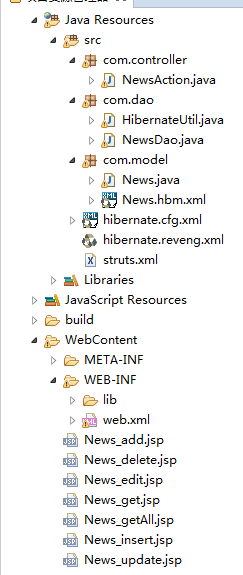
hibernate.hbm.xml配置:
<?xml version="1.0" encoding="UTF-8"?>

<!DOCTYPE hibernate-configuration PUBLIC

        "-//Hibernate/Hibernate Configuration DTD 3.0//EN"

        "http://www.hibernate.org/dtd/hibernate-configuration-3.0.dtd">

<hibernate-configuration>

    <session-factory>

        <property name="hibernate.connection.driver_class">com.mysql.jdbc.Driver</property>

        <property name="hibernate.connection.url">jdbc:mysql://localhost:3306/zhenzai?characterEncoding=GBK</property>

        <property name="hibernate.connection.username">root</property>

        <property name="hibernate.dialect">org.hibernate.dialect.MySQLDialect</property>

        <property name="show_sql">true</property>

        <mapping resource="com/model/News.hbm.xml"/>

    </session-factory>

</hibernate-configuration>
com.model.News.java配置:
package com.model;

// Generated 2017-3-14 10:57:00 by Hibernate Tools 5.2.0.CR1

import java.util.Date;

/**

 * News generated by hbm2java

 */

public class News implements java.io.Serializable {

    private Integer ids;

    private String title;

    private Date time;

    private String content;

    public News() {

    }

    public News(String title, Date time, String content) {

        this.title = title;

        this.time = time;

        this.content = content;

    }

    public Integer getIds() {

        return this.ids;

    }

    public void setIds(Integer ids) {

        this.ids = ids;

    }

    public String getTitle() {

        return this.title;

    }

    public void setTitle(String title) {

        this.title = title;

    }

    public Date getTime() {

        return this.time;

    }

    public void setTime(Date time) {

        this.time = time;

    }

    public String getContent() {

        return this.content;

    }

    public void setContent(String content) {

        this.content = content;

    }

}
com.model.News..hbm.xml配置:
<?xml version="1.0"?>

<!DOCTYPE hibernate-mapping PUBLIC "-//Hibernate/Hibernate Mapping DTD 3.0//EN"

"http://www.hibernate.org/dtd/hibernate-mapping-3.0.dtd">

<!-- Generated 2017-3-14 10:57:01 by Hibernate Tools 5.2.0.CR1 -->

<hibernate-mapping>

    <class name="com.model.News" table="news" catalog="zhenzai" optimistic-lock="version">

        <id name="ids" type="java.lang.Integer">

            <column name="ids" />

            <generator class="identity" />

        </id>

        <property name="title" type="string">

            <column name="title" />

        </property>

        <property name="time" type="timestamp">

            <column name="time" length="19" />

        </property>

        <property name="content" type="string">

            <column name="content" />

        </property>

    </class>

</hibernate-mapping>
com.dao.HibernateUtil.java配置:
package com.dao;

import org.hibernate.Session;

import org.hibernate.SessionFactory;

import org.hibernate.cfg.Configuration;

import javafx.util.BuilderFactory;

public class HibernateUtil {

    private static final SessionFactory factory = BuilderFactory();

    private static final ThreadLocal<Session> lock = new ThreadLocal<Session>();

    private static SessionFactory BuilderFactory() {

        Configuration config = new Configuration().configure();

        return config.buildSessionFactory();

    }

    public static Session getsession(){

        Session session=lock.get();

        if(session==null){

            session=factory.openSession();

            lock.set(session);

        }

        return session;

    }

    public static void closeSession(){

        Session session=lock.get();

        if(session !=null){

            session.close();

            lock.set(null);

        }

    }

}
com.dao.NewsDao.java配置:
package com.dao;

import java.util.ArrayList;

import java.util.List;

import org.hibernate.Session;

import com.model.News;

public class NewsDao {

    private Session session=null;

    public NewsDao(){

        session=HibernateUtil.getsession();

    }

    public List<News> select(){

        List<News> list = new ArrayList<News>();

        try{

         list = session.createQuery("from News").getResultList();

        }catch(Exception e){

            e.printStackTrace();

        }

        finally{

            HibernateUtil.closeSession();

        }

        return list;

    }

    public News select(int ids){

        News list = new News();

        try{

         list = (News)session.createQuery("from News where ids=?")

                 .setParameter(0,ids)

                 .getSingleResult();

        }catch(Exception e){

            e.printStackTrace();

        }

        finally{

            HibernateUtil.closeSession();

        }

        return list;

    }

    public void insert(News news){

        try{

             session.beginTransaction();

             session.save(news);

             session.getTransaction().commit();

            }catch(Exception e){

                e.printStackTrace();

                session.getTransaction().rollback();

            }

            finally{

                HibernateUtil.closeSession();

            }

    }

    public void update(News news){

        try{

             session.beginTransaction();

             News n=session.get(News.class, news.getIds());

             n.setTitle(news.getTitle());

             n.setTime(news.getTime());

             n.setContent(news.getContent());

             session.update(n);

             session.getTransaction().commit();

            }catch(Exception e){

                e.printStackTrace();

                session.getTransaction().rollback();

            }

            finally{

                HibernateUtil.closeSession();

            }

    }

    public void delete(int ids){

        try{

             session.beginTransaction();

             News n = session.get(News.class, ids);

             session.delete(n);

             session.getTransaction().commit();

            }catch(Exception e){

                e.printStackTrace();

                session.getTransaction().rollback();

            }

            finally{

                HibernateUtil.closeSession();

            }

    }

}
接下来就是配置struts的内容:
web.xml配置:
<?xml version="1.0" encoding="UTF-8"?>

<web-app id="WebApp_9" version="2.4" xmlns="http://java.sun.com/xml/ns/j2ee"

         xmlns:xsi="http://www.w3.org/2001/XMLSchema-instance"

         xsi:schemaLocation="http://java.sun.com/xml/ns/j2ee http://java.sun.com/xml/ns/j2ee/web-app_2_4.xsd">

    <display-name>Struts Blank</display-name>

    <filter>

        <filter-name>struts2</filter-name>

        <filter-class>org.apache.struts2.dispatcher.ng.filter.StrutsPrepareAndExecuteFilter</filter-class>

    </filter>

    <filter-mapping>

        <filter-name>struts2</filter-name>

        <url-pattern>/*</url-pattern>

    </filter-mapping>

    <welcome-file-list>

        <welcome-file>index.html</welcome-file>

    </welcome-file-list>

</web-app>
struts.xml配置:
<?xml version="1.0" encoding="UTF-8" ?>

<!DOCTYPE struts PUBLIC

    "-//Apache Software Foundation//DTD Struts Configuration 2.3//EN"

    "http://struts.apache.org/dtds/struts-2.3.dtd">

<struts>

    <constant name="struts.enable.DynamicMethodInvocation" value="false" />

    <constant name="struts.devMode" value="true" />

    <package name="default" namespace="/" extends="struts-default">

        <action name="*_*" class="com.controller.{1}Action" method="{2}">

            <result>

                {1}_{2}.jsp

            </result>

        </action>

    </package>

</struts>
com.controller.NewsAction.java配置:
package com.controller;

import java.util.List;

import javax.servlet.http.HttpServletRequest;

import org.apache.struts2.ServletActionContext;

import com.dao.NewsDao;

import com.model.News;

import com.opensymphony.xwork2.ActionSupport;

public class NewsAction extends ActionSupport {

    private int ids;//创建一个ids字段,供前后端调用时使用

    private News news;//创建一个news对象,供前端调用时直接使用news.xxxx

    public int getIds() {

        return ids;

    }

    public void setIds(int ids) {

        this.ids = ids;

    }

    public News getNews() {

        return news;

    }

    public void setNews(News news) {

        this.news = news;

    }

    public String get(){//对应News_get.jsp界面

        news = new NewsDao().select(ids);

        return SUCCESS;

    }

    public String getAll(){//对应News_getAll.jsp界面

        List<News> list = new NewsDao().select();

        HttpServletRequest req = ServletActionContext.getRequest();//后端直接使用request搭建前后端连接

        req.setAttribute("list", list);

        return SUCCESS;

    }

    public String add(){//对应News_add.jsp界面

        return SUCCESS;

    }

    public String insert(){//对应News_insert.jsp界面

        new NewsDao().insert(news);

        return SUCCESS;

    }

    public String edit(){//对应News_edit.jsp界面

        news = new NewsDao().select(ids);

        return SUCCESS;

    }

    public String update(){//对应News_update.jsp界面

        new NewsDao().update(news);

        return SUCCESS;

    }

    public String delete(){//对应News_delete.jsp界面

        new NewsDao().delete(ids);

        return SUCCESS;

    }

}
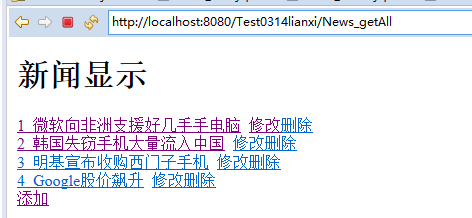
News_getAll.jsp配置:
<%@ page language="java" contentType="text/html; charset=utf-8"
pageEncoding="utf-8"%>
<%@taglib prefix="c" uri="http://java.sun.com/jsp/jstl/core" %>
<!DOCTYPE html PUBLIC "-//W3C//DTD HTML 4.01 Transitional//EN" "http://www.w3.org/TR/html4/loose.dtd">
<html>
<head>
<meta http-equiv="Content-Type" content="text/html; charset=utf-8">
<title>Insert title here</title>
</head>
<body>
<h1>新闻显示</h1>
<div>
<c:forEach var="l" items="${list }">//获取getAll方法中request提供的list
<div>
<a href="News_get?ids=${l.ids }">${l.ids } ${l.title }</a> <a href="News_edit?ids=${l.ids }">修改</a><a href="News_delete?ids=${l.ids }">删除</a>
</div>
</c:forEach>
</div>
<div>
<a href="News_add">添加</a>
</div>
</body>
</html>
News_get.jsp配置:
<%@ page language="java" contentType="text/html; charset=utf-8"

    pageEncoding="utf-8"%>

<!DOCTYPE html PUBLIC "-//W3C//DTD HTML 4.01 Transitional//EN" "http://www.w3.org/TR/html4/loose.dtd">

<html>

<head>

<meta http-equiv="Content-Type" content="text/html; charset=utf-8">

<title>Insert title here</title>

</head>

<body>

${news.title }<br><br>//使用的是NewsAction方法中的private News news;

${news.time }<br><br>

${news.content }<br><br>

</body>

</html>
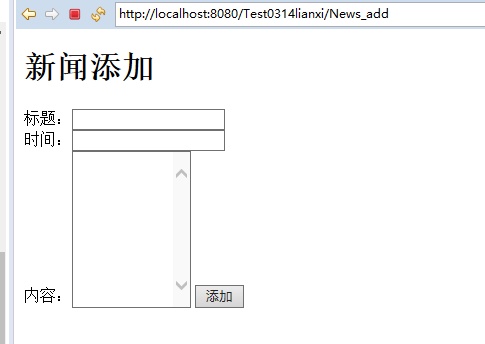
News_add.jsp配置:
<%@ page language="java" contentType="text/html; charset=utf-8"

    pageEncoding="utf-8"%>

<!DOCTYPE html PUBLIC "-//W3C//DTD HTML 4.01 Transitional//EN" "http://www.w3.org/TR/html4/loose.dtd">

<html>

<head>

<meta http-equiv="Content-Type" content="text/html; charset=utf-8">

<title>Insert title here</title>

</head>

<body>

<h1>新闻添加</h1>

<form action="News_insert" method="post">

标题:<input type="text" name="news.title"><br>//使用的是NewsAction方法中的private News news;

时间:<input type="text" name="news.time"><br>

内容:<textarea rows="10" cols="12" name="news.content"></textarea>

<input type="submit" value="添加">

</form>

</body>

</html>
News_insert.jsp配置:
<%@ page language="java" contentType="text/html; charset=utf-8"

    pageEncoding="utf-8"%>

<!DOCTYPE html PUBLIC "-//W3C//DTD HTML 4.01 Transitional//EN" "http://www.w3.org/TR/html4/loose.dtd">

<html>

<head>

<meta http-equiv="Content-Type" content="text/html; charset=utf-8">

<title>Insert title here</title>

</head>

<body>

添加成功

</body>

</html>
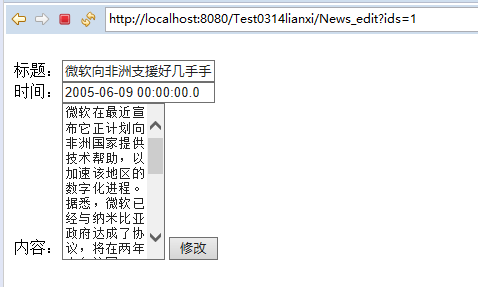
News_edit.jsp配置:
<%@ page language="java" contentType="text/html; charset=utf-8"

    pageEncoding="utf-8"%>

<!DOCTYPE html PUBLIC "-//W3C//DTD HTML 4.01 Transitional//EN" "http://www.w3.org/TR/html4/loose.dtd">

<html>

<head>

<meta http-equiv="Content-Type" content="text/html; charset=utf-8">

<title>Insert title here</title>

</head>

<body>

<form method="post" action="News_update">

<input type="hidden" name="news.ids" value="${news.ids }"><br>//使用的是NewsAction方法中的private News news;

标题:<input type="text" name="news.title" value="${news.title }"><br>

时间:<input type="text" name="news.time" value="${news.time }"><br>

内容:<textarea rows="10" cols="10" name="news.content" >${news.content }</textarea>

<input type="submit" value="修改">

</form>

</body>

</html>
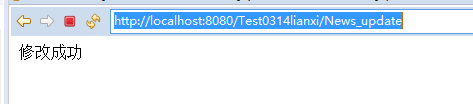
News_update.jsp配置:
<%@ page language="java" contentType="text/html; charset=utf-8"

    pageEncoding="utf-8"%>

<!DOCTYPE html PUBLIC "-//W3C//DTD HTML 4.01 Transitional//EN" "http://www.w3.org/TR/html4/loose.dtd">

<html>

<head>

<meta http-equiv="Content-Type" content="text/html; charset=utf-8">

<title>Insert title here</title>

</head>

<body>

修改成功

</body>

</html>
News_delete.jsp配置:
<%@ page language="java" contentType="text/html; charset=utf-8"

    pageEncoding="utf-8"%>

<!DOCTYPE html PUBLIC "-//W3C//DTD HTML 4.01 Transitional//EN" "http://www.w3.org/TR/html4/loose.dtd">

<html>

<head>

<meta http-equiv="Content-Type" content="text/html; charset=utf-8">

<title>Insert title here</title>

</head>

<body>

删除成功

</body>

</html>



hibernate与struts框架实现增删改查的更多相关文章
- tp框架的增删改查
首先,我们来看一下tp框架里面的查询方法: 查询有很多种,代码如下: <?php namespace Admin\Controller; use Think\Controller; class ...
- Yii2.0高级框架数据库增删改查的一些操作(转)
yii2.0框架是PHP开发的一个比较高效率的框架,集合了作者的大量心血,下面通过用户为例给大家详解yii2.0高级框架数据库增删改查的一些操作 --------------------------- ...
- Yii2.0高级框架数据库增删改查的一些操作
yii2.0框架是PHP开发的一个比较高效率的框架,集合了作者的大量心血,下面通过用户为例给大家详解yii2.0高级框架数据库增删改查的一些操作 --------------------------- ...
- Entity - 使用EF框架进行增删改查 - 模型先行
模型先行:先创建数据库实体模型,然后再进行数据库的增删改查. 基本步骤是不变的,可参照 <Entity - 使用EF框架进行增删改查 - 数据库先行> 其中的不同是,在创建数据库实体模型的 ...
- Hibernate通过createSQLQuery( )方法实现增删改查
一.项目结构 二.hibernate核心配置文件: hibernate.cfg.xm <?xml version="1.0" encoding="UTF-8&q ...
- ssm 框架实现增删改查CRUD操作(Spring + SpringMVC + Mybatis 实现增删改查)
ssm 框架实现增删改查 SpringBoot 项目整合 一.项目准备 1.1 ssm 框架环境搭建 1.2 项目结构图如下 1.3 数据表结构图如下 1.4 运行结果 二.项目实现 1. Emplo ...
- 2、hibernate七步走完成增删改查
一.hibernate框架介绍如下 1.框架=模板 2.Hibernate是对象模型与关系数据库模型之间的桥梁 3.hibernate持久化概念 什么是ORM ORM是对象关系映射,是一种数据持久化操 ...
- Hibernate之API初识及增删改查实现
声明:关于hibernate的学习.非常大一部分东西都是概念性的. 大家最好手里都有一份学习资料,在我的博文中.我不会把书本上的概念一类的东西搬过来.那没有不论什么意义.关于hibernate的学习, ...
- hibernate基本配置与简单增删改查
ORM(Object Relation Mapping)是对象关系映射,是一个思想,它的作用是在关系数据库与对象之间做一个自动映射,将数据库中的表格映射到一个类,也就是持久化类,数据表中每行映射为对象 ...
随机推荐
- Spark Job调优(Part 1)
原文链接:https://wongxingjun.github.io/2016/05/11/Spark-Job%E8%B0%83%E4%BC%98-Part-1/ Spark应用的执行效率是所有程序员 ...
- Predicate和Consumer接口的使用
// Predicate 判断是否拥有资格,Consumer 改变输入的值 案例 public static MyTest2 getV(MyTest2 a, Predicate<MyTe ...
- SubSonic框架使用图解
简介:SubSonic框架是一个优秀的.开源的ORM映射框架,同时提供符合自身需要的代码生成器. 官方下载地址:http://subsonicproject.com/Download 明白了SubSo ...
- Java Marker Interface
先看看什么是标记接口?标记接口有时也叫标签接口(Tag interface),即接口不包含任何方法. 在Java里很容易找到标记接口的例子,比如JDK里的Serializable接口就是一个标记接口. ...
- python之文件操作的初识
1. 操作文件 1.1 操作的方法 f = open("文件路径",mode="模式",encoding="编码") open() # 调用 ...
- 廖老师JavaScript教程高阶函数-sort用法
先来学习一个新词:高阶函数 高阶函数英文叫Higher-order function.那么什么是高阶函数? JavaScript的函数其实都指向某个变量.既然变量可以指向函数,函数的参数能接收变量,那 ...
- 学习JavaScript你必须掌握的8大知识点!
大知识点! 一.JavaScript思维导图之<变量>的学习 二. JavaScript思维导图之<函数基础> 三.JavaScript思维导图之<基本dom操作 ...
- IDEA项目显示树形结构
- 万门大学Python零基础10天进阶班视频教程
点击了解更多Python课程>>> 万门大学Python零基础10天进阶班视频教程 课程简介: 旨在通过两周的学习,让学生不仅能掌握python编程基础从而进行计算机程序的开发, 还 ...
- ipvsadm分发MySQL读请求
在MySQL的部署场景中,经常使用HAproxy和ipvs来作为读请求转发的网关.ipvs的好处在于本身不需要daemon的方式来运行,而是直接作为kernel的服务来提供:当ipvs和应用程序服务器 ...