
Scala对MongoDB的增删改查操作
===========================================
原文链接: Scala对MongoDB的增删改查操作 转载请注明出处!
===========================================
依赖环境:jdk1.8、Scala 2.12、idea
mongodb Driver:3.1.1。注意,mongo for scala的驱动涉及多个jar(如下图),依赖于mongo-java-driver.jar
这里使用的sbt管理依赖,直接在build.sbt中添加依赖:libraryDependencies += "org.mongodb" %% "casbah" % "3.1.1"(强烈建议使用该方法添加依赖)
一、创建数据库连接
A:不需要用户名和密码直接获取MongoDB。
  //  无权限验证连接

  def createDatabase(url: String, port: Int, dbName: String): MongoDB = {

    MongoClient(url, port).getDB(dbName)

  }
这里需要注意一下,在导入的jar包存在两个MongoClient类,一个来自于mongo-java-driver.jar的com.mongodb.MongoClient,另一个来自于casbah-core_2.12:3.1.1.jar的com.mongodb.casbah.MongoClient.前者是用于java调用,Scala使用后者!!!
因此导入包的时候要注意为:import com.mongodb.casbah.MongoClient

B:通过权限验证进行连接
 //验证连接权限

  def createDatabase(url: String, port: Int, dbName: String, loginName: String, password: String): MongoDB = {

    var server = new ServerAddress(url, port)

    //注意:MongoCredential中有6种创建连接方式,这里使用MONGODB_CR机制进行连接。如果选择错误则会发生权限验证失败

    var credentials = MongoCredential.createCredential(loginName, dbName, password.toCharArray)

    var mongoClient = MongoClient(server, List(credentials))

    mongoClient.getDB(dbName)

  }
这里需要注意的是MongoCredential.createCredential(),在MongoCredential中存在着六种认证机制,这里使用createCredential()进行创建,使用错误则将会验证失败
com.mongodb.MongoSecurityException: Exception authenticating
Caused by: com.mongodb.MongoCommandException: Command failed with error 18: 'auth failed' on server localhost:27017. The full response is { "ok" : 0.0, "errmsg" : "auth failed", "code" : 18, "codeName" : "AuthenticationFailed" }
该方法注释如下:
/**
 * Creates a MongoCredential instance with an unspecified mechanism.  The client will negotiate the best mechanism
 * based on the version of the server that the client is authenticating to.  If the server version is 2.8 or higher,
 * the driver will authenticate using the SCRAM-SHA-1 mechanism.  Otherwise, the driver will authenticate using the
 * MONGODB_CR mechanism.
 *
 * @param userName the user name
 * @param database the database where the user is defined
 * @param password the user's password
 */

二、数据添加
  def testInsert(): Unit = {

    for (i <- 1 to 100)

      collection.insert(MongoDBObject("name" -> "Jack%d".format(i), "email" -> "jack%d@sina.com".format(i), "age" -> i % 25, "birthDay" -> new SimpleDateFormat("yyyy-MM-dd").parse("2016-03-25")))

  }
这里的collection是在下面创建的:
var collection= createDatabase("localhost", 27017, "mytest", "user", "123456").getCollection("user")
在进行数据插入的时候,如果不存在该collection则会自动创建(这里是user),如果document中不包含“_id”字段则会自动添加该字段。
DBCollection中存在一个save方法,该save方法区别于insert的地方在于当“_id”存在于集合中,save将会进行更新数据,而insert不会进行任何操作
根据需要选择适合的数据插入函数
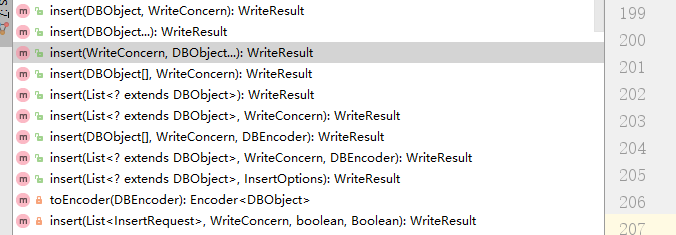
存储之后数据如下:
{ "_id" : { "$oid" : "592ad4be45aefd09f4867f1e"} , "name" : "Jack86" , "email" : "jack86@sina.com" , "age" : 11 , "birthDay" : { "$date" : "2016-03-24T16:00:00.000Z"}}
{ "_id" : { "$oid" : "592ad4be45aefd09f4867f1f"} , "name" : "Jack87" , "email" : "jack87@sina.com" , "age" : 12 , "birthDay" : { "$date" : "2016-03-24T16:00:00.000Z"}}
{ "_id" : { "$oid" : "592ad4be45aefd09f4867f20"} , "name" : "Jack88" , "email" : "jack88@sina.com" , "age" : 13 , "birthDay" : { "$date" : "2016-03-24T16:00:00.000Z"}}
{ "_id" : { "$oid" : "592ad4be45aefd09f4867f21"} , "name" : "Jack89" , "email" : "jack89@sina.com" , "age" : 14 , "birthDay" : { "$date" : "2016-03-24T16:00:00.000Z"}}
三、数据更新修改
A:更新方式一
  def testUpdate(): Unit = {

    var query = MongoDBObject("name" -> "user1", "email" -> "user1@test.com")

    var value = MongoDBObject("name" -> "user1", "email" -> "user1@test.com123456")

    println("=========更新之前============")

    var query02 = MongoDBObject("name" -> "user1")

    collection.find(query02).forEach(x => println(x))

//    query:根据此条件进行查询  value:把查询出来结果集的第一条数据设置为value

    collection.update(query,value)

    println("=========更新之后============")

    collection.find(query02).forEach(x => println(x))

  }
运行结果如下:(注意这里只更新了一条记录,并不是把所有符合结果的数据都进行更新)
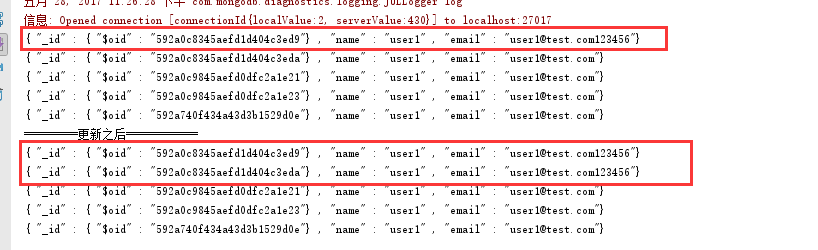
B:更新方式二
  def testUpdate02(): Unit = {

    var query = MongoDBObject("name" -> "user1", "email" -> "user1@test.com123456")

    var value = new BasicDBObject("$set", new BasicDBObject("email", "user1@test.com"))

    //     var value = MongoDBObject("$set",MongoDBObject("name" -> "user1", "email" -> "user1@test.com123"))

    println("=========更新之前============")

    var query02 = MongoDBObject("name" -> "user1")

    collection.find(query02).forEach(x => println(x))

    collection.update(query, value,true, true)

    println("=========更新之后============")

    collection.find(query02).forEach(x => println(x))

  }
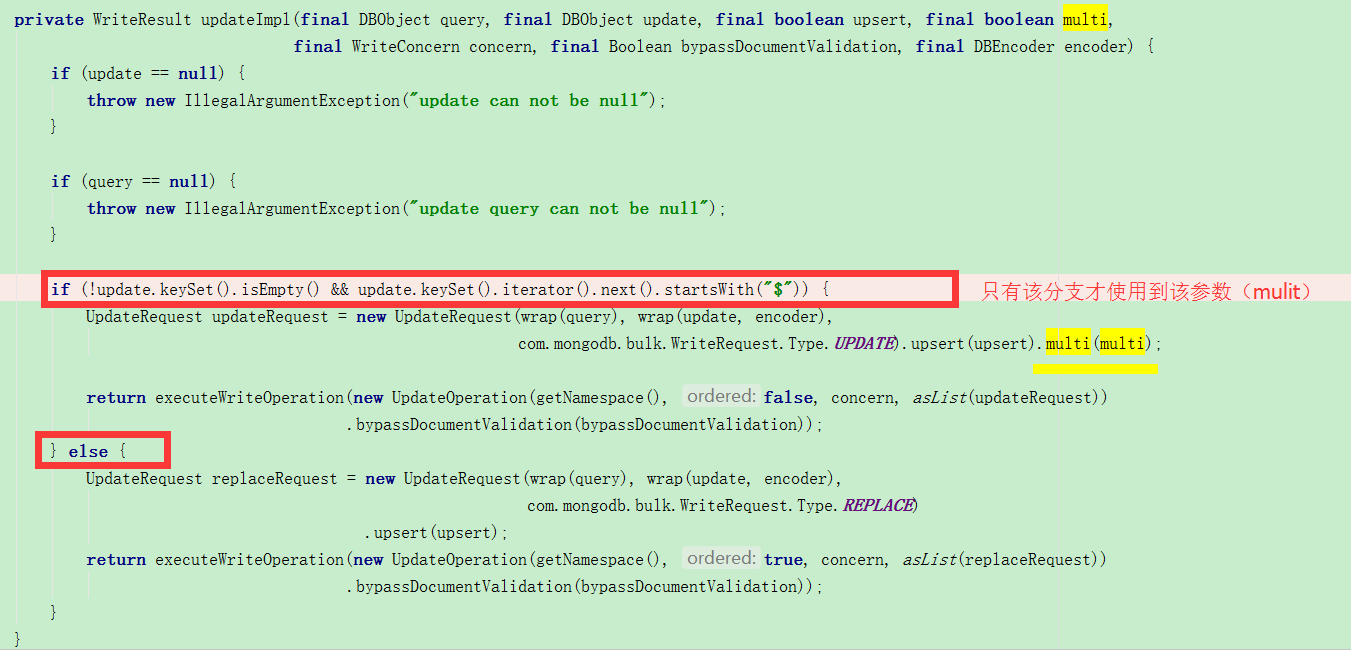
注意该方法:collection.update(query, value,true, true)。
第三个参数:when true, inserts a document if no document matches the update query criteria
第四个参数:when true, updates all documents in the collection that match the update query criteria, otherwise only updates one【当该值为true时,则更新所有的结果集数据,不过前提是value必须使用“$XXX”模式进行定义】。源码如下:
四、数据查询(建议看下这篇文章:MongoDB学习笔记(查询))
  def testSelect(): Unit ={

    println("=========查询所有数据===================")

    collection.find().forEach(x => println(x))

    println("=========查询name = “user1”  同时email=“user1@test.com”===================")

    collection.find(MongoDBObject("name" -> "user1", "email" -> "user1@test.com")).limit(3).forEach(x => println(x))

    //    注意此处不能使用put添加其他查询条件,因为put返回的是HashMap,此处应该使用append进行添加查询条件

    //  var query = new BasicDBObject("name",new BasicDBObject("$in",("user145","user155"))).put("qty",new BasicDBObject("$in",(25.0,105.0)))  该方法错误

    //    查询条件为: (name in ("user145","user155")) && (qty in (25.0,105.0))

    println("=========查询 (name in (\"user145\",\"user155\")) && (qty in (25.0,105.0))===================")

    var query = new BasicDBObject("name", new BasicDBObject("$in", ("user145", "user155"))).append("qty", new BasicDBObject("$in", (25.0, 105.0)))

    collection.find(query).forEach(x => println(x))

    println("=========查询 start >= 10 && end<= 80 的数据===================")

    var query02 = new BasicDBObject("start", new BasicDBObject("$gte", 10)).append("end", new BasicDBObject("$lte", 80))

    collection.find(query02).forEach(x => println(x))

  }
查询结果如下:
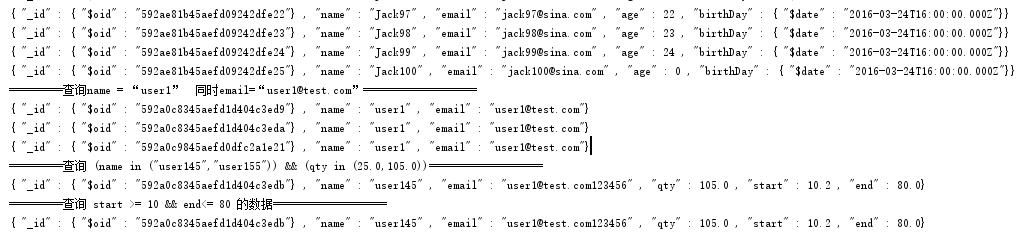
五、数据删除
数据删除主要是构建一个查询条件,把符合该条件的所有数据都进行删除
  def testDelete(): Unit ={

    var query = MongoDBObject("name" -> "user1", "email" -> "user1@test.com")

    println("=========删除之前============")

    collection.find(query).forEach(x => println(x))

    //该参数只是一个查询条件,符合该条件的所有集合都将被删除。重点在于如何构建query

    collection.remove(query)

    println("=========删除之前============")

    collection.find(query).forEach(x => println(x))

  }
执行结果如下:
=========删除之前============
{ "_id" : { "$oid" : "592a0c8345aefd1d404c3ed9"} , "name" : "user1" , "email" : "user1@test.com"}
{ "_id" : { "$oid" : "592a0c8345aefd1d404c3eda"} , "name" : "user1" , "email" : "user1@test.com"}
{ "_id" : { "$oid" : "592a0c9845aefd0dfc2a1e21"} , "name" : "user1" , "email" : "user1@test.com"}
{ "_id" : { "$oid" : "592a0c9845aefd0dfc2a1e23"} , "name" : "user1" , "email" : "user1@test.com"}
{ "_id" : { "$oid" : "592a740f434a43d3b1529d0e"} , "name" : "user1" , "email" : "user1@test.com"}
=========删除之后============
remove方法有如下四种,根据具体情况选取合适的方法:

附测试源码:
package tool

import java.text.SimpleDateFormat

import java.util

import java.util.Date

import com.mongodb.casbah.commons.MongoDBObject

import com.mongodb.{BasicDBObject, DBCollection, ServerAddress}

import com.mongodb.casbah.{MongoClient, MongoCredential, MongoDB}

import com.mongodb.client.model.Filters

import org.joda.time.DateTime

/**

  * Created with IntelliJ IDEA.

  * Description:

  * User: Perkins Zhu

  * Date: 2017-05-28

  * Time: 19:33

  */

object MongoTool {

  def main(args: Array[String]): Unit = {

//        testInsert

//    testUpdate02

//    testSelect

  testDelete

  }

  def testDelete(): Unit ={

    var query = MongoDBObject("name" -> "user1", "email" -> "user1@test.com")

    println("=========删除之前============")

    collection.find(query).forEach(x => println(x))

    //该参数只是一个查询条件,符合该条件的所有集合都将被删除

    collection.remove(query)

    collection.findAndRemove()

    println("=========删除之前============")

    collection.find(query).forEach(x => println(x))

  }

  def testUpdate01(): Unit = {

    var query = MongoDBObject("name" -> "user1", "email" -> "user1@test.com")

    var value = MongoDBObject("name" -> "user1", "email" -> "user1@test.com123456")

    println("=========更新之前============")

    var query02 = MongoDBObject("name" -> "user1")

    collection.find(query02).forEach(x => println(x))

//    query:根据此条件进行查询  value:把查询出来结果集的第一条数据设置为value

    collection.update(query,value)

    println("=========更新之后============")

    collection.find(query02).forEach(x => println(x))

  }

  def testUpdate02(): Unit = {

    var query = MongoDBObject("name" -> "user1", "email" -> "user1@test.com123456")

    var value = new BasicDBObject("$set", new BasicDBObject("email", "user1@test.com"))

    //     var value = MongoDBObject("$set",MongoDBObject("name" -> "user1", "email" -> "user1@test.com123"))

    println("=========更新之前============")

    var query02 = MongoDBObject("name" -> "user1")

    collection.find(query02).forEach(x => println(x))

    collection.update(query, value,true, true)

    println("=========更新之后============")

    collection.find(query02).forEach(x => println(x))

  }

  def testSelect(): Unit ={

    println("=========查询所有数据===================")

    collection.find().forEach(x => println(x))

    println("=========查询name = “user1”  同时email=“user1@test.com”===================")

    collection.find(MongoDBObject("name" -> "user1", "email" -> "user1@test.com")).limit(3).forEach(x => println(x))

    //    注意此处不能使用put添加其他查询条件,因为put返回的是HashMap,此处应该使用append进行添加查询条件

    //  var query = new BasicDBObject("name",new BasicDBObject("$in",("user145","user155"))).put("qty",new BasicDBObject("$in",(25.0,105.0)))  该方法错误

    //    查询条件为: (name in ("user145","user155")) && (qty in (25.0,105.0))

    println("=========查询 (name in (\"user145\",\"user155\")) && (qty in (25.0,105.0))===================")

    var query = new BasicDBObject("name", new BasicDBObject("$in", ("user145", "user155"))).append("qty", new BasicDBObject("$in", (25.0, 105.0)))

    collection.find(query).forEach(x => println(x))

    println("=========查询 start >= 10 && end<= 80 的数据===================")

    var query02 = new BasicDBObject("start", new BasicDBObject("$gte", 10)).append("end", new BasicDBObject("$lte", 80))

    collection.find(query02).forEach(x => println(x))

  }

  def testInsert(): Unit = {

    for (i <- 1 to 100)

//      注意与saved的区别

      collection.insert(MongoDBObject("name" -> "Jack%d".format(i), "email" -> "jack%d@sina.com".format(i), "age" -> i % 25, "birthDay" -> new SimpleDateFormat("yyyy-MM-dd").parse("2016-03-25")))

  }

  var collection = createDatabase("localhost", 27017, "mytest", "user", "123456").getCollection("user")

  //验证连接权限

  def createDatabase(url: String, port: Int, dbName: String, loginName: String, password: String): MongoDB = {

    var server = new ServerAddress(url, port)

    //注意:MongoCredential中有6种创建连接方式,这里使用MONGODB_CR机制进行连接。如果选择错误则会发生权限验证失败

    var credentials = MongoCredential.createCredential(loginName, dbName, password.toCharArray)

    var mongoClient = MongoClient(server, List(credentials))

    mongoClient.getDB(dbName)

  }

  //  无权限验证连接

  def createDatabase(url: String, port: Int, dbName: String): MongoDB = {

    MongoClient(url, port).getDB(dbName)

  }

}
--end
Scala对MongoDB的增删改查操作的更多相关文章
- python 全栈开发,Day124(MongoDB初识,增删改查操作,数据类型,$关键字以及$修改器,"$"的奇妙用法,Array Object 的特殊操作,选取跳过排序,客户端操作)
一.MongoDB初识 什么是MongoDB MongoDB 是一个基于分布式文件存储的数据库.由 C++ 语言编写.旨在为 WEB 应用提供可扩展的高性能数据存储解决方案. MongoDB 是一个介 ...
- Mongodb之增删改查操作
一.创建一个数据库 在我们使用MongoDB数据库时引进了这样一个知识,“对于mongodb,使用了不存在的对象,就等于在创建这个对象”,所以创建数据库的操作就比较简单 在我们使用mysql数据库时u ...
- Node.js对MongoDB进行增删改查操作
MongoDB简介 MongoDB是一个开源的.文档型的NoSQL数据库程序.MongoDB将数据存储在类似JSON的文档中,操作起来更灵活方便.NoSQL数据库中的文档(documents)对应于S ...
- MongoDB基本增删改查操作-mongo shell
基础 1.查看所有数据库: show dbs 2.选择数据库: use test 3.查看数据库中有哪些集合: show collections 如下图: 查询 1.查看集合中有哪些数据,其中abc为 ...
- MongoDB之增删改查(一)
本文主要介绍MongoDB数据库增删改查操作. 增 mongoDB和其它关系型数据库一样,通过insert来添加数据到集合中去. db.collectionName.insert(内容) 显示数据库中 ...
- C# 对MongoDB 进行增删改查的简单操作
C# 对MongoDB 进行增删改查的简单操作 下面演示下C#操作MongoDB驱动的简单的增删改查代码 运用到的MongoDB支持的C#驱动,当前版本为1.6.0 1,连接数据库 /// & ...
- python操作三大主流数据库(8)python操作mongodb数据库②python使用pymongo操作mongodb的增删改查
python操作mongodb数据库②python使用pymongo操作mongodb的增删改查 文档http://api.mongodb.com/python/current/api/index.h ...
- SpringBoot操作MongoDB实现增删改查
本篇博客主讲如何使用SpringBoot操作MongoDB. SpringBoot操作MongoDB实现增删改查 (1)pom.xml引入依赖 <dependency> <group ...
- mongoVUE的增删改查操作使用说明
mongoVUE的增删改查操作使用说明 一. 查询 1. 精确查询 1)右键点击集合名,再左键点击Find 或者直接点击工具栏上的Find 2)查询界面,包括四个区域 {Find}区,查询条件格式{& ...
随机推荐
- Visual Studio 2017 Enterprise 发布 15.3.3 版,附离线安装包百度网盘下载。
Visual Studio 2017 Enterprise 发布 15.3.3 版,附离线安装包百度网盘下载. Visual Studio 2017 Enterprise 更新至 15.3.3 ,本安 ...
- 配置nginx服务器 —— Nginx添加多个二级子域名
1.安装nginx centos/linux下的安装Nginx 2.安装好后进入Nginx目录中 在conf目录下建立一个vhost(ps:名字自己设定)文件夹 其中的$NGINXHOME为你的ngi ...
- hdu 2048 递推&&错排
直接贴出递推公式: cnt[n]=(i-1)*(cnt[n-1]+cnt[n-2]); 数组保存的是失败的种数 AC代码: #include<cstdio> const int maxn= ...
- hdu4825 01字典树+贪心
从高位向低位构造字典树,因为高位得到的数更大. AC代码: #include<cstdio> using namespace std; typedef long long LL; cons ...
- WC2016自测
挑战NPC 原题链接 爆搜20分,贪心10分,网络流30分 //挑战NPC #include <cstdio> #include <cstring> #include < ...
- Machine Learning|Andrew Ng|Coursera 吴恩达机器学习笔记
Week1: Machine Learning: A computer program is said to learn from experience E with respect to some ...
- C# 之三类文件的读写( .XML,.INI 和 .TXT 文件)
笔记之用,关于三类.xml, .ini, .txt 文件的 C# 读写,请多多指教! 1,第一类:.xml 文件的读写 先贴上xml文件,下面对这个文件进行操作: <?xml version=& ...
- react按需加载(getComponent优美写法),并指定输出模块名称解决缓存(getComponent与chunkFilename)
react配合webpack进行按需加载的方法很简单,Route的component改为getComponent,组件用require.ensure的方式获取,并在webpack中配置chunkFil ...
- JavaScript预编译原理分析
一直对变量对象,活动对象,预编译,变量提升,执行上下文的时间顺序有着凌乱的认识,但是这些对理解JS语法有着很重要的作用.读了很多人的文章,都没有一个特别清晰的把这些写出来. 今天主要总结一下现阶段自己 ...
- Keras学习笔记
Keras基于Tensorflow和Theano.作为一个更高级的框架,用其编写网络更加方便.具体流程为根据设想的网络结构,使用函数式模型API逐层构建网络即可,每一层的结构都是一个函数,上一层的输出 ...