
Flask request 属性详解
Flask request 属性详解
一、关于request
在Flask的官方文档中是这样介绍request的:对于 Web 应用,与客户端发送给服务器的数据交互至关重要。在 Flask 中由全局的 request 对象来提供这些信息。
从Flask模块导入request:from flask import request
request的属性:下面是request可使用的属性,其中黑体是比较常用的。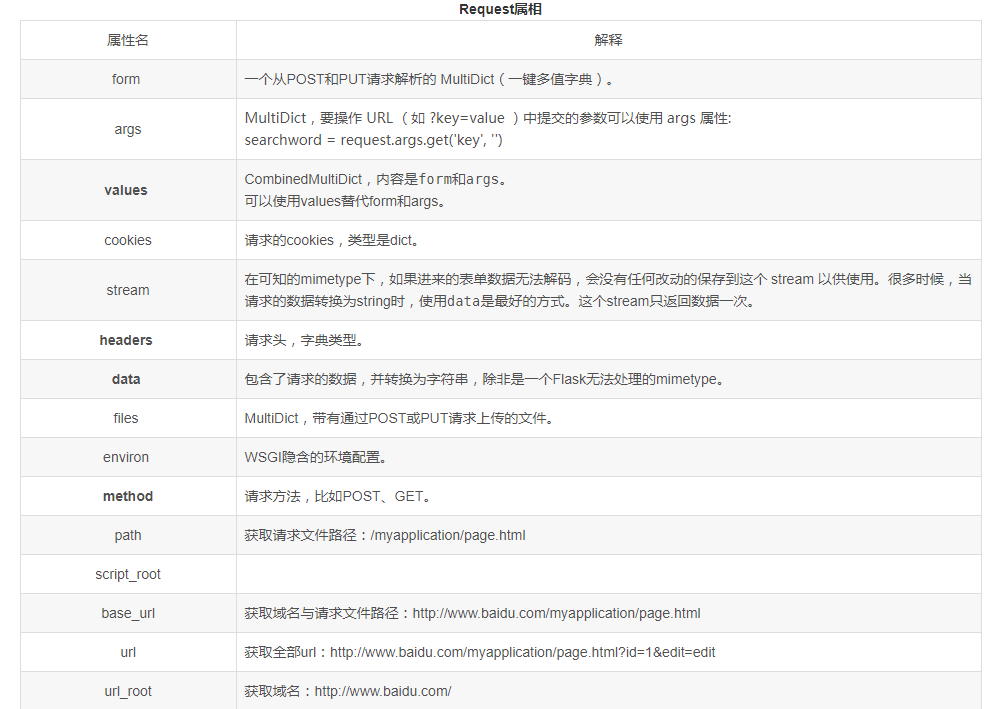
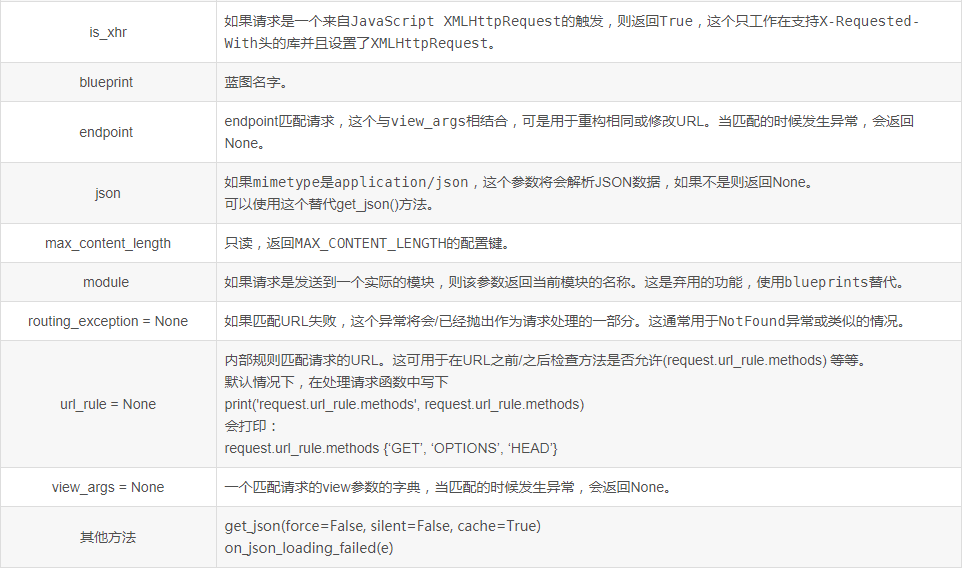
二、常用方法的使用
#代码示例,仅仅是为了测试request的属性值

@app.route('/login', methods = ['GET','POST'])

def login():

    if request.method == 'POST':

        if request.form['username'] == request.form['password']:

            return 'TRUE'

        else:

#当form中的两个字段内容不一致时,返回我们所需要的测试信息

            return str(request.headers)        #需要替换的部分

    else:

        return render_template('login.html')
1、method:请求的方法
return request.method #POST
2、form:返回form的内容
return json.dumps(request.form) #{"username": "123", "password": "1234"}
3、args和values:args返回请求中的参数,values返回请求中的参数和form
return json.dumps(request.args)

#url:http://192.168.1.183:5000/login?a=1&b=2、返回值:{"a": "1", "b": "2"}

print(request.args['a'])

#输出:1

return str(request.values)

#CombinedMultiDict([ImmutableMultiDict([('a', '1'), ('b', '2')]), ImmutableMultiDict([('username', '123'), ('password', '1234')])])
4、cookies:cookies信息
return str(request.headers)        #headers信息

request.headers.get('User-Agent')        #获取User-Agent信息
6、url、path、script_root、base_url、url_root:看结果比较直观
return 'url: %s , script_root: %s , path: %s , base_url: %s , url_root : %s' % (request.url,request.script_root, request.path,request.base_url,request.url_root)

'''

url: http://192.168.1.183:5000/testrequest?a&b ,

script_root: ,

path: /testrequest ,

base_url: http://192.168.1.183:5000/testrequest ,

url_root : http://192.168.1.183:5000/

'''
7、date、files:date是请求的数据,files随请求上传的文件
@app.route('/upload',methods=['GET','POST'])

def upload():

    if request.method == 'POST':

        f = request.files['file']

        filename = secure_filename(f.filename)

        #f.save(os.path.join('app/static',filename))

        f.save('app/static/'+str(filename))

        return 'ok'

    else:

        return render_template('upload.html')

#html

<!DOCTYPE html>

<html>

    <body>

        <form action="upload" method="post" enctype="multipart/form-data">

            <input type="file" name="file" /><br />

            <input type="submit" value="Upload" />

        </form>

    </body>

</html>
Flask request 属性详解的更多相关文章
- request.getcontextPath() 详解
request.getcontextPath() 详解 文章分类:Java编程 <%=request.getContextPath()%>是为了解决相对路径的问题,可返回站点的根路径. 但 ...
- OutputCache属性详解(三)— VaryByHeader,VaryByCustom
目录 OutputCache概念学习 OutputCache属性详解(一) OutputCache属性详解(二) OutputCache属性详解(三) OutputCache属性详解(四)— SqlD ...
- django中request对象详解(转载)
django中的request对象详解 Request 我们知道当URLconf文件匹配到用户输入的路径后,会调用对应的view函数,并将 HttpRequest对象 作为第一个参数传入该函数. ...
- fiddler响应报文的headers属性详解
fiddler响应报文的headers属性详解 (1)Cache头域 1. Cache-Control 在请求报文已经说过了,用于设置缓存的属性,浏览内容不被缓存. 2. Data 生成消息的具体时间 ...
- fiddler请求报文的headers属性详解
fiddler请求报文的headers属性详解 headers的属性包含以下几部分. (1)Cache头域 在Cache头域中,通常会出现以下属性. 1. Cache-Control 用来指定Resp ...
- tomcat 三种部署方式以及server.xml文件的几个属性详解
一.直接将web项目文件件拷贝到webapps目录中 这是最常用的方式,Tomcat的Webapps目录是Tomcat默认的应用目录,当服务器启动时,会加载所有这个目录下的应用.如果你想要修改这个默认 ...
- android:exported 属性详解
属性详解 标签: android 2015-06-11 17:47 27940人阅读 评论(7) 收藏 举报 分类: Android(95) 项目点滴(25) 昨天在用360扫描应用漏洞时,扫描结果, ...
- OutputCache属性详解(一)一Duration、VaryByParam
目录 OutputCache概念学习 OutputCache属性详解(一) OutputCache属性详解(二) OutputCache属性详解(三) OutputCache属性详解(四)— SqlD ...
- OutputCache属性详解(二)一 Location
目录 OutputCache概念学习 OutputCache属性详解(一) OutputCache属性详解(二) OutputCache属性详解(三) OutputCache属性详解(四)— SqlD ...
随机推荐
- m3u8系列(一)练手spider
本次目标 http://www.qiqi.la/vod-detail-id-46194.html 目的,down魔道祖师,实现 前期分析文件得到以下粗略步骤 1 进入二级页面,找到 <ifram ...
- 使用SQLAlchemy,以及问题处理
https://www.liaoxuefeng.com/wiki/001374738125095c955c1e6d8bb493182103fac9270762a000/0014021031294178 ...
- DNS理解
前言 英译汉的时候会掩盖很多本质,导致很多问题稀里糊涂,问的人不知道怎么说,回答的人也是答非所问. DNS是Domain Name System缩写,不是Domain Name Server,或者Do ...
- 14_sqoop数据导入
3.Sqoop的数据导入 “导入工具”导入单个表从RDBMS到HDFS.表中的每一行被视为HDFS的记录.所有记录都存储为文本文件的文 本数据(或者Avro.sequence文件等二进制数据) 3.1 ...
- linq学习(二)
百度搜索:C# linq查询新对象 直接从list中查出一个新对象集合. 文章:https://blog.csdn.net/lym940928/article/details/80278783 fro ...
- go deep copy map
func deepCopyJSON(src map[string]interface{}, dest map[string]interface{}) error { if src == nil { r ...
- Red Hat Enterprise Linux 7.0
简介 Red Hat Enterprise Linux是Red Hat公司的Linux发行版,面向商业市场,包括大型机.红帽公司从Red Hat Enterprise Linux 5开始对企业版LIN ...
- c语言1博客作业07
一.本周作业头 这个作业属于那个课程 C语言程序设计II 这个作业要求在哪里 https://edu.cnblogs.com/campus/zswxy/SE2019-3/homework/9929 我 ...
- tableviewer自动调整列宽
public void resizeTableColumn(TableColumn[] treeColumns) { for (TableColumn tc : treeColumns) tc.pac ...
- SpringBoot启动过程原理(转)
1.1 Springboot启动: @SpringBootApplication public class ServerApplication { public static void main(St ...