
TextView的封装和自定义
实现的效果如下:
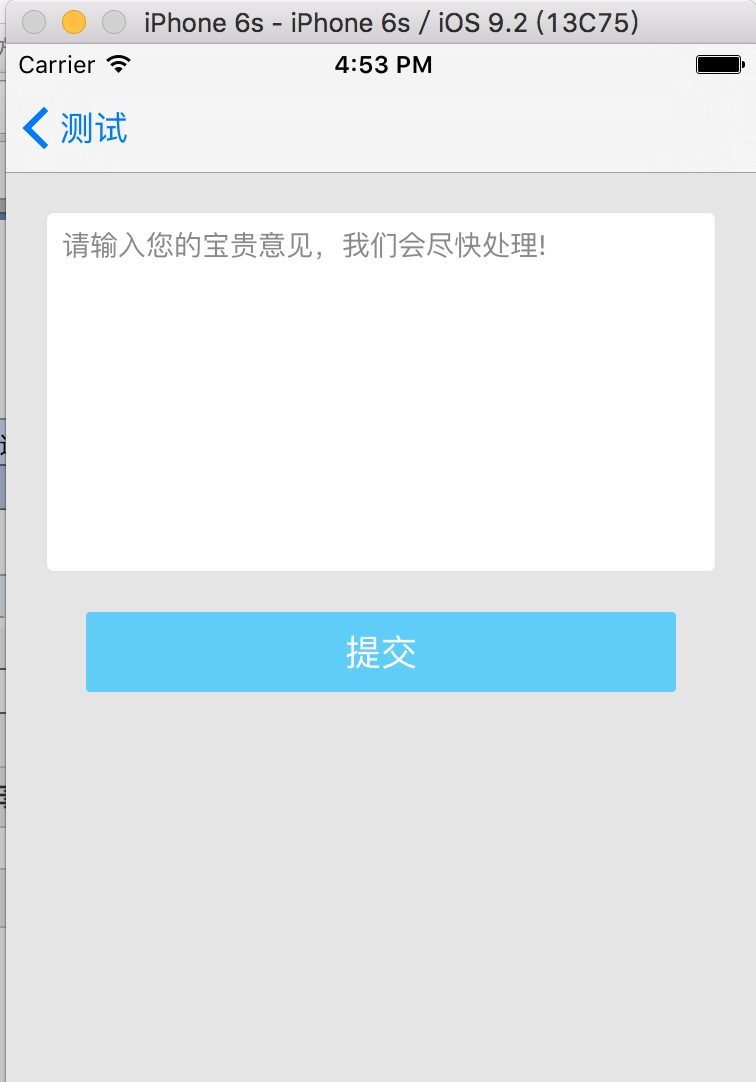
 #import <UIKit/UIKit.h>

 @interface CustomTextView : UITextView

 @property (nonatomic , strong) UILabel *placeHolderLabel; // 默认的Label

 @property (nonatomic , strong) NSString *placeholderStr;  // 默认的文字显示

 @property (nonatomic , strong) UIColor *palceHolderColor;  //默认文字显示的颜色

 @end
 #import "CustomTextView.h"

 @implementation CustomTextView

 - (instancetype)initWithFrame:(CGRect)frame{

     self = [super initWithFrame:frame];

     if (self) {

         [self setPlaceholderStr:@""];

         [self setPalceHolderColor:[UIColor lightGrayColor]];

     }

     return self;

 }

 // 接收数据

 - (void)setPlaceholderStr:(NSString *)placeholderStr{

     if (_placeholderStr != placeholderStr) {

         _placeholderStr = placeholderStr;

         // 防止创建多个

         [self.placeHolderLabel removeFromSuperview];

         self.placeHolderLabel = nil;

         // 重新绘制  会调用drawRect方法

         [self setNeedsDisplay];

     }

 }

 - (void)drawRect:(CGRect)rect{

     [super drawRect:rect];

     if (self.placeholderStr.length > ) {

         if (_placeHolderLabel == nil) {

             _placeHolderLabel = [[UILabel alloc]initWithFrame:CGRectMake(, , self.bounds.size.width - , )];

             _placeHolderLabel.lineBreakMode = NSLineBreakByWordWrapping;

             _placeHolderLabel.numberOfLines = ;

             _placeHolderLabel.font = self.font;

             _placeHolderLabel.backgroundColor = [UIColor clearColor];

             _placeHolderLabel.textColor = self.palceHolderColor;

             _placeHolderLabel.alpha = ;

             _placeHolderLabel.tag = ;

             [self addSubview:_placeHolderLabel];

         }

         _placeHolderLabel.text = self.placeholderStr;

         //自适应宽高

         [_placeHolderLabel sizeToFit];

     }

     if ([[self text] length] ==  && [[self placeholderStr] length] >) {

         [[self viewWithTag:] setAlpha:1.0];

     }

 }
使用如下:
 #import "Button1Controller.h"

 #import "CustomTextView.h"

 #define kTextBorderColor     RGBCOLOR(227,224,216)

 #undef  RGBCOLOR

 #define RGBCOLOR(r,g,b) [UIColor colorWithRed:r/255.0 green:g/255.0 blue:b/255.0 alpha:1]

 @interface Button1Controller ()<UITextViewDelegate>

 @property (nonatomic,strong) CustomTextView *textView;

 @property (nonatomic , strong) UIButton *commitButton;

 @end

 @implementation Button1Controller

 - (void)viewDidLoad {

     [super viewDidLoad];

     self.view.backgroundColor = [UIColor colorWithRed:229.0/ green:229.0/ blue:229.0/ alpha:1.0f];

     [self.view addSubview:self.textView];

     self.automaticallyAdjustsScrollViewInsets = NO;

     [self.view addSubview:self.commitButton];

 }

 // TextView

 - (CustomTextView *)textView{

     if (!_textView) {

         _textView = [[CustomTextView alloc]initWithFrame:CGRectMake(, , self.view.frame.size.width - , )];

         _textView.backgroundColor = [UIColor whiteColor];

         _textView.delegate = self;

         _textView.font = [UIFont systemFontOfSize:.f];

         _textView.textColor = [UIColor blackColor];

         _textView.textAlignment = NSTextAlignmentLeft;

         _textView.editable = YES;

         _textView.layer.cornerRadius = 4.0f;

         _textView.layer.borderColor = kTextBorderColor.CGColor;

         _textView.layer.borderWidth = 0.5;

         _textView.palceHolderColor = RGBCOLOR(0x89, 0x89, 0x89);

         _textView.placeholderStr = @"请输入您的宝贵意见,我们会尽快处理!";

     }

     return _textView;

 }

 // CommutButton

 - (UIButton *)commitButton{

     if (!_commitButton) {

         _commitButton = [UIButton buttonWithType:UIButtonTypeCustom];

         _commitButton.layer.cornerRadius = 2.0f;

         _commitButton.frame = CGRectMake(, CGRectGetMaxY(self.textView.frame)+, self.view.frame.size.width - , );

         _commitButton.backgroundColor = [self colorWithRGBHex:0x60cdf8];

         [_commitButton setTitle:@"提交" forState:UIControlStateNormal];

         [_commitButton addTarget:self action:@selector(sendFeedBack) forControlEvents:UIControlEventTouchUpInside];

     }

     return _commitButton;

 }

 // 16进制转颜色

 - (UIColor *)colorWithRGBHex:(UInt32)hex

 {

     int r = (hex >> ) & 0xFF;

     int g = (hex >> ) & 0xFF;

     int b = (hex) & 0xFF;

     return [UIColor colorWithRed:r / 255.0f

                            green:g / 255.0f

                             blue:b / 255.0f

                            alpha:1.0f];

 }

 // 提交按钮被点击

 - (void)sendFeedBack{

     NSLog(@"提交...");

 }

 // 判断如果用户输入\n,则收回键盘

 - (BOOL)textView:(UITextView *)textView shouldChangeTextInRange:(NSRange)range replacementText:(NSString *)text{

     if ([text isEqualToString:@"\n"]) {

         [textView resignFirstResponder];

         return NO;

     }

     return YES;

 }

 - (void)textViewDidBeginEditing:(UITextView *)textView{

     self.textView.placeholderStr = @"";

 }
TextView的封装和自定义的更多相关文章
- 使用xib封装一个自定义view的步骤
使用xib封装一个自定义view的步骤 1> 新建一个继承UIView的自定义view,假设类名叫做(MJAppView) 2> 新建一个MJAppView.xib文件来描述MJAppVi ...
- OC - 31.通过封装的自定义布局快速实现商品展示
概述 实现效果 设计思路 采用MVC架构,即模型—视图-控制器架构 使用MJExtension框架实现字典转模型 使用MJRefresh框架实现上拉和下拉刷新 上拉刷新,加载新的数据 下拉刷新,加载更 ...
- Springboot学习06-Spring AOP封装接口自定义校验
Springboot学习06-Spring AOP封装接口自定义校验 关键字 BindingResult.Spring AOP.自定义注解.自定义异常处理.ConstraintValidator 前言 ...
- C#封装程序集自定义类方法注释提示
一.为什么使用封装程序集: 在很多分布式应用程序开发中,针对每一种功能可能条用的接口不一样,往往习惯将需要被调用的接口,封装成DLL给调用方应用后使用,这样既规范了调用的方式,又避免了调用出现参数请求 ...
- Struts2 请求数据的自动封装 及 自定义转换器类
请求数据自动封装: 实现原理:使用了参数拦截器.struts-default.xml中 <interceptor name="params" class="com. ...
- TextView加边框,自定义,上下左右四条线 颜色,想用哪个用哪个
1.这是一个自定义的TextView ,看吧,底下就是代码,应该都可以看懂,这里就不多说了 package com.example.admin.myutilsborder;import android ...
- iOS-AFNetworking封装Get(自定义HTTP Header)和Post请求及文件下载
前面提到AFNetworking是一个很强大的网络三方库,首先你需要引入AFNetworking三方库:如封装的有误还请指出,谢谢! 1.Get请求 /**Get请求 url 服务器请求地址 succ ...
- NoHttp封装--02 自定义请求
bean实体类请求: 1.bean import java.io.Serializable; import com.alibaba.fastjson.annotation.JSONField; pub ...
- mybatis二(参数处理和map封装及自定义resultMap)
.单个参数 mybatis不会做特殊处理. #{参数名/任意名}:取出参数值. .多个参数 mybatis会做特殊处理. 多个参数会被封装成 一个map. key:param1...paramN,或者 ...
随机推荐
- EF Migraiton错误解决
System.Runtime.Serialization.SerializationException: Type is not resolved for member 'Oracle.Managed ...
- 使用jaxb用xsd生成java类
命令: xjc -p 包的路径 xsd的名字.xsd -d 目标的文件夹 具体详细见: http://www.iteye.com/topic/1118082
- 【vue】vue-cli中 对于public文件夹的处理
pubcli和assets文件夹都是用来存储静态资源的,: [assets文件夹] 通过相对路径被引入,这类引用会被webpack处理: 比如: 会被编译成: 再比如: 会被编译成: [public文 ...
- 012_STM32程序移植之_内部flash开机次数管理lib库建立
012_STM32程序移植之_内部flash开机次数管理lib库建立 1. 测试环境:STM32C8T6 2. 测试接口: 3. 串口使用串口一,波特率9600 单片机引脚------------CH ...
- @PathVariable,@RequestParam, @RequestBody
https://www.cnblogs.com/guoyinli/p/7056146.html https://www.cnblogs.com/zeroingToOne/p/8992746.html ...
- 现在有没有一种富文本编辑器能够直接从 word 中复制粘贴公式的?
tinymce是很优秀的一款富文本编辑器,可以去官网下载.https://www.tiny.cloud 这里分享的是它官网的一个收费插件powerpaste的旧版本源码,但也不影响功能使用. http ...
- 洛谷 P3382 【模板】三分法(三分 二分)
P3382 [模板]三分法 题目提供者HansBug 难度 普及/提高- 题目描述 如题,给出一个N次函数,保证在范围[l,r]内存在一点x,使得[l,x]上单调增,[x,r]上单调减.试求出x的值. ...
- 以8位并行数据为例确定crc-32的一般矩阵表示形式
在进行数据校验时我们会使用到crc(循环冗余校验)校验的方式,例如在以太网通信网络中会对信息进行编码和校验,生成码采用的就是33位的 crc-32:x32+x26+x23+...+x2+x+1; (1 ...
- Selenium执行cdp命令,driver.execute_cdp_cmd用法
Chrome自带的开发者工具DevTools功能非常强大.有时候我们在使用Selenium操作浏览器时需要通过调用一下DevTools的方法来完成一些设置,如模拟移动设备,弱网模拟等等. Seleni ...
- c语言 数组类型
数组类型重命名数组类型由元素类型和数组大小共同决定数组指针是一个指针,只想对应类型的数组指针数组是一个数组,其中每个元素都是指针数组指针遵循指针运算法则指针数组拥有c语言数组的各种特性 c通过type ...