
Xmemcached集群与SpringBoot整合
创建SpringBoot项目xmemcached_springboot,添加开发需要的包名和类名,项目的目录结构如下:
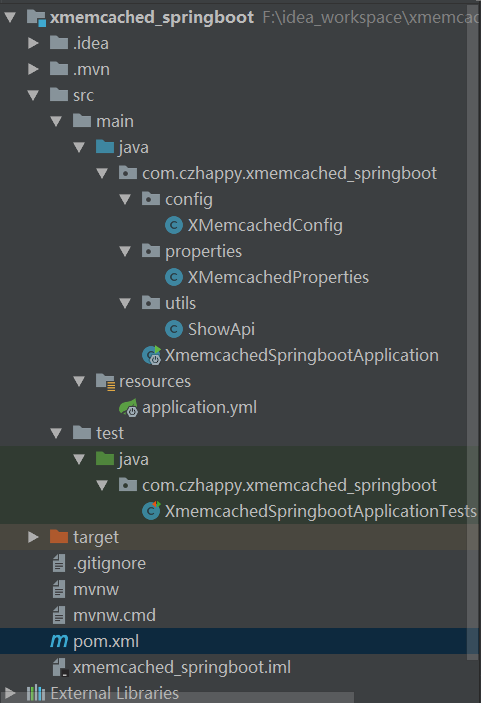
添加XMemcached依赖:
<dependency>

            <groupId>com.googlecode.xmemcached</groupId>

            <artifactId>xmemcached</artifactId>

            <version>2.4.0</version>

        </dependency>
添加XMemcached相关配置到属性文件application.yml
###################  memcached配置  ###################

memcached:

  servers: 192.168.84.128:2222 192.168.84.128:6666

  poolSize: 10

  sanitizeKeys: false

  openCache: true # true为启动缓存 false为标准实现
编写读取上述属性的读取类:XMemcachedProperties.java
package com.czhappy.xmemcached_springboot.properties;

import org.springframework.boot.context.properties.ConfigurationProperties;

import org.springframework.stereotype.Component;

@Component

@ConfigurationProperties(prefix = "memcached")

public class XMemcachedProperties {

    private String servers;

    private int poolSize;

    private boolean sanitizeKeys;

    private boolean openCache;

    public boolean isOpenCache() {

        return openCache;

    }

    public void setOpenCache(boolean openCache) {

        this.openCache = openCache;

    }

    public String getServers() {

        return servers;

    }

    public void setServers(String servers) {

        this.servers = servers;

    }

    public int getPoolSize() {

        return poolSize;

    }

    public void setPoolSize(int poolSize) {

        this.poolSize = poolSize;

    }

    public boolean isSanitizeKeys() {

        return sanitizeKeys;

    }

    public void setSanitizeKeys(boolean sanitizeKeys) {

        this.sanitizeKeys = sanitizeKeys;

    }

}
编写XMemcachedConfig.java,构建builder和client
package com.czhappy.xmemcached_springboot.config;

import com.czhappy.xmemcached_springboot.properties.XMemcachedProperties;

import net.rubyeye.xmemcached.MemcachedClient;

import net.rubyeye.xmemcached.MemcachedClientBuilder;

import net.rubyeye.xmemcached.XMemcachedClientBuilder;

import net.rubyeye.xmemcached.command.BinaryCommandFactory;

import net.rubyeye.xmemcached.impl.KetamaMemcachedSessionLocator;

import org.springframework.beans.factory.annotation.Autowired;

import org.springframework.context.annotation.Bean;

import org.springframework.context.annotation.Configuration;

@Configuration

public class XMemcachedConfig {

    @Autowired

    private XMemcachedProperties xMemcachedProperties;

    // 构建builder

    @Bean

    public MemcachedClientBuilder getXMBuilder(){

        MemcachedClientBuilder memcachedClientBuilder = null;

        try{

            String servers = xMemcachedProperties.getServers();

            System.out.println("servers="+servers);

            memcachedClientBuilder = new XMemcachedClientBuilder(servers);

            // 开启/关闭failure模式

            memcachedClientBuilder.setFailureMode(false);

            memcachedClientBuilder.setSanitizeKeys(xMemcachedProperties.isSanitizeKeys());

            memcachedClientBuilder.setConnectionPoolSize(xMemcachedProperties.getPoolSize());

            memcachedClientBuilder.setCommandFactory(new BinaryCommandFactory());

            memcachedClientBuilder.setOpTimeout(3000);

            memcachedClientBuilder.setSessionLocator(new KetamaMemcachedSessionLocator());

            // 诸多XMemcached配置

            return memcachedClientBuilder;

        }catch(Exception e){

            e.printStackTrace();

        }

        return null;

    }

    // client

    @Bean

    public MemcachedClient getXMClient(MemcachedClientBuilder memcachedClientBuilder){

        MemcachedClient memcachedClient = null;

        try{

            memcachedClient = memcachedClientBuilder.build();

            return memcachedClient;

        }catch(Exception e){

            e.printStackTrace();

        }

        return null;

    }

}
编写ShowApi.java文件,此处仅实现新增和查询方法,其他方法可参考添加
package com.czhappy.xmemcached_springboot.utils;

import net.rubyeye.xmemcached.MemcachedClient;

import org.springframework.beans.factory.annotation.Autowired;

import org.springframework.stereotype.Service;

@Service

public class ShowApi {

    @Autowired

    private MemcachedClient memcachedClient;

    /**

     * 新增

     * @param key

     * @param value

     */

    public void showAdd(String key, String value){

        try {

            memcachedClient.set(key, 0, value);

        }catch (Exception e){

            e.printStackTrace();

        }

    }

    public String showQuery(String key){

        try {

            return memcachedClient.get(key);

        }catch (Exception e){

            e.printStackTrace();

        }

        return "";

    }

}
编写测试类,添加数据并打印查询的结果:
package com.czhappy.xmemcached_springboot;

import com.czhappy.xmemcached_springboot.utils.ShowApi;

import org.junit.Test;

import org.junit.runner.RunWith;

import org.springframework.beans.factory.annotation.Autowired;

import org.springframework.boot.test.context.SpringBootTest;

import org.springframework.test.context.junit4.SpringRunner;

@RunWith(SpringRunner.class)

@SpringBootTest

public class XmemcachedSpringbootApplicationTests {

    @Autowired

    private ShowApi showApi;

    @Test

    public void contextLoads() {

        String key = "goods_name";

        String value = "apple";

        showApi.showAdd(key, value);

        System.out.println(showApi.showQuery(key));

    }

}
为了测试memcached集群和数据存储,我们分别启动端口为2222和6666的memcached服务端


运行测试类,可以看到后台打印出存储的结果

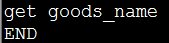
说明数据保存成功,我们也可以去服务端直接查询
2222端口:
6666端口:
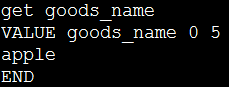
数据具体存储在哪个memcached上我们是无法预知的,它是由客户端XMemcached内部hash算法判断实现,此处我们可以知道数据是存储成功了,通过查询最终结果能知道存在端口为6666的服务端上。
Xmemcached集群与SpringBoot整合的更多相关文章
- springboot和Redis集群版的整合
此篇接上一个文章springboot和Redis单机版的整合 https://www.cnblogs.com/lin530/p/12019023.html 下面接着介绍和Redis集群版的整合. 1. ...
- RabbitMQ 3.9.7 镜像模式集群与Springboot 2.5.5 整合
1. 概述 老话说的好:做人要懂得变通,善于思考,有时稍微转个弯,也许问题就解决了. 言归正传,之前我们聊了 RabbitMQ 3.9.7 镜像模式集群的搭建,今天我们来聊聊 RabbitMQ 3.9 ...
- docker搭建redis主从集群和sentinel哨兵集群,springboot客户端连接
花了两天搭建redis主从集群和sentinel哨兵集群,讲一下springboot客户端连接测试情况 redis主从集群 从网上查看说是有两种方式:一种是指定配置文件,一种是不指定配置文件 引用地址 ...
- springboot+shiro+redis(集群redis版)整合教程
相关教程: 1. springboot+shiro整合教程 2. springboot+shiro+redis(单机redis版)整合教程 3.springboot+shiro+redis(单机red ...
- 如何在Windows上部署Redis集群和SpringBoot进行整合
一.安装Redis的Windows版本并进行配置 (1)下载链接 https://github.com/microsoftarchive/redis/releases (2)将下载后的Redis复制成 ...
- RocketMQ 4.7.1 环境搭建、集群、MQ整合SpringBoot
导读 之前学过ActiveMQ但是并发量不是很大点我直达,所以又学阿里开源的RocketMQ,据说队列可以堆积亿级别.下面是网上找的消息队列对比图,仅供参考 部署 官网 点我直达 前置条件 推荐使用6 ...
- Elasticsearch 分片集群原理、搭建、与SpringBoot整合
单机es可以用,没毛病,但是有一点我们需要去注意,就是高可用是需要关注的,一般我们可以把es搭建成集群,2台以上就能成为es集群了.集群不仅可以实现高可用,也能实现海量数据存储的横向扩展. 新的阅读体 ...
- 04.redis集群+SSM整合使用
redis集群+SSM整合使用 首先是创建redis-cluster文件夹: 因为redis最少需要6个节点(三主三从),为了更好的理解,我这里创建了两台虚拟机(192.168.0.109 192.1 ...
- jedis集群版应用
1.pom文件添加依赖: 2.创建配置文件 <!-- jedis集群版配置(JedisCluster通过构造传参(2个参数)) --> <bean id="redisCli ...
随机推荐
- 遍历器Iterator--指针对象
一. 什么是遍历器 1. 遍历器对象(Iterator) 遍历器对象本质上是一个指针对象,该对象有一个next方法,调用next方法返回一个 含有value和done属性的对象{value: val/ ...
- 学到了林海峰,武沛齐讲的Day31 完 TCP UDP
多用户链接 验证等.学习了思路.还是很有用的..
- learning svn add file execuable
svn propset svn:executable on <file> 为了给svn仓库里的问件添加可执行权限.
- DEA使用git提交代码时,点了commit之后卡死在performing code analysis部分,或者performing code analysis结束后没有进入下一步操作。
把"Perform code analysis" 和 "Check TODO" 复选框前面的勾去掉就好了. 这个可能是因为所分析的目标文件太大了,造成一直分析不 ...
- python-ros No module named PyKDL
sudo apt-get install ros-indigo-kdl-parser-py http://debian.2.n7.nabble.com/Bug-913803-python3-pykdl ...
- SQL按照顺序时间段统计
借助master..spt_values表 按照时间(半小时)划分统计时间段: select ,dateInfo.dday) as time) StartTime, ,),dateInfo.dday) ...
- oracle之case
使用oracle时,不免会用到判断后转换为要展示的值,这里常用case,如下: SELECT (case ) then 'yes' ) then 'no' else 'other' end) --no ...
- 网络中的tarpit/tar pit
最近看haproxy源码,里面有个TARPIT的概念不能理解,找了很久才找到对应的意思.特此记录. tarpit 本意是“沼泽地.地洼地”,这里显然把它引申为“捕获或者困住某个物体”. 在网络语义中提 ...
- Android 格式化分区命令
mkfs.vfat /dev/block/mmcblk0pxxxx 格式化某分区为vfat格式 busybox mkfs.vfat /dev/block/mmcblk0pxxx ...
- Python 3.x 引入了函数注释
Python 3.x 引入了函数注释,以增强函数的注释功能,下面是一个普通的自定义函数: def dog(name, age, species): return (name, age, spe ...