
R TUTORIAL: VISUALIZING MULTIVARIATE RELATIONSHIPS IN LARGE DATASETS
In two previous blog posts I discussed some techniques for visualizing relationships involving two or three variables and a large number of cases. In this tutorial I will extend that discussion to show some techniques that can be used on large datasets and complex multivariate relationships involving three or more variables.
In this tutorial I will use the R package nmle which contains the dataset MathAchieve. Use the code below to install the package and load it into the R environment:
####################################################
#code for visual large dataset MathAchieve
#first show 3d scatterplot; then show tableplot variations
####################################################
install.packages(“nmle”) #install nmle package
library(nlme) #load the package into the R environment
####################################################
Once the package is installed take a look at the structure of the data set by using:
####################################################
attach(MathAchieve) #take a look at the structure of the dataset
str(MathAchieve)
####################################################
Classes ‘nfnGroupedData’, ‘nfGroupedData’, ‘groupedData’ and ‘data.frame’: 7185 obs. of 6 variables:
$ School : Ord.factor w/ 160 levels “8367”<“8854″<..: 59 59 59 59 59 59 59 59 59 59 …
$ Minority: Factor w/ 2 levels “No”,”Yes”: 1 1 1 1 1 1 1 1 1 1 …
$ Sex : Factor w/ 2 levels “Male”,”Female”: 2 2 1 1 1 1 2 1 2 1 …
$ SES : num -1.528 -0.588 -0.528 -0.668 -0.158 …
$ MathAch : num 5.88 19.71 20.35 8.78 17.9 …
$ MEANSES : num -0.428 -0.428 -0.428 -0.428 -0.428 -0.428 -0.428 -0.428 -0.428 -0.428 …
– attr(*, “formula”)=Class ‘formula’ language MathAch ~ SES | School
.. ..- attr(*, “.Environment”)=<environment: R_GlobalEnv>
– attr(*, “labels”)=List of 2
..$ y: chr “Mathematics Achievement score”
..$ x: chr “Socio-economic score”
– attr(*, “FUN”)=function (x)
..- attr(*, “source”)= chr “function (x) max(x, na.rm = TRUE)”
– attr(*, “order.groups”)= logi TRUE
>
As can be seen from the output shown above the MathAchievedataset consists of 7185 observations and six variables. Three of these variables are numeric and three are factors. This presents some difficulties when visualizing the data. With over 7000 cases a two-dimensional scatterplot showing bivariate correlations among the three numeric variables is of limited utility.
We can use a 3D scatterplot and a linear regression model to more clearly visualize and examine relationships among the three numeric variables. The variable SES is a vector measuring socio-economic status, MathAch is a numeric vector measuring mathematics achievment scores, and MEANSES is a vector measuring the mean SESfor the school attended by each student in the sample.
We can look at the correlation matrix of these 3 variables to get a sense of the relationships among the variables:
> ####################################################
> #do a correlation matrix with the 3 numeric vars;
> ###################################################
> data(“MathAchieve”)
> cor(as.matrix(MathAchieve[c(4,5,6)]), method=”pearson”)
SES MathAch MEANSES
SES 1.0000000 0.3607556 0.5306221
MathAch 0.3607556 1.0000000 0.3437221
MEANSES 0.5306221 0.3437221 1.0000000
>
In using the cor() function as seen above we can determine the variables used by specifying the column that each numeric variable is in as shown in the output from the str() function. The 3 numeric variables, for example, are in columns 4, 5, and 6 of the matrix.
As discussed in previous tutorials we can visualize the relationship among these three variable by using a 3D scatterplot. Use the code as seen below:
####################################################
#install.packages(“nlme”)
install.packages(“scatterplot3d”)
library(scatterplot3d)
library(nlme) #load nmle package
attach(MathAchieve) #MathAchive dataset is in environment
scatterplot3d(SES, MEANSES, MathAch, main=”Basic 3D Scatterplot”) #do the plot with default options
####################################################
The resulting plot is:
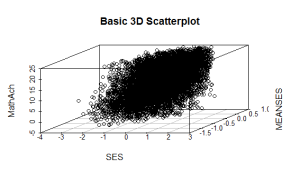
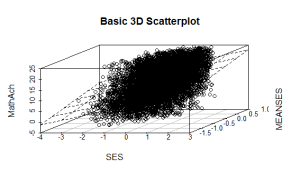
Even though the scatter plot lacks detail due to the large sample size it is still possible to see the moderate correlations shown in the correlation matrix by noting the shape and direction of the data points . A regression plane can be calculated and added to the plot using the following code:
scatterplot3d(SES, MEANSES, MathAch, main=”Basic 3D Scatterplot”) #do the plot with default options
####################################################
##use a linear regression model to plot a regression plane
#y=MathAchieve, SES, MEANSES are predictor variables
####################################################
model1=lm(MathAch ~ SES + MEANSES) ## generate a regression
#take a look at the regression output
summary(model1)
#run scatterplot again putting results in model
model <- scatterplot3d(SES, MEANSES, MathAch, main=”Basic 3D Scatterplot”) #do the plot with default options
#link the scatterplot and linear model using the plane3d function
model$plane3d(model1) ## link the 3d scatterplot in ‘model’ to the ‘plane3d’ option with ‘model1’ regression information
####################################################
The resulting output is seen below:
Call:
lm(formula = MathAch ~ SES + MEANSES)
Residuals:
Min 1Q Median 3Q Max
-20.4242 -4.6365 0.1403 4.8534 17.0496
Coefficients:
Estimate Std. Error t value Pr(>|t|)
(Intercept) 12.72590 0.07429 171.31 <2e-16 ***
SES 2.19115 0.11244 19.49 <2e-16 ***
MEANSES 3.52571 0.21190 16.64 <2e-16 ***
—
Signif. codes: 0 ‘***’ 0.001 ‘**’ 0.01 ‘*’ 0.05 ‘.’ 0.1 ‘ ’ 1
Residual standard error: 6.296 on 7182 degrees of freedom
Multiple R-squared: 0.1624, Adjusted R-squared: 0.1622
F-statistic: 696.4 on 2 and 7182 DF, p-value: < 2.2e-16
and the plot with the plane is:
While the above analysis gives us useful information, it is limited by the mixture of numeric values and factors. A more detailed visual analysis that will allow the display and comparison of all six of the variables is possible by using the functions available in the R packageTableplots. This package was created to aid in the visualization and inspection of large datasets with multiple variables.
The MathAchieve contains a total of six variables and 7185 cases. TheTableplots package can be used with datasets larger than 10,000 observations and up to 12 or so variables. It can be used visualize relationships among variables using the same measurement scale or mixed measurement types.
To look at a comparisons of each data type and then view all 6 together begin with the following:
####################################################
attach(MathAchieve) #attach the dataset
#set up 3 data frames with numeric, factors, and mixed
####################################################
mathmix <- data.frame(SES,MathAch,MEANSES,School=factor(School),Minority=factor(Minority),Sex=factor(Sex)) #all 6 vars
mathfact <- data.frame(School=factor(School),Minority=factor(Minority),Sex=factor(Sex)) #3 factor vars
mathnum <- data.frame(SES,MathAch,MEANSES) #3 numeric vars
####################################################
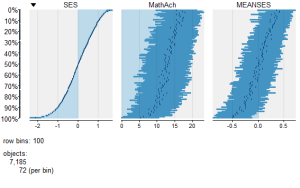
To view a comparison of the 3 numeric variables use:
####################################################
require(tabplot) #load tabplot package
tableplot(mathnum) #generate a table plot with numeric vars only
####################################################
resulting in the following output:
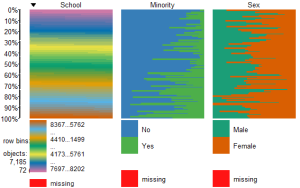
To view only the 3 factor variables use:
####################################################
require(tabplot) #load tabplot package
tableplot(mathfact) #generate a table plot with factors only
####################################################
Resulting in:
To view and compare table plots of all six variables use:
####################################################
require(tabplot) #load tabplot package
tableplot(mathmix) #generate a table plot with all six variables
####################################################
Resulting in:
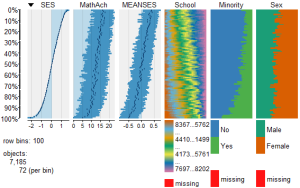
Using tableplots is useful in visualizing relationships among a set of variabes. The fact that comparisons can be made using mixed levels of measurement and very large sample sizes provides a tool that the researcher can use for initial exploratory data analysis.
The above visual table comparisons agree with the moderate correlation among the three numeric variables found in the correlation and regression models discussed above. It is also possible to add some additional interpretation by viewing and comparing the mix of both factor and numeric variables.
In this tutorial I have provided a very basic introduction to the use of table plots in visualizing data. Interested readers can find an abundance of information about Tableplot options and interpretations in the CRAN documentation.
In my next tutorial I will continue a discussion of methods to visualize large and complex datasets by looking at some techniques that allow exploration of very large datasets and up to 12 variables or more.
转自:https://dmwiig.net/2017/02/06/r-tutorial-visualizing-multivariate-relationships-in-large-datasets/
R TUTORIAL: VISUALIZING MULTIVARIATE RELATIONSHIPS IN LARGE DATASETS的更多相关文章
- THE R QGRAPH PACKAGE: USING R TO VISUALIZE COMPLEX RELATIONSHIPS AMONG VARIABLES IN A LARGE DATASET, PART ONE
The R qgraph Package: Using R to Visualize Complex Relationships Among Variables in a Large Dataset, ...
- Factoextra R Package: Easy Multivariate Data Analyses and Elegant Visualization
factoextra is an R package making easy to extract and visualize the output of exploratory multivaria ...
- R tutorial
http://www.clemson.edu/economics/faculty/wilson/R-tutorial/Introduction.html https://www.youtube.com ...
- A Complete Tutorial on Tree Based Modeling from Scratch (in R & Python)
A Complete Tutorial on Tree Based Modeling from Scratch (in R & Python) MACHINE LEARNING PYTHON ...
- How-to go parallel in R – basics + tips(转)
Today is a good day to start parallelizing your code. I’ve been using the parallel package since its ...
- The leaflet package for online mapping in R(转)
It has been possible for some years to launch a web map from within R. A number of packages for doin ...
- Toward Scalable Systems for Big Data Analytics: A Technology Tutorial (I - III)
ABSTRACT Recent technological advancement have led to a deluge of data from distinctive domains (e.g ...
- A Tale of Three Apache Spark APIs: RDDs, DataFrames, and Datasets(中英双语)
文章标题 A Tale of Three Apache Spark APIs: RDDs, DataFrames, and Datasets 且谈Apache Spark的API三剑客:RDD.Dat ...
- 多组学分析及可视化R包
最近打算开始写一个多组学(包括宏基因组/16S/转录组/蛋白组/代谢组)关联分析的R包,避免重复造轮子,在开始之前随便在网上调研了下目前已有的R包工具,部分罗列如下: 1. mixOmics 应该是在 ...
随机推荐
- AngularJS进入使用前的准备工作
安装 AngularJS是以JavaScript文件形式发布的,可以通过 script 标签添加到网页中. 下载地址:https://github.com/angular/angular.js/rel ...
- 监听器的小示例:利用HttpSessionListener和HttpServletContextListener实现定时销毁HttpSession
1.创建MyServletContextListener实现HttpServletContextListener接口 @Override public void contextDestroyed(Se ...
- C++模板--实现容器适配器
STL源码初接触 STL = Standard Template Library,直译过来是:标准模板库,是惠普实验室开发的一系列软件的统称.从根本上说,STL是一些"容器"的集合 ...
- mpusher 源码编译 for windows X64
mpusher 源码编译 for windows X64 对于java我是小白,通过一步步的摸索,将经验总结下来,给更多码友提供入门的帮助.一个人的摸索是很困难的,本教程感谢 [MPush开源消息推送 ...
- 【模板】二分图最大权完美匹配KM算法
hdu2255模板题 KM是什么意思,详见百度百科. 总之知道它可以求二分图最大权完美匹配就可以了,时间复杂度为O(n^3). 给张图. 二分图有了边权,求最大匹配下的最大权值. 所以该怎么做呢?对啊 ...
- 用 js 的 selection range 操作选择区域内容和图片
原创文章,转载请注明出处并保留地址.原文地址:http://www.cnblogs.com/muge10/p/6723894.html 最近在做编辑器相关的东西,遇到一个需求,用户在编辑器中插入或者粘 ...
- Servlet3.0新特性(从注解配置到websocket编程)
Servlet3.0的出现是servlet史上最大的变革,其中的许多新特性大大的简化了web应用的开发,为广大劳苦的程序员减轻了压力,提高了web开发的效率.主要新特性有以下几个: 引入注解配置 支持 ...
- Nodejs进阶:MD5入门介绍及crypto模块的应用
本文摘录自<Nodejs学习笔记>,更多章节及更新,请访问 github主页地址.欢迎加群交流,群号 197339705. 简介 MD5(Message-Digest Algorithm) ...
- webrtc学习笔记1(建立连接基本流程)
最近在做一个基于webrtc的视频软件,以下是自己对于上层建立通话连接流程的基本理解,记录于此. 假设A和B要建立视频通话,A为房间创建端,B为加入房间端: 1.A通过http登录.获取其他服务器地址 ...
- 带你玩转 jQuery
一.简介 定义 jQuery创始人是美国John Resig,是优秀的Javascript框架: jQuery是一个轻量级.快速简洁的javaScript库.源码戳这 jQuery对象 jQuery产 ...