
Ta-lib 函数一览
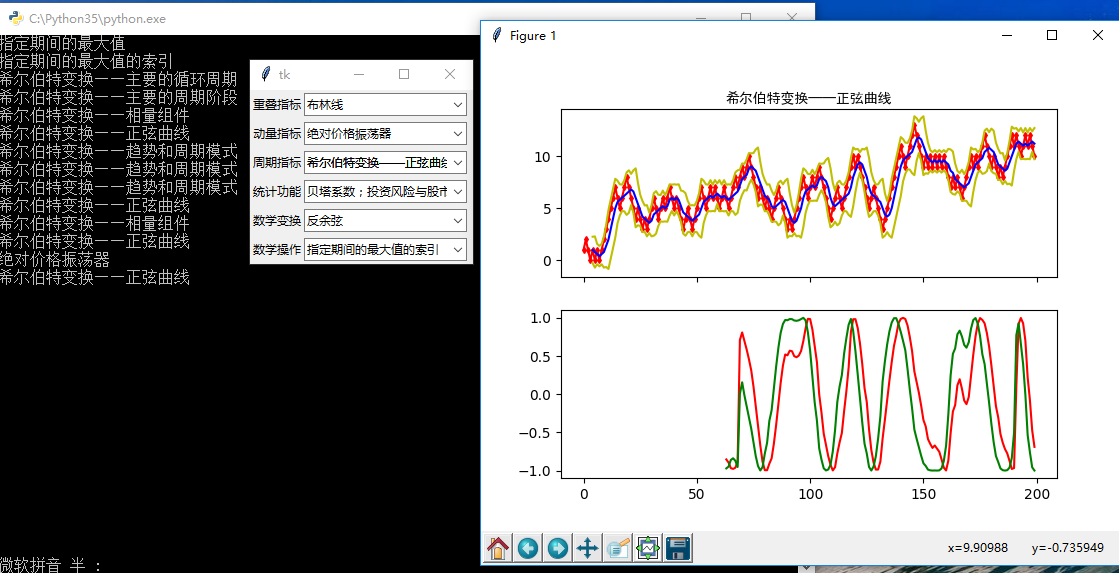
import tkinter as tk

from tkinter import ttk

import matplotlib.pyplot as plt

import numpy as np

import talib as ta

series = np.random.choice([1, -1], size=200)

close = np.cumsum(series).astype(float)

# 重叠指标

def overlap_process(event):

    print(event.widget.get())

    overlap = event.widget.get()

    upperband, middleband, lowerband = ta.BBANDS(close, timeperiod=5, nbdevup=2, nbdevdn=2, matype=0)

    fig, axes = plt.subplots(2, 1, sharex=True)

    ax1, ax2 = axes[0], axes[1]

    axes[0].plot(close, 'rd-', markersize=3)

    axes[0].plot(upperband, 'y-')

    axes[0].plot(middleband, 'b-')

    axes[0].plot(lowerband, 'y-')

    axes[0].set_title(overlap, fontproperties="SimHei")

    if overlap == '布林线':

        pass

    elif overlap == '双指数移动平均线':

        real = ta.DEMA(close, timeperiod=30)

        axes[1].plot(real, 'r-')

    elif overlap == '指数移动平均线 ':

        real = ta.EMA(close, timeperiod=30)

        axes[1].plot(real, 'r-')

    elif overlap == '希尔伯特变换——瞬时趋势线':

        real = ta.HT_TRENDLINE(close)

        axes[1].plot(real, 'r-')

    elif overlap == '考夫曼自适应移动平均线':

        real = ta.KAMA(close, timeperiod=30)

        axes[1].plot(real, 'r-')

    elif overlap == '移动平均线':

        real = ta.MA(close, timeperiod=30, matype=0)

        axes[1].plot(real, 'r-')

    elif overlap == 'MESA自适应移动平均':

        mama, fama = ta.MAMA(close, fastlimit=0, slowlimit=0)

        axes[1].plot(mama, 'r-')

        axes[1].plot(fama, 'g-')

    elif overlap == '变周期移动平均线':

        real = ta.MAVP(close, periods, minperiod=2, maxperiod=30, matype=0)

        axes[1].plot(real, 'r-')

    elif overlap == '简单移动平均线':

        real = ta.SMA(close, timeperiod=30)

        axes[1].plot(real, 'r-')

    elif overlap == '三指数移动平均线(T3)':

        real = ta.T3(close, timeperiod=5, vfactor=0)

        axes[1].plot(real, 'r-')

    elif overlap == '三指数移动平均线':

        real = ta.TEMA(close, timeperiod=30)

        axes[1].plot(real, 'r-')

    elif overlap == '三角形加权法 ':

        real = ta.TRIMA(close, timeperiod=30)

        axes[1].plot(real, 'r-')

    elif overlap == '加权移动平均数':

        real = ta.WMA(close, timeperiod=30)

        axes[1].plot(real, 'r-')

    plt.show()

# 动量指标

def momentum_process(event):

    print(event.widget.get())

    momentum = event.widget.get()

    upperband, middleband, lowerband = ta.BBANDS(close, timeperiod=5, nbdevup=2, nbdevdn=2, matype=0)

    fig, axes = plt.subplots(2, 1, sharex=True)

    ax1, ax2 = axes[0], axes[1]

    axes[0].plot(close, 'rd-', markersize=3)

    axes[0].plot(upperband, 'y-')

    axes[0].plot(middleband, 'b-')

    axes[0].plot(lowerband, 'y-')

    axes[0].set_title(momentum, fontproperties="SimHei")

    if momentum == '绝对价格振荡器':

        real = ta.APO(close, fastperiod=12, slowperiod=26, matype=0)

        axes[1].plot(real, 'r-')

    elif momentum == '钱德动量摆动指标':

        real = ta.CMO(close, timeperiod=14)

        axes[1].plot(real, 'r-')

    elif momentum == '移动平均收敛/散度':

        macd, macdsignal, macdhist = ta.MACD(close, fastperiod=12, slowperiod=26, signalperiod=9)

        axes[1].plot(macd, 'r-')

        axes[1].plot(macdsignal, 'g-')

        axes[1].plot(macdhist, 'b-')

    elif momentum == '带可控MA类型的MACD':

        macd, macdsignal, macdhist = ta.MACDEXT(close, fastperiod=12, fastmatype=0, slowperiod=26, slowmatype=0, signalperiod=9, signalmatype=0)

        axes[1].plot(macd, 'r-')

        axes[1].plot(macdsignal, 'g-')

        axes[1].plot(macdhist, 'b-')

    elif momentum == '移动平均收敛/散度 固定 12/26':

        macd, macdsignal, macdhist = ta.MACDFIX(close, signalperiod=9)

        axes[1].plot(macd, 'r-')

        axes[1].plot(macdsignal, 'g-')

        axes[1].plot(macdhist, 'b-')

    elif momentum == '动量':

        real = ta.MOM(close, timeperiod=10)

        axes[1].plot(real, 'r-')

    elif momentum == '比例价格振荡器':

        real = ta.PPO(close, fastperiod=12, slowperiod=26, matype=0)

        axes[1].plot(real, 'r-')

    elif momentum == '变化率':

        real = ta.ROC(close, timeperiod=10)

        axes[1].plot(real, 'r-')

    elif momentum == '变化率百分比':

        real = ta.ROCP(close, timeperiod=10)

        axes[1].plot(real, 'r-')

    elif momentum == '变化率的比率':

        real = ta.ROCR(close, timeperiod=10)

        axes[1].plot(real, 'r-')

    elif momentum == '变化率的比率100倍':

        real = ta.ROCR100(close, timeperiod=10)

        axes[1].plot(real, 'r-')

    elif momentum == '相对强弱指数':

        real = ta.RSI(close, timeperiod=14)

        axes[1].plot(real, 'r-')

    elif momentum == '随机相对强弱指标':

        fastk, fastd = ta.STOCHRSI(close, timeperiod=14, fastk_period=5, fastd_period=3, fastd_matype=0)

        axes[1].plot(fastk, 'r-')

        axes[1].plot(fastd, 'r-')

    elif momentum == '三重光滑EMA的日变化率':

        real = ta.TRIX(close, timeperiod=30)

        axes[1].plot(real, 'r-')

    plt.show()

# 周期指标

def cycle_process(event):

    print(event.widget.get())

    cycle = event.widget.get()

    upperband, middleband, lowerband = ta.BBANDS(close, timeperiod=5, nbdevup=2, nbdevdn=2, matype=0)

    fig, axes = plt.subplots(2, 1, sharex=True)

    ax1, ax2 = axes[0], axes[1]

    axes[0].plot(close, 'rd-', markersize=3)

    axes[0].plot(upperband, 'y-')

    axes[0].plot(middleband, 'b-')

    axes[0].plot(lowerband, 'y-')

    axes[0].set_title(cycle, fontproperties="SimHei")

    if cycle == '希尔伯特变换——主要的循环周期':

        real = ta.HT_DCPERIOD(close)

        axes[1].plot(real, 'r-')

    elif cycle == '希尔伯特变换,占主导地位的周期阶段':

        real = ta.HT_DCPHASE(close)

        axes[1].plot(real, 'r-')

    elif cycle == '希尔伯特变换——相量组件':

        inphase, quadrature = ta.HT_PHASOR(close)

        axes[1].plot(inphase, 'r-')

        axes[1].plot(quadrature, 'g-')

    elif cycle == '希尔伯特变换——正弦曲线':

        sine, leadsine = ta.HT_SINE(close)

        axes[1].plot(sine, 'r-')

        axes[1].plot(leadsine, 'g-')

    elif cycle == '希尔伯特变换——趋势和周期模式':

        integer = ta.HT_TRENDMODE(close)

        axes[1].plot(integer, 'r-')

    plt.show()

# 统计功能

def statistic_process(event):

    print(event.widget.get())

    statistic = event.widget.get()

    upperband, middleband, lowerband = ta.BBANDS(close, timeperiod=5, nbdevup=2, nbdevdn=2, matype=0)

    fig, axes = plt.subplots(2, 1, sharex=True)

    ax1, ax2 = axes[0], axes[1]

    axes[0].plot(close, 'rd-', markersize=3)

    axes[0].plot(upperband, 'y-')

    axes[0].plot(middleband, 'b-')

    axes[0].plot(lowerband, 'y-')

    axes[0].set_title(statistic, fontproperties="SimHei")

    if statistic == '线性回归':

        real = ta.LINEARREG(close, timeperiod=14)

        axes[1].plot(real, 'r-')

    elif statistic == '线性回归角度':

        real = ta.LINEARREG_ANGLE(close, timeperiod=14)

        axes[1].plot(real, 'r-')

    elif statistic == '线性回归截距':

        real = ta.LINEARREG_INTERCEPT(close, timeperiod=14)

        axes[1].plot(real, 'r-')

    elif statistic == '线性回归斜率':

        real = ta.LINEARREG_SLOPE(close, timeperiod=14)

        axes[1].plot(real, 'r-')

    elif statistic == '标准差':

        real = ta.STDDEV(close, timeperiod=5, nbdev=1)

        axes[1].plot(real, 'r-')

    elif statistic == '时间序列预测':

        real = ta.TSF(close, timeperiod=14)

        axes[1].plot(real, 'r-')

    elif statistic == '方差':

        real = ta.VAR(close, timeperiod=5, nbdev=1)

        axes[1].plot(real, 'r-')

    plt.show()

# 数学变换

def math_transform_process(event):

    print(event.widget.get())

    math_transform = event.widget.get()

    upperband, middleband, lowerband = ta.BBANDS(close, timeperiod=5, nbdevup=2, nbdevdn=2, matype=0)

    fig, axes = plt.subplots(2, 1, sharex=True)

    ax1, ax2 = axes[0], axes[1]

    axes[0].plot(close, 'rd-', markersize=3)

    axes[0].plot(upperband, 'y-')

    axes[0].plot(middleband, 'b-')

    axes[0].plot(lowerband, 'y-')

    axes[0].set_title(math_transform, fontproperties="SimHei")

    if math_transform == '反余弦':

        real = ta.ACOS(close)

        axes[1].plot(real, 'r-')

    elif math_transform == '反正弦':

        real = ta.ASIN(close)

        axes[1].plot(real, 'r-')

    elif math_transform == '反正切':

        real = ta.ATAN(close)

        axes[1].plot(real, 'r-')

    elif math_transform == '向上取整':

        real = ta.CEIL(close)

        axes[1].plot(real, 'r-')

    elif math_transform == '余弦':

        real = ta.COS(close)

        axes[1].plot(real, 'r-')

    elif math_transform == '双曲余弦':

        real = ta.COSH(close)

        axes[1].plot(real, 'r-')

    elif math_transform == '指数':

        real = ta.EXP(close)

        axes[1].plot(real, 'r-')

    elif math_transform == '向下取整':

        real = ta.FLOOR(close)

        axes[1].plot(real, 'r-')

    elif math_transform == '自然对数':

        real = ta.LN(close)

        axes[1].plot(real, 'r-')

    elif math_transform == '常用对数':

        real = ta.LOG10(close)

        axes[1].plot(real, 'r-')

    elif math_transform == '正弦':

        real = ta.SIN(close)

        axes[1].plot(real, 'r-')

    elif math_transform == '双曲正弦':

        real = ta.SINH(close)

        axes[1].plot(real, 'r-')

    elif math_transform == '平方根':

        real = ta.SQRT(close)

        axes[1].plot(real, 'r-')

    elif math_transform == '正切':

        real = ta.TAN(close)

        axes[1].plot(real, 'r-')

    elif math_transform == '双曲正切':

        real = ta.TANH(close)

        axes[1].plot(real, 'r-')

    plt.show()

# 数学操作

def math_operator_process(event):

    print(event.widget.get())

    math_operator = event.widget.get()

    upperband, middleband, lowerband = ta.BBANDS(close, timeperiod=5, nbdevup=2, nbdevdn=2, matype=0)

    fig, axes = plt.subplots(2, 1, sharex=True)

    ax1, ax2 = axes[0], axes[1]

    axes[0].plot(close, 'rd-', markersize=3)

    axes[0].plot(upperband, 'y-')

    axes[0].plot(middleband, 'b-')

    axes[0].plot(lowerband, 'y-')

    axes[0].set_title(math_operator, fontproperties="SimHei")

    if math_operator == '指定的期间的最大值':

        real = ta.MAX(close, timeperiod=30)

        axes[1].plot(real, 'r-')

    elif math_operator == '指定的期间的最大值的索引':

        integer = ta.MAXINDEX(close, timeperiod=30)

        axes[1].plot(integer, 'r-')

    elif math_operator == '指定的期间的最小值':

        real = ta.MIN(close, timeperiod=30)

        axes[1].plot(real, 'r-')

    elif math_operator == '指定的期间的最小值的索引':

        integer = ta.MININDEX(close, timeperiod=30)

        axes[1].plot(integer, 'r-')

    elif math_operator == '指定的期间的最小和最大值':

        min, max = ta.MINMAX(close, timeperiod=30)

        axes[1].plot(min, 'r-')

        axes[1].plot(max, 'r-')

    elif math_operator == '指定的期间的最小和最大值的索引':

        minidx, maxidx = ta.MINMAXINDEX(close, timeperiod=30)

        axes[1].plot(minidx, 'r-')

        axes[1].plot(maxidx, 'r-')

    elif math_operator == '合计':

        real = ta.SUM(close, timeperiod=30)

        axes[1].plot(real, 'r-')

    plt.show()

root = tk.Tk()

# 第一行:重叠指标

rowframe1 = tk.Frame(root)

rowframe1.pack(side=tk.TOP, ipadx=3, ipady=3)

tk.Label(rowframe1, text="重叠指标").pack(side=tk.LEFT)

overlap_indicator = tk.StringVar() # 重叠指标

combobox1 = ttk.Combobox(rowframe1, textvariable=overlap_indicator)

combobox1['values'] = ['布林线','双指数移动平均线','指数移动平均线 ','希尔伯特变换——瞬时趋势线',

                       '考夫曼自适应移动平均线','移动平均线','MESA自适应移动平均','变周期移动平均线',

                       '简单移动平均线','三指数移动平均线(T3)','三指数移动平均线','三角形加权法 ','加权移动平均数']

combobox1.current(0)

combobox1.pack(side=tk.LEFT)

combobox1.bind('<<ComboboxSelected>>', overlap_process)

# 第二行:动量指标

rowframe2 = tk.Frame(root)

rowframe2.pack(side=tk.TOP, ipadx=3, ipady=3)

tk.Label(rowframe2, text="动量指标").pack(side=tk.LEFT)

momentum_indicator = tk.StringVar() # 动量指标

combobox2 = ttk.Combobox(rowframe2, textvariable=momentum_indicator)

combobox2['values'] = ['绝对价格振荡器','钱德动量摆动指标','移动平均收敛/散度','带可控MA类型的MACD',

                       '移动平均收敛/散度 固定 12/26','动量','比例价格振荡器','变化率','变化率百分比',

                       '变化率的比率','变化率的比率100倍','相对强弱指数','随机相对强弱指标','三重光滑EMA的日变化率']

combobox2.current(0)

combobox2.pack(side=tk.LEFT)

combobox2.bind('<<ComboboxSelected>>', momentum_process)

# 第三行:周期指标

rowframe3 = tk.Frame(root)

rowframe3.pack(side=tk.TOP, ipadx=3, ipady=3)

tk.Label(rowframe3, text="周期指标").pack(side=tk.LEFT)

cycle_indicator = tk.StringVar() # 周期指标

combobox3 = ttk.Combobox(rowframe3, textvariable=cycle_indicator)

combobox3['values'] = ['希尔伯特变换——主要的循环周期','希尔伯特变换——主要的周期阶段','希尔伯特变换——相量组件',

                       '希尔伯特变换——正弦曲线','希尔伯特变换——趋势和周期模式']

combobox3.current(0)

combobox3.pack(side=tk.LEFT)

combobox3.bind('<<ComboboxSelected>>', cycle_process)

# 第四行:统计功能

rowframe4 = tk.Frame(root)

rowframe4.pack(side=tk.TOP, ipadx=3, ipady=3)

tk.Label(rowframe4, text="统计功能").pack(side=tk.LEFT)

statistic_indicator = tk.StringVar() # 统计功能

combobox4 = ttk.Combobox(rowframe4, textvariable=statistic_indicator)

combobox4['values'] = ['贝塔系数;投资风险与股市风险系数','皮尔逊相关系数','线性回归','线性回归角度',

                       '线性回归截距','线性回归斜率','标准差','时间序列预测','方差']

combobox4.current(0)

combobox4.pack(side=tk.LEFT)

combobox4.bind('<<ComboboxSelected>>', statistic_process)

# 第五行:数学变换

rowframe5 = tk.Frame(root)

rowframe5.pack(side=tk.TOP, ipadx=3, ipady=3)

tk.Label(rowframe5, text="数学变换").pack(side=tk.LEFT)

math_transform = tk.StringVar() # 数学变换

combobox5 = ttk.Combobox(rowframe5, textvariable=math_transform_process)

combobox5['values'] = ['反余弦','反正弦','反正切','向上取整','余弦','双曲余弦','指数','向下取整',

                       '自然对数','常用对数','正弦','双曲正弦','平方根','正切','双曲正切']

combobox5.current(0)

combobox5.pack(side=tk.LEFT)

combobox5.bind('<<ComboboxSelected>>', math_transform_process)

# 第六行:数学操作

rowframe6 = tk.Frame(root)

rowframe6.pack(side=tk.TOP, ipadx=3, ipady=3)

tk.Label(rowframe6, text="数学操作").pack(side=tk.LEFT)

math_operator = tk.StringVar() # 数学操作

combobox6 = ttk.Combobox(rowframe6, textvariable=math_operator_process)

combobox6['values'] = ['指定期间的最大值','指定期间的最大值的索引','指定期间的最小值','指定期间的最小值的索引',

                       '指定期间的最小和最大值','指定期间的最小和最大值的索引','合计']

combobox6.current(0)

combobox6.pack(side=tk.LEFT)

combobox6.bind('<<ComboboxSelected>>', math_operator_process)

root.mainloop()
Ta-lib 函数一览的更多相关文章
- 【UEFI】---BIOS中对Guid的使用以及Lib函数的使用总结
---恢复内容开始--- BIOS发展至今传统的汇编实现早已被抛弃,UEFI作为目前一套主流的标准定义接口,被广泛使用.之前被一些有关GUID和一些Lib函数的使用以及跨Pkg调用给折腾的不行,每次改 ...
- Matlab绘图函数一览
要查看Matlab所有绘图函数,请从Matlab主界面菜单查看“绘图目录”,或从Matlab帮助文档查看“Types of MATLAB Plots”(在线版本).本文的图和英文解释摘自Matlab帮 ...
- SQLite核心函数一览
abs(X) abs(X)返回 X 的绝对值. Abs(X) returns NULL if X is NULL. Abs(X) return 0.0 if X is a string or blo ...
- 【转】 C++库常用函数一览
本文中提到的函数库有:<string> <cctype> <algorithm> <cmath> <cstdlib> <iomanip ...
- core_cm3文件函数一览
core_cm3是ARM公司推出来的统一规定,这是对下游芯片厂商的统一规定,因此可以再Cortex-M3(CM3)之间进行移植.此文件中定义了一些对特殊功能寄存器的C语言形式的操作,本质上是内敛汇编和 ...
- delphi字符串操作函数一览
首部 function SameText(const S1, S2: string): Boolean; $[SysUtils.pas 功能 返回两个字符串是否相等 说明 不区分大小写 参考 < ...
- PHP内置安全函数一览
内置安全函数 filter_var函数 根据参数中的过滤类型进行过滤,如过滤Email类型的,则符合的字符串返回字符串,不符合的返回False. urldecode函数 写这个函数是特别为了提醒注意, ...
- VS2005环境下采用makefile编译、使用libjpeg.lib函数库
1.从www.ijg.org下载源码,解压后得到文件夹jpeg-8d 2.在文件夹里新建jconfig.h文件,将jconfig.vc里的内容拷到jconfig.h中 3.编译. Run->CM ...
- 3、应用层常用lib函数使用说明
1.mmap函数 void* mmap(void* start,size_t length,int prot,int flags,int fd,off_t offset); start:映射区的开始地 ...
随机推荐
- JAVA EE(简述)
一.平台概述 JavaEE的全称是Java Enterprise Edition,它是一个开发分布式企业级应用的规范和标准 Java 平台三个版本: Java ME(Java Micro Edit ...
- IOS SDWebImage实现原理详解
在之前我写过SDWebImage的使用方法,主要是用与获取网络图片,没有看过的朋友可以看看. 这篇文章将主要介绍SDWebImage的实现原理,主要针对于获取网络图片的原理,如果没有第三方我们该怎么去 ...
- android多种布局的列表实现
最近有一个列表效果,需要一个列表有多种布局,最终效果如下: 这个我也问了同事以及开发群里的朋友,居然都没得到最优的实现方式的回答,看来这种复杂列表的需求还是比较少的,我自己也走了一些弯路,把我几个实现 ...
- 采用 PAT工具及CSP语言,对一个问题进行自动机 建模
pat是新加坡国立开发的工具,需要的去官网下http://www.comp.nus.edu.sg/~pat/ ,学了一天,是个不错的自动机验证工具,感觉还不错啊. 验证一个数是否为斐波那契数且为质数 ...
- CBarChart柱形图类
在用VC做有关图表的时候,感觉不是那么方便,在codeproject找到一个柱形图的实用类,原文地址为:http://www.codeproject.com/KB/miscctrl/CBarChart ...
- Java解决题目:有一对兔子,从出生第三个月起每个月都生一对兔子,小兔子长到第三个月后,每个月又生一对兔子。。。
题目:有一对兔子,从出生第三个月起每个月都生一对兔子,小兔子长到第三个月后,每个月又生一对兔子,假如兔子都不死,问M个月时兔子的数量,M为键盘读入的正整数.(请用Java语言作答) 样例输入: 3 样 ...
- jQuery Form 表单提交插件-----ajaxSubmit() 的应用
Form Plugin API 里提供了很多有用的方法可以让你轻松的处理表单里的数据和表单的提交过程. 测试环境:部署到Tomcat中的web项目. 一.ajaxSubmit() 介绍 立即通过AJ ...
- Eclipse编译去除svn文件夹
使用Eclipse编译文件后,classes文件中总是有.svn的文件夹,这些文件没有什么用,而且影响build的速度 "Project->Properties->Java Bu ...
- JS高级程序设计2nd部分知识要点4
ECMAScript中所有函数的参数都是按值传递的. 5种基本数据类型: Undfined,Null,Boolean,Number,String. ECMAScript中的所有参数传递的都是值,不可能 ...
- 记一次查内存异常问题(续《记一次Web应用CPU偏高》)
继上一次查应用的CPU飙高问题(http://www.cnblogs.com/hzmark/p/JVM_CPU.html)过去10天了.上次只是定位到了是一个第三方包占用了大量的CPU使用,但没有细致 ...