
ROS naviagtion analysis: costmap_2d--CostmapLayer
博客转自:https://blog.csdn.net/u013158492/article/details/50493220
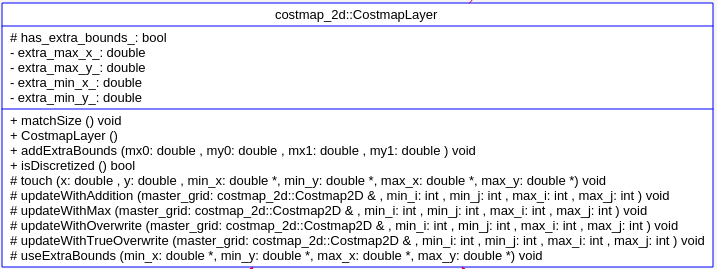
这个类是为ObstacleLayer StaticLayer voxelLayer 这种维护了自己所在层的地图数据的类,提供了一些公共的操作方法。
从UML中可以看到,这个类提供了以下方法,这些方法的参数列表均为(costmap_2d::Costmap2D& master_grid, int min_i, int min_j, int max_i, int max_j)
updateWithTrueOverwrite

updateWithOverwrite

updateWithMax

updateWithAddition
这些成员函数都是为本层的地图,如何更新数据到master map上的一些更新方法。这里调一个例子说明:
void CostmapLayer::updateWithOverwrite(costmap_2d::Costmap2D& master_grid, int min_i, int min_j, int max_i, int max_j)

{

  if (!enabled_)

    return;

  unsigned char* master = master_grid.getCharMap();

  unsigned int span = master_grid.getSizeInCellsX();

  for (int j = min_j; j < max_j; j++)

  {

    unsigned int it = span*j+min_i;

    for (int i = min_i; i < max_i; i++)

    {

      if (costmap_[it] != NO_INFORMATION)

        master[it] = costmap_[it];//这里就是overwrite的涵义,costmap_是本层的地图数据。直接将本层的数据赋值给master map的对应索引就行了

      it++;

    }

  }

}
另外还有两个函数成员:
void CostmapLayer::touch(double x, double y, double* min_x, double* min_y, double* max_x, double* max_y)

{

    *min_x = std::min(x, *min_x);

    *min_y = std::min(y, *min_y);

    *max_x = std::max(x, *max_x);

    *max_y = std::max(y, *max_y);

}

void CostmapLayer::matchSize()

{

    Costmap2D* master = layered_costmap_->getCostmap();//这是由Layer  继承过来的,Layer的指针LayeredCostmap* layered_costmap_

    resizeMap(master->getSizeInCellsX(), master->getSizeInCellsY(), master->getResolution(),master->getOriginX(), master->getOriginY());//这里调整的对象是继承的Costmap2D的数据成员char* costmap_, 也就是这里的调整是针对各层的地图,不是关于master map的。

}
ROS naviagtion analysis: costmap_2d--CostmapLayer的更多相关文章
- ROS naviagtion analysis: costmap_2d--Costmap2DROS
博客转载自:https://blog.csdn.net/u013158492/article/details/50485418 在上一篇文章中moveBase就有关于costmap_2d的使用: pl ...
- ROS naviagtion analysis: move_base
博客转载自:https://blog.csdn.net/u013158492/article/details/50483123 这是navigation的第一篇文章,主要通过分析ROS代码级实现,了解 ...
- ROS naviagtion analysis: costmap_2d--ObstacleLayer
博客转载自:https://blog.csdn.net/u013158492/article/details/50493676 构造函数 ObstacleLayer() { costmap_ = NU ...
- ROS naviagtion analysis: costmap_2d--LayeredCostmap
博客转自:https://blog.csdn.net/u013158492/article/details/50490490 在数据成员中,有两个重要的变量:Costmap2D costmap_和 s ...
- ROS naviagtion analysis: costmap_2d--StaticLayer
博客转载自:https://blog.csdn.net/u013158492/article/details/50493246 从UML中能够看到,StaticLayer主要是在实现Layer层要求实 ...
- ROS naviagtion analysis: costmap_2d--Layer
博客转载自:https://blog.csdn.net/u013158492/article/details/50493113 这个类中有一个LayeredCostmap* layered_costm ...
- ROS naviagtion analysis: costmap_2d--Costmap2D
博客转载自:https://blog.csdn.net/u013158492/article/details/50492506 Costmap2D是存储地图数据的父类.真正的地图数据就存储在数据成员u ...
- ROS探索总结(十三)——导航与定位框架
导航与定位是机器人研究中的重要部分. 一般机器人在陌生的环境下需要使用激光传感器(或者深度传感器转换成激光数据),先进行地图建模,然后在根据建立的地图进行导航.定位.在ROS中也有很多 ...
- ROS 教程之 navigation :在 catkin 环境下创建costmap layer plugin
在做机器人导航的时候,肯定见到过global_costmap和local_costmap.global_costmap是为了全局路径规划服务的,如从这个房间到那个房间该怎么走.local_costma ...
随机推荐
- bzoj 1226 学校食堂Dining
Written with StackEdit. Description 小\(F\) 的学校在城市的一个偏僻角落,所有学生都只好在学校吃饭.学校有一个食堂,虽然简陋,但食堂大厨总能做出让同学们满意的菜 ...
- Mac OS X显示隐藏文件命令
defaults write com.apple.finder AppleShowAllFiles Yes && killall Finder //显示隐藏文件 defaults wr ...
- 转载论文关于fir滤波器的fpga实现
摘 要 本文讨论的FIR滤波器因其具有严格的线性相位特性而得到广泛的应用.在工程实践中,往往要求信号处理具有实时性和灵活性,本论文研究FIR的FPGA解决方案正体现了电子系统的微型化和单片化. 本论文 ...
- 如何用php+ajax实现页面的局部刷新?(转)
client.html XML/HTML code ? 1 2 3 4 5 6 7 8 9 10 11 12 13 14 15 16 17 18 19 20 21 22 <!DOCTYPE ...
- VC++中如何让RadioButton分组,并且互斥
首先让两个RadioButton的Group属性为False. 将两个RadioButton放入一个GroupBox里面,即可如果分成多个组,则将多组Radio分别用GroupBox框起来,并将每组的 ...
- 【转】jmeter压力测试
jmeter压力测试 Apache JMeter是Apache组织开发的基于Java的压力测试工具.用于对软件做压力测试,它最初被设计用于Web应用测试但后来扩展到其他测试领域, 是压力测试的首选软件 ...
- 微信小程序之if操作
.wxss控制样式 .price-agent{ font-size: 25rpx; color:#ababab; float: left; position: absolute; bottom: 0; ...
- python开发函数进阶:命名空间,作用域,函数的本质,闭包,作用域方法(globales)
一,命名空间 #局部命名空间#全局命名空间#内置命名空间 #三者的顺序#加载顺序 内置命名空间(程序运行前加载)->全局命名空间(程序运行中:从上到下加载)->局部命名空间(程 ...
- ARM-Linux移植之(四)——根文件系统构建
相关工具版本: busybox-1.7.0 arm-linux-4.3.2 linux-2.6.22 1.配置busybox并安装. 在我们的根文件系统中的/bin和/sbin目录下有各种命令的应 ...
- 使用Docker模拟ansible集群环境
/etc/ansible/hosts 192.168.99.100 ansible_ssh_port=8081 ansible_ssh_user=root 配置容器免密码SSH登录