
View and Data API Tips: Constrain Viewer Within a div Container
By Daniel Du
When working with View and Data API, you probably want to contain viewer into a <div> tag, the position and size of <div> can be defined with CSS. The HTML can be simple as below, a <div> tag as a container, the position and style is defined in a CSS class named as “viewer”:
    <h2>Autodesk View and Data API</h2>

    <div id="viewer" class="viewer">

    </div>
.csharpcode, .csharpcode pre
{
font-size: small;
color: black;
font-family: consolas, "Courier New", courier, monospace;
background-color: #ffffff;
/*white-space: pre;*/
}
.csharpcode pre { margin: 0em; }
.csharpcode .rem { color: #008000; }
.csharpcode .kwrd { color: #0000ff; }
.csharpcode .str { color: #006080; }
.csharpcode .op { color: #0000c0; }
.csharpcode .preproc { color: #cc6633; }
.csharpcode .asp { background-color: #ffff00; }
.csharpcode .html { color: #800000; }
.csharpcode .attr { color: #ff0000; }
.csharpcode .alt
{
background-color: #f4f4f4;
width: 100%;
margin: 0em;
}
.csharpcode .lnum { color: #606060; }
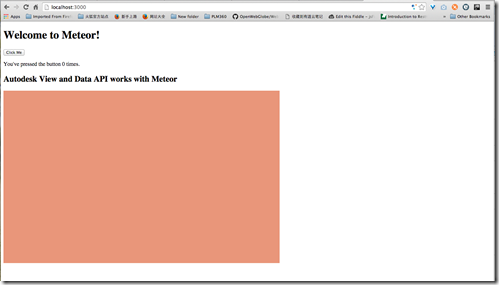
For example, here is my css class, make the viewer container with 800px * 500px, and to make it easy to see, I also add a background color:
.viewer {

    background-color: darksalmon;

    height: 500px;

    width: 800px;

  }
.csharpcode, .csharpcode pre
{
font-size: small;
color: black;
font-family: consolas, "Courier New", courier, monospace;
background-color: #ffffff;
/*white-space: pre;*/
}
.csharpcode pre { margin: 0em; }
.csharpcode .rem { color: #008000; }
.csharpcode .kwrd { color: #0000ff; }
.csharpcode .str { color: #006080; }
.csharpcode .op { color: #0000c0; }
.csharpcode .preproc { color: #cc6633; }
.csharpcode .asp { background-color: #ffff00; }
.csharpcode .html { color: #800000; }
.csharpcode .attr { color: #ff0000; }
.csharpcode .alt
{
background-color: #f4f4f4;
width: 100%;
margin: 0em;
}
.csharpcode .lnum { color: #606060; }
Here is how it looks like, seems good:
Now let’s add viewer, the code snippet is simple, you can go to github for complete code:
        var viewerContainer = document.getElementById(containerId);

        var viewer = new Autodesk.Viewing.Private.GuiViewer3D(

            viewerContainer);
.csharpcode, .csharpcode pre
{
font-size: small;
color: black;
font-family: consolas, "Courier New", courier, monospace;
background-color: #ffffff;
/*white-space: pre;*/
}
.csharpcode pre { margin: 0em; }
.csharpcode .rem { color: #008000; }
.csharpcode .kwrd { color: #0000ff; }
.csharpcode .str { color: #006080; }
.csharpcode .op { color: #0000c0; }
.csharpcode .preproc { color: #cc6633; }
.csharpcode .asp { background-color: #ffff00; }
.csharpcode .html { color: #800000; }
.csharpcode .attr { color: #ff0000; }
.csharpcode .alt
{
background-color: #f4f4f4;
width: 100%;
margin: 0em;
}
.csharpcode .lnum { color: #606060; }
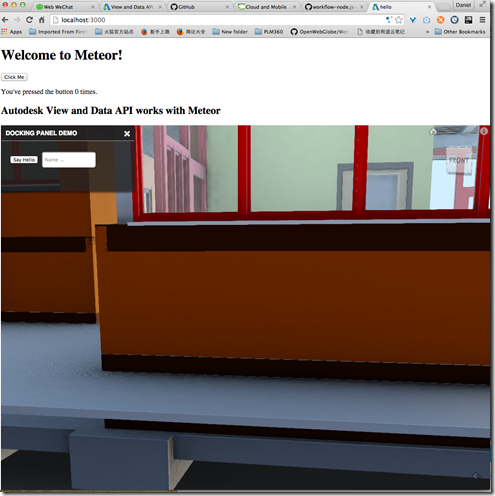
But just with this style, the viewer is “overflow” out of the <div> container,:
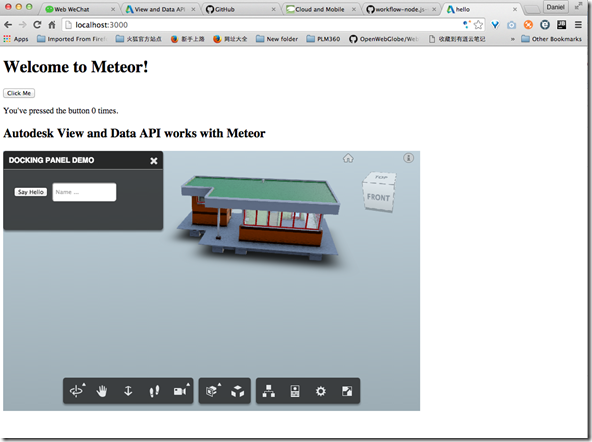
Here is a tip to contains the viewer into the <div> container, just edit the CSS as below, add “position : relative” :
.viewer {

    background-color: darksalmon;

    height: 500px;

    width: 800px;

    position: relative;

}
.csharpcode, .csharpcode pre
{
font-size: small;
color: black;
font-family: consolas, "Courier New", courier, monospace;
background-color: #ffffff;
/*white-space: pre;*/
}
.csharpcode pre { margin: 0em; }
.csharpcode .rem { color: #008000; }
.csharpcode .kwrd { color: #0000ff; }
.csharpcode .str { color: #006080; }
.csharpcode .op { color: #0000c0; }
.csharpcode .preproc { color: #cc6633; }
.csharpcode .asp { background-color: #ffff00; }
.csharpcode .html { color: #800000; }
.csharpcode .attr { color: #ff0000; }
.csharpcode .alt
{
background-color: #f4f4f4;
width: 100%;
margin: 0em;
}
.csharpcode .lnum { color: #606060; }
Here is how it looks after the change, the viewer is constrained within the div tag:
Not a big deal, just a small tip in case you do not know.
View and Data API Tips: Constrain Viewer Within a div Container的更多相关文章
- View and Data API Tips: Hide elements in viewer completely
By Daniel Du With View and Data API, you can hide some elements in viewer by calling "viewer.hi ...
- View and Data API Tips: how to make viewer full screen
By Daniel Du If you have not heard of View and Data API, here is the idea, the View & Data API e ...
- View and Data API tips: 缓存Access Token
对于云API服务,常见的方式就是按照API调用次数收费,某些API调用也就有某些限制,比如在特定时间内只允许调用指定的次数以免造成滥用.虽然Autodesk的view and Data API目前还没 ...
- View and Data API Tips : Conversion between DbId and node
By Daniel Du In View and Data client side API, The assets in the Autodesk Viewer have an object tree ...
- Autodesk View and Data API二次开发学习指南
什么是View and Data API? 使用View and Data API,你可以轻松的在网页上显示大型三维模型或者二维图纸而不需要安装任何插件.通过View and Data API,你可以 ...
- Using View and Data API with Meteor
By Daniel Du I have been studying Meteor these days, and find that Meteor is really a mind-blowing f ...
- 使用AxisHelper帮助理解View and Data API中的坐标系统
大家使用View and Data API做三维模型开发,必然首先要理解View and Data API的坐标系统,即XYZ三个轴向分别是怎么定义的.Three.js里面提供了一个AxisHelpe ...
- 在View and Data API中更改指定元素的颜色
大家在使用View and Data API开发过程中,经常会用到的就是改变某些元素的颜色已区别显示.比如根据某些属性做不同颜色的专题显示,或者用不同颜色表示施工进度,或者只是简单的以颜色变化来提醒用 ...
- 特大喜讯,View and Data API 现在支持中文界面了
大家经常会问到,使用View and Data API怎么做界面的本地化,来显示中文,现在好消息来了,从v1.2.19起,View and Data API开始支持多国语言界面了.你需要制定版本号为v ...
随机推荐
- Linux自动共享USB设备:udev+Samba
一.概述 公司最近要我实现USB设备插入Ubuntu后,自动共享到网络上,能像Windows共享一样(如\\192.168.1.10)访问里面的内容,不需要写入权限.当时听完这需求,我这新人表示惊呆了 ...
- [LeetCode] Longest Substring with At Least K Repeating Characters 至少有K个重复字符的最长子字符串
Find the length of the longest substring T of a given string (consists of lowercase letters only) su ...
- 在Linux(Luna)下向Launch启动器中添加图标
记录下在Luna下向Launch中添加图标的步骤,以供以后参考,这里我以加入eclipse图标为例: 首先,我们来创建一个desktop文件(Luna中到启动器Launch可以看作是Ubuntu中到桌 ...
- 《高性能javascript》一书要点和延伸(下)
第六章 快速响应的用户界面 本章开篇介绍了浏览器UI线程的概念,我也突然想到一个小例子,这是写css3动画的朋友都经常会碰到的一个问题: <head> <meta charset=& ...
- xp搭建IIS出现HTTP 500错误-2147467259 (0x80004005)
安装IIS后访问localhost页面, 提示The remote procedure call failed and did not execute,再刷新变为:-2147467259 (0x800 ...
- 空中网招聘Java架构师、数据库开发等各类人才
爱好网络游戏吗?爱好网站开发技术吗? 有没有想过可以成为史诗级MMO RPG<激战2>运营团队中的一员? 如果下面的职位有合适你的,加入我们吧! http://gw2.kongzhong. ...
- mongodb全套配置
1,下载&安装 MongoDB 提供了centos yum安装方式. 参考:http://docs.mongodb.org/manual/tutorial/install-mongodb-on ...
- ASP.NET MVC系列:Model
1. Model任务 Model负责通过数据库.AD(Active Directory).Web Service及其他方式获取数据,以及将用户输入的数据保存到数据库.AD.Web Service等中. ...
- Android Studio vs. Eclipse ADT Comparison
Android Studio 是一个新的基于 IntelliJ IDEA Android 的安卓开发环境,它对 Eclipse ADT 进行了改进并新增了功能. Feature Android Stu ...
- html5 canvas常用api总结(一)
1.监听浏览器加载事件. window.addEventListener("load",eventWindowLoaded,false); load事件在html页面加载结束时发生 ...