
Using View and Data API with Meteor
By Daniel Du
I have been studying Meteor these days, and find that Meteor is really a mind-blowing framework, I can talk about this latter. I was inspired by this question on forum and started to looking at the possibilities of using View and Data API in Meteor. Since the way of Meteor works is so different, I have to say that it is not pleasant experience to do that especially for a meteor starter like me. Anyway, after struggling for days, trying this and that, I finally made a simple working site and deployed it as http://lmv.meteor.com. In this post I will write down how I did this, hopefully it is helpful in case you are doing similar stuff.
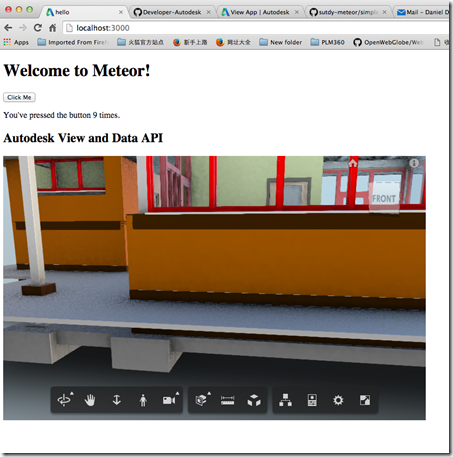
Firstly I created a Meteor project with “meteor create myproject” command, which creates a “hello world” project. To make it look nice, I refactored the folder structure according to the document of meteor about file structure as below:
.
├── README.md
├── client
│ ├── index.html
│ ├── index.js
│ ├── style.css
│ └── viewer
│ ├── viewer.html
│ └── viewer.js
├── lib
└── server
└── index.js
The “client” folder contains the contents which are running at client side, “server” folder contains the scripts which are running at server side.
To use View and Data API, we need to do the authentication process to get access token with consumer key/ secret key, which can be applied from http://developer.autodesk.com . The authentication should be done at server side, otherwise your secret key will be peeked by hackers, so I will do the authentication in “\server\index.js”. But first let me add the “http” package to send REST request to Autodesk authentication server from meteor. You can do this by running command “meteor add http” from command line, and you can also edit “./meteor/packages” file directly, so here is my packages file:
===========================
# Meteor packages used by this project, one per line.
# Check this file (and the other files in this directory) into your repository.
#
# 'meteor add' and 'meteor remove' will edit this file for you,
# but you can also edit it by hand.
meteor-base # Packages every Meteor app needs to have
mobile-experience # Packages for a great mobile UX
mongo # The database Meteor supports right now
blaze-html-templates # Compile .html files into Meteor Blaze views
session # Client-side reactive dictionary for your app
jquery # Helpful client-side library
tracker # Meteor's client-side reactive programming library
standard-minifiers # JS/CSS minifiers run for production mode
es5-shim # ECMAScript 5 compatibility for older browsers.
ecmascript # Enable ECMAScript2015+ syntax in app code
autopublish # Publish all data to the clients (for prototyping)
insecure # Allow all DB writes from clients (for prototyping)
# Allow to send REST calls to authentication server
http
.csharpcode, .csharpcode pre
{
font-size: small;
color: black;
font-family: consolas, "Courier New", courier, monospace;
background-color: #ffffff;
/*white-space: pre;*/
}
.csharpcode pre { margin: 0em; }
.csharpcode .rem { color: #008000; }
.csharpcode .kwrd { color: #0000ff; }
.csharpcode .str { color: #006080; }
.csharpcode .op { color: #0000c0; }
.csharpcode .preproc { color: #cc6633; }
.csharpcode .asp { background-color: #ffff00; }
.csharpcode .html { color: #800000; }
.csharpcode .attr { color: #ff0000; }
.csharpcode .alt
{
background-color: #f4f4f4;
width: 100%;
margin: 0em;
}
.csharpcode .lnum { color: #606060; }
=============================
With that, I can add a Meteor method to do authentication from “/server/index.js”,. It can be called from client side with “Meteor.call()”. Here is the code snippet, please note that I am using synchronous mode when doing “Meteor.http.post”, as I found that I cannot get the returned access token from client side afterwards if I use async mode.
Meteor.startup(function () {

    // code to run on server at startup

});

Meteor.methods({

    getAccessToken: function () {

        this.unblock();

        var credentials = {

            credentials: {

                // Replace placeholder below by the Consumer Key and Consumer Secret you got from

                // http://developer.autodesk.com/ for the production server

                client_id: process.env.CONSUMERKEY || 'replace with your consumer key',

                client_secret: process.env.CONSUMERSECRET || 'your secrete key',

                grant_type: 'client_credentials'

            },

            // If you which to use the Autodesk View & Data API on the staging server, change this url

            BaseUrl: 'https://developer.api.autodesk.com',

            Version: 'v1'

        };

        credentials.AuthenticationURL = credentials.BaseUrl + '/authentication/' + credentials.Version + '/authenticate'

        //must use synchronous mode

        var result = Meteor.http.post(

            credentials.AuthenticationURL,

            {params: credentials.credentials}

        );

        //get the access token object

        return result.data;

    }

})
.csharpcode, .csharpcode pre
{
font-size: small;
color: black;
font-family: consolas, "Courier New", courier, monospace;
background-color: #ffffff;
/*white-space: pre;*/
}
.csharpcode pre { margin: 0em; }
.csharpcode .rem { color: #008000; }
.csharpcode .kwrd { color: #0000ff; }
.csharpcode .str { color: #006080; }
.csharpcode .op { color: #0000c0; }
.csharpcode .preproc { color: #cc6633; }
.csharpcode .asp { background-color: #ffff00; }
.csharpcode .html { color: #800000; }
.csharpcode .attr { color: #ff0000; }
.csharpcode .alt
{
background-color: #f4f4f4;
width: 100%;
margin: 0em;
}
.csharpcode .lnum { color: #606060; }
Now let’s back to the client side, in “/client/viewer/viewer.html” I created a simple template as below:
<Template name="viewer">

    <h2>Autodesk View and Data API</h2>

    <div id="viewer" class="viewer">

    </div>

</Template>
.csharpcode, .csharpcode pre
{
font-size: small;
color: black;
font-family: consolas, "Courier New", courier, monospace;
background-color: #ffffff;
/*white-space: pre;*/
}
.csharpcode pre { margin: 0em; }
.csharpcode .rem { color: #008000; }
.csharpcode .kwrd { color: #0000ff; }
.csharpcode .str { color: #006080; }
.csharpcode .op { color: #0000c0; }
.csharpcode .preproc { color: #cc6633; }
.csharpcode .asp { background-color: #ffff00; }
.csharpcode .html { color: #800000; }
.csharpcode .attr { color: #ff0000; }
.csharpcode .alt
{
background-color: #f4f4f4;
width: 100%;
margin: 0em;
}
.csharpcode .lnum { color: #606060; }In the “\viewer\viewer.js”, I will try to get the access token first with following code:
Template.viewer.onCreated(function(){

    //console.log('viewer template created.')

    Meteor.call('getAccessToken', function (error, result) {

        if (error) {

            console.log(error);

        }

        else {

            var token = result.access_token;

            console.log(token);

            //initialize the viewer

            initViewer(token);

        }

    });

});
.csharpcode, .csharpcode pre
{
font-size: small;
color: black;
font-family: consolas, "Courier New", courier, monospace;
background-color: #ffffff;
/*white-space: pre;*/
}
.csharpcode pre { margin: 0em; }
.csharpcode .rem { color: #008000; }
.csharpcode .kwrd { color: #0000ff; }
.csharpcode .str { color: #006080; }
.csharpcode .op { color: #0000c0; }
.csharpcode .preproc { color: #cc6633; }
.csharpcode .asp { background-color: #ffff00; }
.csharpcode .html { color: #800000; }
.csharpcode .attr { color: #ff0000; }
.csharpcode .alt
{
background-color: #f4f4f4;
width: 100%;
margin: 0em;
}
.csharpcode .lnum { color: #606060; }
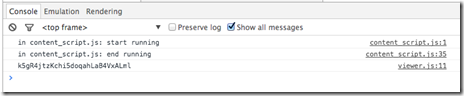
When the viewer template is created, I call to the server side meteor method to do authentication and get the access token, once I get the access token, I can initialize a viewer at client side with View and Data JavaScript API. Now I can see the token from console of developer tool, so far so good.
To use View and Data API, we need to add reference to viewer JavaScript libraries. It seems a very basic thing but it turns out to be the difficult part when it comes to Meteor. This blog introduced two ways to add a script tag into meteor. I tried this solution by creating a script template and load the “viewer3d.js” and viewer style file on the fly, but when I am trying to create a viewer with View and Data JavaScript API, I run to the problem as described in the forum post:
"Uncaught ReferenceError: AutodeskNamespace is not defined"
If I examined to the network tab of browser development tool, the “viewer3d.min.js” has not been loaded yet when I was trying to use it.
Meteor controls the load process of JS files and it is not easy to control the load order, here is the load order as described on meteor document:
The JavaScript and CSS files in an application are loaded according to these rules:
Files in the lib directory at the root of your application are loaded first.
Files that match main.* are loaded after everything else.
Files in subdirectories are loaded before files in parent directories, so that files in the deepest subdirectory are loaded first (after lib), and files in the root directory are loaded last (other than main.*).
Within a directory, files are loaded in alphabetical order by filename.
These rules stack, so that within lib, for example, files are still loaded in alphabetical order; and if there are multiple files named main.js, the ones in subdirectories are loaded earlier.
So since viewer js lib is loaded very late, I cannot use it in viewer.js to initialize the viewer. Luckily, I found that if I put the <script src=””/> tag into <head>, it will be loaded first, so in “/client/index.html”:
<head>

  <title>hello</title>

    <link rel="stylesheet" type="text/css" href="https://developer.api.autodesk.com/viewingservice/v1/viewers/style.css"/>

    <script src="https://developer.api.autodesk.com/viewingservice/v1/viewers/viewer3D.min.js"></script>

</head>

<body>

  <h1>Welcome to Meteor!</h1>

  {{> hello}}

  {{> viewer }}

</body>

<template name="hello">

  <button>Click Me</button>

  <p>You've pressed the button {{counter}} times.</p>

</template>
.csharpcode, .csharpcode pre
{
font-size: small;
color: black;
font-family: consolas, "Courier New", courier, monospace;
background-color: #ffffff;
/*white-space: pre;*/
}
.csharpcode pre { margin: 0em; }
.csharpcode .rem { color: #008000; }
.csharpcode .kwrd { color: #0000ff; }
.csharpcode .str { color: #006080; }
.csharpcode .op { color: #0000c0; }
.csharpcode .preproc { color: #cc6633; }
.csharpcode .asp { background-color: #ffff00; }
.csharpcode .html { color: #800000; }
.csharpcode .attr { color: #ff0000; }
.csharpcode .alt
{
background-color: #f4f4f4;
width: 100%;
margin: 0em;
}
.csharpcode .lnum { color: #606060; }
OK, with that I can initialized viewer in “/client/viewer/viewer.js” file, the code snippet is below:
Template.viewer.onCreated(function(){

    //console.log('viewer template created.')

    Meteor.call('getAccessToken', function (error, result) {

        if (error) {

            console.log(error);

        }

        else {

            var token = result.access_token;

            console.log(token);

            //initialize the viewer

            initViewer(token);

        }

    });

});

var initViewer = function (token) {

    var defaultUrn = 'dXJuOmFkc2sub2JqZWN0czpvcy5vYmplY3Q6bW9kZWwyMDE2LTAxLTI4LTAyLTQ0LTM2LWlkbWpjajl5ZXlnYzhwN3h5bDBwZXB5dm54OWkvZ2F0ZWhvdXNlLm53ZA==';

    if (defaultUrn.indexOf('urn:') !== 0)

        defaultUrn = 'urn:' + defaultUrn;

    function initializeViewer(containerId, documentId, role) {

        var viewerContainer = document.getElementById(containerId);

        var viewer = new Autodesk.Viewing.Private.GuiViewer3D(

            viewerContainer);

        viewer.start();

        Autodesk.Viewing.Document.load(documentId,

            function (document) {

                var rootItem = document.getRootItem();

                var geometryItems = Autodesk.Viewing.Document.getSubItemsWithProperties(

                    rootItem,

                    { 'type': 'geometry', 'role': role },

                    true);

                viewer.load(document.getViewablePath(geometryItems[0]));

            },

            // onErrorCallback

            function (msg) {

                console.log("Error loading document: " + msg);

            }

        );

    }

    function initialize() {

        var options = {

            env: "AutodeskProduction",

            //getAccessToken: getToken,

            //refreshToken: getToken

            accessToken : token

        };

        Autodesk.Viewing.Initializer(options, function () {

            initializeViewer('viewer', defaultUrn, '3d');

        });

    }

    //call

    initialize();

}
Now I have a running meteor application with viewer embedded. I also posted my sample on github, so you may want to take a look to check the complete code. Hope it helps some.
https://github.com/Developer-Autodesk/meteor-view.and.data.api
Using View and Data API with Meteor的更多相关文章
- Autodesk View and Data API二次开发学习指南
什么是View and Data API? 使用View and Data API,你可以轻松的在网页上显示大型三维模型或者二维图纸而不需要安装任何插件.通过View and Data API,你可以 ...
- View and Data API Tips: Constrain Viewer Within a div Container
By Daniel Du When working with View and Data API, you probably want to contain viewer into a <div ...
- View and Data API Tips: Hide elements in viewer completely
By Daniel Du With View and Data API, you can hide some elements in viewer by calling "viewer.hi ...
- 使用AxisHelper帮助理解View and Data API中的坐标系统
大家使用View and Data API做三维模型开发,必然首先要理解View and Data API的坐标系统,即XYZ三个轴向分别是怎么定义的.Three.js里面提供了一个AxisHelpe ...
- 在View and Data API中更改指定元素的颜色
大家在使用View and Data API开发过程中,经常会用到的就是改变某些元素的颜色已区别显示.比如根据某些属性做不同颜色的专题显示,或者用不同颜色表示施工进度,或者只是简单的以颜色变化来提醒用 ...
- 特大喜讯,View and Data API 现在支持中文界面了
大家经常会问到,使用View and Data API怎么做界面的本地化,来显示中文,现在好消息来了,从v1.2.19起,View and Data API开始支持多国语言界面了.你需要制定版本号为v ...
- View and Data API 现在支持IE11了
By Daniel Du After a long time waiting, IE11 finally supports WebGL, which enables us viewing our 3D ...
- View and Data API tips: 缓存Access Token
对于云API服务,常见的方式就是按照API调用次数收费,某些API调用也就有某些限制,比如在特定时间内只允许调用指定的次数以免造成滥用.虽然Autodesk的view and Data API目前还没 ...
- View and Data API Tips: how to make viewer full screen
By Daniel Du If you have not heard of View and Data API, here is the idea, the View & Data API e ...
随机推荐
- servlet使用入门
创建web工程servlet,然后新建TestServlet.java package com.xmyself.servlet; import java.io.IOException; import ...
- 【腾讯Bugly干货分享】Android Patch 方案与持续交付
本文来自于腾讯bugly开发者社区,非经作者同意,请勿转载,原文地址:http://dev.qq.com/topic/57a31921ac3a1fb613dd40f3 Android 不仅系统版本众多 ...
- 我们为什么使用Node
引言:Node 已经迅速成为一个可行并且真正高效的web 开发平台.在Node 诞生之前,在服务端运行JavasScript 是件不可思议的事情,并且对其他的脚本语言来说,要实现非阻塞I/O 通常需要 ...
- iOS App引导页功能实现
一.写作原因 以前都没有想着来写点东西,今天遇到件事情让我决定每次还是要做记录.因为以前自己可以轻松的完成pod spec的配置,但是今天在做的时候还是忘了遇到了很多坑.pod spec配置遇到的坑不 ...
- Windows操作系统下tomcat安装版图文教程
下载tomcat安装文件,官方下载地址是:http://tomcat.apache.org/,本文以tomcat-7.0.26版本为例进行安装过程的说明: 1.双击apache-tomcat-7.0. ...
- 生成任意长度的随机数 JS
1.Math.random().toString(36).substr(2); 结果:ywv6cnpkliahj4tep0 2. 1 2 3 4 5 6 7 8 9 10 11 12 13 14 ...
- SQL多表连接查询(详细实例)
转载博客:joeleo博客(http://www.xker.com/page/e2012/0708/117368.html) 本文主要列举两张和三张表来讲述多表连接查询. 新建两张表: 表1:stud ...
- web api添加拦截器
实现思路 1.标识控制器有拦截特性: 2.控制器拦截处理: 代码实现 1.标识控制器有拦截特性,代码: [MyFilter] public string PostFindUser([FromBody] ...
- YYModel 源码解读(二)之YYClassInfo.h (3)
前边3篇介绍了YYClassinfo 文件的组成单元,算是功能的分割,按照业务的设计思想来说,方向应该是相反的 由此引申出我们在设计api的思想其实和项目管理是很类似的----- 一些题外话 1.目的 ...
- Java Map hashCode深究
[Java心得总结七]Java容器下——Map 在自己总结的这篇文章中有提到hashCode,但是没有细究,今天细究整理一下hashCode相关问题 1.hashCode与equals 首先我们都知道 ...