
View and Data API Tips: Constrain Viewer Within a div Container
By Daniel Du
When working with View and Data API, you probably want to contain viewer into a <div> tag, the position and size of <div> can be defined with CSS. The HTML can be simple as below, a <div> tag as a container, the position and style is defined in a CSS class named as “viewer”:
    <h2>Autodesk View and Data API</h2>

    <div id="viewer" class="viewer">

    </div>
.csharpcode, .csharpcode pre
{
font-size: small;
color: black;
font-family: consolas, "Courier New", courier, monospace;
background-color: #ffffff;
/*white-space: pre;*/
}
.csharpcode pre { margin: 0em; }
.csharpcode .rem { color: #008000; }
.csharpcode .kwrd { color: #0000ff; }
.csharpcode .str { color: #006080; }
.csharpcode .op { color: #0000c0; }
.csharpcode .preproc { color: #cc6633; }
.csharpcode .asp { background-color: #ffff00; }
.csharpcode .html { color: #800000; }
.csharpcode .attr { color: #ff0000; }
.csharpcode .alt
{
background-color: #f4f4f4;
width: 100%;
margin: 0em;
}
.csharpcode .lnum { color: #606060; }
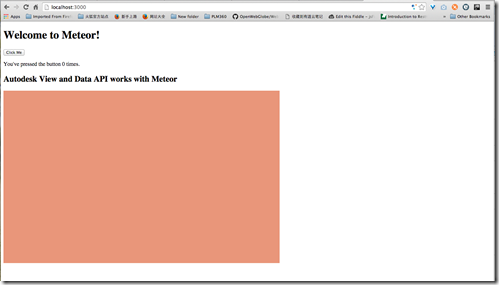
For example, here is my css class, make the viewer container with 800px * 500px, and to make it easy to see, I also add a background color:
.viewer {

    background-color: darksalmon;

    height: 500px;

    width: 800px;

  }
.csharpcode, .csharpcode pre
{
font-size: small;
color: black;
font-family: consolas, "Courier New", courier, monospace;
background-color: #ffffff;
/*white-space: pre;*/
}
.csharpcode pre { margin: 0em; }
.csharpcode .rem { color: #008000; }
.csharpcode .kwrd { color: #0000ff; }
.csharpcode .str { color: #006080; }
.csharpcode .op { color: #0000c0; }
.csharpcode .preproc { color: #cc6633; }
.csharpcode .asp { background-color: #ffff00; }
.csharpcode .html { color: #800000; }
.csharpcode .attr { color: #ff0000; }
.csharpcode .alt
{
background-color: #f4f4f4;
width: 100%;
margin: 0em;
}
.csharpcode .lnum { color: #606060; }
Here is how it looks like, seems good:
Now let’s add viewer, the code snippet is simple, you can go to github for complete code:
        var viewerContainer = document.getElementById(containerId);

        var viewer = new Autodesk.Viewing.Private.GuiViewer3D(

            viewerContainer);
.csharpcode, .csharpcode pre
{
font-size: small;
color: black;
font-family: consolas, "Courier New", courier, monospace;
background-color: #ffffff;
/*white-space: pre;*/
}
.csharpcode pre { margin: 0em; }
.csharpcode .rem { color: #008000; }
.csharpcode .kwrd { color: #0000ff; }
.csharpcode .str { color: #006080; }
.csharpcode .op { color: #0000c0; }
.csharpcode .preproc { color: #cc6633; }
.csharpcode .asp { background-color: #ffff00; }
.csharpcode .html { color: #800000; }
.csharpcode .attr { color: #ff0000; }
.csharpcode .alt
{
background-color: #f4f4f4;
width: 100%;
margin: 0em;
}
.csharpcode .lnum { color: #606060; }
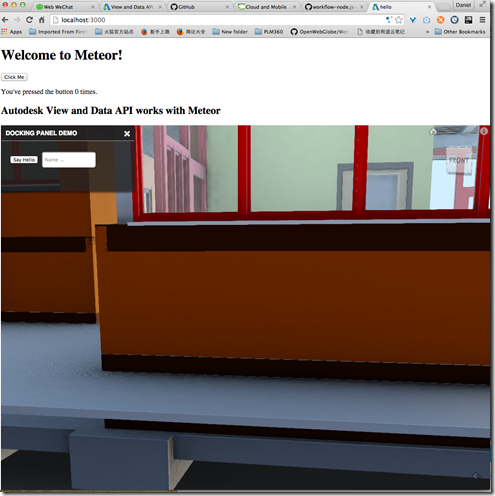
But just with this style, the viewer is “overflow” out of the <div> container,:
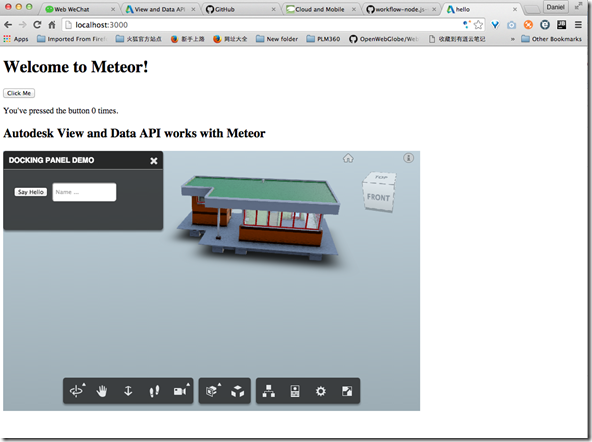
Here is a tip to contains the viewer into the <div> container, just edit the CSS as below, add “position : relative” :
.viewer {

    background-color: darksalmon;

    height: 500px;

    width: 800px;

    position: relative;

}
.csharpcode, .csharpcode pre
{
font-size: small;
color: black;
font-family: consolas, "Courier New", courier, monospace;
background-color: #ffffff;
/*white-space: pre;*/
}
.csharpcode pre { margin: 0em; }
.csharpcode .rem { color: #008000; }
.csharpcode .kwrd { color: #0000ff; }
.csharpcode .str { color: #006080; }
.csharpcode .op { color: #0000c0; }
.csharpcode .preproc { color: #cc6633; }
.csharpcode .asp { background-color: #ffff00; }
.csharpcode .html { color: #800000; }
.csharpcode .attr { color: #ff0000; }
.csharpcode .alt
{
background-color: #f4f4f4;
width: 100%;
margin: 0em;
}
.csharpcode .lnum { color: #606060; }
Here is how it looks after the change, the viewer is constrained within the div tag:
Not a big deal, just a small tip in case you do not know.
View and Data API Tips: Constrain Viewer Within a div Container的更多相关文章
- View and Data API Tips: Hide elements in viewer completely
By Daniel Du With View and Data API, you can hide some elements in viewer by calling "viewer.hi ...
- View and Data API Tips: how to make viewer full screen
By Daniel Du If you have not heard of View and Data API, here is the idea, the View & Data API e ...
- View and Data API tips: 缓存Access Token
对于云API服务,常见的方式就是按照API调用次数收费,某些API调用也就有某些限制,比如在特定时间内只允许调用指定的次数以免造成滥用.虽然Autodesk的view and Data API目前还没 ...
- View and Data API Tips : Conversion between DbId and node
By Daniel Du In View and Data client side API, The assets in the Autodesk Viewer have an object tree ...
- Autodesk View and Data API二次开发学习指南
什么是View and Data API? 使用View and Data API,你可以轻松的在网页上显示大型三维模型或者二维图纸而不需要安装任何插件.通过View and Data API,你可以 ...
- Using View and Data API with Meteor
By Daniel Du I have been studying Meteor these days, and find that Meteor is really a mind-blowing f ...
- 使用AxisHelper帮助理解View and Data API中的坐标系统
大家使用View and Data API做三维模型开发,必然首先要理解View and Data API的坐标系统,即XYZ三个轴向分别是怎么定义的.Three.js里面提供了一个AxisHelpe ...
- 在View and Data API中更改指定元素的颜色
大家在使用View and Data API开发过程中,经常会用到的就是改变某些元素的颜色已区别显示.比如根据某些属性做不同颜色的专题显示,或者用不同颜色表示施工进度,或者只是简单的以颜色变化来提醒用 ...
- 特大喜讯,View and Data API 现在支持中文界面了
大家经常会问到,使用View and Data API怎么做界面的本地化,来显示中文,现在好消息来了,从v1.2.19起,View and Data API开始支持多国语言界面了.你需要制定版本号为v ...
随机推荐
- [转]ThinkPHP中实例化对象M()和D()的区别,select和find的区别
1.ThinkPHP中实例化对象M()和D()的区别 在实例化的过程中,经常使用D方法和M方法,这两个方法的区别在于M方法实例化模型无需用户为每个数据表定义模型类,如果D方法没有找到定义的模型类,则会 ...
- 使用Metrics.NET 构建 ASP.NET MVC 应用程序的性能指标
通常我们需要监测ASP.NET MVC 或 Web API 的应用程序的性能时,通常采用的是自定义性能计数器,性能计数器会引发无休止的运维问题(损坏的计数器.权限问题等).这篇文章向你介绍一个新的替代 ...
- Mac OS X 上编写 ASP.NET vNext (二) IDE配置
上一篇中介绍了如何在OS X上搭建.Net运行时.不过光有运行时还不够,还需要有一个好用的IDE,有了IDE的支持,OS X上的开发才称为可能. 和上篇类似,这里先列举出具体步骤,个人可以根据自己的情 ...
- .NET开发邮件发送功能的全面教程(含邮件组件源码)
今天,给大家分享的是如何在.NET平台中开发“邮件发送”功能.在网上搜的到的各种资料一般都介绍的比较简单,那今天我想比较细的整理介绍下: 1) 邮件基础理论知识 2) ...
- ASP.NET MVC Model验证(五)
ASP.NET MVC Model验证(五) 前言 上篇主要讲解ModelValidatorProvider 和ModelValidator两种类型的自定义实现, 然而在MVC框架中还给我们提供了其它 ...
- Cleaver快速制作网页PPT
原文首发链接:http://www.jeffjade.com/2015/10/15/2015-10-16-cleaver-make-ppt/ 写在开始之前 互联网时代,以浏览器作为入口,已经有越来越多 ...
- C#设计模式-访问者模式
一. 访问者(Vistor)模式 访问者模式是封装一些施加于某种数据结构之上的操作.一旦这些操作需要修改的话,接受这个操作的数据结构则可以保存不变.访问者模式适用于数据结构相对稳定的系统, 它把数据结 ...
- ES6 新特性
ECMAScript 6(以下简称ES6)是JavaScript语言的下一代标准.因为当前版本的ES6是在2015年发布的,所以又称ECMAScript 2015. 也就是说,ES6就是ES2015. ...
- python __globals__, __file__
Attribute Meaning __doc__ The function's documentationstring, or None ifunavailable; not inherited ...
- 用VB脚本批到导入字段到PowerDesigner
在PowerDesigner使用脚本批量导入excel中记录的表结构信息,由于需要通过powerdesigner逆向工程创建一些sybase IQ的表,由于是接口数据,只有excel表,手动导入太耗时 ...