
Cocos2dLua3.17.2集成FairyGUI之 lua绑定 (二)
上一章中将fairyGUI集成到C++工程,由于本人使用的是cocoslua,还需要将C++的绑定到lua中使用,本章记录一下过程,由于是过了一段时间,有些步骤忘记了,大概记录一下,诸位大大做个临时参考吧
1 打开\cocos2d-x-3.17.2\tools\tolua文件夹,创建一个py脚本,FairyGUIgenbindings.py.仿照genbingings.py写入代码:
 #!/usr/bin/python

 # This script is used to generate luabinding glue codes.

 # Android ndk version must be ndk-r9b.

 import sys

 import os, os.path

 import shutil

 import ConfigParser

 import subprocess

 import re

 from contextlib import contextmanager

 def _check_ndk_root_env():

     ''' Checking the environment NDK_ROOT, which will be used for building

     '''

     try:

         NDK_ROOT = os.environ['NDK_ROOT']

     except Exception:

         print "NDK_ROOT not defined. Please define NDK_ROOT in your environment."

         sys.exit(1)

     return NDK_ROOT

 def _check_python_bin_env():

     ''' Checking the environment PYTHON_BIN, which will be used for building

     '''

     try:

         PYTHON_BIN = os.environ['PYTHON_BIN']

     except Exception:

         print "PYTHON_BIN not defined, use current python."

         PYTHON_BIN = sys.executable

     return PYTHON_BIN

 class CmdError(Exception):

     pass

 @contextmanager

 def _pushd(newDir):

     previousDir = os.getcwd()

     os.chdir(newDir)

     yield

     os.chdir(previousDir)

 def _run_cmd(command):

     ret = subprocess.call(command, shell=True)

     if ret != 0:

         message = "Error running command"

         raise CmdError(message)

 def main():

     cur_platform= '??'

     llvm_path = '??'

     ndk_root = _check_ndk_root_env()

     # del the " in the path

     ndk_root = re.sub(r"\"", "", ndk_root)

     python_bin = _check_python_bin_env()

     platform = sys.platform

     if platform == 'win32':

         cur_platform = 'windows'

     elif platform == 'darwin':

         cur_platform = platform

     elif 'linux' in platform:

         cur_platform = 'linux'

     else:

         print 'Your platform is not supported!'

         sys.exit(1)

     x86_llvm_path = ""

     x64_llvm_path = os.path.abspath(os.path.join(ndk_root, 'toolchains/llvm/prebuilt', '%s-%s' % (cur_platform, 'x86_64')))

     if not os.path.exists(x64_llvm_path):

         x86_llvm_path = os.path.abspath(os.path.join(ndk_root, 'toolchains/llvm/prebuilt', '%s' % (cur_platform)))

     if not os.path.exists(x86_llvm_path):

         x86_llvm_path = os.path.abspath(os.path.join(ndk_root, 'toolchains/llvm/prebuilt', '%s-%s' % (cur_platform, 'x86')))

     if os.path.isdir(x64_llvm_path):

         llvm_path = x64_llvm_path

     elif os.path.isdir(x86_llvm_path):

         llvm_path = x86_llvm_path

     else:

         print 'llvm toolchain not found!'

         print 'path: %s or path: %s are not valid! ' % (x86_llvm_path, x64_llvm_path)

         sys.exit(1)

     x86_gcc_toolchain_path = ""

     x64_gcc_toolchain_path = os.path.abspath(os.path.join(ndk_root, 'toolchains/arm-linux-androideabi-4.9/prebuilt', '%s-%s' % (cur_platform, 'x86_64')))

     if not os.path.exists(x64_gcc_toolchain_path):

         x86_gcc_toolchain_path = os.path.abspath(os.path.join(ndk_root, 'toolchains/arm-linux-androideabi-4.9/prebuilt', '%s' % (cur_platform)))

     if not os.path.exists(x86_gcc_toolchain_path):

         x86_gcc_toolchain_path = os.path.abspath(os.path.join(ndk_root, 'toolchains/arm-linux-androideabi-4.9/prebuilt', '%s-%s' % (cur_platform, 'x86')))

     if os.path.isdir(x64_gcc_toolchain_path):

         gcc_toolchain_path = x64_gcc_toolchain_path

     elif os.path.isdir(x86_gcc_toolchain_path):

         gcc_toolchain_path = x86_gcc_toolchain_path

     else:

         print 'gcc toolchain not found!'

         print 'path: %s or path: %s are not valid! ' % (x64_gcc_toolchain_path, x86_gcc_toolchain_path)

         sys.exit(1)

     project_root = os.path.abspath(os.path.join(os.path.dirname(__file__), '..', '..'))

     cocos_root = os.path.abspath(os.path.join(project_root, ''))

     cxx_generator_root = os.path.abspath(os.path.join(project_root, 'tools/bindings-generator'))

     # save config to file

     config = ConfigParser.ConfigParser()

     config.set('DEFAULT', 'androidndkdir', ndk_root)

     config.set('DEFAULT', 'clangllvmdir', llvm_path)

     config.set('DEFAULT', 'gcc_toolchain_dir', gcc_toolchain_path)

     config.set('DEFAULT', 'cocosdir', cocos_root)

     config.set('DEFAULT', 'cxxgeneratordir', cxx_generator_root)

     config.set('DEFAULT', 'extra_flags', '')

     conf_ini_file = os.path.abspath(os.path.join(os.path.dirname(__file__), 'userconf.ini'))

     print 'generating userconf.ini...'

     with open(conf_ini_file, 'w') as configfile:

       config.write(configfile)

     # set proper environment variables

     if 'linux' in platform or platform == 'darwin':

         os.putenv('LD_LIBRARY_PATH', '%s/libclang' % cxx_generator_root)

     if platform == 'win32':

         path_env = os.environ['PATH']

         os.putenv('PATH', r'%s;%s\libclang;%s\tools\win32;' % (path_env, cxx_generator_root, cxx_generator_root))

     try:

         tolua_root = '%s/tools/tolua' % project_root

         output_dir = '%s/cocos/scripting/lua-bindings/auto' % project_root

         cmd_args = {

                     'cocos2dx_fairygui.ini' : ('cocos2dx_fairygui', 'lua_cocos2dx_fairygui_auto'), \

                     }

         target = 'lua'

         generator_py = '%s/generator.py' % cxx_generator_root

         for key in cmd_args.keys():

             args = cmd_args[key]

             cfg = '%s/%s' % (tolua_root, key)

             print 'Generating bindings for %s...' % (key[:-4])

             command = '%s %s %s -s %s -t %s -o %s -n %s' % (python_bin, generator_py, cfg, args[0], target, output_dir, args[1])

             _run_cmd(command)

         print '---------------------------------'

         print 'Generating lua bindings succeeds.'

         print '---------------------------------'

     except Exception as e:

         if e.__class__.__name__ == 'CmdError':

             print '---------------------------------'

             print 'Generating lua bindings fails.'

             print '---------------------------------'

             sys.exit(1)

         else:

             raise

 # -------------- main --------------

 if __name__ == '__main__':

     main()
新建cocos2dx_fairygui.ini文件写入代码
[cocos2dx_fairygui]

# the prefix to be added to the generated functions. You might or might not use this in your own

# templates

prefix = cocos2dx_fairygui

# create a target namespace (in javascript, this would create some code like the equiv. to `ns = ns || {}`)

# all classes will be embedded in that namespace

target_namespace = fgui

android_headers =

android_flags = -target armv7-none-linux-androideabi -D_LIBCPP_DISABLE_VISIBILITY_ANNOTATIONS -DANDROID -D__ANDROID_API__= -gcc-toolchain %(gcc_toolchain_dir)s --sysroot=%(androidndkdir)s/platforms/android-/arch-arm  -idirafter %(androidndkdir)s/sources/android/support/include -idirafter %(androidndkdir)s/sysroot/usr/include -idirafter %(androidndkdir)s/sysroot/usr/include/arm-linux-androideabi -idirafter %(clangllvmdir)s/lib64/clang/5.0/include -I%(androidndkdir)s/sources/cxx-stl/llvm-libc++/include

clang_headers =

clang_flags = -nostdinc -x c++ -std=c++ -fsigned-char -U__SSE__

cocos_headers = -I%(cocosdir)s -I%(cocosdir)s/cocos -I%(cocosdir)s/../libfairygui/Classes -I%(cocosdir)s/cocos/platform/android -I%(cocosdir)s/external

cocos_flags = -DANDROID

cxxgenerator_headers =

# extra arguments for clang

extra_arguments = %(android_headers)s %(clang_headers)s %(cxxgenerator_headers)s %(cocos_headers)s %(android_flags)s %(clang_flags)s %(cocos_flags)s %(extra_flags)s

# what headers to parse

headers = %(cocosdir)s/../libfairygui/Classes/FairyGUI.h %(cocosdir)s/../libfairygui/Classes/FairyGUIMacros.h

# what classes to produce code for. You can use regular expressions here. When testing the regular

# expression, it will be enclosed in "^$", like this: "^Menu*$".

classes = UIPackage GRoot GObject GComponent UIEventDispatcher GImage GMovieClip GTextField GRichTextField GTextInput GGraph GLoader GGroup GButton GComboBox GProgressBar GSlider GScrollBar GList Window PopupMenu UIObjectFactory GObjectPool DragDropManager FairyGUIMacros EventContext JoystickModule Transition GController ScrollPane InputEvent

# what should we skip? in the format ClassName::[function function]

# ClassName is a regular expression, but will be used like this: "^ClassName$" functions are also

# regular expressions, they will not be surrounded by "^$". If you want to skip a whole class, just

# add a single "*" as functions. See bellow for several examples. A special class name is "*", which

# will apply to all class names. This is a convenience wildcard to be able to skip similar named

# functions from all classe/s.

skip =

#skip = UIEventDispatcher::[^addEventListener$ ^removeEventListener$ ^hasEventListener$],

#    GObject::[^addClickListener$ removeClickListener getData],

#    GComponent::[^constructFromResource$],

#    Transition::[^play$ setup],

#    UIObjectFactory::[setPackageItemExtension],

#    GController::[setup],

#    EventContext::[getData]

rename_functions =

rename_classes =

# for all class names, should we remove something when registering in the target VM?

remove_prefix =

# classes for which there will be no "parent" lookup

classes_have_no_parents =

# base classes which will be skipped when their sub-classes found them.

base_classes_to_skip =

# classes that create no constructor

# Set is special and we will use a hand-written constructor

abstract_classes = ArmatureDataManager Manifest

# Determining whether to use script object(js object) to control the lifecycle of native(cpp) object or the other way around. Supported values are 'yes' or 'no'.

script_control_cpp = no
2修改cocos2d-x-3.17.2\tools\bindings-generator\targets\lua\conversions.yaml里的ns_map:下添加fairygui的命名空间"fairygui::": "fgui."
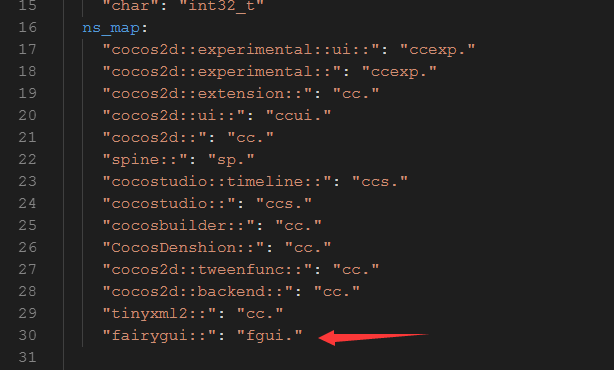
以及在中间to_native:和底部from_native:
 to_native:

"Margin": "ok &= luaval_to_margin(tolua_S, ${arg_idx}, &${out_value}, ${lua_namespaced_class_name}:${func_name})"
 from_native:

"Margin": "margin_to_luaval(tolua_S, ${in_value})"
2 命令行执行 FairyGUIgenbindings.py. 要用python2版本。执行后在cocos2d-x-3.17.2\cocos\scripting\lua-bindings\auto文件夹下会生成

两个文件。在C++工程中导入两个文件。
3 在lua_module_register中include头文件并注册
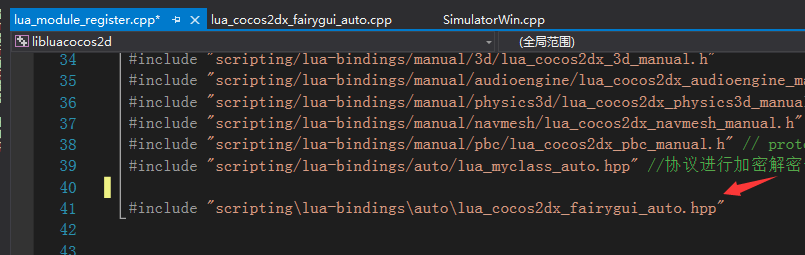
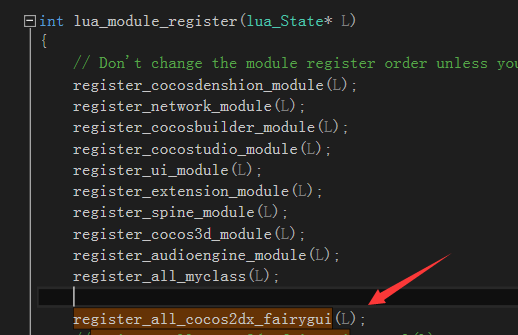
4,编译运行
5 成功截图
lua测试代码(直接用的fairy的demo资源)
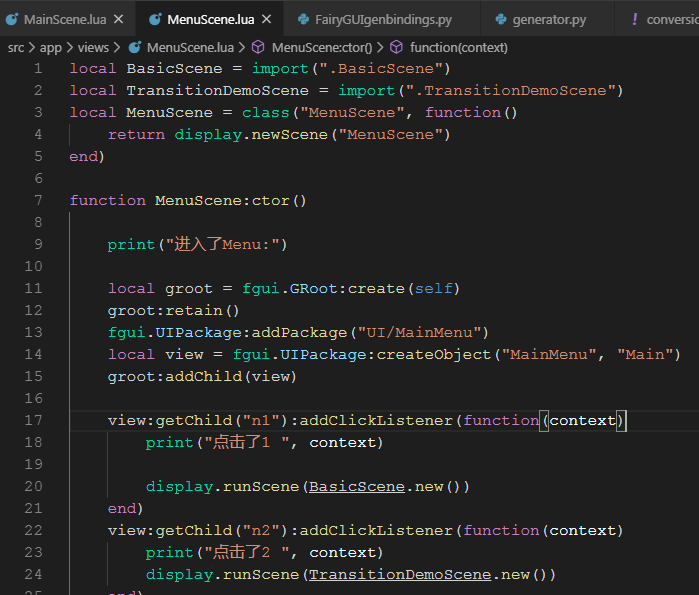

注释:过程中可能会遇到一些问题,由于我是好些天前集成的,遇到的一些问题都忘记截图了,以上只是大体的流程。
放上一点test的 lua 代码:
链接:https://pan.baidu.com/s/1MSzsX78rZKPV2TQrVWxsmg
提取码:nh5i
Cocos2dLua3.17.2集成FairyGUI之 lua绑定 (二)的更多相关文章
- Cocos2dLua3.17.2集成FairyGUI(一)
版本说明:使用cocos2d-lua3.17.2版本 FairyGUI下载好链接地址是:https://github.com/fairygui/FairyGUI-cocos2dx 首先创建cocos项 ...
- 开源基于lua gc管理c++对象的cocos2dx lua绑定方案
cocos2dx目前lua对应的c++对象的生命周期管理,是基于c++析构函数的,也就是生命周期可能存在不一致,比如c++对象已经释放,而lua对象还存在,如果这时候再使用,会有宕机的风险,为此我开发 ...
- cocos2d-x lua绑定解析
花了几天时间看了下cocos2d-x lua绑定那块,总算是基本搞明白了,下面分三部分解析lua绑定: 一.lua绑定主要用到的底层函数 lua绑定其本质就是有一个公用的lua_Stack来进行C和L ...
- cocos2dx的lua绑定
一.cocos2dx对tolua++绑定的修正 A.c对lua回调函数的引用 在使用cocos2dx编写游戏时,我们经常会设置一些回调函数(时钟.菜单选择等).如果采用脚本方式编写游戏的话,这些回调函 ...
- cocos2dx lua 绑定之二:手动绑定自定义类中的函数
cococs2dx 3.13.1 + vs2013 + win10 1.首先按照<cocos2dx lua 绑定之一:自动绑定自定义类>绑定Student类 2.在Student类中增加一 ...
- Cocos2d-x v3.3 lua绑定c++类方法总结
网上有很多cocos2d-x lua绑定c++类的接口教程,这篇文章也是总结他们的经验. 其中重点参考了 http://cn.cocos2d-x.org/tutorial/show?id=1295, ...
- 使用cocos2d脚本生成lua绑定
这几天要老大要求把DragonBones移到cocos2dx 3.0 里边,并且绑定lua使用接口.因为刚学lua,使用的引擎也刚从2.2改为3.0,各种不熟悉,折腾了好几天才弄完,有空了总结一下 这 ...
- cocos2dx lua 绑定之一:自动绑定自定义类中的函数
cococs2dx 3.13.1 + vs2013 + win10 1.首先定义C++类Student 在cocos2d-x\cocos文件夹下新建一个user_define的文件夹放置两个文件. 注 ...
- quick-cocos2d-x 创建自定义lua绑定c++类
内容主要参考 “在quick-cocos2d-x中添加自定义的类给lua使用” ( http://www.codeo4.cn/archives/746) 1. quick-coco2d-x 使用 to ...
随机推荐
- leetcode 1214 Two Sum BSTs
function rob(a, b, target) { var hash = {} var stack = [a] while (queue.length) { var node = stack.p ...
- 集成Log4Net到自己的Unity工程
需要使用的插件库说明: Loxodon Framework Log4NetVersion: 1.0.0© 2016, Clark Yang=============================== ...
- 普及C组第三题(8.10)
2301. [普及组T3或T4]线索 (File IO): input:assassin.in output:assassin.out 时间限制: 1000 ms 空间限制: 262144 KB 题 ...
- telnet不起作用
1.出现 'telnet' 不是内部或外部命令,也不是可运行的程序或批处理文件. 原因:因为本机的Telnet客户端默认是关闭的,所以我们要手动打开 解决方案:打开控制面板–>程序–>打开 ...
- numpy广播机制,取特定行、特定列的元素 的高级索引取法
numpy广播机制,取特定行.特定列的元素 的高级索引取法 enter description here enter description here
- 图的最短路径算法Dijkstra算法模板
Dijkstra算法:伪代码 //G为图,一般设为全局变量,数组d[u]为原点到达个点的额最短路径, s为起点 Dijkstra(G, d[u], s){ 初始化: for (循环n次){ u = 是 ...
- 题解 【洛谷P1035】[NOIP2002普及组]级数求和
[NOIP2002普及组]级数求和 这个题……用循环也是可以的,不过我写了两种循环的题解,供各位dalao参考!O(∩_∩)O谢谢! for循环版本: #include<bits/stdc++. ...
- 解决报错WARNING: IPv4 forwarding is disabled. Networking will not work.
报错: [root@localhost /]# docker run -it ubuntu /bin/bash WARNING: IPv4 forwarding is disabled. Networ ...
- 在同一个tomcat下部署多个springboot项目时,springboot项目无法正常启动的问题
这个问题是基于,不使用springboot内置的tomcat会产生(即使用自己的tomcat时). 今天在部署springboot项目的时候遇到了一个问题,怎么部署都访问不了,在网上查了很多原因,什么 ...
- 安装VMware Tools和设置屏幕
在虚拟机窗口的虚拟机-安装VMware Tools,点击安装,直到安装完成,出现以下界面 在主文件夹中新建VM文件夹,将VMware Tools中的VMwareTools-10.0.10-430167 ...