
android软件简约记账app开发day05-记账页面条目代码优化和bug解决
android软件简约记账app开发day05-记账页面条目代码优化和bug解决
今天还是因为该bug又极大的耽误了项目进程,该开发文档都要没有时间来写了。
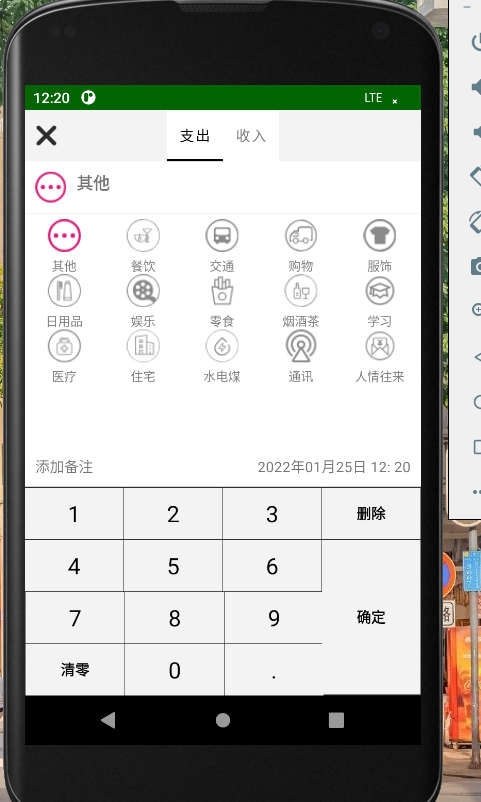
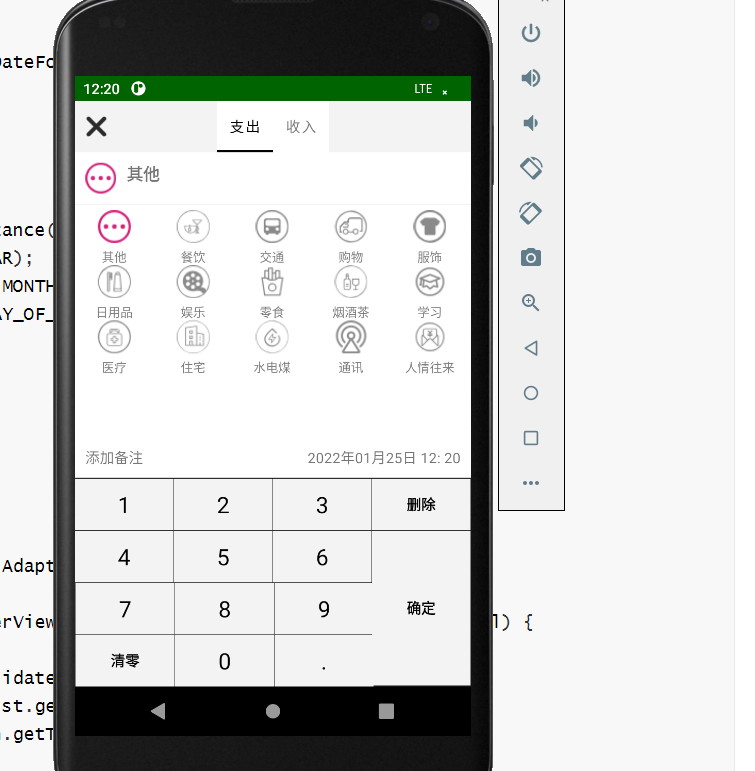
先说bug吧,在昨天已经实现了页面图标的展示,并且可以左右滑动来切换时支出还时收入页面,可就是在页面上部不显示支出和收入,这让我百思不得其解,翻看项目目录也不知道时那里的问题,我首先试了试Debug来看一下,我打了几个断点,可以当我点击那个晓聪子按钮时,他还让我下载什么东西,我心想我就调试一下,你就每一步就给我走不就完了,还要下载什么东西,真是无语,算了,还是下吧,可我这一点击download,这要下载的东西可多啊,愣是下了得有5分钟,当我下载完后,本以为点击debug按钮后该bug就能简简单单的解决时,知识砂纸擦屁股给我露了一手啊,这来来回回跳转的类得有百十来个,我点啊点,看呀看,是又点不玩,又看不到,来回挑战java类,也还不加载页面,我心想写个日志看看能打印出什么来不,可他就是出不来,什么也输出不了。
其次我就放弃了调试,选择从头梳理一下逻辑,既然能加载,说明记一笔可以点击,并且页面可以跳转,条目可以显示,说明从数据库角度来说没有问题,我相当于又从头看了一下所有昨天写的代码,终于我点进了写的适配器类RecordPagerAdapter我发现在我定义的String[] titles={"支出","收入"};竟然是灰的,这属实让我心头一紧,我立马就发现了
public CharSequence getPageTitle(int position) {

    return titles[position];

}
该类没改return,当然这是改过之后的,这、啊这、啊这这这、哎,我就无语,怎么能有我这么菜的人。
现在看着写起来也就四五百字,这可是四五个小时才发现的。。。。。。
接下来,让我来优化一下代码,稍微、简单的优化一下,把outcomefragment和incomefragment两个类的相同部分抽取一下,写成baserecordfragment类,在用两个类继承一下。
package com.open.tally.frag_record;
import android.inputmethodservice.Keyboard;
import android.inputmethodservice.KeyboardView;
import android.os.Bundle;
import androidx.annotation.Nullable;
import androidx.fragment.app.Fragment;
import android.text.TextUtils;
import android.view.LayoutInflater;
import android.view.View;
import android.view.ViewGroup;
import android.widget.AdapterView;
import android.widget.EditText;
import android.widget.GridView;
import android.widget.ImageView;
import android.widget.TextView;
import com.open.tally.R;
import com.open.tally.db.AccountBean;
import com.open.tally.db.DBManager;
import com.open.tally.db.TypeBean;
import com.open.tally.util.KeyBoardUtils;
import java.text.SimpleDateFormat;
import java.util.ArrayList;
import java.util.Calendar;
import java.util.Date;
import java.util.GregorianCalendar;
import java.util.List;
/**
* 记录页面的支出模块
*/
public class BaseRecordFragment extends Fragment {
KeyboardView keyboardView;
EditText moneyEt;
ImageView typeIv;
TextView typeTv, beizhuTv, timeTv;
GridView typeGv;
List<TypeBean> typeList;
TypeBaseAdapter adapter;
AccountBean accountBean;//保存到数据库中使用的封装类
@Override
public void onCreate(@Nullable Bundle savedInstanceState) {
super.onCreate(savedInstanceState);
accountBean=new AccountBean();
accountBean.setTypename("其他");
accountBean.setsImageId(R.mipmap.ic_qita_fs);
}
public BaseRecordFragment() {
// Required empty public constructor
}
@Override
public View onCreateView(LayoutInflater inflater, ViewGroup container,
Bundle savedInstanceState) {
// Inflate the layout for this fragment
View view = inflater.inflate(R.layout.fragment_outcome, container, false);
initView(view);
setInitTime();
loadDataToGV();
setGVListener();//设置每一项的gradeView的点击事件
return view;
}
/**
* 获取当前时间
*/
private void setInitTime(){
Date date=new Date();
SimpleDateFormat sdf = new SimpleDateFormat("yyyy年MM月dd日 HH: mm");
String time=sdf.format(date);
timeTv.setText(time);
accountBean.setTime(time);
Calendar calendar=Calendar.getInstance();
int year=calendar.get(Calendar.YEAR);
int month = calendar.get(Calendar.MONTH)+1;
int day = calendar.get(Calendar.DAY_OF_MONTH);
accountBean.setYear(year);
accountBean.setMonth(month);
accountBean.setDay(day);
}
/**
* 设置每一项的gradeView的点击事件
*/
private void setGVListener() {
typeGv.setOnItemClickListener(new AdapterView.OnItemClickListener() {
@Override
public void onItemClick(AdapterView<?> adapterView, View view, int i, long l) {
adapter.selectPos=i;
adapter.notifyDataSetInvalidated();
TypeBean typeBean = typeList.get(i);
String typename = typeBean.getTypename();
typeTv.setText(typename);
int simageId = typeBean.getSimageId();
typeIv.setImageResource(simageId);
accountBean.setsImageId(simageId);
accountBean.setTypename(typename);
}
});
}
/**
* 给GridView填充数据的方法
*/
private void loadDataToGV(){
typeList=new ArrayList<>();
adapter = new TypeBaseAdapter(getContext(), typeList);
typeGv.setAdapter(adapter);
//获取数据库当中数据源
List<TypeBean> outlist = DBManager.getTypeList(0);
typeList.addAll(outlist);
adapter.notifyDataSetChanged();
}
private void initView(View view) {
keyboardView = view.findViewById(R.id.frag_record_keyboard);
moneyEt = view.findViewById(R.id.frag_record_et_money);
typeIv = view.findViewById(R.id.frag_record_iv);
typeGv = view.findViewById(R.id.frag_record_gv);
typeTv = view.findViewById(R.id.frag_record_tv_type);
beizhuTv = view.findViewById(R.id.frag_record_tv_beizhu);
timeTv = view.findViewById(R.id.frag_record_tv_time);
//显示自定义软键盘
KeyBoardUtils keyBoardUtils = new KeyBoardUtils(keyboardView, moneyEt);
keyBoardUtils.showKeyboard();
//设置接口监听确定按钮被点击了
keyBoardUtils.setOnEnsureListener(new KeyBoardUtils.OnEnsureListener() {
@Override
public void onEnsure() {
//获取收入钱数
String moneyStr = moneyEt.getText().toString();
if (!TextUtils.isEmpty(moneyStr)||moneyStr.equals("0")){
getActivity().finish();
return;
}
float money=Float.parseFloat(moneyStr);
accountBean.setMoney(money);
//点击了确定按钮
//获取用户输入的信息
//返回上一级界面
getActivity().finish();
}
});
}
}最后写了一个账单类来存储用户打算存的账单信息。
package com.open.tally.db;
/**
* 将数据插入到数据库的封装类
*/
public class AccountBean {
int id;
String typename;
int sImageId;
String beizhu;
float money;
String time;
int year;
int month;
int day;
int kind;//收入1,支出0
public AccountBean() {
}
public AccountBean(int id, String typename, int sImageId, String beizhu, float money, String time, int year, int month, int day, int kind) {
this.id = id;
this.typename = typename;
this.sImageId = sImageId;
this.beizhu = beizhu;
this.money = money;
this.time = time;
this.year = year;
this.month = month;
this.day = day;
this.kind = kind;
}
public int getId() {
return id;
}
public void setId(int id) {
this.id = id;
}
public String getTypename() {
return typename;
}
public void setTypename(String typename) {
this.typename = typename;
}
public int getsImageId() {
return sImageId;
}
public void setsImageId(int sImageId) {
this.sImageId = sImageId;
}
public String getBeizhu() {
return beizhu;
}
public void setBeizhu(String beizhu) {
this.beizhu = beizhu;
}
public float getMoney() {
return money;
}
public void setMoney(float money) {
this.money = money;
}
public String getTime() {
return time;
}
public void setTime(String time) {
this.time = time;
}
public int getYear() {
return year;
}
public void setYear(int year) {
this.year = year;
}
public int getMonth() {
return month;
}
public void setMonth(int month) {
this.month = month;
}
public int getDay() {
return day;
}
public void setDay(int day) {
this.day = day;
}
public int getKind() {
return kind;
}
public void setKind(int kind) {
this.kind = kind;
}
}
好了明天再见把,呜呜呜~~~~~
android软件简约记账app开发day05-记账页面条目代码优化和bug解决的更多相关文章
- android软件简约记账app开发day08-时间对话框的书写+改bug,改bug
android软件简约记账app开发day08-时间对话框的书写+改bug,改bug 绘制对话跨页面 在添加记账信息功能中,我提供了用户添加备注添加事件的功能,设计是点击时间会弹出一个时间对话框供用户 ...
- android软件简约记账app开发day06-将记账条目添加到数据库并且绘制备注页面
android软件简约记账app开发day06-将记账条目添加到数据库并且绘制备注页面 首先写添加到数据库 在DBOpenHelper中添加创建记账表的语句 //创建记账表 sql = "c ...
- android软件简约记账app开发day10-主页面模块--头信息的展示,和之后功能完善的目标。
android软件简约记账app开发day10-主页面模块--头信息的展示,和之后功能完善的目标. 今天来写主界面头信息的展示,也就是将第一天的写的layout中的item_main_top展示到主界 ...
- android软件简约记账app开发day09-主页面模块,收支记账信息的展示
android软件简约记账app开发day09-主页面模块,收支记账信息的展示 我们第一天已经绘制了记账条目的界面,也在主界面设置了LietView来展示记账条目,今天来实现记账后再主界面的展示效果 ...
- android软件简约记账app开发day07-备注界面完善
android软件简约记账app开发day07-备注界面完善 ## 昨天我们已经绘制了备注页面,今天来用Java代码组装完善一下. 首先我们新建BeiZhuDialog类关联备注页面,并且实现点击接口 ...
- android软件简约记账app开发day04-记账页面条目的代码书写
android软件简约记账app开发day04-记账页面条目的代码书写 在前三天我们完成了基本的界面展示,从今天开始,我们进入到后台逻辑代码的编写中,今天开发记账条目的代码 我们在主页面点击记一笔图标 ...
- android软件简约记账app开发day03-自定义键盘的书写
android软件简约记账app开发day03-自定义键盘的书写 我们在fragment界面使用了自定义的keybroad键盘,所以今天我们来书写自定义的键盘代码 新建util包,新建keyboard ...
- android软件简约记账app开发day02-收入支出明细页面绘制
android软件简约记账app开发day02-收入支出明细页面绘制 效果图 列表界面绘制 新建layout文件-item_mainlv.xml大体使用绝对布局,嵌套相对布局,嵌套文本内容实现 < ...
- android软件简约记账app开发day01-今日收支明细的界面绘制
android软件简约记账app开发day01-今日收支明细的界面绘制 导入素材 导入在阿里iconfront图标库下载的字体图标分为大小两种,分别导入到项目目录mipmap-hdpi和mipmap- ...
随机推荐
- 切换阿里巴巴开源镜像站镜像——Kali镜像
参考链接: 阿里巴巴开源镜像站 镜像切换参考链接:阿里云Kali镜像源 安装Kali Linux系统参考链接:使用VMware虚拟机安装kali Linux 一.打开终端命令窗口 二.进入source ...
- ansible 五 playbooks剧本使用
一.Playbook 简介 Playbooks与Ad-Hoc相比,是一种完全不同的运用Ansible的方式,而且是非常之强大的:也是系统ansible命令的集合,其利用yaml语言编写,运行过程,an ...
- python发送邮件之宝藏库yagmail
之前使用email模块+smtplib模块发送邮件,虽然可以实现功能,但过程比较繁琐,今天发现一个宝藏库(yagmail),可以说是炒鸡好用啦!!! 贴上实现代码,大家细品 yagmail安装 pip ...
- java+eclipse安装及配置
一.JDK安装 0x00 下载JDK 首先我们需要下载java开发工具包JDK 下载地址:https://www.oracle.com/technetwork/java/javase/download ...
- VUE开发--环境配置(一)(转)
无剑_君关注 0.312019.05.09 11:53:43字数 1,073阅读 19,627 https://www.jianshu.com/p/a494417def99?utm_so ...
- java的jsr303校验
因为是菜鸡,所以就还没有具体了解jsr303具体是什么 JSR是Java Specification Requests的缩写,意思是Java 规范提案.是指向JCP(Java Community Pr ...
- Redis 的同步机制了解么?
Redis 可以使用主从同步,从从同步.第一次同步时,主节点做一次 bgsave, 并同时将后续修改操作记录到内存 buffer,待完成后将 rdb 文件全量同步到复制 节点,复制节点接受完成后将 r ...
- 学习heartbeat-05 实现web服务高可用
一.环境介绍 说明:所有案例在虚拟机(VMware)上完成 操作系统:centos 6.5 64bit 高可用软件:heartbeat 3.0.4 Web应用服务器:apache httpd 2.2. ...
- Python学习--21天Python基础学习之旅(Day08-Day21)
Day08: Chapter 11 异常 1.1如果try代码块中代码运行没有问题,则运行时跳过except代码块.(有异常时执行except中的代码,没有异常则跳过except中的代码) try-e ...
- Altium design使用日常故障总结
1.altiumdesigner09如何将不同的板子拼在一起发给工厂?打开这两个图,其中一个图ctrl+a,ctrl+c,打开另一个图pastespecial.放置时选取一边对齐.制版时告诉厂家做个V ...