
QtGui.QPen
The QtGui.QPen is an elementary graphics object. It is used to draw lines, curves and outlines of rectangles, ellipses, polygons, or other shapes.
#!/usr/bin/python

# -*- coding: utf-8 -*-

"""

ZetCode PyQt4 tutorial

In this example we draw 6 lines using

different pen styles.

author: Jan Bodnar

website: zetcode.com

last edited: September 2011

"""

import sys

from PyQt4 import QtGui, QtCore

class Example(QtGui.QWidget):

    def __init__(self):

        super(Example, self).__init__()

        self.initUI()

    def initUI(self):

        self.setGeometry(300, 300, 280, 270)

        self.setWindowTitle('Pen styles')

        self.show()

    def paintEvent(self, e):

        qp = QtGui.QPainter()

        qp.begin(self)

        self.drawLines(qp)

        qp.end()

    def drawLines(self, qp):

        pen = QtGui.QPen(QtCore.Qt.black, 2, QtCore.Qt.SolidLine)

        qp.setPen(pen)

        qp.drawLine(20, 40, 250, 40)

        pen.setStyle(QtCore.Qt.DashLine)

        qp.setPen(pen)

        qp.drawLine(20, 80, 250, 80)

        pen.setStyle(QtCore.Qt.DashDotLine)

        qp.setPen(pen)

        qp.drawLine(20, 120, 250, 120)

        pen.setStyle(QtCore.Qt.DotLine)

        qp.setPen(pen)

        qp.drawLine(20, 160, 250, 160)

        pen.setStyle(QtCore.Qt.DashDotDotLine)

        qp.setPen(pen)

        qp.drawLine(20, 200, 250, 200)

        pen.setStyle(QtCore.Qt.CustomDashLine)

        pen.setDashPattern([1, 4, 5, 4])

        qp.setPen(pen)

        qp.drawLine(20, 240, 250, 240)

def main():

    app = QtGui.QApplication(sys.argv)

    ex = Example()

    sys.exit(app.exec_())

if __name__ == '__main__':

    main()
In our example, we draw six lines. The lines are drawn in six different pen styles. There are five predefined pen styles. We can create also custom pen styles. The last line is drawn using a custom pen style.
pen = QtGui.QPen(QtCore.Qt.black, 2, QtCore.Qt.SolidLine)
We create a QtGui.QPen object. The colour is black. The width is set to 2 pixels so that we can see the differences between the pen styles. The QtCore.Qt.SolidLine is one of the predefined pen styles.
pen.setStyle(QtCore.Qt.CustomDashLine)

pen.setDashPattern([1, 4, 5, 4])

qp.setPen(pen)
Here we define a custom pen style. We set a QtCore.Qt.CustomDashLine pen style and call thesetDashPattern() method. The list of numbers defines a style. There must be an even number of numbers. Odd numbers define a dash, even numbers space. The greater the number, the greater the space or the dash. Our pattern is 1px dash, 4px space, 5px dash, 4px space etc.
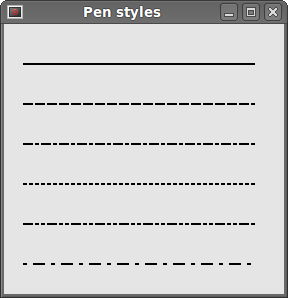 Figure: Pen styles
QtGui.QPen的更多相关文章
- 用 eric6 与 PyQt5 实现python的极速GUI编程(系列03)---- Drawing(绘图)(3)-- 画线
[概览] 本文实现如下的程序:(在窗体中绘画出各种不同风格的线条) 主要步骤如下: 1.在eric6中新建项目,新建窗体 2.(自动打开)进入PyQt5 Desinger,编辑图形界面,保存 3.回到 ...
- ZetCode PyQt4 tutorial custom widget
#!/usr/bin/python # -*- coding: utf-8 -*- """ ZetCode PyQt4 tutorial In this example, ...
- ZetCode PyQt4 tutorial basic painting
#!/usr/bin/python # -*- coding: utf-8 -*- """ ZetCode PyQt4 tutorial In this example, ...
- Burning widget
This is a widget that we can see in Nero, K3B, or other CD/DVD burning software. #!/usr/bin/python # ...
- Python游戏引擎开发(七):绘制矢量图
今天来完毕绘制矢量图形. 没有读过前几章的同学,请先阅读前几章: Python游戏引擎开发(一):序 Python游戏引擎开发(二):创建窗体以及重绘界面 Python游戏引擎开发(三):显示图片 P ...
- 读Pyqt4教程,带你入门Pyqt4 _013
你是否曾经看着应用程序并思考特定的GUI项是如何产生的?大概每位程序员都这样过.然后你能看到你喜欢的GUI库提供的一系列窗口组件,但是你无法找到它.工具包通常仅仅提供最常用的窗口组件,比如按钮.文本组 ...
- 读Pyqt4教程,带你入门Pyqt4 _012
颜色 颜色是指一个代表红(Red).绿(Green).蓝(Blue)(RGB)强度值组合的对象,有效的RGB值在0~255之间.我们可以用多种方式定义颜色,最常用的是RGB十进制或者十六进制值.也可以 ...
- 100行Python代码实现一款高精度免费OCR工具
近期Github开源了一款基于Python开发.名为 Textshot 的截图工具,刚开源不到半个月已经500+Star. 很多人学习python,不知道从何学起.很多人学习python,掌握了基本语 ...
- 第15.47节、PyQt显示部件:QGraphicsView图形视图和QGraphicsScene图形场景简介及应用案例
专栏:Python基础教程目录 专栏:使用PyQt开发图形界面Python应用 专栏:PyQt入门学习 老猿Python博文目录 老猿学5G博文目录 一.概述 Designer中的Graphics V ...
随机推荐
- Ubuntu系统安装网易云音乐、搜狗输入法
这两个软件都很良心,提供了Ubuntu版本,直接下载安装即可. 网易云音乐: 下载-打开-安装 http://music.163.com/#/download 搜狗拼音输入法 下载-打开-安装 htt ...
- 51Nod1140 矩阵相乘的结果
随机化算法. A*B==C那么X*A*B==X*C 降到了n*n复杂度. 多次随机X判断即可. By:大奕哥 #include<bits/stdc++.h> using namespace ...
- [BZOJ5028]小Z的加油店
[BZOJ5028]小Z的加油店 题目大意: 一个长度为\(n(n\le10^5)\)的数列,\(m(m\le10^5)\)次操作,支持区间加和区间\(\gcd\). 思路: 线段树维护差分,\(\g ...
- fpdf中文乱码,添加字符集
中文乱码 引入Olivier的chinese.php(点击下载) 支持中文,其中有Big5,GB两种 使用方法也很简单 $pdf->AddBig5Font(); $pdf->SetFont ...
- 11.m进制转十进制
Strlen是字符串有多长就是多长,包括所有的元素和\0这个结束符 题目描述 Description 将m进制数n转化成一个十进制数 m<=16 题目保证转换后的十进制数<=100 输入描 ...
- JVM堆设置及调优
1.JVM堆设置 -Xmx3550m 设置JVM最大堆内存 为3550M. -Xms3550m 设置JVM初始堆内存 为3550M.此值可以设置与-Xmx相同,以避免每次垃圾回收完成后JVM重新分配内 ...
- ExifInterface针对照片的使用
ExifInterface是保存照片信息的,那么我们在有需要的时候就可以通过这类,来获取照片的一些数码参数来做适当来逻辑处理,比较典型的案例就是android有的机型拍照或者选择照片后,照片可能会被旋 ...
- HDU 1171 Big Event in HDU (多重背包变形)
Big Event in HDU Time Limit: 10000/5000 MS (Java/Others) Memory Limit: 65536/32768 K (Java/Others ...
- 谈谈SQL server的 worker threads-----微软亚太区数据库技术支持组 官方博客
https://blogs.msdn.microsoft.com/apgcdsd/2012/11/27/sql-server-worker-threads/
- sublime在高分辨率屏幕下,左侧边栏字体问题
因为新的笔记本是1920*1080分辨率的屏幕,在打开sublime的时候,侧边栏的文件夹名字会变得很小,虽然很清晰,但是太小了看起来很吃力, 如下图所示 网上找了很多的方法试了好久没有成功,一天闲下 ...