
http响应报文,如果响应的内容比较大,客户端怎么样判断接收完了呢?
1. http协议有正文大小说明的
content-length
2. 或者分块传输chunked的话 读到0\r\n\r\n 就是读完了
-----------------------------------------------------------------------------------------------
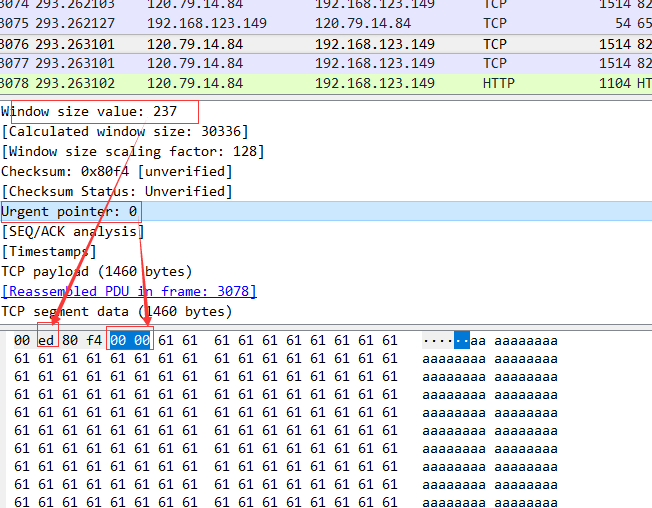
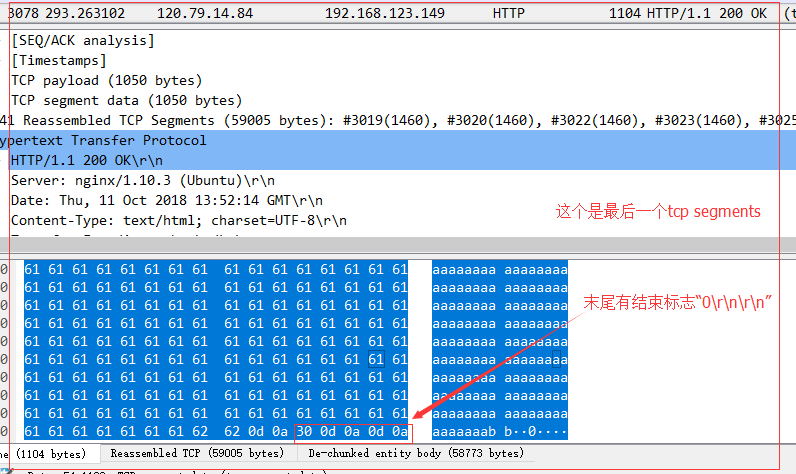
http响应内容比较大的话,会分成多个tcp segment 发送,不是最后一个segment的话, tcp的payload不会有http header字段,
如果是最后一个tcp segment 的话,就会有http header 字段,同时, 数据的最后会有 "0\r\n\r\n" 这个东西,这个东西就表示数据都发送完了。
如果是最后一个tcp segment 的话,就会有http header 字段,同时, 数据的最后会有 "0\r\n\r\n" 这个东西,这个东西就表示数据都发送完了。
https://osqa-ask.wireshark.org/questions/7268/http-continuation-vs-tcp-segment
|
2
|
In fact there are at least three different issues with reassembling considered chunked HTTP transfer encoding and you must check your preferences very carefully, especially if you are dealing with 'endless' server connection sending chunks of messages. First, the application-level protocol packet, such as HTTP request may fit in single TCP segment, and may not. If the HTTP header is big enough to be split in segments (that's a rare issue, but happens if site is sending lots of cookies and optional X-headers), then you will see two or more packets in the wireshark capture, period. The same can happen to HTTP response headers and mostly it does happen to HTTP request/response bodies. Sometimes applications just do send HTTP headers in single TCP segment and HTTP body in next one. But please note, that those segments have nothing in common with chunks, when chunked Transfer-Encoding is used, because that encoding is application level and TCP is the transport level of the OSI model. So, even your single "chunk" can span multiple segments. But that's not the whole story. Single TCP segment can either fit in ethernet frame (PDU), but can be split as well. Most of the time this does not happen, but for some badly configured Windows machines the maximum size of TCP frame is bigger then usual maximum of Ethernet switches can handle. To add more fun, transport-level packets must be ACK'ed by the endpoint, and sometimes ACK is set within next TCP data packet, and sometimes it is sent separately, while still on the same HTTP port. So, if you try to analyse Web application traffic on TCP level, you'll get a loads of useless sh#t most of the time. That's why you should use filters. To help upper-level protocols collect and filter information, the wireshark dissectors have notion of 'reassembling', where higher-level dissector returns special code meaning 'hey, I need more data to properly dissect this packet' and then processing is restarted when more data arrives. If you turn off ALL reassembling options for TCP and HTTP (and SSL) protocols, then you'll see the naked packets as they are on the wire. You'll notice that 'Continuation of HTTP traffic' message in Info column when packet is with data, but neither HTTP request nor HTTP response header found within it. And all packets without data will be tagged as plain TCP in Protocol column. Mostly that's about ACKs, SYNs and FINs, so you can filter them out. If you allow TCP to reassemble streams, but leave other options unchecked - the picture won't change much, because upper level protocols won't request reassembling. If you allow HTTP to request reassembling the headers spanning multiple segments and bodies then you can already do filtering by application protocol means. E.g. enter 'http' in the Display filter and you'll can forget about all [reassembled PDU] infos - they all be marked as being 'TCP' protocol. Now the dangled part - reassembling application-level chunks. If you analyse protocol that depends upon sending data in chunks, e.g. AJAX chat over HTTP, I'd suggest leaving that option unchecked. Because reassembling stops when you receive the chunk with '0' size, which in your case you would never. However, if your application does encode HTTP bodies with gzip, and use chunked encoding just to send it in streamlined version, you'd better check option of chunk reassembling, otherwise ungzipping will fail. That was quite a lot of text above, but hope now everything is clear for you. Also, if you want more advanced filtering options for HTTP responses, you may find it useful to install following Lua script : Assocating HTTP responses to requests in Wireshark. Should you have any questions about it, feel free to ask. |
http响应报文,如果响应的内容比较大,客户端怎么样判断接收完了呢?的更多相关文章
- 重温Http协议--请求报文和响应报文
http协议是位于应用层的协议,我们在日常浏览网页比如在导航网站请求百度首页的时候,会先通过http协议把请求做一个类似于编码的工作,发送给百度的服务器,然后在百度服务器响应请求时把相应的内容再通过h ...
- HTTP 请求报文 响应报文
引言 超文本传输协议(HTTP,HyperText Transfer Protocol)是互联网上应用最为广泛的一种网络协议.所有的WWW文件都必须遵守这个标准.设计HTTP最初的目的是为了提供一种发 ...
- HTTP请求报文和HTTP响应报文
HTTP报文是面向文本的,报文中的每一个字段都是一些ASCII码串,各个字段的长度是不确定的.HTTP有两类报文:请求报文和响应报文. HTTP请求报文 一个HTTP请求报文由请求行(request ...
- HTTP请求报文和HTTP响应报文(转)
原文地址:http://blog.csdn.net/zhangliang_571/article/details/23508953 HTTP报文是面向文本的,报文中的每一个字段都是一些ASCII码串, ...
- HTTP响应报文与工作原理详解
超文本传输协议(Hypertext Transfer Protocol,简称HTTP)是应用层协议.HTTP 是一种请求/响应式的协议,即一个客户端与服务器建立连接后,向服务器发送一个请求;服务器接到 ...
- 关于HTTP请求报文和响应报文学习笔记
超文本传输协议(Hypertext Transfer Protocol,简称HTTP)是应用层的一种通信协议.它是一种请求/响应式的协议,即一个客户端与服务器建立连接后,向服务器发送一个请求;服务器接 ...
- Http请求和响应报文基础知识
一 HTTP请求报文(http://en.wikipedia.org/wiki/List_of_HTTP_header_fields) 请求报文由三部分组成:请求行,请求头和请求体. 请求行:请求方法 ...
- HTTP 请求报文 响应报文(转)
引言 超文本传输协议(HTTP,HyperText Transfer Protocol)是互联网上应用最为广泛的一种网络协议.所有的WWW文件都必须遵守这个标准.设计HTTP最初的目的是为了提供一种发 ...
- 【转】HTTP响应报文与工作原理详解
超文本传输协议(Hypertext Transfer Protocol,简称HTTP)是应用层协议.HTTP 是一种请求/响应式的协议,即一个客户端与服务器建立连接后,向服务器发送一个请求;服务器接到 ...
随机推荐
- Java多线程编程——volatile关键字
(本篇主要内容摘自<Java多线程编程核心技术>) volatile关键字的主要作用是保证线程之间变量的可见性. package com.func; public class RunThr ...
- Hibernate fetching strategies(抓取策略)
抓取策略(fetching strategies)是指:当应用程序需要在(Hibernate实体对象图的)关联关系间进行导航的时候,Hibernate如何获取关联对象的策略.抓取策略可以在O/R映射的 ...
- JMS介绍:我对JMS的理解和认识
[ZT]JMS介绍:我对JMS的理解和认识 转自:http://blog.csdn.net/KimmKing/archive/2011/06/30/6577021.aspx,感谢作者KimmKing ...
- 【tarjan+拓扑】BZOJ3887-[Usaco2015 Jan]Grass Cownoisseur
[题目大意] 给一个有向图,然后选一条路径起点终点都为1的路径出来,有一次机会可以沿某条边逆方向走,问最多有多少个点可以被经过?(一个点在路径中无论出现多少正整数次对答案的贡献均为1) [思路] 首先 ...
- django自定义分页控件
1.准备数据 在models创建测试表 from django.db import models class Host(models.Model): hostname = models.CharFie ...
- bzoj 2809: [Apio2012]dispatching -- 可并堆
2809: [Apio2012]dispatching Time Limit: 10 Sec Memory Limit: 128 MB Description 在一个忍者的帮派里,一些忍者们被选中派 ...
- [原]Android Studio使用极光推送出现at cn.jpush.android.service.ServiceInterface.a(Unknown Source) 已解决
- Codeforces Round #301 (Div. 2) B. School Marks 构造/贪心
B. School Marks Time Limit: 1 Sec Memory Limit: 256 MB 题目连接 http://codeforces.com/contest/540/probl ...
- 一步一步创建JAVA线程
(一)创建线程 要想明白线程机制,我们先从一些基本内容的概念下手. 线程和进程是两个完全不同的概念,进程是运行在自己的地址空间内的自包容的程序,而线程是在进程中的一个单一的顺序控制流,因此,单个进程可 ...
- 2013新mac air直接安装windowns系统无法下一步 键盘鼠标失灵 无法新建分区提示gpt分区解决方案
今天同学拿来了2013款MacbookAir,叫我帮忙装一个Win7系统,保留原来的Mac系统,于是开工.按照教程,准备一个8g的U盘,先进入Air自带的Mac系统(俗称”小牛”),将Win7旗舰版6 ...