
WPF教程:附加属性
一、附加属性的特点
1、特殊的依赖属性
2、用于非定义该属性的类 例如Grid面板的RowDefinition、ColumnDefinition、Canvas面板的Left、Right
DockPanel面板的Dock都是附加属性。
二、附加属性的定义
1、声明数据属性变量。 public static 的DependencyProperty类型的变量。
2、在属性系统中进行注册,使用DependencyProperty.RegisterAttached()方法来注册,方法参数和注册依赖属性时Register()方法的参数一致。
3、调用静态方法设置和获取属性值。通过调用DependencyObject的SetValue()和GetValue()方法来设置和获取属性的值。
两个方法应该命名为SetPropertyName()方法和GetPropertyName()方法。
三、示例演示附加属性
实现的功能,窗体字体的大小随TextBox控件里面输入的值的大小而改变。
1、新建WPF版的用户控件,命名为“MyDependencyProperty”,在用户控件里面添加TextBox和TextBlock控件
XAML代码:
 <UserControl x:Class="WPFDependencyProperty.MyDependencyProperty"

              xmlns="http://schemas.microsoft.com/winfx/2006/xaml/presentation"

              xmlns:x="http://schemas.microsoft.com/winfx/2006/xaml"

              xmlns:mc="http://schemas.openxmlformats.org/markup-compatibility/2006"

              xmlns:d="http://schemas.microsoft.com/expression/blend/2008"

              xmlns:p="clr-namespace:WPFDependencyProperty"

              mc:Ignorable="d"

              d:DesignHeight="" d:DesignWidth="">

     <Grid>

         <StackPanel>

             <TextBox p:MyDependencyProperty.MyAttachedFontSize="{Binding Path=Text,

                 RelativeSource={RelativeSource Mode=Self}}" ></TextBox>

             <TextBlock>通过附加属性修改FontSize的大小</TextBlock>

         </StackPanel>

     </Grid>

 </UserControl>
设计界面:
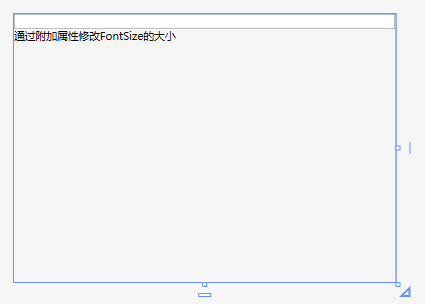
2、、在MyDependencyProperty.xaml.cs文件里面添加附件属性,附件属性的名称为MyAttachedFontSize,使用快捷方式创建附件属性:输入propa,连续按两下Tab健。
 using System;

 using System.Collections.Generic;

 using System.Linq;

 using System.Text;

 using System.Threading.Tasks;

 using System.Windows;

 using System.Windows.Controls;

 using System.Windows.Data;

 using System.Windows.Documents;

 using System.Windows.Input;

 using System.Windows.Media;

 using System.Windows.Media.Imaging;

 using System.Windows.Navigation;

 using System.Windows.Shapes;

 namespace WPFDependencyProperty

 {

     /// <summary>

     /// MyDependencyProperty.xaml 的交互逻辑

     /// </summary>

     public partial class MyDependencyProperty : UserControl

     {

         public MyDependencyProperty()

         {

             InitializeComponent();

         }

         public static int GetMyAttachedFontSize(DependencyObject obj)

         {

             return (int)obj.GetValue(MyAttachedFontSizeProperty);

         }

         public static void SetMyAttachedFontSize(DependencyObject obj, int value)

         {

             obj.SetValue(MyAttachedFontSizeProperty, value);

         }

         // Using a DependencyProperty as the backing store for MyAttachedFontSize.  This enables animation, styling, binding, etc...

         public static readonly DependencyProperty MyAttachedFontSizeProperty =

             DependencyProperty.RegisterAttached("MyAttachedFontSize", typeof(int), typeof(MyDependencyProperty),

             new PropertyMetadata((s, e) =>

             {

                 //获取MyDependencyProperty用户控件,s代表Textbox,

                 //MyDependencyProperty用户控件是TextBox的父级的父级的父级控件

                 var mdp = (((s as FrameworkElement).Parent as FrameworkElement).Parent

                     as FrameworkElement).Parent as MyDependencyProperty;

                 //更改用户控件的FontSize的值

                 if (mdp != null && e.NewValue != null)

                 {

                     var fontsize = ;

                     int.TryParse(e.NewValue.ToString(), out fontsize);

                     mdp.FontSize = fontsize;

                 }

             }));

     }

 }
3、在主界面测试附件属性
 <Window x:Class="WPFDependencyProperty.MainWindow"

         xmlns="http://schemas.microsoft.com/winfx/2006/xaml/presentation"

         xmlns:x="http://schemas.microsoft.com/winfx/2006/xaml"

        xmlns:p="clr-namespace:WPFDependencyProperty"

         Title="MainWindow" Height="" Width="" WindowStartupLocation="CenterScreen">

     <Grid >

         <StackPanel>

             <TextBlock>请输入字体的大小</TextBlock>

             <p:MyDependencyProperty></p:MyDependencyProperty>

         </StackPanel>

     </Grid>

 </Window>
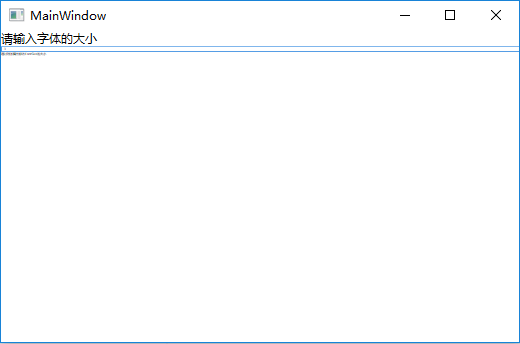
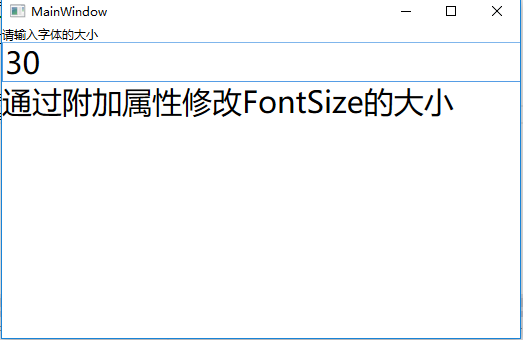
程序运行效果:
在TextBox里面输入3:
在TextBox里面输入30:
WPF教程:附加属性的更多相关文章
- Unity3D嵌入WPF教程
Unity3D嵌入WPF教程 创建一个 类库工程 添加 WindowForm 用户控件 (UserControl) 1).引入 UntiyWebPlayer COM 组件 在工具->选择工具箱中 ...
- WPF教程002 - 实现Step步骤条控件
原文:WPF教程002 - 实现Step步骤条控件 在网上看到这么一个效果,刚好在用WPF做控件,就想着用WPF来实现一下 1.实现原理 1.1.该控件分为2个模块,类似ComboBox控件分为Ste ...
- WPF教程十一:简单了解并使用控件模板
WPF教程十一:简单了解并使用控件模板 这一章梳理控件模板,每个WPF控件都设计成无外观的,但是行为设计上是不允许改变的,比如使用Button的控件时,按钮提供了能被点击的内容,那么自由的改变控件外观 ...
- WPF教程九:理解WPF中的对象资源
在WPF中,所有继承自FrameworkElement的元素都包含一个Resources属性,这个属性就是我们这篇要讲的资源. 这一篇讲解的资源是不是上一篇的程序集资源(那个是在编译过程中打包到程序集 ...
- WPF教程十二:了解自定义控件的基础和自定义无外观控件
这一篇本来想先写风格主题,主题切换.自定义配套的样式.但是最近加班.搬家.新租的房子打扫卫生,我家宝宝6月中旬要出生协调各种的事情,导致了最近精神状态不是很好,又没有看到我比较喜欢的主题风格去模仿的, ...
- WPF教程二:理解WPF的布局系统和常用的Panel布局
WPF的布局系统 了解元素的测量和排列方式是理解布局的第一步.在测量(measure)阶段容器遍历所有子元素,并询问子元素它们所期望的尺寸.在排列(arrange)阶段,容器在合适的位置放置子元素.理 ...
- WPF Adorner+附加属性 实现控件友好提示
标题太空泛,直接上图 无论是在验证啊,还是提示方面等一些右上角的角标之类的效果,我们会怎么做? 这里介绍一种稍微简单一些的方法,利用附加属性和Adorner来完成. 例如WPF自带的控件上要加这样的效 ...
- WPF利用附加属性修改ShowGridLines效果
1.思路主要代码 wpf的gridline原本效果是虚线类型的.有时候需要设计成表格形式的,因此有了用附加属性来自动绘制边框线的想法. 思路:绘制Line并添加到grid的children里,但效果并 ...
- WPF通过附加属性控制窗口关闭
场景1 当使用 ShowDialog() 方式显示窗口时,通过定义附加属性的方式可实现在 ViewModel 中进行数据绑定(bool?)来控制子窗口的显示和关闭 public class ExWin ...
随机推荐
- 关于WIFI DIRECT功能的
http://processors.wiki.ti.com/index.php/WiFi_Direct_Configuration_Scripts#p2p_find https://wire ...
- hibernate ——关联关系
1.一对一单向外键关联 <?xml version='1.0' encoding='utf-8'?> <!DOCTYPE hibernate-configuration PUBLIC ...
- table详解
1.tr 元素定义表格行,th 元素定义表头,td 元素定义表格单元. tr内是th还是td可由自己定义,th,td可存在于任一行,th与td的区别在与th字体更粗 2.定义一个table默认有bor ...
- 转 Problem: AnyConnect was not able to establish a connection to the specified secu
不多说直接上问题,在点击连接时,也是能正常连接上输入密码,在输出用户名密码后 连接后,会出现: problem:anyconnect was net able to establish a conne ...
- API CLOUD 快捷键
常用快捷键有:Ctrl+Z:撤销Ctrl+N:创建项目或文件Ctrl+Shift+F:代码格式化(这个经常用,可以美化代码,也可以通过这个检查代码是否出错)Ctrl+/ :注释和反注释Alt+/:强制 ...
- ShellExecute快捷键大全
文件夹,文件,网址可以创建快捷方式,控制面板 中的设置也可以创建快捷方式,下面是快捷方式的命令,使用方法:在桌面或文件夹的空白处点右键,选择新建,快捷方式,在"请键入项目的位置"输 ...
- 配置App真机测试证书的流程 一览
原文链接:http://www.jianshu.com/p/6b0de0d4c925 有开发者账号的前提下, 请进行如下步骤:1.首先登录网站:https://developer.apple.com. ...
- tiny210 u-boot 网络ping不通主机解决方案
站在巨人的肩膀上: http://blog.csdn.net/liukun321/article/details/7438880 http://www.arm9home.net/read.php?ti ...
- Lucene 简单手记http://www.cnblogs.com/hoojo/archive/2012/09/05/2671678.html
什么是全文检索与全文检索系统? 全文检索是指计算机索引程序通过扫描文章中的每一个词,对每一个词建立一个索引,指明该词在文章中出现的次数和位置,当用户查询时,检索程序就根据事先建立的索引进行查找,并将查 ...
- HDU - 5753 多校联萌3-2
题目链接:http://acm.hdu.edu.cn/showproblem.php?pid=5753 Sample Input Sample Output 6.000000 52.833333 分析 ...