
WPF利用附加属性修改ShowGridLines效果
1.思路主要代码
wpf的gridline原本效果是虚线类型的。有时候需要设计成表格形式的,因此有了用附加属性来自动绘制边框线的想法。
思路:绘制Line并添加到grid的children里,但效果并不理想,会出现锯齿,像素对齐,模糊等问题。
UseLayoutRounding="False"
SnapsToDevicePixels="True"
RenderOptions.EdgeModeProperty 貌似都没起作用。
于是想到了用border来实现,简单又实用吧 哈哈。
大致思路如下:绘制border的左边框和上边框,在边界的时候考虑边界封闭。然后将border平移一半的距离。这样边框就居中并且包围了所有的线。
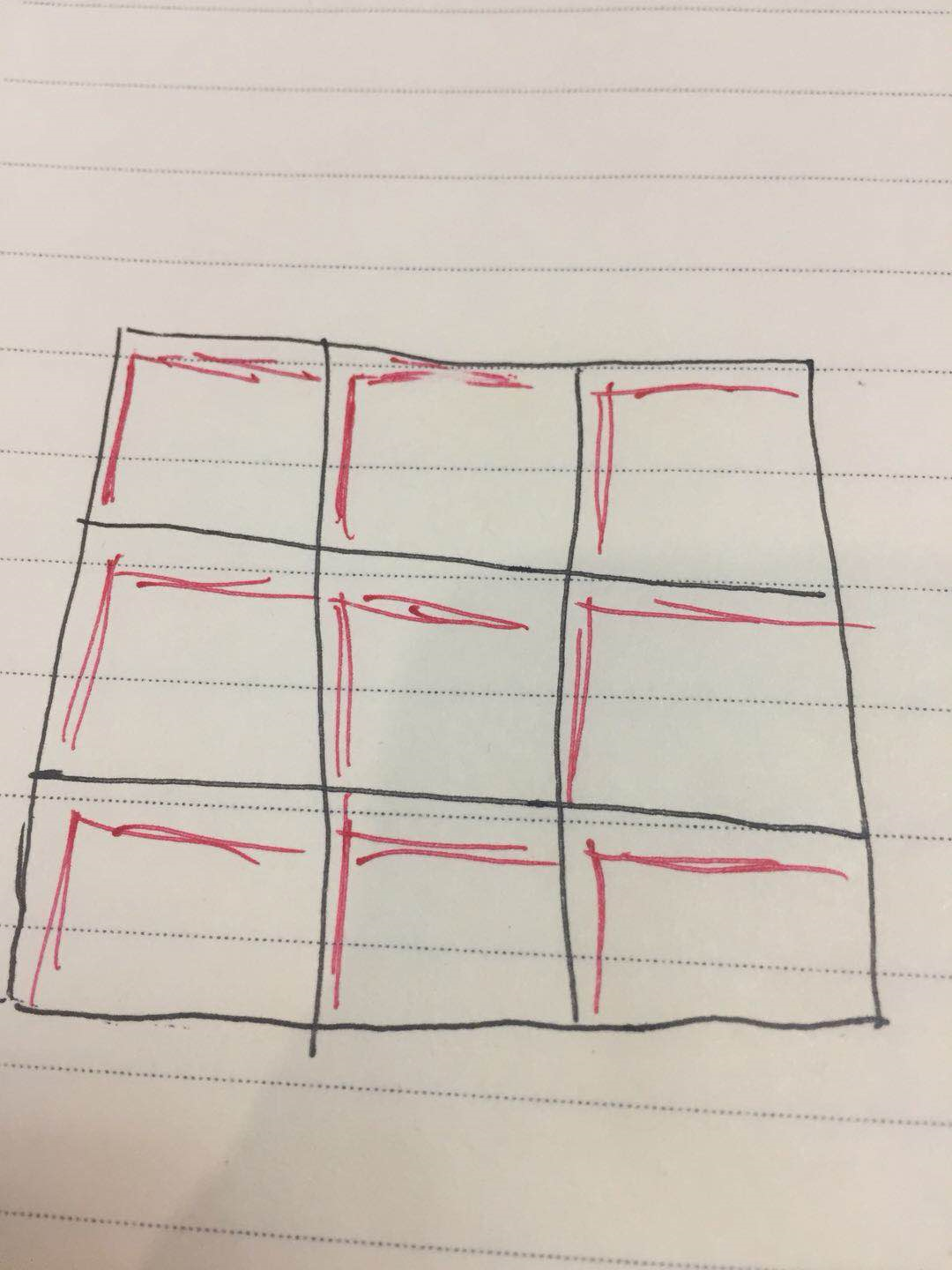
主要代码如下:
using System.Windows;

using System.Windows.Controls;

using System.Windows.Media;

namespace 用附加属性修改Grid的边框

{

    public class GridHelper

    {

        private static void RefreshGrid(Grid grid, int lineWidth, Brush color)

        {

            for (var i = grid.Children.Count - 1; i > 0; i--)

            {

                var child = grid.Children[i];

                var bd = child as Border;

                if (bd != null && bd.Tag != null && bd.Tag.ToString() == "gridline")

                {

                    grid.Children.Remove(bd);

                }

            }

            var rows = grid.RowDefinitions.Count;

            var cols = grid.ColumnDefinitions.Count;

            //边界考虑

            if (rows == 0)

            {

                rows = 1;

            }

            if (cols == 0)

            {

                cols = 1;

            }

            //生成行列

            for (var i = 0; i < rows; i++)

            {

                for (var j = 0; j < cols; j++)

                {

                    var thick = new Thickness(lineWidth, lineWidth, 0, 0);

                    var margin = new Thickness(-lineWidth/2d, -lineWidth/2d, 0, 0);

                    //边界考虑

                    if (i == 0)

                    {

                        margin.Top = 0;

                    }

                    if (i == rows - 1)

                    {

                        thick.Bottom = lineWidth;

                    }

                    if (j == 0)

                    {

                        margin.Left = 0;

                    }

                    if (j == cols - 1)

                    {

                        thick.Right = lineWidth;

                    }

                    var bd = new Border

                    {

                        BorderThickness = thick,

                        Margin = margin,

                        BorderBrush = color,

                        Tag = "gridline"

                    };

                    Grid.SetRow(bd, i);

                    Grid.SetColumn(bd, j);

                    grid.Children.Add(bd);

                }

            }

            grid.InvalidateArrange();

            grid.InvalidateVisual();

        }

        #region 线颜色

        // Using a DependencyProperty as the backing store for LineColor.  This enables animation, styling, binding, etc...

        public static readonly DependencyProperty LineColorProperty =

            DependencyProperty.RegisterAttached("LineColor", typeof (Brush), typeof (GridHelper),

                new PropertyMetadata(Brushes.Black, LineColorPropertyChanged));

        public static Brush GetLineColor(DependencyObject obj)

        {

            return (Brush) obj.GetValue(LineColorProperty);

        }

        public static void SetLineColor(DependencyObject obj, Brush value)

        {

            obj.SetValue(LineColorProperty, value);

        }

        private static void LineColorPropertyChanged(DependencyObject d, DependencyPropertyChangedEventArgs e)

        {

            var grid = d as Grid;

            if (grid == null)

            {

                return;

            }

            var showLines = GetShowGridLines(grid);

            var color = GetLineColor(grid);

            var lineWidth = GetLineWidth(grid);

            if (showLines)

            {

                //  grid.SnapsToDevicePixels = true;

                grid.Loaded += delegate { RefreshGrid(grid, lineWidth, color); };

            }

        }

        #endregion

        #region 线宽度

        // Using a DependencyProperty as the backing store for LineWidth.  This enables animation, styling, binding, etc...

        public static readonly DependencyProperty LineWidthProperty =

            DependencyProperty.RegisterAttached("LineWidth", typeof (int), typeof (GridHelper),

                new PropertyMetadata(1, LineWidthPropertyChanged));

        public static int GetLineWidth(DependencyObject obj)

        {

            return (int) obj.GetValue(LineWidthProperty)

                ;

        }

        public static void SetLineWidth(DependencyObject obj, int value)

        {

            obj.SetValue(LineWidthProperty, value);

        }

        private static void LineWidthPropertyChanged(DependencyObject d, DependencyPropertyChangedEventArgs e)

        {

            var grid = d as Grid;

            if (grid == null)

            {

                return;

            }

            var showLines = GetShowGridLines(grid);

            var color = GetLineColor(grid);

            var lineWidth = GetLineWidth(grid);

            if (showLines)

            {

                // grid.SnapsToDevicePixels = true;

                grid.Loaded += delegate { RefreshGrid(grid, lineWidth, color); };

            }

        }

        #endregion

        #region 是否显示线

        // Using a DependencyProperty as the backing store for ShowGridLines.  This enables animation, styling, binding, etc...

        public static readonly DependencyProperty ShowGridLinesProperty =

            DependencyProperty.RegisterAttached("ShowGridLines", typeof (bool), typeof (GridHelper),

                new PropertyMetadata(false, ShowGridLinesPropertyChanged));

        public static bool GetShowGridLines(DependencyObject obj)

        {

            return (bool) obj.GetValue(ShowGridLinesProperty);

        }

        public static void SetShowGridLines(DependencyObject obj, bool value)

        {

            obj.SetValue(ShowGridLinesProperty, value);

        }

        private static void ShowGridLinesPropertyChanged(DependencyObject d, DependencyPropertyChangedEventArgs e)

        {

            var grid = d as Grid;

            if (grid == null)

            {

                return;

            }

            var showLines = GetShowGridLines(grid);

            var color = GetLineColor(grid);

            var lineWidth = GetLineWidth(grid);

            if (showLines)

            {

                //  grid.SnapsToDevicePixels = true;

                grid.Loaded += delegate { RefreshGrid(grid, lineWidth, color); };

            }

        }

        #endregion

    }

}
2.效果图
效果还可以,任何分辨率下,任何边框大小,都没有出现像素对齐或者模糊问题。 图中的虚线是grid的默认gridLine,红色和绿色是自定义的gridline,跟虚线完美重合。
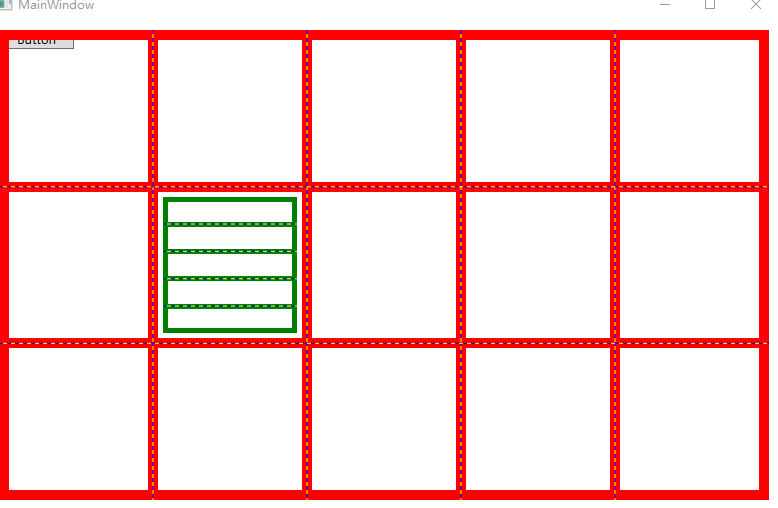
3.源码下载
https://files.cnblogs.com/files/chlm/%E7%94%A8%E9%99%84%E5%8A%A0%E5%B1%9E%E6%80%A7%E4%BF%AE%E6%94%B9Grid%E7%9A%84%E8%BE%B9%E6%A1%86.rar
WPF利用附加属性修改ShowGridLines效果的更多相关文章
- WPF中利用RadialGradient模拟放大镜效果
原文:WPF中利用RadialGradient模拟放大镜效果 --------------------------------------------------------------------- ...
- WPF Adorner+附加属性 实现控件友好提示
标题太空泛,直接上图 无论是在验证啊,还是提示方面等一些右上角的角标之类的效果,我们会怎么做? 这里介绍一种稍微简单一些的方法,利用附加属性和Adorner来完成. 例如WPF自带的控件上要加这样的效 ...
- 利用Photoshop修改图片以达到投稿要求
摘自:http://www.dxy.cn/bbs/thread/8602152#8602152 利用Photoshop修改图片以达到投稿要求 软件版本为Photoshop CS V8.0.1(中文版) ...
- WPF利用动画实现圆形进度条
原文:WPF利用动画实现圆形进度条 这是我的第一篇随笔,最近因为工作需要,开始学习WPF相关技术,自己想实现以下圆形进度条的效果,逛了园子发现基本都是很久以前的文章,实现方式一般都是GDI实现的,想到 ...
- WPF 图片浏览 伪3D效果
原文:WPF 图片浏览 伪3D效果 首先上效果图: 因项目要求,需要把图片以"好看"."炫"的效果展示出来,特地研究了一下WPF关于3D方面的制作,奈何最终成果 ...
- 【WPF】两则动画效果
原文:[WPF]两则动画效果 引言 利用WPF的动画可以轻而易举的实现各种各样的特效,如擦除,滑动进入等,先看两个效果图 第一个效果 这个动画其实利用了OpacityMask和LinearGradie ...
- WPF利用HelixToolKit后台导入3D模型
原文:WPF利用HelixToolKit后台导入3D模型 版权声明:本文为博主原创文章,未经博主允许不得转载. https://blog.csdn.net/m0_37591671/article/de ...
- 用WPF轻松打造iTunes CoverFlow效果
原文:用WPF轻松打造iTunes CoverFlow效果 用WPF轻松打造iTunes CoverFlow效果 ...
- c# wpf 利用截屏键实现截屏功能
原文:c# wpf 利用截屏键实现截屏功能 最近做一个wpf程序需要截图功能,查找资料费了一些曲折,跟大家分享一下. 先是找到了这样一份代码: static class Scr ...
随机推荐
- Django+xadmin打造在线教育平台(三)
五.完成注册.找回密码和激活验证码功能 5.1.用户注册 register.html拷贝到templates目录 (1)users/views.py class RegisterView(View): ...
- 【Python】 SSH连接的paramiko
paramiko *paramiko需要PyCrypto模块的支持 paramiko支持通过SSH协议进行一些操作,比如远程执行命令,上下传文件等等 用法: ① 远程命令 ssh = paramiko ...
- Python的几个小程序,其实我觉得可以称作初学时的基础算法
昨天学习的,今天做一下整理,以前学过几天c,感觉什么都没有搞出来,有点泄气,看到Python后试试,从最基本的东西学起,希望不要辜负我的这一点热情. if语句的应用 n=1 while n<5: ...
- 鹅厂优文 | 怎样用AI运维
欢迎大家前往腾讯云+社区,获取更多腾讯海量技术实践干货哦~ 本文由 织云平台团队 团队发布在腾讯云+社区 诞生背景 最近这些年,运维行业提出了不少概念,各种各样的"XX运维"可以说 ...
- Java基础学习笔记二十四 MySQL安装图解
.MYSQL的安装 1.打开下载的mysql安装文件mysql-5.5.27-win32.zip,双击解压缩,运行“setup.exe”. 2.选择安装类型,有“Typical(默认)”.“Compl ...
- java冒泡排序和快速排序
本ID技术干货公众号"java工会",欢迎关注指正. 一.冒泡排序 1.算法介绍 设排序表长为n,从后向前或者从前向后两两比较相邻元素的值,如果两者的相对次序不对(A[i-1] & ...
- Java Client/Server 基础知识
Java的网络类库支持多种Internet协议,包括Telnet, FTP 和HTTP (WWW),与此相对应的Java网络类库的子类库为: Java.net Java.net.ftp Java. ...
- jQuery函数学习
函数:after(content) 功能:在每个匹配的元素后面添加html内容 返回:jQuery对象 参数:content (<Content>): Content to insert ...
- android 检查软件是否有更新版本
import java.net.HttpURLConnection; import java.net.URL; import java.util.HashMap; import com.yuxin.m ...
- bzoj千题计划244:bzoj3730: 震波
http://www.lydsy.com/JudgeOnline/problem.php?id=3730 点分树内对每个节点动态维护2颗线段树 线段树以距离为下标,城市的价值为权值 对于节点x的两棵线 ...