
Cesium入门4 - 创建Cesium Viewer
Cesium入门4 - 创建Cesium Viewer
Cesium中文网:http://cesiumcn.org/ | 国内快速访问:http://cesium.coinidea.com/
任何Cesium应用程序的基础都是Viewer。Viewer是一个带有多种功能的可交互的三位数字地球的容器(盒子)。创建一个Viewer和HTML中的一个id为"cesiumContainer"的div绑定即可。
var viewer = new Cesium.Viewer('cesiumContainer');
使用以上代码之后,能看到下图所示的基本的数字地球:
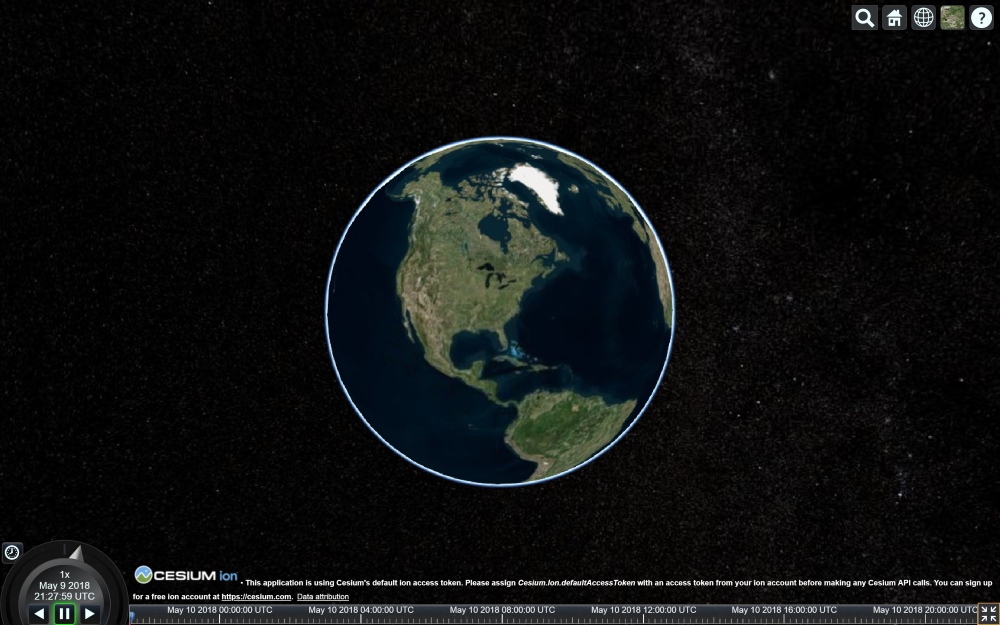
默认地,场景支持鼠标(电脑)和手指(移动设备)交互。控制相机漫游数字地球可以通过以下方式:
- Left click and drag - Pans the camera over the surface of the globe.
- Right click and drag - Zooms the camera in and out.
- Middle wheel scrolling - Also zooms the camera in and out.
- Middle click and drag - Rotates the camera around the point on the surface of the globe.
翻译 - 按住鼠标左键拖拽 - 让相机在数字地球平面平移。
- 按住鼠标右键拖拽 - 放缩相机。
- 鼠标滚轮滑动 - 放缩相机。
- 按住鼠标中键拖拽 - 在当前地球的屏幕中间点,旋转相机。
默认的Viewer自带了一些有用的组件:
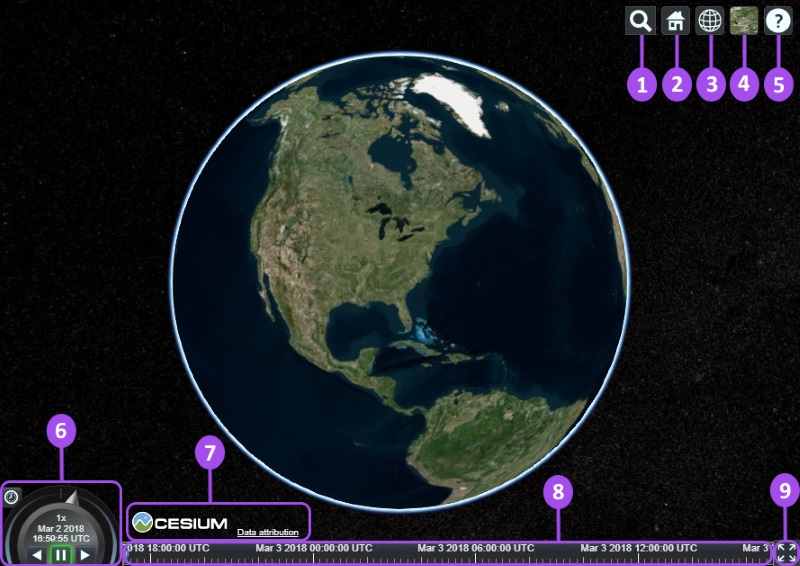
- Geocoder : A location search tool that flies the camera to queried location. Uses Bing Maps data by default.
- HomeButton : Flies the viewer back to a default view.
- SceneModePicker : Switches between 3D, 2D and Columbus View (CV) modes.
- BaseLayerPicker : Chooses the imagery and terrain to display on the globe.
- NavigationHelpButton : Displays the default camera controls.
- Animation : Controls the play speed for view animation.
- CreditsDisplay : Displays data attributions. Almost always required!
- Timeline : Indicates current time and allows users to jump to a specific time using the scrubber.
- FullscreenButton : Makes the Viewer fullscreen.
翻译
- Geocoder : 一种地理位置搜索工具,用于显示相机访问的地理位置。默认使用微软的Bing地图。
- HomeButton : 首页位置,点击之后将视图跳转到默认视角。
- SceneModePicker : 切换2D、3D 和 Columbus View (CV) 模式。
- BaseLayerPicker : 选择三维数字地球的底图(imagery and terrain)。
- NavigationHelpButton : 帮助提示,如何操作数字地球。
- Animation :控制视窗动画的播放速度。
- CreditsDisplay : 展示商标版权和数据源。
- Timeline : 展示当前时间和允许用户在进度条上拖动到任何一个指定的时间。
- FullscreenButton : 视察全屏按钮。
我们可以通过代码来配置视窗组件,在我们初始化视窗的时候,通过配置参数添加/移除相关组件。
以下代码是通过参数配置得到的viewer,该Viewer不带selection indicators, base layer picker or scene mode picker等组件。
var viewer = new Cesium.Viewer('cesiumContainer', {

    scene3DOnly: true,

    selectionIndicator: false,

    baseLayerPicker: false

});
如果需要查看Viewer的完整配置,请查看:https://cesiumjs.org/Cesium/Build/Documentation/Viewer.html。
Cesium中文网交流QQ群:807482793
Cesium中文网:http://cesiumcn.org/ | 国内快速访问:http://cesium.coinidea.com/
Cesium入门4 - 创建Cesium Viewer的更多相关文章
- cesium 入门开发系列矢量瓦片加载展示(附源码下载)
前言 cesium 入门开发系列环境知识点了解:cesium api文档介绍,详细介绍 cesium 每个类的函数以及属性等等cesium 在线例子 内容概览 cesium 实现矢量瓦片加载效果 源代 ...
- cesium入门示例-测量工具
作为cesium入门示例级别的最后一篇,参考cesium-长度测量和面积测量实现测量工具封装,修改了其中的距离测量函数,计算贴地距离,并对事件内部处理做了调整.包括贴地距离测量.面积测量.结果清除. ...
- Cesium入门13 - Extras - 附加内容
Cesium入门13 - Extras - 附加内容 Cesium中文网:http://cesiumcn.org/ | 国内快速访问:http://cesium.coinidea.com/ 剩下的代码 ...
- Cesium入门11 - Interactivity - 交互性
Cesium入门11 - Interactivity - 交互性 Cesium中文网:http://cesiumcn.org/ | 国内快速访问:http://cesium.coinidea.com/ ...
- Cesium入门9 - Loading and Styling Entities - 加载和样式化实体
Cesium入门9 - Loading and Styling Entities - 加载和样式化实体 Cesium中文网:http://cesiumcn.org/ | 国内快速访问:http://c ...
- Cesium入门8 - Configuring the Scene - 配置视窗
Cesium入门8 - Configuring the Scene - 配置视窗 Cesium中文网:http://cesiumcn.org/ | 国内快速访问:http://cesium.coini ...
- Cesium入门7 - Adding Terrain - 添加地形
Cesium入门7 - Adding Terrain - 添加地形 Cesium中文网:http://cesiumcn.org/ | 国内快速访问:http://cesium.coinidea.com ...
- Cesium入门6 - Adding Imagery - 添加图层
Cesium入门6 - Adding Imagery - 添加图层 Cesium中文网:http://cesiumcn.org/ | 国内快速访问:http://cesium.coinidea.com ...
- Cesium入门5 - Cesium ion
Cesium入门5 - Cesium ion Cesium中文网:http://cesiumcn.org/ | 国内快速访问:http://cesium.coinidea.com/ Cesium io ...
随机推荐
- .Net Core 项目发布在IIS上 访问404 问题对应
对策: 1.进入线程池画面,将当前程序的线程池设为"无托管代码" 2.修改配置文件 Web.config,加上配置 原因: 因为.NetCore 5.0 自带集成了Swag ...
- docker启动报错:Failed to Setup IP tables: Unable to enable SKIP DNAT rule
Creating network "kafka_default" with the default driverERROR: Failed to Setup IP tables: ...
- RPA账户和密码管理方案
如何将登录业务系统的账户和密码"更好的,更合适"地交给RPA? 相信很多小伙伴们在做RPA的时候, 都会或多或少的遇到类似的问题. 正常情况下IT管理人员都会给真实的业务人员分配业 ...
- git 命令之暂存相关指令。
git 命令之暂存相关指令. 1.git 代码暂存指令:git stash 2.git 代码暂存列表信息:git stash list 3.git 代码应用暂存代码:git stash apply s ...
- 【LeetCode】954. Array of Doubled Pairs 解题报告(Python)
作者: 负雪明烛 id: fuxuemingzhu 个人博客: http://fuxuemingzhu.cn/ 目录 题目描述 题目大意 解题方法 日期 题目地址:https://leetcode.c ...
- 「算法笔记」Polya 定理
一.前置概念 接下来的这些定义摘自 置换群 - OI Wiki. 1. 群 若集合 \(s\neq \varnothing\) 和 \(S\) 上的运算 \(\cdot\) 构成的代数结构 \((S, ...
- CausalVAE: Disentangled Representation Learning via Neural Structural Causal Models
目录 概 主要内容 模型 ELBO 关于 Yang M., Liu F., Chen Z., Shen X., Hao J. and Wang J. CausalVAE: disentangled r ...
- matplotlb 进阶之Styling with cycler
目录 cycler 教程 函数链接 matplotlib教程学习笔记 cycler 在教程开始之前,我们需要了解cycler模块 from __future__ import print_functi ...
- Java EE数据持久化框架 • 【第2章 MyBatis实现DML操作】
全部章节 >>>> 本章目录 2.1 标签 2.1.1 标签简单应用 2.1.2 使用JDBC方式返回主键自增的值 2.1.3 使用标签返回普通主键的值 2.1.4 实践练 ...
- Oracle导出导入dmp文件(exp.imp命令行)
1.说明 使用Oracle命令行导出导入dmp文件, 从而在两个数据库之间快速转移数据, 也可以用来作为数据库的备份, 将来可以快速恢复数据. 命令:导出exp.导入imp 步骤: 使用Oracle的 ...