
iCloud无法导入vCard问题。fix the error when import vcard/vcf to icloud.
问题描述:当登录icloud.com,进入通讯录的时候,导入VCF格式的联系人的时候会报错。如图:
1.从outlook的联系人中选一个联系人,导出联系人卡片-vCard文件
(如果是塞班手机,可以用export tool工具导出vcf格式文件,export tools支持如下版本和手机
- Required : Symbian s60v3 & Sybmian s60v5
- Compatible Devices : Symbian s60v3 & Sybmian s60v5 Phone: Nokia E5-00, E50, E51, E52, E55, E60, E61, E62, E63, E65, E66, E7, E70, E71, E72, E73, E75, E90, N71, N73, N75, N76, N77, N78, N79, N8, N80, N81, N82, N85, N86, N91, N92, N93, N95, N96, N97, 3250, 5228, 5230, 5235, 5250, 5320, 5500, 5530, 5630, 5700, 5730, 5800, 6110, 6120, 6124, 6210, 6220, 6290, 6650, 6710, 6720, 6730, 6760, 6788, 6790, X5, X6, C5, C6, C7
)
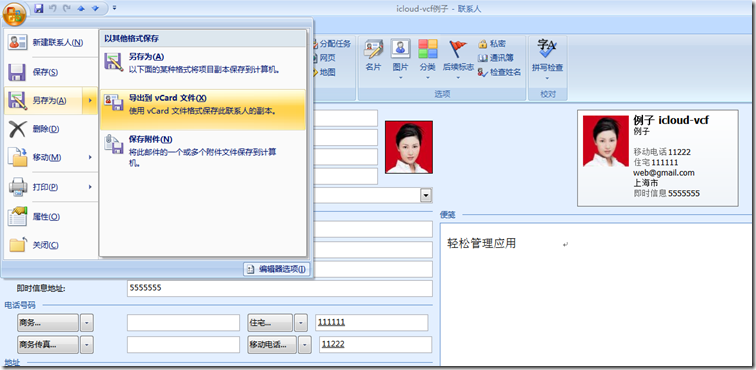
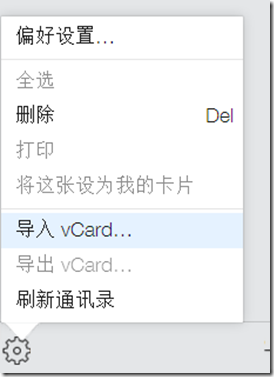
2.登录icloud,进入联系人,点击导入vCard,选择刚才的vcf文件
3.报错如下
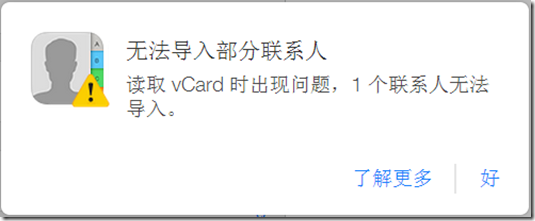
如果是英文的icloud,报错如下:

点击:了解更多:http://support.apple.com/kb/HT4489?viewlocale=zh_CN
显示如下限制:
通讯录
- 联系人卡片总数:25,000
- 联系人卡片的最大大小:256 KB
- 联系人照片的最大大小:224 KB
- 联系人小组的最大大小:256 KB
- 所有联系人卡片的最大大小:
- 卡片文本:24 MB
- 卡片照片:100 MB
- 联系人照片支持的文件类型:JPEG、JPG、BMP、PNG、GIF
- vCard 导入限制:
- vCard 总数:25,000
- vCard 的最大大小:256 KB(照片 + 文本)
- vCard 的最大照片大小:224 KB
单个联系人导入的解决办法:
1.将vcf文件导入gmail
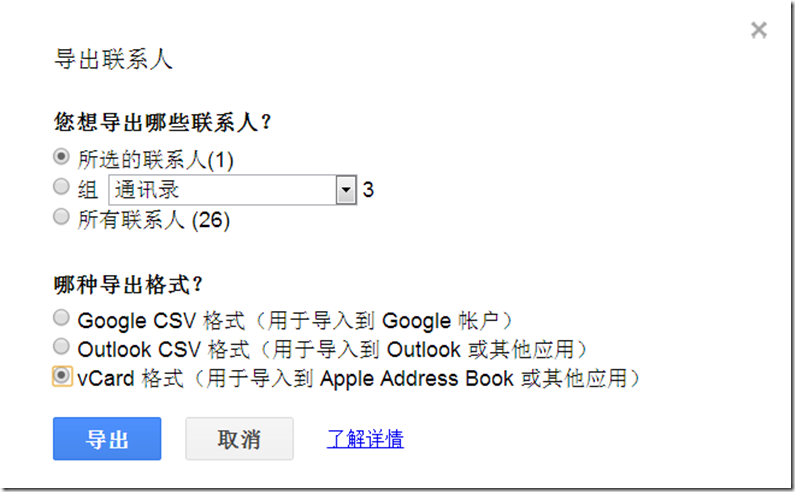
2.从gmail导出vcard格式文件
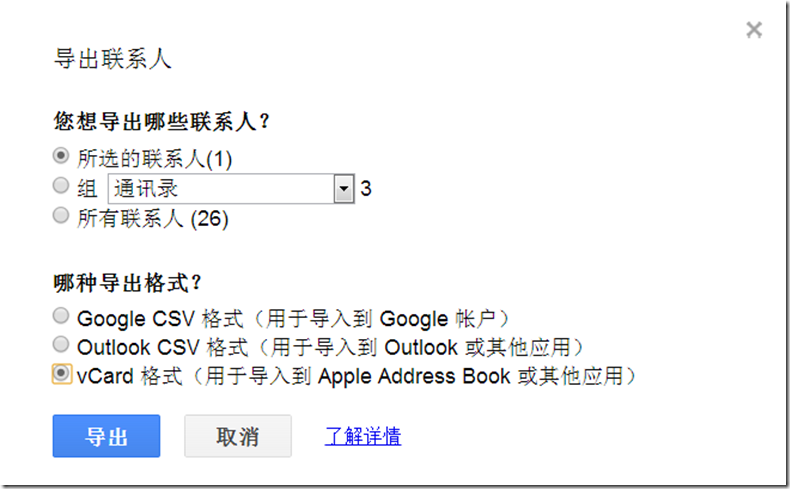
3.将vcard文件导入icloud,成功!
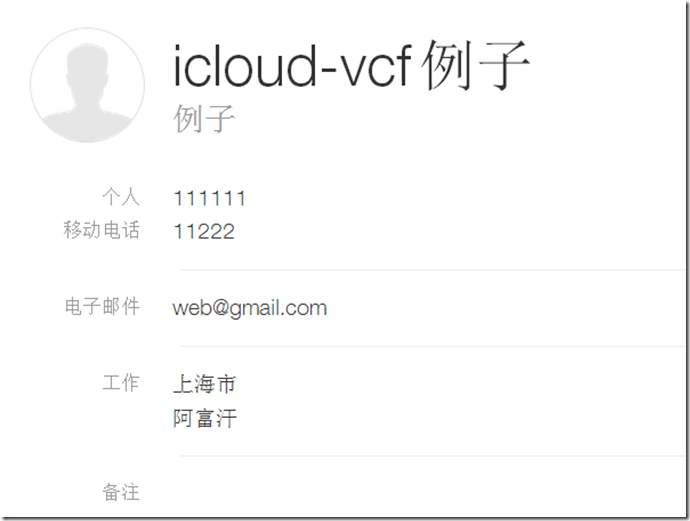
批量联系人导入的解决办法
1. On outlook 2010, go to file, options, mail, and in the compose messages section select *plain text* from the dropdown box, then hit OK. THIS IS VERY IMPORTANT, for the next action to work.
2. now go to CONTACTS, hit ctrl+a (will select all your contacts), then go up to the ribbon and on the SHARE section, where it reads Forward Contact, click on the dropdown and select *As Business Cards* (if you don´t do step one, outlook will crash attempting to create images of the vcards for each contact on an email message).
3.if you did right, now you have a new email window opened, with all your vcards as attachment. select all the Vcards and copy.
4.create a folder in C: and paste all those vcards in there.
5.time to merge all vcards into a single one, for them to be uploaded into your GMAIL account, follow the instructions here http://www.creativeworld9.com/2011/04/how-to-combine-all-vcf-files-to-single.htm l. this link will teach you how to merge various VCF using the command prompt.
7.Once you managed to create one single .vcf files with all your contacts (don´t try to open it cause you will see nothing), go to your gmail account and import them. to do that, on the left upper corner of the screen, 3rd row, you’ll see the word *GMAIL*, click the dropdown there and select contacts. Moving along the same row, go to *More*, click the dropdown and select *import contacts*, then select the VCF file and voilà….you contacts are now in GMAIL.
8.Now we will export the contacts select ALL contacts (if you have more than 100 contacts, you will need to do this in 3 or 4 pieces, selecting no more than 100 contacts to export) , then hit *more* and select *export contacts*. Use the last option, *vCard format (for importing into Apple Address Book or another application)*.
9. this will give you a VCF files with all the contacts, in a format that ICLOUD will accept with no issues, then just sync your idevice, and that is it.
参见:https://discussions.apple.com/thread/3648480?start=0&tstart=0
iCloud无法导入vCard问题。fix the error when import vcard/vcf to icloud.的更多相关文章
- LR_问题_在导入wsdl时出现parsing error
问题描述:使用LR录制webservice协议的脚本,在导入wsdl时出现parsing error,详见图 问题解决:在导入wsdl时输入的地址错误,只指定了地址的虚拟目录名称,未指定方法名称,应该 ...
- ERROR 3009 (HY000): Column count of mysql.user is wrong. Expected 45, found 42. Created with MySQL 50560, now running 50725. Please use mysql_upgrade to fix this error.
centos7.5 登入mysql,进行授权报错 问题: mysql> grant all privileges on *.* to 'lvhanzhi'@'%' identified by ' ...
- 导入Unity插件时出现Failed to import package with error: Couldn't decompress package
导入Unity插件时出现Failed to import package with error: Couldn't decompress package 一开始以为压缩包本身有问题,坏了 后来发现在父 ...
- [转]ADT中通过DDMS导入文件出错ddms transfer error: Read-only file system,Failed to push selection: Read-only file system
[已解决] 原文 http://www.crifan.com/ddms_import_file_error_transfer_error_read_only_file_system/ 想要通过adt ...
- Column count of mysql.user is wrong. Expected 43, found 42. Created with MySQL 50518, now running 50641. Please use mysql_upgrade to fix this error.
出现问题: Column count of mysql.user is wrong. Expected 43, found 42. Created with MySQL 50518, now runn ...
- 升级CUDA版本导致VS2010错误:未找到导入的项目XXX,请确认<Import>声明中的路径正确,且磁盘上存在该文件
转自:http://www.cnblogs.com/yeahgis/p/3853420.html VS2010错误:未找到导入的项目XXX,请确认<Import>声明中的路径正确,且磁盘上 ...
- Eclipse error: “The import XXX cannot be resolved”
解决 Eclipse error: “The import XXX cannot be resolved” eclipse中修改: 1. 项目-->Properties-->java bu ...
- 导入AppiumLibrary报错: ImportError: cannot import name 'InvalidArgumentException
导入AppiumLibrary报错: ImportError: cannot import name 'InvalidArgumentException报错原因 selenium.common.exc ...
- Import Error:cannot import name main解决方案
在Ubuntu上安装软件,不小心升级了pip,导致使用时报错如下: Import Error:cannot import name main 后来发现是因为将pip更新为10.0.0后库里面的函数有所 ...
随机推荐
- (七)CXF添加拦截器
今天开始讲下拦截器,前面大家学过servlet,struts2 都有拦截器概念,主要作用是做一些权限过滤,编码处理等: webservice也可以加上拦截器,我们可以给webservice请求加权限判 ...
- python3笔记(三)if...else、if...elif...else
if语句 if 语句的基本用法如下: if 表达式: 语句块 其中,表达式可以是一个单纯的布尔值或变量,也可以是比较表达式或逻辑表达式(例 如:a > band a != c),如果表达式为真, ...
- Kafka动态增加Topic的副本
一.kafka的副本机制 由于Producer和Consumer都只会与Leader角色的分区副本相连,所以kafka需要以集群的组织形式提供主题下的消息高可用.kafka支持主备复制,所以消息具备高 ...
- codeforces 758D Ability To Convert【DP】
在N进制下给你一个数,要你转换成最小的十进制数; 状态转移方程:从前向后 dp[j]表示j位前数列的最小十进制数 dp[j]=min(dp[j],dp[i]*n+x) 程序: #include < ...
- 行为型模式之Command模式
命令模式将一个请求封装成一个对象,从而让你使用不同的请求把客户端参数化, 并且可以对请求排队或者记录请求日志,可以提供命令的撤销和恢复功能. 概念描述 把命令的调用者与执行者分开,使双方不必关心对方是 ...
- 078 Hbase中rowkey设计原则
1.热点问题 在某一时间段,有大量的数据同时对一个region进行操作 2.原因 对rowkey的设计不合理 对rowkey的划分不合理 3.解决方式 rowkey是hbase的读写唯一标识 最大长度 ...
- Python2 - 基础2 - 数据类型和模块
一.数据类型 标准数据类型(5): Numbers(数字) String(字符串) List(列表) Tuple(元组) Dictionary(字典) 其中数字类型有4种: int(有符号整型) 在3 ...
- 洛谷 P4779 【dijkstra】+(堆优化)+(链式前向星) (模板题)
<题目链接> 题目描述 给定一个 N 个点, M 条有向边的带非负权图,请你计算从 S 出发,到每个点的距离. 数据保证你能从 S 出发到任意点. 输入格式: 第一行为三个正整数 N,M, ...
- P1279 字串距离
P1279 字串距离一看就是字符串dp,然而并不会,骗分之后爆零了.以后dp题要好好想想转移方程.f[i][j]表示是a串选了前i个字符,b串选了前j个字符的距离.显然(QAQ)f[i][j]=min ...
- 利用SQL为Code128码添加起始符和休止符
在利用code128码字体打印条码是,打印出来的条形码,扫描枪会出现认不出的情况,这种情况是由于直接将文本设置为code128字体而没有给他们指定起始符和休止符引起的. 经过查资料获发现好多人遇到这样 ...