
Spring mybatis thymeleaf 基础操作,实现数据展示,修改,删除,查询
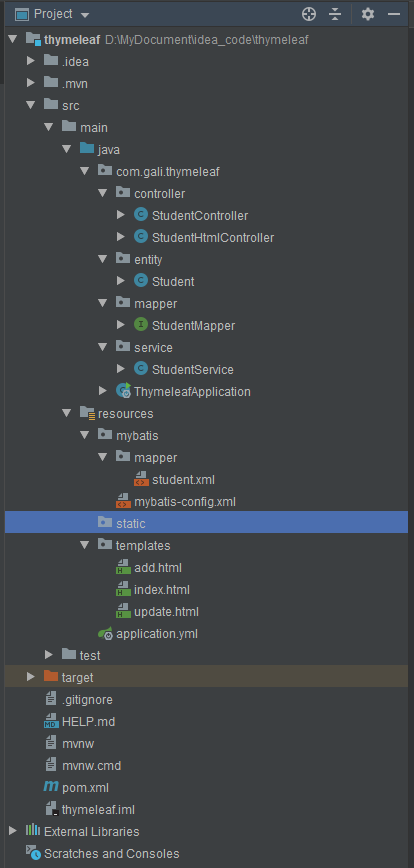
目录结构如图
index.html
<!DOCTYPE html>

<html lang="en"

      xmlns:th="http://www.thymeleaf.org"

      xmlns:sec="http://www.thymeleaf.org/thymeleaf-extras-springsecurity3">

<head>

    <meta charset="UTF-8">

    <title>Title</title>

</head>

<script>

  function tvClick() {

      var x=document.getElementById("tv").value;

      //window.location.href="http://localhost:8080/search?id="+x;

       window.location.href="search?id="+x;

  }

</script>

<body>

<div th:width="300px" th:height="50px">

    <a th:href="@{/edit(user_id=${null})}"> 添加新数据 </a>

</div>

<div th:width="300px" th:height="50px">

    <input th:width="300px" th:height="50px" id="tv" th:value="${keyValue}">  </input>   <button id="btn" onclick="tvClick()">查询</button>

</div>

<table border="1">

    <tr>

        <th>id</th>

        <th>姓名</th>

        <th>年龄</th>

        <th>修改</th>

        <th>删除</th>

    </tr>

    <tr th:each="student:${students}">

        <td><span th:text="${student.id}"></span></td>

        <td><span th:text="${student.name}"></span></td>

        <td><span th:text="${student.age}"></span></td>

        <td><a th:href="@{/edit(id=${student.id})}"> edit </a></td>

        <td><a th:href="@{/del(user_id=${student.id})}"> delete </a></td>

    </tr>

</table>

</body>

</html>
add.html
<!DOCTYPE html>

<html lang="en"  xmlns:th="http://www.thymeleaf.org">

<head>

    <meta charset="UTF-8">

    <title>新增、编辑客户</title>

</head>

<body>

<form th:action="@{/save}" method="post">

    <div>

        <label>id</label>

        <input type="text" name="id" readonly="readonly" th:field="${student.id}" />

    </div>

    <div>

        <label>name</label>

        <input type="text" name="name" th:field="${student.name}" />

    </div>

    <div>

        <label>age</label>

        <input type="text" name="age" th:field="${student.age}" />

    </div>

    <div>

        <input type="submit" value="提交" />

    </div>

</form>

</body>

</html>
mapper/student.xml
<?xml version="1.0" encoding="UTF-8"?>

<!DOCTYPE mapper

        PUBLIC "-//mybatis.org//DTD Mapper 3.0//EN"

        "http://mybatis.org/dtd/mybatis-3-mapper.dtd">

<mapper namespace="com.gali.thymeleaf.mapper.StudentMapper">

    <select id="findAll"  resultType="java.util.Map">

        select * from student

    </select>

    <select id="findAll2"  resultType="java.util.Map" parameterType="Integer">

        select * from student where id > #{id}

    </select>

    <delete id="delById" parameterType="Integer">

        delete  from student  where id = #{user_id}

    </delete>

    <select id="findById" parameterType="Integer" resultType="com.gali.thymeleaf.entity.Student">

        select * from student where id= #{id}

    </select>

    <insert id="create" parameterType="com.gali.thymeleaf.entity.Student">

        insert into   student ( name,age)

        values (#{name},#{age})

        <!-- selectKEY 用于回填数据 keyProperty 主键  keycolume是字段名  resultType 是字段类型 order 是指定在执行sql前或后返回数据-->

        <selectKey keyProperty="id" keyColumn="id" resultType="Integer" order="AFTER">

            select Last_INSERT_ID()

        </selectKey>

    </insert>

    <update id="update" parameterType="com.gali.thymeleaf.entity.Student">

     update  student set name = #{name} ,  age= #{age} where id= #{id}

    </update>

</mapper>
StudentHtmlController
这里使用@Controller ,不再使用@RestController
@Controller

@RequestMapping(path = "/")

public class StudentHtmlController {

    @Autowired

    StudentService studentService;

    @RequestMapping(path = "/index" , method = RequestMethod.GET)

    public String getHtml(Model model){

        model.addAttribute("students" ,studentService.findAll());

        return "index";

    }

    @RequestMapping(path = "/search" , method = RequestMethod.GET)

    public ModelAndView getIndex(@RequestParam("id") Integer id){

        ModelAndView av=new ModelAndView("index");

        av.addObject("students",studentService.findAll2(id));

        av.addObject("keyValue",id);

        return av;

    }

    @RequestMapping(path = "/del")

    public String del(@RequestParam(name = "user_id") Integer user_id){

        studentService.delById(user_id);

        return "redirect:/index";

    }

    @RequestMapping(path = "/save" ,method = RequestMethod.POST)

    public String save(@ModelAttribute Student student){

        if(student==null){

            return "fail";

        }

        if(student.id!=null && student.id > 0){

            studentService.update(student);

            return "redirect:/index";

        }else{

            studentService.create(student);

            return "redirect:/index";

        }

    }

    @RequestMapping(path = "/findById" ,method = RequestMethod.GET)

    public Student findById(@RequestParam("id") Integer id){

      return   studentService.findById(id);

    }

    @RequestMapping(path = "/edit" , method = RequestMethod.GET)

    public String edit(ModelMap modelMap ,@RequestParam(defaultValue = "0") int id){

        if(id>0){

            modelMap.addAttribute("student",studentService.findById(id));

        }else{

            Student student=new Student();

            student.setAge(null);

            student.setName("");

            modelMap.addAttribute("student",student);

        }

        return "update";

    }

}
ThymeleafApplication
使用@MapperScan 扫描Mapper 包路径
package com.gali.thymeleaf;

import org.mybatis.spring.annotation.MapperScan;

import org.springframework.boot.SpringApplication;

import org.springframework.boot.autoconfigure.SpringBootApplication;

@SpringBootApplication

@MapperScan("com.gali.thymeleaf.mapper")

public class ThymeleafApplication {

    public static void main(String[] args) {

        SpringApplication.run(ThymeleafApplication.class, args);

    }

}
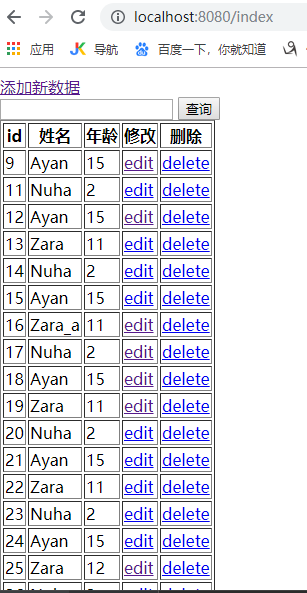
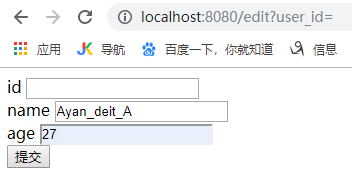
效果图


完整Code(thymeleaf)
链接:https://pan.baidu.com/s/1iOT2a59NFkppoNJOq4MIbg
提取码:47og
Spring mybatis thymeleaf 基础操作,实现数据展示,修改,删除,查询的更多相关文章
- MYSQL基础操作之数据约束与关联查询
一.MYSQL约束 1.默认值约束,当字段没有插入值的时候,mysql自动给该字段分配默认值. 默认值的字段允许为空. 对默认值字段也可以插入null. CREATE TABLE STUDENT( I ...
- UITaleView的基础使用及数据展示操作
UITableView表视图,是实用的数据展示的基础控件,是继承于UIScrollView,所以也可以滚动.但不同于UIScrollView,UITableView只可以上下滚动,而不能左右滚动. 因 ...
- idea+springmvc+spring+mybatis+maven整合返回json数据webapi
首先看一张目录结构图: : 创建步骤: 1.创建maven webapp工程, 创建完后的目录结构为: 2.添加项目依赖(添加jar包) 需要的jar包: spring-webmvc, spring ...
- layui数据表格使用(一:基础篇,数据展示、分页组件、表格内嵌表单和图片)
表格展示神器之一:layui表格 前言:在写后台管理系统中使用最多的就是表格数据展示了,使用表格组件能提高大量的开发效率,目前主流的数据表格组件有bootstrap table.layui table ...
- oracle navicat 可视化操作进行数据的修改
在进行oracle数据库中的数据操作编辑时,需要小心.oracle内置的安全机制是无处不在,并且很有必要存在的. 使用navicat对oracle中数据进行select操作时,查询出的结果是只读的,这 ...
- mysql常用基础操作语法(十)~~子查询【命令行模式】
mysql中虽然有连接查询实现多表连接查询,但是连接查询的性能很差,因此便出现了子查询. 1.理论上,子查询可以出现在查询语句的任何位置,但实际应用中多出现在from后和where后.出现在from后 ...
- SpringMVC + Spring + MyBatis 学习笔记:提交数据遭遇基础类型和日期类型报400错误解决方法
系统:WIN8.1 数据库:Oracle 11GR2 开发工具:MyEclipse 8.6 框架:Spring3.2.9.SpringMVC3.2.9.MyBatis3.2.8 使用SpringMVC ...
- mysql基础操作(二):简单查询DQL
-- 1.查询所有字段 select * from student; -- 2.查询指定的字段 select id from student; select id, name from student ...
- EXTJS4.2 内存中操作表格数据时,删除表格数据,行号不连续解决
需要重新刷新下表格的view => grid.view.refresh();
随机推荐
- flashdevelop调用ios方法
来源:http://blog.csdn.net/zu12jing/article/details/7331397 flash开发工具用的是flashdevelop(由于flashdevelop还能直接 ...
- Java内存模型JMM简单分析
参考博文:http://blog.csdn.net/suifeng3051/article/details/52611310 http://www.cnblogs.com/nexiyi/p/java_ ...
- Python学习日记(十一) 内置函数
什么是内置函数? 就是Python中已经写好了的函数,可以直接使用 内置函数图表: 以3.6.2为例 内置函数分类: 一.反射相关 1.hasattr() 2.getattr() 3.setattr( ...
- C#入门概述
ASP.NET 则是一种技术. Main方法 代码编写规范 命名规范
- Java Decompiler反编译Jar文件
1.重新编译已经打包的Jar包,使用 Java Decompiler 打开需要重新编译的jar包,找到自己需要自己修改的Class文件 ,修改之后电子保存文件 ,保存的时候编译工具自动将class文件 ...
- javascript详解1
推荐学习链接: https://book.apeland.cn/details/356/ http://es6.ruanyifeng.com/#README https://developer.moz ...
- 【转】spring bean 卸载
spring bean 卸载起因: 群里的一个朋友问到: 关于配置destory-method, springboot中 yml如何指定 首先介绍 bean卸载的三种形式 自定义destory-met ...
- 软件测试_Loadrunner_性能测试_服务器资源监控
使用Loadrunner进行Windows服务器性能监控 将装有Loadrunner的机器叫做监控端,被监控资源的服务器叫做被监控端 一.前置环境设置 1. 设置被监控端管理员账户可用:我的电脑右键- ...
- Integer Inquiry UVA-424(大整数)
题意分析: 将字符串倒着存入int数组中,每次加完后再取余除去大于10的部分 关键:倒着存入,这样会明显缩短代码量. #include<iostream> #include<cstd ...
- JavaScript类型转换总结与常见情况解析
类型转换是将值从一种类型转换为另一种类型的过程(比如字符串转数字,对象转布尔值等) 一.类型转换的分类 类型转换可以分为隐式类型转换和显式类型转换. 二者的区别显而易见:我们能够从代码中看出哪些地方是 ...