
WEB甘特图(机器运行状态图)
前台框架使用BootStrap轻量级框架AdminLTE
后台框架使用的是Spring、SpringMVC
初此使用数据库SQL Server故只能用JDBC连接
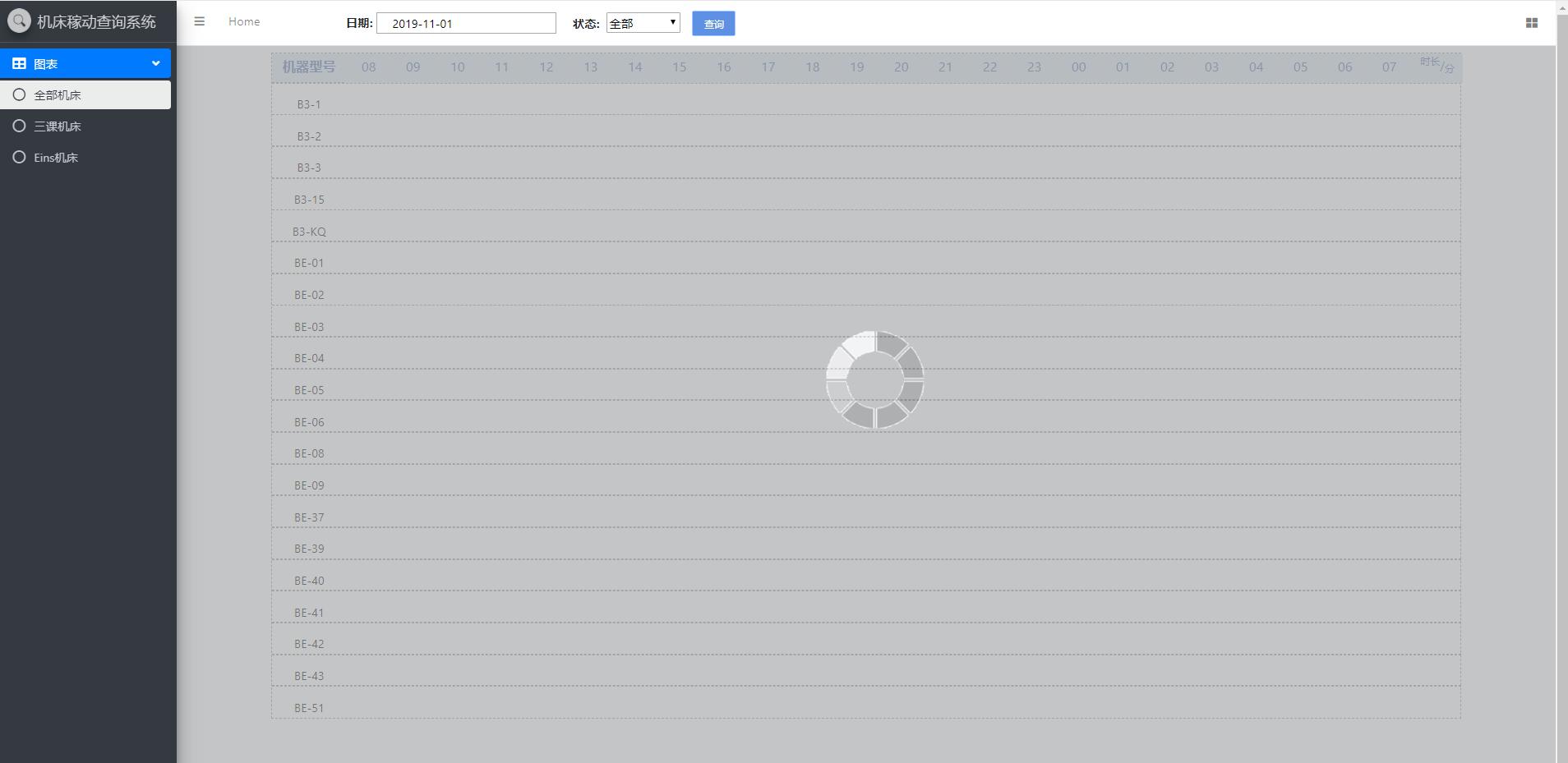
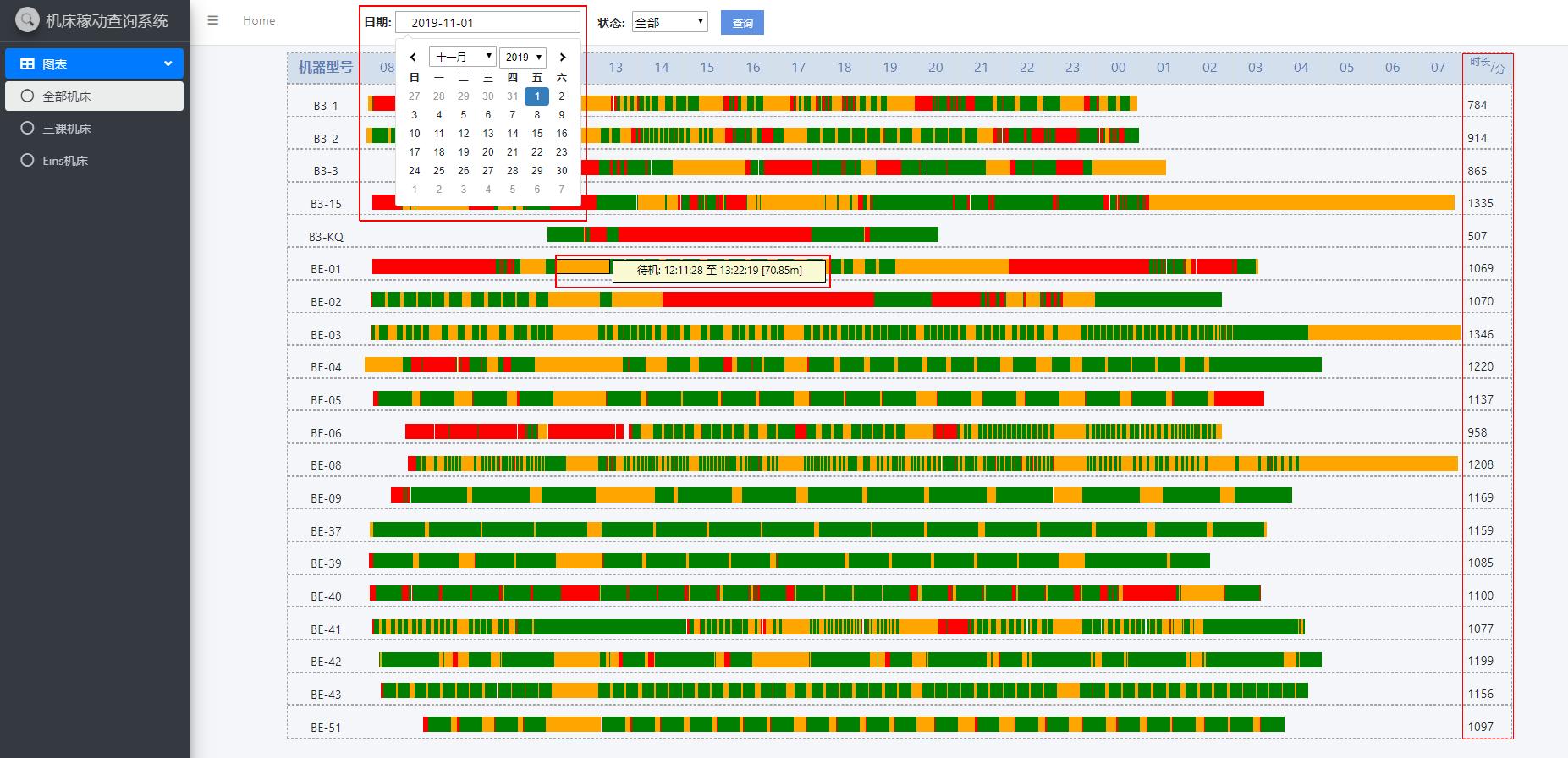
请勿见怪!jsp页面重复添加元素过多重复过多,非常简单纯粹手写添加!
JSP 页面
<div class="wrapper" style="background-color: #F4F6F9;">

		<!-- Navbar -->

		<nav

			class="main-header navbar navbar-expand navbar-white navbar-light">

			<!-- Left navbar links -->

			<ul class="navbar-nav">

				<li class="nav-item"><a class="nav-link" data-widget="pushmenu"

					href="#"><i class="fas fa-bars"></i></a></li>

				<li class="nav-item d-none d-sm-inline-block"><a

					href="${pageContext.request.contextPath}/mainUI.jsp"

					class="nav-link">Home</a></li>

				<li style="width: 100px;"></li>

				<b style="position: relative; margin-top: 10px;">日期: </b>

				<li><input type="text" name="txtBeginDate" id="txtBeginDate"

					style="width: 244px; height: 28px;">   </li>

				<li style="position: relative; margin-top: 7px;"><b>  状态: </b>

					<select id="stcolor" style="width: 100px; height: 28px;">

						<option value="all">全部</option>

						<option value="green">运行</option>

						<option value="yellow">待机</option>

						<option value="blue">停机</option>

						<option value="red">警报</option>

				</select>    <input type="button" id="btfind" value="查询"></li>

			</ul>

			<!-- Right navbar links -->

			<ul class="navbar-nav ml-auto">

				<li class="nav-item"><a class="nav-link"

					data-widget="control-sidebar" data-slide="true" href="#"> <i

						class="fas fa-th-large"></i>

				</a></li>

			</ul>

		</nav>

		<!-- /.navbar -->

		<!-- Main Sidebar Container -->

		<aside class="main-sidebar sidebar-dark-primary elevation-4">

			<!-- Brand Logo -->

			<a href="${pageContext.request.contextPath}/mainUI.jsp"

				class="brand-link"> <img src="dist/img/search.png"

				alt="Equipment background management system"

				class="brand-image img-circle elevation-3" style="opacity: .8">

				<span class="brand-text font-weight-light">机床稼动查询系统</span>

			</a>

			<!-- Sidebar -->

			<div class="sidebar">

				<!-- Sidebar Menu -->

				<nav class="mt-2" style="background-color: #343A40;">

					<ul class="nav nav-pills nav-sidebar flex-column"

						data-widget="treeview" role="menu" data-accordion="false">

						<li class="nav-item has-treeview menu-open"><a href="#"

							class="nav-link active"> <i class="nav-icon fas fa-table"></i>

								<p>

									图表 <i class="right fas fa-angle-left"></i>

								</p>

						</a>

							<ul class="nav nav-treeview">

								<li class="nav-item"><a

									href="${pageContext.request.contextPath}/graphAll"

									class="nav-link active"> <i class="far fa-circle nav-icon"></i>

										<p>全部机床</p>

								</a></li>

								<li class="nav-item"><a

									href="${pageContext.request.contextPath}/graphThird"

									class="nav-link"> <i class="far fa-circle nav-icon"></i>

										<p>三课机床</p>

								</a></li>

								<li class="nav-item"><a

									href="${pageContext.request.contextPath}/graphEins"

									class="nav-link"> <i class="far fa-circle nav-icon"></i>

										<p>Eins机床</p>

								</a></li>

							</ul></li>

					</ul>

				</nav>

				<!-- /.sidebar-menu -->

			</div>

			<!-- /.sidebar -->

		</aside>

		<div class="content-wrapper">

			<center>

				<div id="container"

					style="width: 1608px; height: 901px; border: 1px dashed #A4A4A4; margin-top: 9px;">

					<div class="carNum">

						<div style="background: #D3DFED; height: 40px; text-align: center;">

							<font size="4" color="#5D7CB2"><label style="position: relative; top: 5px;">机器型号</label></font>

						</div>

						<hr style="width: 1605px; border-top: 1px; border: 1px dashed #A4A4A4; margin-top: -1px;" />

						<div style="height: 9px;">B3-1</div>

						<div id="B3-1" style="position: absolute; margin-left: 1540px; margin-top: -10px;"> </div>

						<hr style="width: 1605px; border-top: 1px; border: 1px dashed #A4A4A4;" />

						<div style="height: 9px;">B3-2</div>

						<div id="B3-2" style="position: absolute; margin-left: 1540px; margin-top: -10px;"> </div>

						<hr style="width: 1605px; border-top: 1px; border: 1px dashed #A4A4A4;" />

						<div style="height: 9px;">B3-3</div>

						<div id="B3-3" style="position: absolute; margin-left: 1540px; margin-top: -10px;"> </div>

						<hr style="width: 1605px; border-top: 1px; border: 1px dashed #A4A4A4;" />

						<div style="height: 9px;">B3-15</div>

						<div id="B3-15" style="position: absolute; margin-left: 1540px; margin-top: -10px;"> </div>

						<hr style="width: 1605px; border-top: 1px; border: 1px dashed #A4A4A4;" />

						<div style="height: 9px;">B3-KQ</div>

						<div id="B3-KQ" style="position: absolute; margin-left: 1540px; margin-top: -10px;"> </div>

						<hr style="width: 1605px; border-top: 1px; border: 1px dashed #A4A4A4;" />

						<div style="height: 9px;">BE-01</div>

						<div id="BE-01" style="position: absolute; margin-left: 1540px; margin-top: -10px;"> </div>

						<hr style="width: 1605px; border-top: 1px; border: 1px dashed #A4A4A4;" />

						<div style="height: 9px;">BE-02</div>

						<div id="BE-02" style="position: absolute; margin-left: 1540px; margin-top: -10px;"> </div>

						<hr style="width: 1605px; border-top: 1px; border: 1px dashed #A4A4A4;" />

						<div style="height: 9px;">BE-03</div>

						<div id="BE-03" style="position: absolute; margin-left: 1540px; margin-top: -10px;"> </div>

						<hr style="width: 1605px; border-top: 1px; border: 1px dashed #A4A4A4;" />

						<div style="height: 9px;">BE-04</div>

						<div id="BE-04" style="position: absolute; margin-left: 1540px; margin-top: -10px;"> </div>

						<hr style="width: 1605px; border-top: 1px; border: 1px dashed #A4A4A4;" />

						<div style="height: 9px;">BE-05</div>

						<div id="BE-05" style="position: absolute; margin-left: 1540px; margin-top: -10px;"> </div>

						<hr style="width: 1605px; border-top: 1px; border: 1px dashed #A4A4A4;" />

						<div style="height: 9px;">BE-06</div>

						<div id="BE-06" style="position: absolute; margin-left: 1540px; margin-top: -10px;"> </div>

						<hr style="width: 1605px; border-top: 1px; border: 1px dashed #A4A4A4;" />

						<div style="height: 9px;">BE-08</div>

						<div id="BE-08" style="position: absolute; margin-left: 1540px; margin-top: -10px;"> </div>

						<hr style="width: 1605px; border-top: 1px; border: 1px dashed #A4A4A4;" />

						<div style="height: 9px;">BE-09</div>

						<div id="BE-09" style="position: absolute; margin-left: 1540px; margin-top: -10px;"> </div>

						<hr style="width: 1605px; border-top: 1px; border: 1px dashed #A4A4A4;" />

						<div style="height: 9px;">BE-37</div>

						<div id="BE-37" style="position: absolute; margin-left: 1540px; margin-top: -10px;"> </div>

						<hr style="width: 1605px; border-top: 1px; border: 1px dashed #A4A4A4;" />

						<div style="height: 9px;">BE-39</div>

						<div id="BE-39" style="position: absolute; margin-left: 1540px; margin-top: -10px;"> </div>

						<hr style="width: 1605px; border-top: 1px; border: 1px dashed #A4A4A4;" />

						<div style="height: 9px;">BE-40</div>

						<div id="BE-40" style="position: absolute; margin-left: 1540px; margin-top: -10px;"> </div>

						<hr style="width: 1605px; border-top: 1px; border: 1px dashed #A4A4A4;" />

						<div style="height: 9px;">BE-41</div>

						<div id="BE-41" style="position: absolute; margin-left: 1540px; margin-top: -10px;"> </div>

						<hr style="width: 1605px; border-top: 1px; border: 1px dashed #A4A4A4;" />

						<div style="height: 9px;">BE-42</div>

						<div id="BE-42" style="position: absolute; margin-left: 1540px; margin-top: -10px;"> </div>

						<hr style="width: 1605px; border-top: 1px; border: 1px dashed #A4A4A4;" />

						<div style="height: 9px;">BE-43</div>

						<div id="BE-43" style="position: absolute; margin-left: 1540px; margin-top: -10px;"> </div>

						<hr style="width: 1605px; border-top: 1px; border: 1px dashed #A4A4A4;" />

						<div style="height: 9px;">BE-51</div>

						<div id="BE-51"

							style="position: absolute; margin-left: 1540px; margin-top: -10px;"> </div>

					</div>

					<div id="hour" style="position: absolute; margin-left: 100px;"></div>

				</div>

			</center>

		</div>

		<!-- Control Sidebar -->

		<aside class="control-sidebar control-sidebar-dark">

			<!-- Control sidebar content goes here -->

		</aside>

		<!-- /.control-sidebar -->

	</div>

	<!--遮罩层-->

	<div id="addBox" class="addBox">

		<a href="javascript:;"

			onclick="jQuery('.addBox').hide();jQuery('.shadow').hide();"

			class="close"></a>

	</div>

	<div class="shadow" id="progress">

		<div class="container">

			<div class="warning">

				<img style="margin-top: 400px; margin-left: 500px;"

					src="${pageContext.request.contextPath}/images/2.gif">

			</div>

		</div>

	</div>
JavaScripte
<script type="text/javascript">

		$(function() {

			var html = '';

			for (var i = 8; i < 24; i++) {

				if (i < 10) {

					html += "<div style='height:40px;'><font size='4'>" + ("0" + i) + "</font></div>";

				} else {

					html += "<div style='height:40px;'><font size='4'>" + i + "</font></div>";

				}

			}

			for (var i = 0; i < 8; i++) {

				html += "<div style='height:40px;'><font size='4'>" + ("0" + i) + "</font></div>";

			}

			document.getElementById('hour').innerHTML = html;

			document.getElementById('hour').innerHTML += "<div style='height: 40px; width: 70px;'><font size='3'><sup>时长</sup>/<sub>分</sub></font></div>";

			//单个时间插件

			$("input[name='txtBeginDate']").daterangepicker(

					{

						singleDatePicker : true,//设置为单个的datepicker,而不是有区间的datepicker 默认false

						showDropdowns : true,//当设置值为true的时候,允许年份和月份通过下拉框的形式选择 默认false

						autoUpdateInput : false,//1.当设置为false的时候,不给与默认值(当前时间)2.选择时间时,失去鼠标焦点,不会给与默认值 默认true

						timePicker24Hour : true,//设置小时为24小时制 默认false

						timePicker : false,//可选中时分 默认false

						locale : {

							format : "YYYY-MM-DD",

							separator : " - ",

							daysOfWeek : [ "日", "一", "二", "三", "四", "五", "六" ],

							monthNames : [ "一月", "二月", "三月", "四月", "五月", "六月","七月", "八月", "九月", "十月", "十一月", "十二月" ]

						}

					}).on('cancel.daterangepicker', function(ev, picker) {

				$("#submitDate").val("");

			}).on('apply.daterangepicker', function(ev, picker) {

				$("#submitDate").val(picker.startDate.format('YYYY-MM-DD'));

				$("#txtBeginDate").val(picker.startDate.format('YYYY-MM-DD'));

			});

		});

		var removetimes = 0;

		// 日期文本框初始化

		var date = new Date();

		var seperator1 = "-";

		var year = date.getFullYear();

		var month = date.getMonth() + 1;

		var strDate = date.getDate() - 1;

		if (month >= 1 && month <= 9) {

			month = "0" + month;

		}

		if (strDate >= 0 && strDate <= 9) {

			strDate = "0" + strDate;

		}

		var today = date.getDate() - 1; // 今天的日期

		if (today == 0) {

			if (month == 1 || month == 3 || month == 5 || month == 8

					|| month == 10 || month == 11) {

				month -= 1;

				strDate = 31;

			} else {

				month -= 1;

				strDate = 30;

			}

		}

		var currentdate = "" + year + seperator1 + month + seperator1 + strDate;

		document.getElementById("txtBeginDate").value = currentdate;

		$(function() {

			$("#btfind").click(

							function() {

								var ml = null;

								/* 所有状态时长之和的标签内容清空后再次追加内容 */

								document.getElementById("B3-1").innerHTML = " ";

								document.getElementById("BE-39").innerHTML = " ";

								document.getElementById("BE-43").innerHTML = " ";

								document.getElementById("BE-41").innerHTML = " ";

								document.getElementById("BE-04").innerHTML = " ";

								document.getElementById("BE-05").innerHTML = " ";

								document.getElementById("BE-03").innerHTML = " ";

								document.getElementById("BE-37").innerHTML = " ";

								document.getElementById("B3-2").innerHTML = " ";

								document.getElementById("BE-08").innerHTML = " ";

								document.getElementById("BE-09").innerHTML = " ";

								document.getElementById("BE-51").innerHTML = " ";

								document.getElementById("BE-06").innerHTML = " ";

								document.getElementById("B3-3").innerHTML = " ";

								document.getElementById("BE-01").innerHTML = " ";

								document.getElementById("BE-02").innerHTML = " ";

								document.getElementById("BE-42").innerHTML = " ";

								document.getElementById("B3-15").innerHTML = " ";

								document.getElementById("B3-KQ").innerHTML = " ";

								document.getElementById("BE-40").innerHTML = " ";

								/* 判断用户所使用的浏览器类型,IE和其他浏览器在页面标签摆放位置上有冲突,故用此方法解决 */

								if (!!window.ActiveXobject

										|| "ActiveXObject" in window) {

									ml = 100;

									for (var i = 0; i < removetimes; i++) {

										var temp = document.getElementById("lblstate");

										if (temp != null && "" != temp) {

											document.getElementById("lblstate").removeNode(true);

										}

									}

								} else {

									ml = -698;

									for (var i = 0; i < removetimes; i++) {

										var temp = document.getElementById("lblstate");

										if (temp != null && "" != temp) {

											document.getElementById("lblstate").remove();

										}

									}

								}

								/* 遮罩层 */

								$(".shadow").css({

									'display' : 'block'

								});

								$('.addBox').show();

								/* 获取用户选择日期 */

								var strdate = $("#txtBeginDate").val();

								var stColor = $("#stcolor option:selected")

										.val();

								var dateArr = strdate.split("-");

								var year = parseInt(dateArr[0]);

								var month;

								//处理月份为04这样的情况

								var dateTemp = dateArr[1]

								if (dateTemp.indexOf("0") == 0) {

									month = parseInt(dateTemp.substring(1));

								} else {

									month = parseInt(dateTemp);

								}

								var day = parseInt(dateArr[2]);

								if (day == 31) {

									day = 0;

								}

								/* 通过ajax发送请求 */

								$.ajax({

											url : "${pageContext.request.contextPath}/result",

											type : "post",

											data : {

												itdate : strdate,//日期

												stateColor : stColor,//状态

												mtype : "alltype"//机器类型

											},

											success : function(data) {

												/* 未查询到数据情况*/

												if (null == data || "" == data) {

													alert("未查询到对应数据");

													$('.addBox').hide();

												}

												/* 已查询到数据情况 */

												var List = null, html = null, allLeft = null, t = null, demoData = new Array(), innerht;

												for (var key = 0; key < data.length; key++) { //第一层循环取到各个list

													List = data[key], html = '', allLeft = 0, t = 1;

													var len = List.length;

													for (var i = 0; i < len; i++) { //第二层循环取list中的对象

														/* 通过算法计算出标签marging-left的大小 */

														var start = new Date(List[2]), end = new Date(

																List[3]), start_d = start.getDate(), end_d = end.getDate(), start_h = start.getHours();

																start_m = start.getMinutes(),start_s = start.getSeconds(),end_h = end.getHours(),

																end_m = end.getMinutes(),end_s = end.getSeconds(),left_offset = 0,bgcolor = List[4],

																_left_offset = 0,width = '';

														if (start_d === (day + 1)) {

															left_offset = ((23 - 8) * 60) + ((start_h + 1) * 60) + start_m + start_s/ 60;

															_left_offset = left_offset - allLeft;

															width = (((23 + (end_h + 1)) - 8) * 60 + end_m + end_s / 60) - left_offset;

														} else if (end_d === (day + 1)) {

															left_offset = ((start_h - 8) * 60) + start_m + start_s / 60;

															_left_offset = left_offset - allLeft;

															width = (((24 + end_h) - 8) * 60 + end_m + end_s / 60) - left_offset;

														} else {

															left_offset = (start_h - 8) * 60 + start_m + start_s / 60;

															_left_offset = left_offset - allLeft;

															width = ((end_h - 8) * 60 + end_m + end_s / 60) - left_offset;

														}

														allLeft = left_offset + width;

														/* 此处本人也不是很清楚,单纯为了解决标签重复出现问题 */

														if (t == 1) {

															html = html

																	+ "<span class='content' style=' background:"+ bgcolor

																	+ ";position:absolute; width:"+ width

																	+ "px;margin-left:"+ (left_offset + ml)

																	+ "px;margin-top:"+ List[5]

																	+ "px;' data-content='"+ List[1]+ ":"

																	+ List[2].substring(parseInt(List[2].lastIndexOf("/")) + 3,parseInt(List[2].length))

																	+ " 至"

																	+ List[3].substring(parseInt(List[3].lastIndexOf("/")) + 3,parseInt(List[3].length))

																	+ " "

																	+ "["+ ((end.getTime() - start.getTime()) / 60000).toFixed(2)

																	+ "m" + "]"+ "'>"+ "</span>";

															t = 0;

														}

														break;

													}

													/* 显示出机器所有状态的时长之和 */

													if (data[key][6] != null && "" != data[key][6]) {

														document.getElementById(data[key][0]).innerHTML = "  "+ data[key][6]+ "";

													}

													/* 连续追加同一台机器的状态条直至完成 */

													innerht += "<div id='lblstate' class='gantt-item' >"+ html + "</div>";

													removetimes += 1;

												}

												/* 页面添加某台机器的全部状态条 */

												document.getElementById('container').innerHTML += innerht;

												/* 遮罩层 */

												$('.addBox').hide();

												$(".shadow").css({

													'display' : 'none'

												});

											}

										});

							});

		});

	</script>
Controller
	/**

	 *

	 * @Title: intoGraphAll @Description:

	 *         TODO(通过指定的URL:/graphAll,进入到allMachine.jsp页面) @param 无 @return String

	 *         全部机床运行图 @throws

	 */

	@RequestMapping(value = "/graphAll", method = RequestMethod.GET)

	public String intoGraphAll() {

		return "graph/allMachine";

	}

	/**

	 *

	 * @Title: intoGraphThird @Description:

	 *         TODO(通过指定的URL:/graphThird,进入到thirdMachine.jsp页面 ) @param 无 @return

	 *         String 三课机床运行图 @throws

	 */

	@RequestMapping(value = "/graphThird", method = RequestMethod.GET)

	public String intoGraphThird() {

		return "graph/thirdMachine";

	}

	/**

	 *

	 * @Title: intoGraphEins @Description:

	 *         TODO(通过指定的URL:/intoGraphEins,进入到einsMachine.jsp页面 ) @param 无 @return

	 *         String eins机床运行图 @throws

	 */

	@RequestMapping(value = "/graphEins", method = RequestMethod.GET)

	public String intoGraphEins() {

		return "graph/einsMachine";

	}

	/**

	 *

	 * @Title: findData @Description: TODO(显示指定日期下指定类型内指定状态机床运行情况) @param itdate

	 *         用户选择的日期 @param stateColor 用户选择的运行状态 @param mtype 用户选择的机床种类 @return

	 *         ArrayList<ArrayList<String>> 指定日期下指定类型中机床指定状态的运行状态 @throws

	 */

	@RequestMapping(value = "/result", method = RequestMethod.POST)

	@ResponseBody

	public ArrayList<ArrayList<String>> findData(String itdate, String stateColor, String mtype) {

		return gs.searchData(mtype, itdate, stateColor);

	}
Dao
@Repository("machineStateDao")

public class MachineStateDaoImp implements MachinestateDao {

	/**

	 *

	 * @Title: findData @Description: TODO(查询指定条件下的机床运行情况) @param mtemp 机床种类 @param

	 * itdate 日期 @param stateColor 运行状态 @return ArrayList<ArrayList<String>>

	 * 指定日期下指定类型中机床指定状态的运行状态 @throws

	 */

	public ArrayList<ArrayList<String>> findData(String mtemp, String itdate, String stateColor) {

		/**

		 * 年月日+时分秒

		 */

		itdate += " 08:00:00";

		/**

		 * 日期格式化

		 */

		SimpleDateFormat simdate = new SimpleDateFormat("yyyy-MM-dd HH:mm:ss");

		/**

		 * 创建开始日期

		 */

		Date begintime = null;

		if (itdate != null && !"".equals(itdate)) {

			try {

				begintime = simdate.parse(itdate);

			} catch (ParseException e) {

				e.printStackTrace();

			}

		}

		/**

		 * 当前日期设置为结束日期

		 */

		Calendar calendar = Calendar.getInstance();

		calendar.setTime(begintime);

		calendar.set(calendar.get(Calendar.YEAR), calendar.get(Calendar.MONTH), calendar.get(Calendar.DATE) + 1);

		String endtime = simdate.format(calendar.getTime());

		/**

		 * 多条件查询(日期、机器种类),以及必须根据机器种类在前和日期在后排序

		 */

		String sql = "select * from [EOS20150914].[dbo].[t_zj_machine_state_eins] where 1=1";

		if (itdate != null && !"".equals(itdate)) {

			sql += " and FDate>='" + itdate + "' and FDate<='" + endtime + "'";

		}

		if (mtemp.equals("eins")) {

			sql += " and FMachine like 'CE%'";

		}

		if (mtemp.equals("third")) {

			sql += " and FMachine like 'B%'";

		}

		sql += " order by FMachine,FDate";

		/**

		 * 数据库连接 此处使用PreparedStatement防止sql注入

		 */

		Connection conn = JDBCTools.getConnection();

		PreparedStatement ps = null;

		ResultSet rs = null;

		List<MachineState> list = new ArrayList<MachineState>();

		try {

			ps = conn.prepareStatement(sql);

			rs = ps.executeQuery();

			while (rs.next()) {

				MachineState ms = new MachineState();

				ms.setFno(rs.getInt("Fno"));

				StringBuilder temp = new StringBuilder(rs.getString("FMachine"));

				/**

				 * 此处由于数据库存储的都是CE开头的机器型号,但是有所变动故将CE开头的机器型号用BE代替

				 */

				if ((rs.getString("FMachine").contains("CE"))) {

					temp.replace(0, 2, "BE");

				}

				/**

				 * 将数据库中的数据转换为对象

				 */

				ms.setFMachine(new String(temp));

				ms.setFStateCode(rs.getString("FStateCode"));

				ms.setFStateInfo(rs.getString("FStateInfo"));

				ms.setFDate(rs.getTimestamp("FDate"));

				if (!ms.getFStateInfo().equals("关机") && !ms.getFStateInfo().equals("开机")) {

					list.add(ms);

				}

			}

		} catch (SQLException e) {

			e.printStackTrace();

		} finally {

			try {

				conn.close();

				ps.close();

			} catch (SQLException e) {

				e.printStackTrace();

			}

		}

		ArrayList<ArrayList<String>> List = new ArrayList<ArrayList<String>>();

		/**

		 * 状态持续时间

		 */

		int alltime = 0;

		for (int i = 0; i < list.size() - 1; i++) {

			ArrayList<String> listStr = new ArrayList<String>();

			if (list.get(i).getFMachine().equals(list.get(i + 1).getFMachine())) {

				SimpleDateFormat formatter = new SimpleDateFormat("yyyy/MM/dd HH:mm:ss");

				listStr.add(list.get(i).getFMachine());

				listStr.add(list.get(i).getFStateInfo());

				listStr.add("" + formatter.format(list.get(i).getFDate()));

				listStr.add("" + formatter.format(list.get(i + 1).getFDate()));

				/**

				 * 根据机器种类条件给机器对象添加状态颜色和该机器运行时长

				 */

				if (!stateColor.equals("all")) {

					if (listStr.get(1).equals("待机")) {

						listStr.add("yellow");

						if (listStr.get(4).equals(stateColor)) {

							if (mtemp.equals("alltype")) {

								methodall(list, i, listStr);

							}

							if (mtemp.equals("eins")) {

								methodeins(list, i, listStr);

							}

							if (mtemp.equals("third")) {

								methodthird(list, i, listStr);

							}

							alltime += ((list.get(i + 1).getFDate().getTime() - list.get(i).getFDate().getTime()) / 1000

									/ 60);

							listStr.add(alltime + "");

							List.add(listStr);

						}

					} else if (listStr.get(1).equals("运行")) {

						listStr.add("green");

						if (listStr.get(4).equals(stateColor)) {

							if (mtemp.equals("alltype")) {

								methodall(list, i, listStr);

							}

							if (mtemp.equals("eins")) {

								methodeins(list, i, listStr);

							}

							if (mtemp.equals("third")) {

								methodthird(list, i, listStr);

							}

							alltime += ((list.get(i + 1).getFDate().getTime() - list.get(i).getFDate().getTime()) / 1000

									/ 60);

							listStr.add(alltime + "");

							List.add(listStr);

						}

					} else if (listStr.get(1).equals("停机")) {

						listStr.add("blue");

						if (listStr.get(4).equals(stateColor)) {

							if (mtemp.equals("alltype")) {

								methodall(list, i, listStr);

							}

							if (mtemp.equals("eins")) {

								methodeins(list, i, listStr);

							}

							if (mtemp.equals("third")) {

								methodthird(list, i, listStr);

							}

							alltime += ((list.get(i + 1).getFDate().getTime() - list.get(i).getFDate().getTime()) / 1000

									/ 60);

							listStr.add(alltime + "");

							List.add(listStr);

						}

					}else if (listStr.get(1).equals("警报")) {

						listStr.add("red");

						if (listStr.get(4).equals(stateColor)) {

							if (mtemp.equals("alltype")) {

								methodall(list, i, listStr);

							}

							if (mtemp.equals("eins")) {

								methodeins(list, i, listStr);

							}

							if (mtemp.equals("third")) {

								methodthird(list, i, listStr);

							}

							alltime += ((list.get(i + 1).getFDate().getTime() - list.get(i).getFDate().getTime()) / 1000

									/ 60);

							listStr.add(alltime + "");

							List.add(listStr);

						}

					}

				} else {

					if (listStr.get(1).equals("待机")) {

						listStr.add("yellow");

					} else if (listStr.get(1).equals("运行")) {

						listStr.add("green");

					} else if (listStr.get(1).equals("停机")) {

						listStr.add("blue");

					}else if (listStr.get(1).equals("警报")) {

						listStr.add("red");

					}

					if (mtemp.equals("alltype")) {

						methodall(list, i, listStr);

					}

					if (mtemp.equals("eins")) {

						methodeins(list, i, listStr);

					}

					if (mtemp.equals("third")) {

						methodthird(list, i, listStr);

					}

					alltime += ((list.get(i + 1).getFDate().getTime() - list.get(i).getFDate().getTime()) / 1000 / 60);

					listStr.add(alltime + "");

					List.add(listStr);

				}

			} else {

				alltime = 0;

			}

		}

		return List;

	}

	/**

	 *

	 * @Title: methodall @Description: TODO(根据浏览器显示的机器名称位置设置将要显示机器状态条距顶部的距离) @param

	 * list 机器对象 @param i 集合下标 @param listStr 字符串集合 @return 无 @throws

	 */

	public void methodall(List<MachineState> list, int i, List<String> listStr) {

		if (list.get(i).getFMachine().equals("B3-1")) {

			listStr.add("32");// *

		} else if (list.get(i).getFMachine().equals("B3-2")) {

			listStr.add("75");// *

		} else if (list.get(i).getFMachine().equals("B3-3")) {

			listStr.add("117");// *

		} else if (list.get(i).getFMachine().equals("B3-15")) {

			listStr.add("162");// *

		} else if (list.get(i).getFMachine().equals("B3-KQ")) {

			listStr.add("205");// *

		} else if (list.get(i).getFMachine().equals("BE-01")) {

			listStr.add("247");// *

		} else if (list.get(i).getFMachine().equals("BE-02")) {

			listStr.add("290");// *

		} else if (list.get(i).getFMachine().equals("BE-03")) {

			listStr.add("333");// *

		} else if (list.get(i).getFMachine().equals("BE-04")) {

			listStr.add("376");// *

		} else if (list.get(i).getFMachine().equals("BE-05")) {

			listStr.add("420");// *

		} else if (list.get(i).getFMachine().equals("BE-06")) {

			listStr.add("463");// *

		} else if (list.get(i).getFMachine().equals("BE-08")) {

			listStr.add("506");// *

		} else if (list.get(i).getFMachine().equals("BE-09")) {

			listStr.add("547");// *

		} else if (list.get(i).getFMachine().equals("BE-37")) {

			listStr.add("592");// *

		} else if (list.get(i).getFMachine().equals("BE-39")) {

			listStr.add("634");// *

		} else if (list.get(i).getFMachine().equals("BE-40")) {

			listStr.add("676");// *

		} else if (list.get(i).getFMachine().equals("BE-41")) {

			listStr.add("720");// *

		} else if (list.get(i).getFMachine().equals("BE-42")) {

			listStr.add("763");// *

		} else if (list.get(i).getFMachine().equals("BE-43")) {

			listStr.add("804");// *

		} else if (list.get(i).getFMachine().equals("BE-51")) {

			listStr.add("848");// *

		}

	}

	/**

	 *

	 * @Title: methodeins @Description: TODO(根据浏览器显示的机器名称位置设置将要显示机器状态条距顶部的距离) @param

	 * list 机器对象 @param i 集合下标 @param listStr 字符串集合 @return 无 @throws

	 */

	public void methodeins(List<MachineState> list, int i, List<String> listStr) {

		if (list.get(i).getFMachine().equals("BE-01")) {

			listStr.add("32");// *

		} else if (list.get(i).getFMachine().equals("BE-02")) {

			listStr.add("75");// *

		} else if (list.get(i).getFMachine().equals("BE-03")) {

			listStr.add("117");// *

		} else if (list.get(i).getFMachine().equals("BE-04")) {

			listStr.add("162");// *

		} else if (list.get(i).getFMachine().equals("BE-05")) {

			listStr.add("205");// *

		} else if (list.get(i).getFMachine().equals("BE-06")) {

			listStr.add("247");// *

		} else if (list.get(i).getFMachine().equals("BE-08")) {

			listStr.add("290");// *

		} else if (list.get(i).getFMachine().equals("BE-09")) {

			listStr.add("333");// *

		} else if (list.get(i).getFMachine().equals("BE-37")) {

			listStr.add("376");// *

		} else if (list.get(i).getFMachine().equals("BE-39")) {

			listStr.add("420");// *

		} else if (list.get(i).getFMachine().equals("BE-40")) {

			listStr.add("463");// *

		} else if (list.get(i).getFMachine().equals("BE-41")) {

			listStr.add("506");// *

		} else if (list.get(i).getFMachine().equals("BE-42")) {

			listStr.add("547");// *

		} else if (list.get(i).getFMachine().equals("BE-43")) {

			listStr.add("592");// *

		} else if (list.get(i).getFMachine().equals("BE-51")) {

			listStr.add("634");// *

		}

	}

	/**

	 *

	 * @Title: methodthird @Description:

	 * TODO(根据浏览器显示的机器名称位置设置将要显示机器状态条距顶部的距离) @param list 机器对象 @param i 集合下标 @param

	 * listStr 字符串集合 @return 无 @throws

	 */

	public void methodthird(List<MachineState> list, int i, List<String> listStr) {

		if (list.get(i).getFMachine().equals("B3-1")) {

			listStr.add("32");// *

		} else if (list.get(i).getFMachine().equals("B3-2")) {

			listStr.add("75");// *

		} else if (list.get(i).getFMachine().equals("B3-3")) {

			listStr.add("117");// *

		} else if (list.get(i).getFMachine().equals("B3-15")) {

			listStr.add("162");// *

		} else if (list.get(i).getFMachine().equals("B3-KQ")) {

			listStr.add("205");// *

		}

	}

}
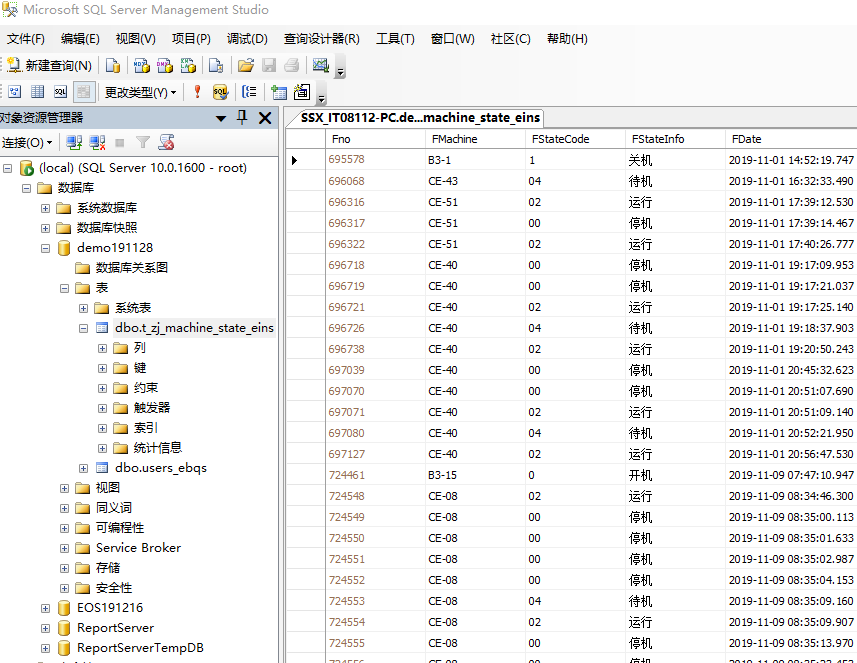
数据库部分数据展示:
想了解前端代码,可以去下载源代码
或者先看效果
WEB甘特图(机器运行状态图)的更多相关文章
- 一个好用的web甘特图
前些天一直在弄web甘特图,发现网上很多web甘特图框架,但大部分是收费的.偶尔发现了向日葵甘特图 感觉不错,特此写下来一方面当做记录,另一方面也为寻找web甘特图的同学们少走一些弯路,双赢嘛~ ...
- 画图前端:mermaid。时序图/类图/甘特图/流程图/状态图/饼图。类似工具:Typora
文档 https://mermaidjs.github.io/#/ cdn https://www.bootcdn.cn/mermaid/ 在线编辑 https://mermaidjs.github. ...
- 还能这么玩?用VsCode画类图、流程图、时序图、状态图...不要太爽!
文章每周持续更新,各位的「三连」是对我最大的肯定.可以微信搜索公众号「 后端技术学堂 」第一时间阅读(一般比博客早更新一到两篇) 软件设计中,有好几种图需要画,比如流程图.类图.组件图等,我知道大部分 ...
- SNF快速开发平台WinForm-CS甘特图
我们在做项目当中会经常用到按时间进度查看任务,其通过条状图来显示项目,进度,和其他时间相关的系统进展的内在关系随着时间进展的情况. 甘特图包含以下三个含义: 1.以图形或表格的形式显示活动: 2.通用 ...
- MVC使用Gantt Chart实现甘特图,管理事情进度
借助"甘特图",可以直观地了解任务.活动.工作的进度.dhtmlxGantt是一个开源的Javacirpt库,能帮助我们快速创建"甘特图",本篇体验在MVC中的 ...
- FusionCharts Free 甘特图
用FusionCharts做甘特图 1.同步方式(用xml格式字符) 前台aspx代码 <!DOCTYPE html> <html xmlns="http://www.w3 ...
- 甘特图控件如何自定义绘图?DevExpress Winforms帮你忙
DevExpress Winforms Controls 内置140多个UI控件和库,完美构建流畅.美观且易于使用的应用程序.无论是Office风格的界面,还是分析处理大批量的业务数据,DevExpr ...
- gantt甘特图可拖拽、编辑(vue、react都可用 highcharts)
前言 Excel功能强大,应用广泛.随着web应用的兴起和完善,用户的要求也越来越高.很多Excel的功能都搬到了sass里面.恨不得给他们做个Excel出来...程序员太难了... 去年我遇到了 ...
- Twproject Gantt开源甘特图功能扩展
1.Twproject Gantt甘特图介绍 Twproject Gantt 是一款基于 jQuery 开发的甘特图组件,也可以创建其它图表,例如任务树(Task Trees).内置编辑.缩放和 CS ...
随机推荐
- 关闭 OSX 10.11 SIP (System Integrity Protection) 功能
关闭 OSX 10.11 SIP (System Integrity Protection) 功能 来源 https://cms.35g.tw/coding/%E9%97%9C%E9%96%89-os ...
- 在有多个网卡,配置了多个IP的情况下,python 获取本地网卡的主IP
如图所示有多个网卡 本地网卡配置了多个IP class Public_IPOp: @staticmethod def GetLocalIP(): rt = [False] # 根节点 reg_root ...
- spring boot 集成mybatis plus 含分页 完整教程
一.添加依赖 <dependency> <groupId>com.baomidou</groupId> <artifactId>mybatis-plus ...
- 码云和Git使用说明
Git下载网站: https://git-scm.com/download/win 码云网站 :https://gitee.com 下载Git,并一路下一步安装. 鼠标空白处右键点击,出现两个 ...
- 1、uiautomator2常用语法
uiautomator2常用语法 连接设备 使用USB连接: d=u2.connect_USB('148b4090')输入手机序列号 d是给当前连接设备定位一个变量 获取设备的信息: print(d. ...
- 资源管理与调度系统-YARN的资源调度器
资源管理与调度系统-YARN的资源调度器 作者:尹正杰 版权声明:原创作品,谢绝转载!否则将追究法律责任. 资源调度器是Hadoop YARN中最核心的组件之一,它是ResourceManager中的 ...
- MongonDB 知识
配置 vi mongodb.conf dbpath=/usr/local/mongodb/data/ logpath=/usr/local/mongodb/data/mongodb.log port ...
- js 字符截取 汉字2字符 英文1个字符
function countCharacters(str, num) { var str = '' + str || '', num = +num || 0, res = '', length = 0 ...
- jmeter生成html报告详解
Jmeter Dashboard详解 结果面板主要分为Dashboard和Charts两部分.Dashboard对信息进行汇总展示,Charts展示更多详细指标数据. Dashboard Test a ...
- 《Exceptioning团队》第六次作业:团队项目系统设计改进与详细设计
一.项目基本介绍 项目 内容 这个作业属于哪个课程 任课教师博客主页链接 这个作业的要求在哪里 作业链接地址 团队名称 Exception 作业学习目标 1.掌握面向对象软件设计方法:2.完善系统设计 ...