
win10环境安装配置Nginx
前言:
参考 https://blog.csdn.net/kisscatforever/article/details/73129270
Nginx的应用场景
1、 http服务器。Nginx是一个http服务可以独立提供http服务。可以做网页静态服务器。
2、 虚拟主机。可以实现在一台服务器虚拟出多个网站。例如个人网站使用的虚拟主机。
基于端口的,不同的端口
基于域名的,不同域名
3、 反向代理,负载均衡。当网站的访问量达到一定程度后,单台服务器不能满足用户的请求时,需要用多台服务器集群可以使用nginx做反向代理。并且多台服务器可以平均分担负载,不会因为某台服务器负载高宕机而某台服务器闲置的情况。
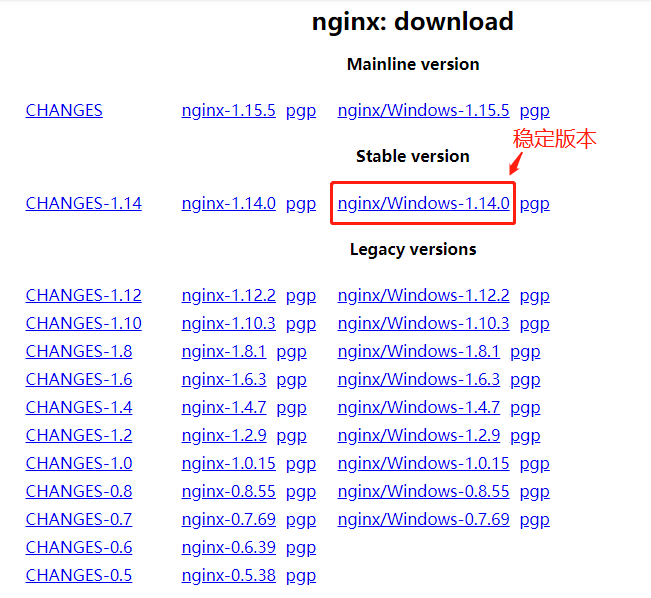
1、到官网下载nginx安装包。如下图所示(建议安装稳定版本):
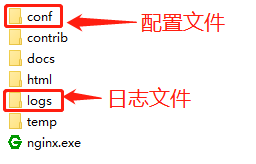
2、解压安装包,如下图所示:
3、开始安装(建议用cmd命令执行安装)
1)定位到加压文件根目录:cd C:\nginx-1.14.0
2)安装:C:\server\nginx-1.14.0>start nginx
4、其他命令
停止:C:\server\nginx-1.14.0>nginx.exe -s stop
重新载入Nginx:C:\server\nginx-1.14.0>nginx.exe -s reload
查看Nginx版本:C:\server\nginx-1.14.0>nginx -v
========================配置nginx文件(以下为本地案例)===========================
 #user  nobody;

 worker_processes  1;

 #error_log  logs/error.log;

 #error_log  logs/error.log  notice;

 #error_log  logs/error.log  info;

 #pid        logs/nginx.pid;

 events {

     worker_connections  1024;

 }

 http {

     include       mime.types;

     default_type  application/octet-stream;

     #log_format  main  '$remote_addr - $remote_user [$time_local] "$request" '

     #                  '$status $body_bytes_sent "$http_referer" '

     #                  '"$http_user_agent" "$http_x_forwarded_for"';

     #access_log  logs/access.log  main;

     sendfile        on;

     #tcp_nopush     on;

     #keepalive_timeout  0;

     keepalive_timeout  65;

     #gzip  on;

     server {

         listen       88;

         server_name 127.0.0.1;

         #charset koi8-r;

           proxy_set_header   Host    127.0.0.1:88;

           proxy_set_header X-Real-IP $remote_addr;

           proxy_set_header REMOTE-HOST $remote_addr;

           proxy_set_header X-Forwarded-For $proxy_add_x_forwarded_for;

         #access_log  logs/host.access.log  main;

         location ^~ /ProxyService/  {    proxy_set_header Host $host;  proxy_pass http://127.0.0.1:8067/;  }

         location ^~ /ph/  {    proxy_set_header Host $host;  proxy_pass http://127.0.0.1:8091/;  }

         location ^~ /report/  {    proxy_set_header Host $host;  proxy_pass http://127.0.0.1:90/;  }

        location  ^~ /admin/  { proxy_pass http://127.0.0.1:88/;         }

         #其他路径默认访问前台网站

         location / {

          proxy_redirect        off;

          proxy_pass http://WeixinRespon;

          proxy_set_header HOST $host;

          proxy_set_header X-Real-IP $remote_addr;

          proxy_set_header X-Forwarded-For $proxy_add_x_forwarded_for;

         }

         #error_page  404              /404.html;

         # redirect server error pages to the static page /50x.html

         #

         error_page   500 502 503 504  /50x.html;

         location = /50x.html {

             root   html;

         }

         # proxy the PHP scripts to Apache listening on 127.0.0.1:80

         #

         #location ~ \.php$ {

         #    proxy_pass   http://127.0.0.1;

         #}

         # pass the PHP scripts to FastCGI server listening on 127.0.0.1:9000

         #

         #location ~ \.php$ {

         #    root           html;

         #    fastcgi_pass   127.0.0.1:9000;

         #    fastcgi_index  index.php;

         #    fastcgi_param  SCRIPT_FILENAME  /scripts$fastcgi_script_name;

         #    include        fastcgi_params;

         #}

         # deny access to .htaccess files, if Apache's document root

         # concurs with nginx's one

         #

         #location ~ /\.ht {

         #    deny  all;

         #}

     }

 upstream WeixinRespon {

     server 127.0.0.1:8080;

 }

     # HTTPS server

     #

     #server {

     #    listen       443 ssl;

     #    server_name  localhost;

     #    ssl_certificate      cert.pem;

     #    ssl_certificate_key  cert.key;

     #    ssl_session_cache    shared:SSL:1m;

     #    ssl_session_timeout  5m;

     #    ssl_ciphers  HIGH:!aNULL:!MD5;

     #    ssl_prefer_server_ciphers  on;

     #    location / {

     #        root   html;

     #        index  index.html index.htm;

     #    }

     #}

 }
win10环境安装配置Nginx的更多相关文章
- linux环境安装配置nginx
安装依赖 yum install gcc yum install pcre-devel yum install zlib zlib-devel yum install openssl openssl- ...
- LNMP1.3一键安装Linux环境,配置Nginx运行ThinkPHP3.2
LNMP1.3一键安装Linux环境,配置Nginx运行ThinkPHP3.2 你是否遇见过:安装LNMP1.3环境后,运行ThinkPHP 3.2,只能打开首页,不能访问控制器,报404错误. 按照 ...
- Linux下安装php环境并且配置Nginx支持php-fpm模块[www]
Linux下安装php环境并且配置Nginx支持php-fpm模块 http://www.cnblogs.com/freeweb/p/5425554.html 5分钟搭建 nginx +php --- ...
- ELK 6安装配置 nginx日志收集 kabana汉化
#ELK 6安装配置 nginx日志收集 kabana汉化 #环境 centos 7.4 ,ELK 6 ,单节点 #服务端 Logstash 收集,过滤 Elasticsearch 存储,索引日志 K ...
- (转)windows 下安装配置 Nginx 详解
windows 下安装配置 Nginx 详解 本文转自https://blog.csdn.net/kingscoming/article/details/79042874 nginx功能之一可以启动一 ...
- Linux下xampp集成环境安装配置方法 、部署bugfree及部署禅道
XAMPP(Apache+MySQL+PHP+PERL)是一个功能强大的建站集成软件包.XAMPP 是一个易于安装且包含 MySQL.PHP 和 Perl 的 Apache 发行版.XAMPP 的确非 ...
- Sencha Toucha 2 —1.环境安装配置、在线打包、离线打包
环境安装配置 1. 下载 1.1 Sencha Touch 下载 http://cdn.sencha.com/touch/sencha-touch-2.2.1-gpl.zip 1 ...
- [转载]SharePoint 2013测试环境安装配置指南
软件版本 Windows Server 2012 标准版 SQL Server 2012 标准版 SharePoint Server 2013 企业版 Office Web Apps 2013 备注: ...
- Windows7 x64 跨平台开发环境安装配置
======================================================================= Windows7 x64 跨平台开发环境安装配置 201 ...
随机推荐
- Linux下nginx配置https协议访问
一.配置nginx支持https协议访问,需要在编译安装nginx的时候添加相应的模块--with-http_ssl_module 查看nginx编译参数:/usr/local/nginx/sbin/ ...
- Flask 静态文件缓存问题
大家好,今天才发现很多学习Flask的小伙伴都有这么一个问题,清理缓存好麻烦啊,今天就教大家怎么解决. 大家在使用Flask静态文件的时候,每次更新,发现CSS或是Js或者其他的文件不会更新. 这是因 ...
- WPF 设置TextBox为空时,背景为文字提示。
<TextBox FontSize="> <TextBox.Resources> <VisualBrush x:Key="HelpBrush" ...
- PowerDesigner设置code和name不联动的方法
按照如下设置即可: 具体步骤:菜单:Tools--General Options--Name to Code mirroring的复选框不要选中.
- 启动mongodb报错,无法连接mongodb
报错原因如下: MongoDB shell version v3.4.2 connecting to: mongodb://127.0.0.1:27017 --01T12:: W NETWORK [t ...
- mysql访问慢解决
配置变更思路: 扩大MySQL连接数至2000,同时扩大操作系统最大文件描述符:扩大innodb缓存池 操作步骤: vi /etc/my.cnf max_connections = 2000innod ...
- seaborn可视化
文章来自https://blog.csdn.net/qq_33120943/article/details/76569756 详细教程可以查看官方额示例:http://seaborn.pydata.o ...
- 【ARM-Linux开发】ARM7 ARM9 ARM Cortex M3 M4 有什么区别
ARM7 ARM9 ARM Cortex M3 M4 区别 arm7 arm9 可以类比386和奔腾, 不同代,arm9相比arm7指令集和性能都有所增强,arm7和arm9都有带mmu和无mmu的版 ...
- 【编程开发】MD5和RSA
MD5和RSA是网络传输中最常用的两个算法,了解这两个算法原理后就能大致知道加密是怎么一回事了.但这两种算法使用环境有差异,刚好互补. (1)MD5 MD5(单向散列算法)的全称是Message-Di ...
- oracle服务器硬盘磁盘空间满了
问题描述:oracle服务器硬盘磁盘空间满了,没有空间写入数据: 解决思路: a.服务器是虚拟机还是实体机? 虚拟机,->物理机上有空间直接给它扩容,再给数据库的相关表空间添加文件就可: 实体机 ...