
IDEA报错:Error starting ApplicationContext. To display the auto-configuration report re-run your application with 'debug' enabled. ('crmWatcherService'错误)
单表插入项目,插入前正常,插入后运行webapplication报错:
run:

debug:

于webapplication报错:
Injection of autowired dependencies failed; nested exception is java.lang.IllegalArgumentException: Could not resolve placeholder 'crm.watcher.get.db.slave.status.url' in value "${crm.watcher.get.db.slave.status.url}"

log:
 2017-12-09 13:02:04.251  WARN 8600 --- [           main] ationConfigEmbeddedWebApplicationContext : Exception encountered during context initialization - cancelling refresh attempt: org.springframework.beans.factory.BeanCreationException: Error creating bean with name 'crmWatcherService': Injection of autowired dependencies failed; nested exception is java.lang.IllegalArgumentException: Could not resolve placeholder 'crm.watcher.get.db.slave.status.url' in value "${crm.watcher.get.db.slave.status.url}"

 2017-12-09 13:02:04.253  INFO 8600 --- [           main] s.c.a.AnnotationConfigApplicationContext : Closing org.springframework.context.annotation.AnnotationConfigApplicationContext@55fc6344: startup date [Sat Dec 09 13:02:00 CST 2017]; parent: org.springframework.boot.context.embedded.AnnotationConfigEmbeddedWebApplicationContext@1d25c1c

 2017-12-09 13:02:04.255  INFO 8600 --- [           main] o.apache.catalina.core.StandardService   : Stopping service Tomcat

 2017-12-09 13:02:04.279  INFO 8600 --- [           main] utoConfigurationReportLoggingInitializer :

 Error starting ApplicationContext. To display the auto-configuration report re-run your application with 'debug' enabled.

 2017-12-09 13:02:04.292 ERROR 8600 --- [           main] o.s.boot.SpringApplication               : Application startup failed

 org.springframework.beans.factory.BeanCreationException: Error creating bean with name 'crmWatcherService': Injection of autowired dependencies failed; nested exception is java.lang.IllegalArgumentException: Could not resolve placeholder 'crm.watcher.get.db.slave.status.url' in value "${crm.watcher.get.db.slave.status.url}"

     at org.springframework.beans.factory.annotation.AutowiredAnnotationBeanPostProcessor.postProcessPropertyValues(AutowiredAnnotationBeanPostProcessor.java:372) ~[spring-beans-4.3.7.RELEASE.jar:4.3.7.RELEASE]

     at org.springframework.beans.factory.support.AbstractAutowireCapableBeanFactory.populateBean(AbstractAutowireCapableBeanFactory.java:1264) ~[spring-beans-4.3.7.RELEASE.jar:4.3.7.RELEASE]

     at org.springframework.beans.factory.support.AbstractAutowireCapableBeanFactory.doCreateBean(AbstractAutowireCapableBeanFactory.java:553) ~[spring-beans-4.3.7.RELEASE.jar:4.3.7.RELEASE]

     at org.springframework.beans.factory.support.AbstractAutowireCapableBeanFactory.createBean(AbstractAutowireCapableBeanFactory.java:483) ~[spring-beans-4.3.7.RELEASE.jar:4.3.7.RELEASE]

     at org.springframework.beans.factory.support.AbstractBeanFactory$1.getObject(AbstractBeanFactory.java:306) ~[spring-beans-4.3.7.RELEASE.jar:4.3.7.RELEASE]

     at org.springframework.beans.factory.support.DefaultSingletonBeanRegistry.getSingleton(DefaultSingletonBeanRegistry.java:230) ~[spring-beans-4.3.7.RELEASE.jar:4.3.7.RELEASE]

     at org.springframework.beans.factory.support.AbstractBeanFactory.doGetBean(AbstractBeanFactory.java:302) ~[spring-beans-4.3.7.RELEASE.jar:4.3.7.RELEASE]

     at org.springframework.beans.factory.support.AbstractBeanFactory.getBean(AbstractBeanFactory.java:197) ~[spring-beans-4.3.7.RELEASE.jar:4.3.7.RELEASE]

     at org.springframework.beans.factory.support.DefaultListableBeanFactory.preInstantiateSingletons(DefaultListableBeanFactory.java:761) ~[spring-beans-4.3.7.RELEASE.jar:4.3.7.RELEASE]

     at org.springframework.context.support.AbstractApplicationContext.finishBeanFactoryInitialization(AbstractApplicationContext.java:866) ~[spring-context-4.3.7.RELEASE.jar:4.3.7.RELEASE]

     at org.springframework.context.support.AbstractApplicationContext.refresh(AbstractApplicationContext.java:542) ~[spring-context-4.3.7.RELEASE.jar:4.3.7.RELEASE]

     at org.springframework.boot.context.embedded.EmbeddedWebApplicationContext.refresh(EmbeddedWebApplicationContext.java:122) ~[spring-boot-1.5.2.RELEASE.jar:1.5.2.RELEASE]

     at org.springframework.boot.SpringApplication.refresh(SpringApplication.java:737) [spring-boot-1.5.2.RELEASE.jar:1.5.2.RELEASE]

     at org.springframework.boot.SpringApplication.refreshContext(SpringApplication.java:370) [spring-boot-1.5.2.RELEASE.jar:1.5.2.RELEASE]

     at org.springframework.boot.SpringApplication.run(SpringApplication.java:314) [spring-boot-1.5.2.RELEASE.jar:1.5.2.RELEASE]

     at org.springframework.boot.SpringApplication.run(SpringApplication.java:1162) [spring-boot-1.5.2.RELEASE.jar:1.5.2.RELEASE]

     at org.springframework.boot.SpringApplication.run(SpringApplication.java:1151) [spring-boot-1.5.2.RELEASE.jar:1.5.2.RELEASE]

     at com.mobcb.platform.WebApplication.main(WebApplication.java:36) [classes/:na]

 Caused by: java.lang.IllegalArgumentException: Could not resolve placeholder 'crm.watcher.get.db.slave.status.url' in value "${crm.watcher.get.db.slave.status.url}"

     at org.springframework.util.PropertyPlaceholderHelper.parseStringValue(PropertyPlaceholderHelper.java:174) ~[spring-core-4.3.7.RELEASE.jar:4.3.7.RELEASE]

     at org.springframework.util.PropertyPlaceholderHelper.replacePlaceholders(PropertyPlaceholderHelper.java:126) ~[spring-core-4.3.7.RELEASE.jar:4.3.7.RELEASE]

     at org.springframework.core.env.AbstractPropertyResolver.doResolvePlaceholders(AbstractPropertyResolver.java:236) ~[spring-core-4.3.7.RELEASE.jar:4.3.7.RELEASE]

     at org.springframework.core.env.AbstractPropertyResolver.resolveRequiredPlaceholders(AbstractPropertyResolver.java:210) ~[spring-core-4.3.7.RELEASE.jar:4.3.7.RELEASE]

     at org.springframework.context.support.PropertySourcesPlaceholderConfigurer$2.resolveStringValue(PropertySourcesPlaceholderConfigurer.java:172) ~[spring-context-4.3.7.RELEASE.jar:4.3.7.RELEASE]

     at org.springframework.beans.factory.support.AbstractBeanFactory.resolveEmbeddedValue(AbstractBeanFactory.java:831) ~[spring-beans-4.3.7.RELEASE.jar:4.3.7.RELEASE]

     at org.springframework.beans.factory.support.DefaultListableBeanFactory.doResolveDependency(DefaultListableBeanFactory.java:1086) ~[spring-beans-4.3.7.RELEASE.jar:4.3.7.RELEASE]

     at org.springframework.beans.factory.support.DefaultListableBeanFactory.resolveDependency(DefaultListableBeanFactory.java:1066) ~[spring-beans-4.3.7.RELEASE.jar:4.3.7.RELEASE]

     at org.springframework.beans.factory.annotation.AutowiredAnnotationBeanPostProcessor$AutowiredFieldElement.inject(AutowiredAnnotationBeanPostProcessor.java:585) ~[spring-beans-4.3.7.RELEASE.jar:4.3.7.RELEASE]

     at org.springframework.beans.factory.annotation.InjectionMetadata.inject(InjectionMetadata.java:88) ~[spring-beans-4.3.7.RELEASE.jar:4.3.7.RELEASE]

     at org.springframework.beans.factory.annotation.AutowiredAnnotationBeanPostProcessor.postProcessPropertyValues(AutowiredAnnotationBeanPostProcessor.java:366) ~[spring-beans-4.3.7.RELEASE.jar:4.3.7.RELEASE]

     ... 17 common frames omitted

 Disconnected from the target VM, address: '127.0.0.1:61069', transport: 'socket'

 Process finished with exit code 1
解决方法:
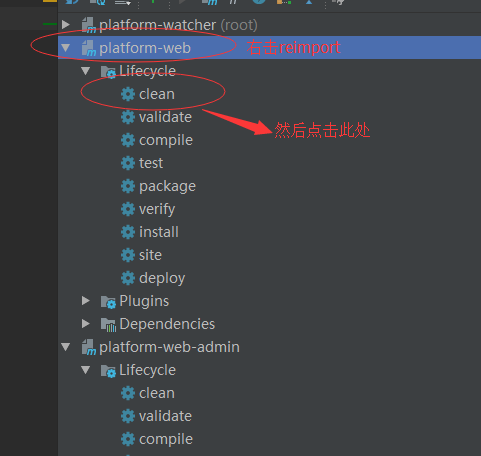
之后要启动:
如果登录时出现满屏代码:

IDEA报错:Error starting ApplicationContext. To display the auto-configuration report re-run your application with 'debug' enabled. ('crmWatcherService'错误)的更多相关文章
- springboot启动报错,Error starting ApplicationContext. To display the conditions report re-run your application with 'debug' enabled.
报错: Error starting ApplicationContext. To display the conditions report re-run your application with ...
- spring boot启动报错Error starting ApplicationContext(未能配置数据源)
主要错误:Failed to configure a DataSource: 'url' attribute is not specified and no embedded datasource c ...
- SpringBoot报错:Error starting ApplicationContext. To display the conditions report re-run your application with 'debug' enabled.
Spring Boot报错:Error starting ApplicationContext. To display the conditions report re-run your applic ...
- Error starting ApplicationContext. To display the conditions report re-run your application with 'debug' enabled.
Error starting ApplicationContext. To display the conditions report re-run your application with 'de ...
- 解决 docker 报错: Error starting daemon: error initializing graphdriver: backing file system is unsupported for this graph driver
CentOS 7.5 x64下 sudo yum install docker -y systemctl enable docker systemctl start docker 发现启动失败 jou ...
- 多个类用@feignclient标注同一个服务,出错问题:Error starting ApplicationContext. To display the conditions report re-run your application with 'debug' enabled.Caused by: org.springframework.beans.factory.support.Bea..
如果标注了两个或以上类 @FeignClient 标注同一个 服务名称 调用方会主配置类启动会报错 测试类报错 java.lang.IllegalStateException: Failed to l ...
- Debug - SpringBoot - Error starting ApplicationContext. To display the auto-configuration report re-runyour application
Error log 2019-12-07 22:33:03.959 ERROR 3760 --- [ main] o.s.b.d.LoggingFailureAnalysisReporter : ** ...
- 关于MyEclipse启动报错:Error starting static Resources;下面伴随Failed to start component [StandardServer[8005]]; A child container failed during start.的错误提示解决办法.
最后才发现原因是Tomcat的server.xml配置文件有问题:apache-tomcat-7.0.67\conf的service.xml下边多了类似与 <Host appBase=" ...
- 倍福TwinCAT(贝福Beckhoff)常见问题(FAQ)-点击运行按钮进入到运行状态报错Error starting TwinCAT System怎么办 AdsWarning1823怎么办
一般提示如下 点击Device,然后选中当前真正连接到的网卡 一般是由于重装系统之后,没有把本来是realtime capable的设备Install,所以找不到支持EtherCAT的设备导致 ...
随机推荐
- 【原创】实现一个简单的邮件服务API
经常在公司写一些内部小程序需要用到发邮件的功能,于是决定写一个邮件服务. 实现思路:以URL形式提供一个RESTful API 给客户端,客户端通过post请求把json格式的邮件信息发送到服务端,服 ...
- Windows下调试hadoop
1. 本地模式 本地模式下调试hadoop:下载winutils.exe和hadoop.dll hadoop.lib等windows的hadoop依赖文件放在D:\proc\hadoop\bin目 ...
- ASP.NET Core 1.0 基础与应用启动
.NET Core http://dotnet.github.io/[https://github.com/dotnet/coreclr] ASP.NET Core 1.0 https://get.a ...
- [转]cximage双缓冲绘图 .
1.起因 本来是想用gdi绘图的,但是一想到用gdi+libpng,还要自己处理一些比如alpha的效果之类的巨麻烦(而且涉及到处理每一个像素点的计算,一般都很耗时),我对自己处理像素点的能力一直持有 ...
- sdcard 导入文件错误
把 AVI 文件导入到 sdcard 时,报 Failed to push selection: Read-only file system 错误. 解决办法: 1.在命令行中输入:adb shell ...
- 一道JS面试题引发的血案
刚入职新公司,属于公司萌新一枚,一天下午对着屏幕看代码架构时. BI项目组长给我看了一道面试别人的JS面试题. 虽然答对了,但把理由说错了,照样不及格. 话不多说,直接上题: var a = 1; s ...
- 全网最详细的Sublime Text 3的安装Package Control插件管理包(图文详解)
不多说,直接上干货! 全网最详细的Windows里下载与安装Sublime Text *(图文详解) 全网最详细的Sublime Text 3的激活(图文详解) 全网最详细的Sublime Text ...
- MVC源码分析 - Authorize授权过滤器
从 上一篇 其实能看到, 程序执行的过滤器, 有四种 : 过滤器类型 接口 描述 Authorization IAuthorizationFilter 此类型(或过滤器)用于限制进入控制器或控制器的某 ...
- 数据库字典查询,从EF工具操作中提取的
用户表: SELECT [Project1].[C1] AS [C1] , [Project1].[CatalogName] AS [CatalogName] , [Project1].[Schema ...
- Jackson xml json
public class XMLTest { private static XmlMapper xmlMapper = new XmlMapper(); private static ObjectMa ...