
NIO初识
Java编程中的NIO,俗称new I/O,是在JDK1.4版本之后开始引入的,在JDK1.4之前,Java服务端大多使用同步阻塞式来处理网络请求,在低流量、低并发情况还能抗住,在如今互联网时代,信息量很明显差远了,在没有NIO之前,服务器端通信模块基本被C/C++占据着,它们可以利用操作系统的原生API来处理非阻塞事件,随着java的nio类库发布,经过不断发展完善,性能也逐渐与c++媲美了,加上JAVA很多优秀的开源类库,使用更广泛了,现在,来了解一下nio的原理,做一个感官上的认识。
使用NIO,必须记住如下3个核心概念,编程实现就是围绕他们的关系的:
1. 缓冲区Buffer: 在nio编程中,读写都在基于缓冲区的,区别于之前的基于流的,根据用途,可以使用字节缓冲区、字符缓冲区等
2. 通道Channel: 在Buffer里的数据通过Channel与网络交互,是全双工的,而流数单工操作的
3. 多路复用器Selector: 管理Channel,最基本的就是读写Channel,一个线程使用Selector来轮询读写Channel,通道上有事件发生时,就会进行处理,类似一个函数指针集合,在BLE开发的底层OS上也是这样处理的,增加一个模块,只要写好模块函数,然后把函数指针放到功能数组就可以了,后面就轮询这个注册了的函数,有置位就调用指针进行操作。这种模式可以实现单线程就能支持上千万并发连接。
下面新建一个工程来测试一下:
1. 新建一个TestNIO工程,目录结构设为如下:

2. 实现服务器端,代码如下:
package cn.linjk.testnio.server;

import java.io.IOException;

import java.net.InetSocketAddress;

import java.nio.ByteBuffer;

import java.nio.channels.SelectionKey;

import java.nio.channels.Selector;

import java.nio.channels.ServerSocketChannel;

import java.nio.channels.SocketChannel;

import java.util.Iterator;

import java.util.Set;

/**

 * Created by LinJK on 19/11/2016.

 */

public class NioServer {

    private static final int serverPort = 8889;

    public static void main(String[] argc) {

        //启动一个线程来处理Selector

        HelloServer helloServer = new HelloServer(serverPort);

        if (!helloServer.getInitResult()) {

            System.out.println("Init Error");

            System.exit(-1);

        }

        System.out.println("Hello Server listening on localhost:" + serverPort);

        new Thread(helloServer).start();

    }

}

class HelloServer implements Runnable {

    private Selector            selector;

    private ServerSocketChannel serverSocketChannel;

    private volatile boolean    stop;

    private ByteBuffer byteBufferWrite;

    private boolean             contrustorFlag;

    public HelloServer(int port) {

        try {

            selector            = Selector.open();

            serverSocketChannel = ServerSocketChannel.open();

            serverSocketChannel.configureBlocking(false);

            serverSocketChannel.socket().bind(new InetSocketAddress(port), 1024);

            serverSocketChannel.register(selector, SelectionKey.OP_ACCEPT);

            contrustorFlag = true;

        }

        catch (Exception e) {

            contrustorFlag = false;

            e.printStackTrace();

        }

    }

    public boolean getInitResult() {

        return contrustorFlag;

    }

    public void stop() {

        stop = true;

    }

    @Override

    public void run() {

        while (!stop) {

            try {

                selector.select(1000); //1秒轮询周期,可以按需修改

                Set<SelectionKey> selectionKeys = selector.selectedKeys();

                Iterator<SelectionKey> it = selectionKeys.iterator();

                SelectionKey selectionKey = null;

                while (it.hasNext()) {

                    selectionKey = it.next();

                    it.remove();

                    try {

                        //handle event

                        handleIncomeEvent(selectionKey);

                    }

                    catch (Exception e) {

                        e.printStackTrace();

                        if (selectionKey != null) {

                            selectionKey.cancel();

                            if (selectionKey.channel() != null) {

                                selectionKey.channel().close();

                            }

                        }

                    }

                }

            }

            catch (Exception e) {

                e.printStackTrace();

            }

        }

        //User set stop listening, clear something

        if (selector != null) {

            try {

                selector.close();

            }

            catch (IOException e) {

                e.printStackTrace();

            }

        }

    }

    private void handleIncomeEvent(SelectionKey key) {

        if (key.isValid()) {

            //连接事件

            if (key.isAcceptable()) {

                try {

                    ServerSocketChannel serverSocketChannel = (ServerSocketChannel)key.channel();

                    SocketChannel socketChannel = serverSocketChannel.accept();

                    socketChannel.configureBlocking(false);

                    //监听到了连接事件,原有基础上注册监听读取用户端数据事件

                    socketChannel.register(selector, SelectionKey.OP_READ);

                }

                catch (IOException e) {

                    e.printStackTrace();

                }

            }

            //读到客户端数据事件

            if (key.isReadable()) {

                SocketChannel socketChannel = (SocketChannel)key.channel();

                ByteBuffer byteBufferRead = ByteBuffer.allocate(1024);

                try {

                    int readCnt = socketChannel.read(byteBufferRead);

                    if (readCnt > 0) {

                        byteBufferRead.flip();//刷新缓冲区,然后从缓冲区读取数据

                        byte[] bytes = new byte[byteBufferRead.remaining()];

                        byteBufferRead.get(bytes);

                        String request = new String(bytes, "UTF-8");

                        System.out.println("Server receive: " + request);

                        //say hello to client

                        byteBufferWrite = ByteBuffer.allocate(20);

                        byteBufferWrite.put("[<<-]Hello".getBytes());

                        byteBufferWrite.flip();//刷新数据到缓冲区

                        socketChannel.write(byteBufferWrite);

                        //避免缓冲区已满,造成写数据不全现象,注册写事件,轮询是否所有数据已写完

                        socketChannel.register(selector, SelectionKey.OP_WRITE);

                    }

                    else if (readCnt < 0) {

                        key.cancel();

                        socketChannel.close();

                    }

                    else {

                        //

                    }

                }

                catch (IOException e) {

                    e.printStackTrace();

                }

            }

            if (key.isWritable()) {

                SocketChannel socketChannel = (SocketChannel)key.channel();

                while (byteBufferWrite.hasRemaining()){

                    //.....

                }

            }

        }

        else {

            System.out.println("Input key unvalid");

        }

    }

}
3. 实现客户端,测试功能,有些异常没有写全,也没实现重连服务器机制,只把框架写了,代码如下:
package cn.linjk.testnio.client;

import java.io.IOException;

import java.net.InetSocketAddress;

import java.nio.ByteBuffer;

import java.nio.channels.SelectionKey;

import java.nio.channels.Selector;

import java.nio.channels.SocketChannel;

import java.util.Iterator;

import java.util.Set;

/**

 * Created by LinJK on 19/11/2016.

 */

public class NioClient {

    private static Selector selector;

    private static SocketChannel socketChannel;

    private static volatile boolean stop;

    public static void main(String[] argc) {

        new Thread(new Runnable() {

            @Override

            public void run() {

                try {

                    selector = Selector.open();

                    socketChannel = SocketChannel.open();

                    socketChannel.configureBlocking(false);

                    //connect to server

                    if (socketChannel.connect(new InetSocketAddress("127.0.0.1", 8889))) {

                        //注册监听服务器返回事件

                        socketChannel.register(selector, SelectionKey.OP_READ);

                        //send request to server

                        ByteBuffer byteBufferWrite = ByteBuffer.allocate(100);

                        byteBufferWrite.put("I am Jim".getBytes());

                        byteBufferWrite.flip();

                        socketChannel.write(byteBufferWrite);

                        if (!byteBufferWrite.hasRemaining()) {

                            System.out.println("Send Finish.");

                        }

                    }

                    else {

                        socketChannel.register(selector, SelectionKey.OP_CONNECT);

                    }

                    while (!stop) {

                        selector.select(1000);

                        Set<SelectionKey> selectionKeys = selector.selectedKeys();

                        Iterator<SelectionKey> it = selectionKeys.iterator();

                        SelectionKey selectionKey = null;

                        while (it.hasNext()) {

                            selectionKey = it.next();

                            it.remove();

                            if (selectionKey.isValid()) {

                                SocketChannel socketChannel = (SocketChannel)selectionKey.channel();

                                if (selectionKey.isConnectable()) {

                                    if (socketChannel.finishConnect()) {

                                        socketChannel.register(selector, SelectionKey.OP_READ);

                                        //send data

                                        ByteBuffer byteBufferWrite = ByteBuffer.allocate(100);

                                        byteBufferWrite.put("I am Jim".getBytes());

                                        byteBufferWrite.flip();

                                        socketChannel.write(byteBufferWrite);

                                        if (!byteBufferWrite.hasRemaining()) {

                                            System.out.println("Send Finish.");

                                        }

                                    }

                                }

                                //收到服务器返回数据事件

                                if (selectionKey.isReadable()) {

                                    ByteBuffer byteBufferRead = ByteBuffer.allocate(100);

                                    int readCnt = socketChannel.read(byteBufferRead);

                                    if (readCnt > 0) {

                                        byteBufferRead.flip();

                                        byte[] bytes = new byte[byteBufferRead.remaining()];

                                        byteBufferRead.get(bytes);

                                        System.out.println("Receive from server: " + new String(bytes, "UTF-8"));

                                        stop = true;

                                    }

                                    else if (readCnt < 0){

                                        selectionKey.channel();

                                        socketChannel.close();

                                    }

                                }

                            }

                        }

                    }

                    if (selector != null) {

                        selector.close();

                    }

                }

                catch (IOException e) {

                    //资源清理....

                    System.exit(1);

                }

            }

        }).start();

    }

}
4. 代码分析:
对比服务端和客户端的代码逻辑,有如下两点相似:
a. 程序启动后创建一个线程来管理Selctor
b. 都配置为非阻塞操作,然后注册SelctionKey到SocketChanell,然后在线程的run()函数里轮询哪个事件发生了再进行操作
流程都相似,稍微有点不一样,看代码并运行一下就明白了。
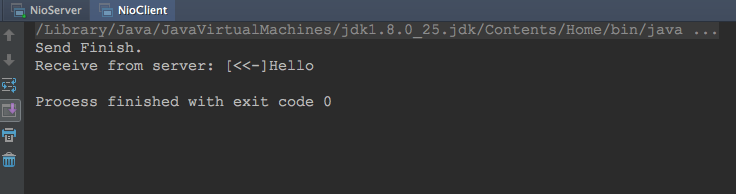
5. 运行结果:
先运行Server端,然后运行Client端,二者输出分别如下:
Server:

Client:
6. 总结:
NIO和IO直接最大区别就是,NIO是面向缓冲区的,IO是面向流的,面向缓冲区数据处理比较灵活,数据处理速度与吞吐量更大,同时保证数据完整性比较重要,前面提到缓冲区满时,需要检测"半包"也是这个意思,使用NIO的非阻塞避免了因网络情况阻塞造成的高并发环境下时延问题,在高并发通讯情况下,可以使用它来处理通信还是很好的。
NIO初识的更多相关文章
- java核心技术-NIO
1.reactor(反应器)模式 使用单线程模拟多线程,提高资源利用率和程序的效率,增加系统吞吐量.下面例子比较形象的说明了什么是反应器模式: 一个老板经营一个饭店, 传统模式 - 来一个客人安排一个 ...
- Java NIO学习与记录(一):初识NIO
初识 工作中有些地方用到了netty,netty是一个NIO框架,对于NIO却不是那么熟悉,这个系列的文章是我在学习NIO时的一个记录,也期待自己可以更好的掌握NIO. 一.NIO是什么? 非阻塞式I ...
- Java NIO (一) 初识NIO
Java NIO(New IO / Non-Blocking IO)是从JDK 1.4版本开始引入的IO API , 可以替代标准的Java IO API .NIO与原来标准IO有同样的作用和目的,但 ...
- 初识Java NIO
原文链接:http://tutorials.jenkov.com/java-nio/index.html Java NIO是java 1.4之后新出的一套IO接口,这里的新是相对于原有标准的Java ...
- 深入理解Java NIO
初识NIO: 在 JDK 1. 4 中 新 加入 了 NIO( New Input/ Output) 类, 引入了一种基于通道和缓冲区的 I/O 方式,它可以使用 Native 函数库直接分配堆外内存 ...
- DotNetty网络通信框架学习之初识Netty
p{ text-align:center; } blockquote > p > span{ text-align:center; font-size: 18px; color: #ff0 ...
- Java NIO学习与记录(二):FileChannel与Buffer用法与说明
FileChannel与Buffer用法与说明 上一篇简单介绍了NIO,这一篇将介绍FileChannel结合Buffer的用法,主要介绍Buffer FileChannel的简单使用&Buf ...
- 从 BIO、NIO 聊到 Netty,最后还要实现个 RPC 框架!
大家好,我是 「后端技术进阶」 作者,一个热爱技术的少年. 觉得不错的话,欢迎 star!ღ( ´・ᴗ・` )比心 Netty 从入门到实战系列文章地址:https://github.com/Snai ...
- Netty与NIO
初识Netty Netty是由JBoss提供的一个Java的开源框架,是GitHub上的独立项目. Netty是一个异步的,基于事件驱动的网络应用框架,用于快速开发高性能.高可靠的网络IO程序. Ne ...
随机推荐
- Ubuntu 下,修改 Mac address
ifconfig // check Mac address sudo ifconfig eth0 down sudo ifconfig eth0 hw ether xx:xx:xx:xx: ...
- 读取本地外网IP地址
读取本地外网IP地址. 根据启动并运行的网卡名称,找到本机实际的IP地址(已知当前运行的无线网卡名包含某一个字符) import java.net.InterfaceAddress; import j ...
- bzoj4462: [Jsoi2013]编程作业
KMP还是有点用处的嘛qwq 对于小写字母,修改其为前一个这个小写字母和它的距离 然后跑KMP就行了 跑得飞快 #include <iostream> #include <cstdi ...
- Map工具系列-03-代码生成BySQl工具使用说明
所有cs端工具集成了一个工具面板 -打开(IE) Map工具系列-01-Map代码生成工具说明 Map工具系列-02-数据迁移工具使用说明 Map工具系列-03-代码生成BySQl工具使用说明 Map ...
- Zabbix监控mysql主从复制状态
原理 mysql slave show slave status\G 在输出信息中查看I/O线程和SQL线程的状态值(YES为正常,NO为错误) Slave_IO_Running: Yes Slave ...
- 网页中嵌入可以点击“运行代码”执行html/css/js代码
html代码 <textarea name="textarea" cols="60" rows="10" id="rn01& ...
- <<< Js中实现对字符串的截取
1.函数split() 功能:使用一个指定的分隔符把一个字符串分割存储到数组 例:var Data = "1/234/5678/9"; var str = shuju.split( ...
- (转载)Sumblime Text 2 常用插件以及安装方法
[内容提要]使用Package Control组件在线安装更方便 安装Sublime Text 2插件的方法: 1.直接安装 安装Sublime text 2插件很方便,可以直接下载安装包解压缩到Pa ...
- Linux 命令行总结
1.使用ln不加参数,会创建硬链接,如果要创建软连接,需要加-s 参数. # ln test1 test8 -rw-r--r-- root root Nov : test1 -rw-r--r-- ro ...
- PHP之static静态变量详解(一)
什么是static静态变量?(以下为在C语言中的理解) 静态变量 类型说明符是static. 静态变量属于静态存储方式,其存储空间为内存中的静态数据区(在静态存储区内分配存储单元),该 区域中的数据在 ...