
底部导航栏实现一 Fragment-replace
【效果】(这里下载的软件收费的试用有水印)

【推荐】这里推荐一个图标网http://iconfont.cn/。以上图标来自此图标网
【项目结构】

【步骤】
①创建布局文件,写底部导航栏
 <?xml version="1.0" encoding="utf-8"?>

 <LinearLayout xmlns:android="http://schemas.android.com/apk/res/android"

     xmlns:app="http://schemas.android.com/apk/res-auto"

     xmlns:tools="http://schemas.android.com/tools"

     android:layout_width="match_parent"

     android:layout_height="match_parent"

     tools:context=".MainActivity"

     android:orientation="vertical">

     <RelativeLayout

         android:id="@+id/rl_content"

         android:layout_width="match_parent"

         android:layout_height="0dp"

         android:layout_weight="1">

        <!--这里设置权重weight为1, 下面不设置权重。-->

         <!--意思是,剩余的位置全都是RelativeLayout的-->

     </RelativeLayout>

     <TextView

         android:layout_width="match_parent"

         android:layout_height="1dp"

         android:background="#797878"/>

     <LinearLayout

         android:layout_width="match_parent"

         android:layout_height="80dp"

         android:orientation="horizontal">

         <LinearLayout

             android:id="@+id/item1"

             android:layout_width="0dp"

             android:layout_weight="1"

             android:layout_height="match_parent"

             android:orientation="vertical">

             <ImageView

                 android:id="@+id/item1_iv"

                 android:layout_width="match_parent"

                 android:layout_height="0dp"

                 android:layout_weight="3"

                 android:layout_margin="3dp"

                 android:scaleType="fitCenter"

                 android:src="@drawable/wxb"

                 android:padding="1dp"/>

             <TextView

                 android:id="@+id/item1_tv"

                 android:text="女王"

                 android:textSize="16sp"

                 android:layout_width="match_parent"

                 android:layout_height="0dp"

                 android:layout_weight="1"

                 android:gravity="center"/>

         </LinearLayout>

         <LinearLayout

             android:id="@+id/item2"

             android:layout_width="0dp"

             android:layout_weight="1"

             android:layout_height="match_parent"

             android:orientation="vertical">

             <ImageView

                 android:id="@+id/item2_iv"

                 android:layout_width="match_parent"

                 android:layout_height="0dp"

                 android:layout_weight="3"

                 android:layout_margin="3dp"

                 android:scaleType="fitCenter"

                 android:src="@drawable/meizhuang"

                 android:padding="4dp"/>

             <TextView

                 android:id="@+id/item2_tv"

                 android:text="美妆"

                 android:textSize="16sp"

                 android:layout_width="match_parent"

                 android:layout_height="0dp"

                 android:layout_weight="1"

                 android:gravity="center"/>

         </LinearLayout>

         <LinearLayout

             android:id="@+id/item3"

             android:layout_width="0dp"

             android:layout_weight="1"

             android:layout_height="match_parent"

             android:orientation="vertical">

             <ImageView

                 android:id="@+id/item3_iv"

                 android:layout_width="match_parent"

                 android:layout_height="0dp"

                 android:layout_weight="3"

                 android:layout_margin="3dp"

                 android:scaleType="fitCenter"

                 android:src="@drawable/fuzhuang"

                 android:padding="5dp"/>

             <TextView

                 android:id="@+id/item3_tv"

                 android:text="衣帽"

                 android:textSize="16sp"

                 android:layout_width="match_parent"

                 android:layout_height="0dp"

                 android:layout_weight="1"

                 android:gravity="center" />

         </LinearLayout>

         <LinearLayout

             android:id="@+id/item4"

             android:layout_width="0dp"

             android:layout_weight="1"

             android:layout_height="match_parent"

             android:orientation="vertical">

             <ImageView

                 android:id="@+id/item4_iv"

                 android:layout_width="match_parent"

                 android:layout_height="0dp"

                 android:layout_weight="3"

                 android:layout_margin="3dp"

                 android:scaleType="fitCenter"

                 android:src="@drawable/xiebaopeishi"

                 android:padding="3dp"/>

             <TextView

                 android:id="@+id/item4_tv"

                 android:text="鞋包"

                 android:textSize="16sp"

                 android:layout_width="match_parent"

                 android:layout_height="0dp"

                 android:layout_weight="1"

                 android:gravity="center" />

         </LinearLayout>

     </LinearLayout>

 </LinearLayout>
②定义Fragment
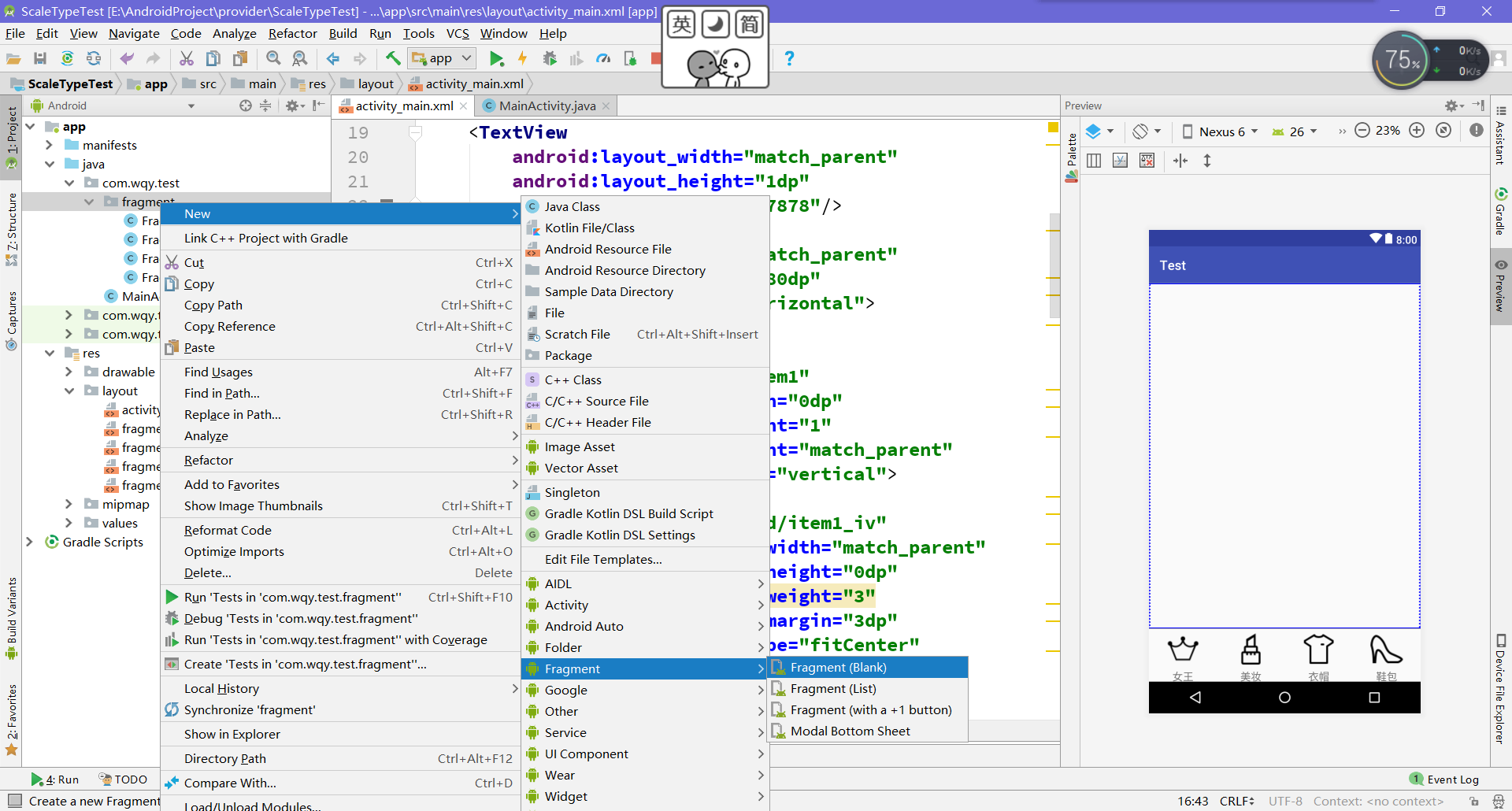
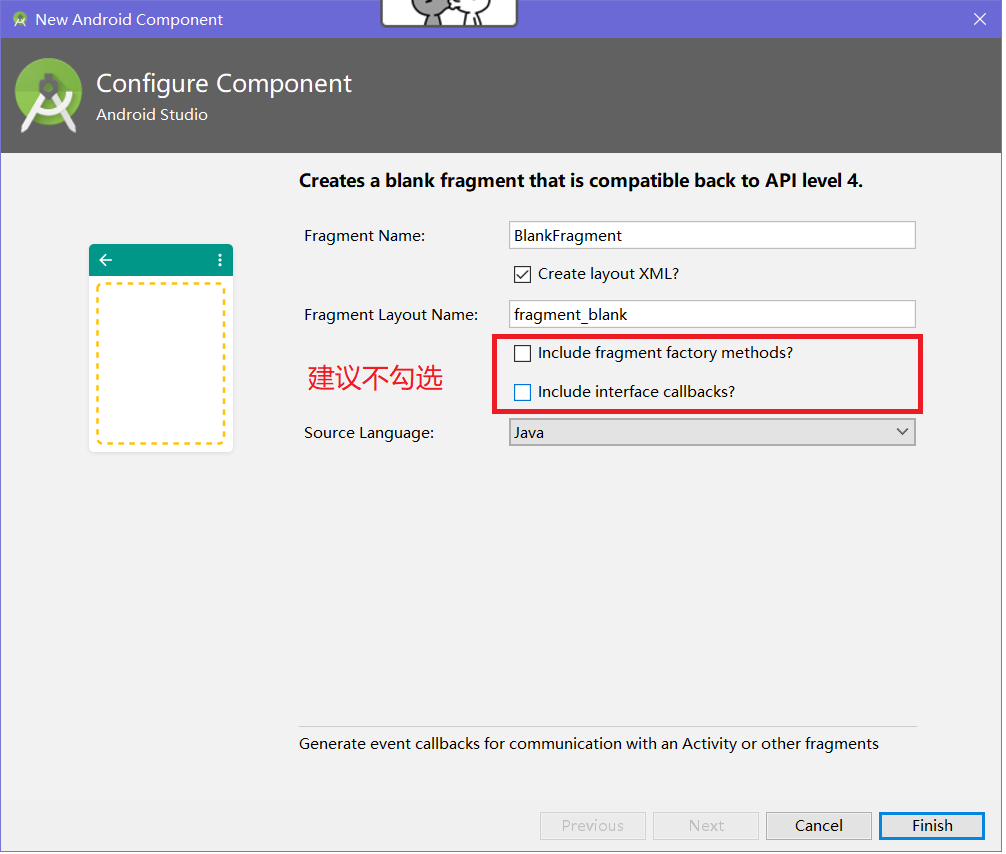
【提示】可以通过下图方式创建
 public class FragmentA extends Fragment {

     public FragmentA() {

         // Required empty public constructor

     }

     @Override

     public View onCreateView(LayoutInflater inflater, ViewGroup container,

                              Bundle savedInstanceState) {

         // Inflate the layout for this fragment

         return inflater.inflate(R.layout.fragment_a, container, false);

     }

 }
对于生成的Fragment不用作修改,对应的布局中设置一个背景颜色便于观察。
③MainActivity代码的编写
 public class MainActivity extends AppCompatActivity implements View.OnClickListener{

     private FragmentManager fragmentManager;

     private RelativeLayout rl_content;

     private ImageView item1_iv,item2_iv,item3_iv,item4_iv;

     private TextView item1_tv,item2_tv,item3_tv,item4_tv;

     private LinearLayout item1,item2,item3,item4;

     private ImageView[] ivs;

     private TextView[] tvs;

     @Override

     protected void onCreate(Bundle savedInstanceState) {

         super.onCreate(savedInstanceState);

         setContentView(R.layout.activity_main);

         initView();

         fragmentManager = getSupportFragmentManager();

         initListener();

     }

     private void initListener() {

         item1.setOnClickListener(this);

         item2.setOnClickListener(this);

         item3.setOnClickListener(this);

         item4.setOnClickListener(this);

     }

     private void initView() {

         rl_content = (RelativeLayout) findViewById(R.id.rl_content);

         item1_iv = (ImageView) findViewById(R.id.item1_iv);

         item1_tv = (TextView) findViewById(R.id.item1_tv);

         item1 = (LinearLayout) findViewById(R.id.item1);

         item2_iv = (ImageView) findViewById(R.id.item2_iv);

         item2_tv = (TextView) findViewById(R.id.item2_tv);

         item2 = (LinearLayout) findViewById(R.id.item2);

         item3_iv = (ImageView) findViewById(R.id.item3_iv);

         item3_tv = (TextView) findViewById(R.id.item3_tv);

         item3 = (LinearLayout) findViewById(R.id.item3);

         item4_iv = (ImageView) findViewById(R.id.item4_iv);

         item4_tv = (TextView) findViewById(R.id.item4_tv);

         item4 = (LinearLayout) findViewById(R.id.item4);

         ivs = new ImageView[]{item1_iv,item2_iv,item3_iv,item4_iv};

         tvs = new TextView[]{item1_tv,item2_tv,item3_tv,item4_tv};

     }

     @Override

     public void onClick(View view) {

         switch (view.getId()){

             case R.id.item1: {

                 FragmentTransaction transaction = fragmentManager.beginTransaction();//创建一个事务

                 transaction.replace(R.id.rl_content,new FragmentA());

                 transaction.commit();//事务一定要提交,replace才会有效

                 setCheck(0);//自定义方法

                 break;

             }

             case R.id.item2: {

                 FragmentTransaction transaction = fragmentManager.beginTransaction();

                 transaction.replace(R.id.rl_content,new FragmentB());

                 transaction.commit();

                 setCheck(1);

                 break;

             }

             case R.id.item3: {

                 FragmentTransaction transaction = fragmentManager.beginTransaction();

                 transaction.replace(R.id.rl_content,new FragmentC());

                 transaction.commit();

                 setCheck(2);

                 break;

             }

             case R.id.item4: {

                 FragmentTransaction transaction = fragmentManager.beginTransaction();

                 transaction.replace(R.id.rl_content,new FragmentD());

                 transaction.commit();

                 setCheck(3);

                 break;

             }

             default:break;

         }

     }

     public void setCheck(int itemId){

         //这个方法设置底部导航栏选中时的效果

         for (int i = 0; i < 4; i++) {

             ivs[i].setColorFilter(Color.parseColor("#0f0f0f"));

             tvs[i].setTextColor(Color.parseColor("#0f0f0f"));

         }

         ivs[itemId].setColorFilter(Color.GREEN);

         tvs[itemId].setTextColor(Color.GREEN);

     }

 }
【提示】①这里的点击事件是通过Activity实现Onclick接口的方式
②getSupportFragmentManager()是v4包中的,兼容效果好,如果用getFragmentManager()可能会崩掉
③FragmentManager只需要获取一次,但是事务FragmentTransaction要重新开启。最后事务一定要提交commit。
④方法setCheck是为了设置导航的被选中效果。
底部导航栏实现一 Fragment-replace的更多相关文章
- AndroidStudio制作底部导航栏以及用Fragment实现切换功能
前言 大家好,给大家带来AndroidStudio制作底部导航栏以及用Fragment实现切换功能的概述,希望你们喜欢 学习目标 AndroidStudio制作底部导航栏以及用Fragment实现切换 ...
- TextView+Fragment实现底部导航栏
前言:项目第二版刚上线没多久,产品又对需求进行了大改动,以前用的是左滑菜单,现在又要换成底部导航栏,于是今天又苦逼加班了.花了几个小时实现了一个底部导航栏的demo,然后总结一下.写一篇博客.供自己以 ...
- 二、Fragment+RadioButton实现底部导航栏
在App中经常看到这样的tab底部导航栏 那么这种效果是如何实现,实现的方式有很多种,最常见的就是使用Fragment+RadioButton去实现.下面我们来写一个例子 首先我们先在activi ...
- Android学习笔记- Fragment实例 底部导航栏的实现
1.要实现的效果图以及工程目录结构: 先看看效果图吧: 接着看看我们的工程的目录结构: 2.实现流程: Step 1:写下底部选项的一些资源文件 我们从图上可以看到,我们底部的每一项点击的时候都有不同 ...
- [置顶]
xamarin android Fragment实现底部导航栏
前段时间写了篇关于Fragment的文章,介绍了基础的概念,用静态和动态的方式加载Fragment Xamarin Android Fragment的两种加载方式.下面的这个例子介绍xamarin ...
- Android商城开发系列(三)——使用Fragment+RadioButton实现商城底部导航栏
在商城第一篇的开篇当中,我们看到商城的效果图里面有一个底部导航栏效果,如下图所示: 今天我们就来实现商城底部导航栏,最终效果图如下所示: 那么这种效果是如何实现,实现的方式有很多种,最常见的就是使 ...
- Android_ViewPager+Fragment实现页面滑动和底部导航栏
1.Xml中底部导航栏由一个RadioGroup组成,其上是ViewPager. <?xml version="1.0" encoding="utf-8" ...
- Android底部导航栏——FrameLayout + RadioGroup
原创文章,转载请注明出处http://www.cnblogs.com/baipengzhan/p/6285881.html Android底部导航栏有多种实现方式,本文详细介绍FrameLayout ...
- Android 底部导航栏实现一 Fragment-replace
[效果](这里下载的软件收费的试用有水印) [推荐]这里推荐一个图标网http://iconfont.cn/.以上图标来自此图标网 [项目结构] [步骤] ①创建布局文件,写底部导航栏 <?xm ...
随机推荐
- bootstrap 菜单之手风琴效果
自己用bootstrap搭了个项目,纯属娱乐....为了检验学习bootstrap之成果. 效果如图: 一.搭建中发现一问题,因为以前测试都是写的html页面,这次用了母版页,点击页面的之后,页面会刷 ...
- HTML mate标签
META标签分两大部分:HTTP标题信息(http-equiv)和页面描述信息(name). http-equiv http-equiv类似于HTTP的头部协议,它回应给浏览器一些有用的信息,以帮助正 ...
- Python基础数据类型之int、bool、str
数据类型:int bool str list 元祖 dict 集合 int:整数型,用于各种数学运算. bool:只有两种,True和False,用户判断. str:存储少量数据,进行操作 ...
- python开发:python基本数据类型
运算符 1.算数运算: 2.比较运算: 3.赋值运算: 4.逻辑运算: 5.成员运算: 基本数据类型 1.数字 int(整型) 在32位机器上,整数的位数为32位,取值范围为-2**31-2**31- ...
- Tcl与Design Compiler (五)——综合库(时序库)和DC的设计对象
本文如果有错,欢迎留言更正:此外,转载请标明出处 http://www.cnblogs.com/IClearner/ ,作者:IC_learner 前面一直说到综合库/工艺库这些东西,现在就来讲讲讲 ...
- 安卓手机USB共享网络给PC上网
开端 哈哈,最近我又发现了一个校园网的漏洞,但是只能手机连接,于是就想手机连接之后通过usb共享给电脑上网. 在手机上连接校园网WiFi,开启USB网络共享并且连接电脑之后,却发现电脑十分的卡顿!CP ...
- JavaScript实现图片轮播图
<!DOCTYPE html><html> <head> <script > var time; function init(){ //设置定时操作 t ...
- 开发一个成功APP的六个技巧
越来越多的人开始使用智能手机,平板电脑或其他的移动设备.出于这个原因,移动APP开发已成为当今软件开发中增长最快的领域之一.本文提供九个简单而有效的提示,可帮助您规划和实施成功的移动APP. 1.目标 ...
- 前端面试送命题-JS三座大山
前言 本篇文章比较适合3年以上的前端工作者,JS三座大山分别指:原型与原型链,作用域及闭包,异步和单线程. 原型与原型链 说到原型,就不得不提一下构造函数,首先我们看下面一个简单的例子: functi ...
- Oracle12c功能增强新特性之维护&升级&恢复&数据泵等
1. 内容提要 1) 表分区维护的增强. 2) 数据库升级改善. 3) 跨网络还原/恢复数据文件. 4) 数据泵的增强. 5) 实时ADDM. 6) 并发统计信息收集. 2 ...