
animate.css的使用
前面的话
animate.css是一个使用CSS3的animation制作的动画效果的CSS集合,里面预设了很多种常用的动画,且使用非常简单。本文将详细介绍animate.css的使用
引入
animate.css的最新版本是3.5.2,引入animate.css很容易,有以下几种方法
1、从官网下载
https://raw.github.com/daneden/animate.css/master/animate.css
2、通过npm安装
$ npm install animate.css
3、使用在线cdn
https://unpkg.com/animate.css@3.5.2/animate.min.css
效果演示
animate.css的使用非常简单,因为它是把不同的动画绑定到了不同的类里,所以想要使用哪种动画,只需要把通用类animated和相应的类添加到元素上就行了
下面来详细介绍animate.css里面的类,主要包括Attention(晃动效果)、bounce(弹性缓冲效果)、fade(透明度变化效果)、flip(翻转效果)、rotate(旋转效果)、slide(滑动效果)、zoom(变焦效果)、special(特殊效果)这8类
【Attention(晃动效果)】
bounce

flash

pulse

rubberBand

shake

headShake

swing

tada

wobble

jello
以在div上使用bounce为例
<div class="animated bounce"></div>
【bounce(弹性缓冲效果)】
bounceIn

bounceInDown

bounceInLeft

bounceInRight

bounceInUp

bounceOut

bounceOutDown

bounceOutLeft

bounceOutRight

bounceOutUp
【fade(透明度变化效果)】
fadeIn

fadeInDown

fadeInDownBig

fadeInLeft

fadeInLeftBig

fadeInRight

fadeInRightBig

fadeInUp

fadeInUpBig

fadeOut

fadeOutDown

fadeOutDownBig

fadeOutLeft

fadeOutLeftBig

fadeOutRight

fadeOutRightBig

fadeOutUp

fadeOutUpBig
【flip(翻转效果)】
flip

flipInX

flipInY

flipOutX

flipOutY
【rotate(旋转效果)】
rotateIn

rotateInDownLeft

rotateInDownRight

rotateInUpLeft

rotateInUpRight

rotateOut

rotateOutDownLeft

rotateOutDownRight

rotateOutUpLeft

rotateOutUpRight
【slide(滑动效果)】
slideInDown

slideInLeft

slideInRight

slideInUp

slideOutDown

slideOutLeft

slideOutRight

slideOutUp
【zoom(变焦效果)】
zoomIn

zoomInDown

zoomInLeft

zoomInRight

zoomInUp

zoomOut

zoomOutDown

zoomOutLeft

zoomOutRight

zoomOutUp
【special(特殊效果)】
hinge

rollIn

rollOut

lightSpeedIn

lightSpeedOut
实际应用
在一般的使用中,直接在元素上添加animated和对应的类名即可
<!DOCTYPE html>

<html lang="en">

<head>

<meta charset="UTF-8">

<title>Document</title>

<link rel="stylesheet" href="https://unpkg.com/animate.css@3.5.2/animate.min.css">

<style>

.box{height: 100px;width: 100px;background-color: lightblue}

</style>

</head>

<body>

<div class="box animated flash"></div>

</body>

</html>
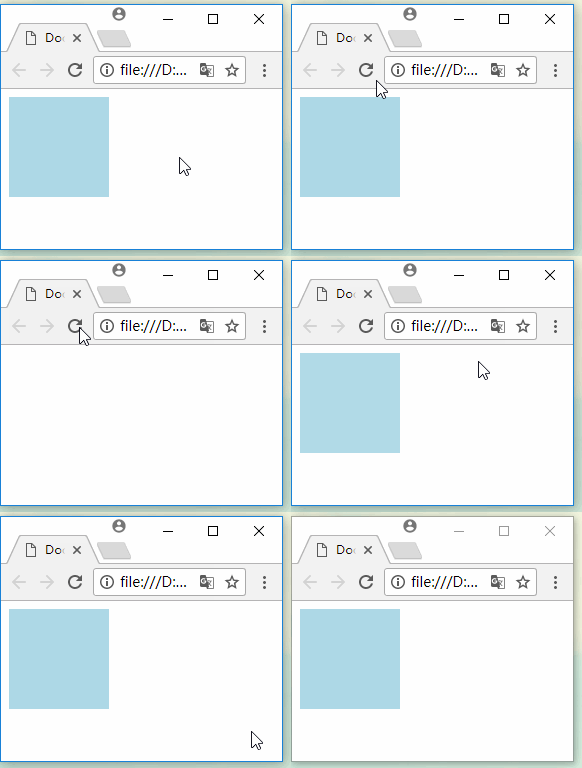
通过给JS添加或删除class,可以实现动态效果
<!DOCTYPE html>

<html lang="en">

<head>

<meta charset="UTF-8">

<title>Document</title>

<link rel="stylesheet" href="https://unpkg.com/animate.css@3.5.2/animate.min.css">

<style>

.box{height: 100px;width: 100px;background-color: lightblue}

</style>

</head>

<body>

<button id="btn1">添加</button>

<button id="btn2">移除</button>

<div id="box" class="box"></div>

<script>

var oBtn1 = document.getElementById('btn1');

var oBtn2 = document.getElementById('btn2');

var oBox = document.getElementById('box');

oBtn1.onclick = function(){

  oBox.classList.add('animated');

  oBox.classList.add('flash');

}

oBtn2.onclick = function(){

  oBox.classList.remove('flash');

}

</script>

</body>

</html>
至于动画的配置参数,比如动画持续时间,动画的执行次数等等,可以在元素上自行定义,覆盖掉animate.css里面所定义的就行了
<!DOCTYPE html>

<html lang="en">

<head>

<meta charset="UTF-8">

<title>Document</title>

<link rel="stylesheet" href="https://unpkg.com/animate.css@3.5.2/animate.min.css">

<style>

.box{height: 100px;width: 100px;background-color: lightblue}

.infinite{animation-iteration-count:infinite;}

</style>

</head>

<body>

<button id="btn1">添加循环的动画效果</button>

<button id="btn2">移除</button>

<div id="box" class="box"></div>

<script>

var oBtn1 = document.getElementById('btn1');

var oBtn2 = document.getElementById('btn2');

var oBox = document.getElementById('box');

oBtn1.onclick = function(){

  oBox.classList.add('animated');

  oBox.classList.add('flash');

  oBox.classList.add('infinite');

}

oBtn2.onclick = function(){

  oBox.classList.remove('flash');

}

</script>

</body>

</html>
animate.css的使用的更多相关文章
- animate.css(第三方动画使用方法)
p.p1 { margin: 0.0px 0.0px 0.0px 0.0px; font: 17.0px Monaco; color: #a5b2b9 } animation 语法: animatio ...
- css3动画简介以及动画库animate.css的使用
在这个年代,你要是不懂一点点css3的知识,你都不好意思说你是个美工.美你妹啊,请叫我前端工程师好不好.呃..好吧,攻城尸...呵呵,作为一个攻城尸,没有点高端大气上档次的东西怎么能行呢,那么css3 ...
- 使用CSS3动画库animate.css
IE9及更早版本的IE浏览器都不支持css3动画 谷歌浏览器.火狐浏览器.IE10+浏览器以及移动端浏览器等这些都支持css3动画 animate.css内置了很多典型的css3动画 用法 1 ...
- 动画库Animate.css
笔记分享: 用法:到官网(http://daneden.github.io/animate.css/),下载animate.min.css文件.点击这里 1.首先引入animate css文件 < ...
- animate.css总结
本文对animate.css的各个效果进行总结 bounce 从上掉落,在地上小幅度跳起 <!DOCTYPE html> <meta charset="utf-8" ...
- animate.css 一些常用的CSS3动画效果
大家已经开始在项目中使用一些CSS3动画效果了吧,这让网站在高端浏览器上看起来很上流.animate.css是一个老外做的各种CSS3动画的合集,比较全,也很炫,大家可以参考学习一下. 项目主页:ht ...
- animate.css配合wow.min.js实现各种页面滚动效果
有的页面在向下滚动的时候,有些元素会产生细小的动画效果.虽然动画比较小,但却能吸引你的注意.比如刚刚发布的 iPhone 6 的页面(查看).如果你希望你的页面也更加有趣,那么你可以试试 WOW.js ...
- animate.css
这是个css3动画框架,现在很流行,在小动画效果有很多,使用的方式 <div class="animated bounce"></div> /*只要修改bo ...
- css 动画类库Animate.css
地址为:http://daneden.github.io/animate.css/ 源码地址为:https://github.com/daneden/animate.css 简单的使用方法: Anim ...
- 图片翻页效果引出的animate.css,很好玩,多动动吧~
有一个项目,客户需要页面翻转的效果,需要应用在合作伙伴里面的图片上,一共有43张图片,我把它做成了随机定时的转动,鼠标经过时转动: animate.css科普文章:http://www.dowebok ...
随机推荐
- 编写运行最简单的java程序——使用记事本编写java程序
第一个java程序--使用记事本编辑 经过上篇文章的java环境搭建成功的小伙伴们可以在自己的计算机上编写属于自己的java程序了yo~ 还没有搭建环境变量的小伙伴请转移到上一篇的随笔中去完成搭建. ...
- angular4.0 父子组建之间的相互通信
父组建---->子组建 传递信息 首先先通过angular脚手架生成两个基本组件,有一个好处是 会自动关联到跟模版,节约时间,而且还是偷懒 ng generate component compo ...
- 在suse上折腾iptables
需求背景:有台服务器希望屏蔽掉某IP对它的SSH连接. 临时客串下DevOps,下面的做法可能在专业运维的同学里不太专业,还请指教. 该服务器的操作系统是SuSE Linux,服务器上是安装了ipta ...
- Tomcat服务器无法启动socket监听端口
最近生成一个新的web服务器,在启动后无法启动socket监听,检查程序本身无问题, 找原因,只是发布时搞错.处理如下: 1.在Eclipse平台 删除原来的web server; 2.新建serve ...
- EventBus 事件总线之我的理解
用例:假设公司发布了一个公告 需要通过短信 和 邮件分别2种方式 通知员工 1:首先我们建立领域模型 /// <summary> /// 领域核心基类 /// </summary&g ...
- JavaScript用typeof判断变量是数组还是对象,都返回object
在JavaScript中所有数据类型严格意义上都是对象,但实际使用中我们还是有类型之分,如果要判断一个变量是数组还是对象使用typeof搞不定,因为它全都返回object. 使用typeof加leng ...
- C++第二篇--访问控制
C++第二篇--访问控制 1. 引入 上一篇博文中从结构体引到了类,类当中不仅有数据成员还有一些函数,这些函数被称为成员函数.今天介绍新的内容,类当中的访问控制. 2. 访问控制 当你不添加任何声明, ...
- 支持苹果IPV6 ONLY 的socket 修改方法
首先别错误理解以为app 必须支持 ipv6 的服务端, 只需要支持 ipv6的客户端需要访问 ipv4 的服务端. 目前需要经过 NAT64 转换就能达到目的,客户端只需要支持该转换就能实现, 在 ...
- 中国(北方)大学生程序设计训练赛(第一周) (D E)
比赛链接 D题是个二分,每次check复杂度为O(n),类似于xdu_1068,只是一个是求积,一个是求商 #include<bits/stdc++.h> using namespace ...
- 中国剩余定理(CRT)与欧拉函数[数论]
中国剩余定理 ——!x^n+y^n=z^n 想必大家都听过同余方程这种玩意,但是可能对于中国剩余定理有诸多不解,作为一个MOer&OIer,在此具体说明. 对于同余方程: x≡c1(mod m ...