
js 金融数字格式化
js 金融数字格式化
finance money number format
数字格式化
regex
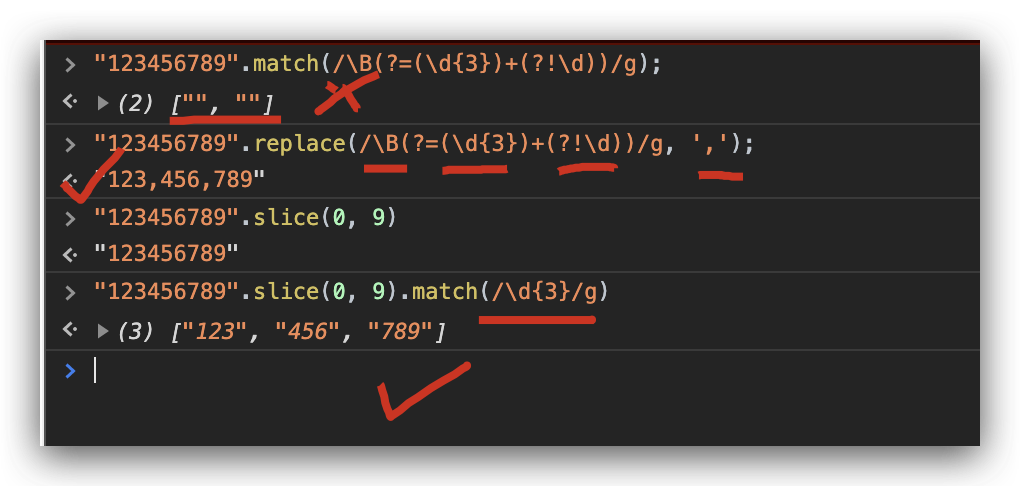
`123456789`.replace(/\B(?=(\d{3})+(?!\d))/g, ',');

// "123,456,789"
\B
\d
{3}
()
?
!+
?=
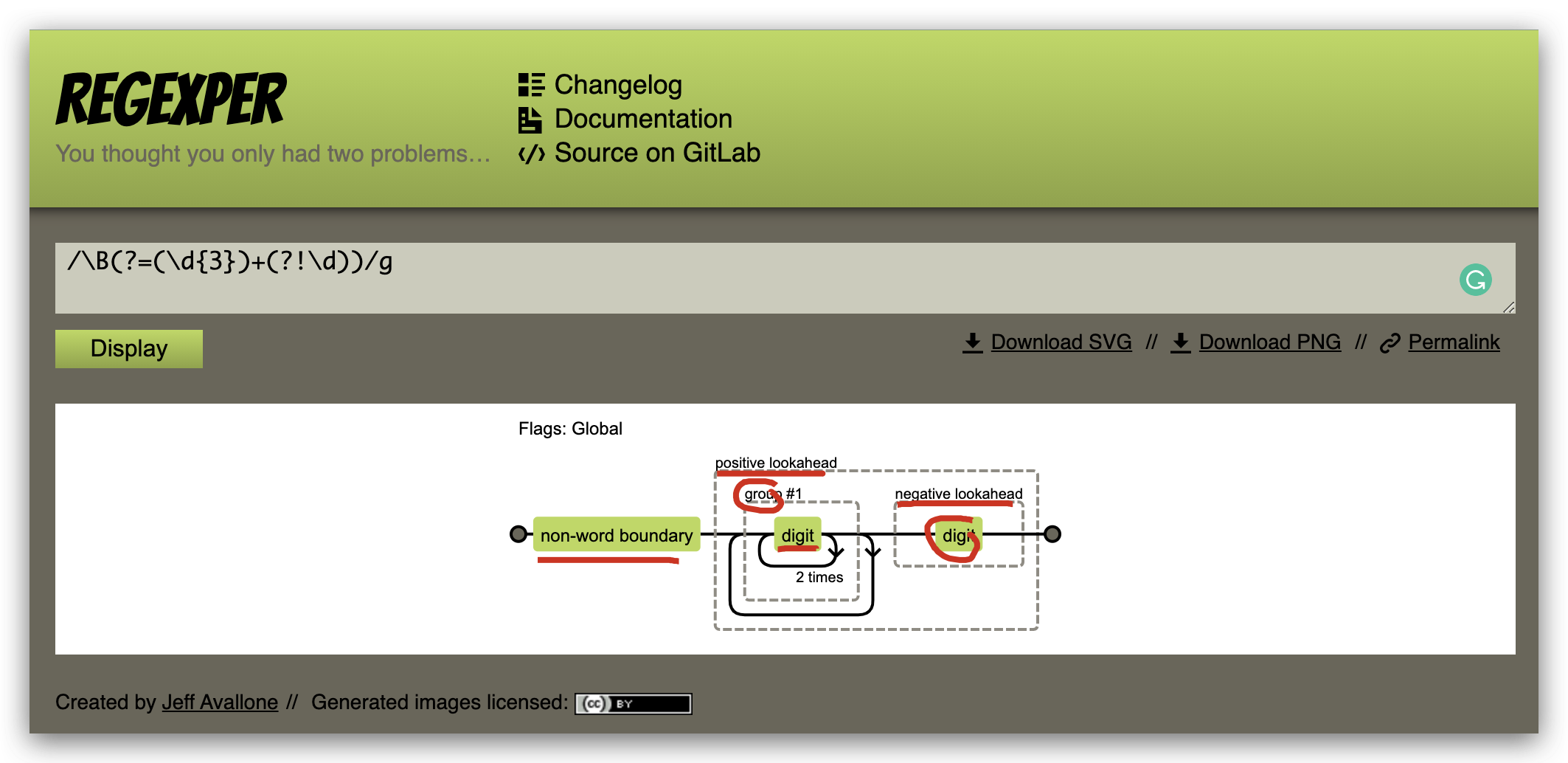
https://regexper.com/#%2F\B(%3F%3D(\d{3})%2B(%3F!\d))%2Fg
Flags: Global
non-word boundary
positive lookahead
group #1
digit
2 times
negative lookahead
solutions
// 金融数字格式化

// 1234567890 --> 1,234,567,890

const log = console.log;

// 正则实现

const formatMoney = (str) => str.replace(/\B(?=(\d{3})+(?!\d))/g, ',');

// 非正则实现

function formatCash(str) {

  return str.split('').reverse().reduce((prev, next, index) => {

    return ((index % 3) ? next : (next + ',')) + prev

  })

}

const test = '1234567890'

console.log(formatMoney('1234567890'));

// 1,234,567,890

console.log(formatCash('1234567890'));

// 1,234,567,890
parseFloat / parseInt & toLocaleString
number tolocalString
const num = 123456789;

// 123456789

num.toString();

// "123456789"

num.toLocaleString();

// "123,456,789"
'1234567890'.toLocaleString();

// "1234567890"

parseFloat("1234567890").toLocaleString();

// "1,234,567,890"

parseInt("1234567890").toLocaleString();

// "1,234,567,890"
regex
const moneyFormat = num => {

  const str = num.toString();

  const len = str.length;

  if (len <= 3) {

    return str;

  } else {

    // 判断是否有小数, 截取小数部分

    const decimals = str.indexOf('.') > -1 ? str.split('.')[1] : ``;

    let foot = '';

    if(decimals) {

      foot = '.' + decimals;

    }

    let remainder = len % 3;

    if (remainder > 0) {

      // 不是 3 的整数倍, 有 head, 如(1234567.333 => 1, 234, 567.333)

      const head = str.slice(0, remainder) + ',';

      const body = str.slice(remainder, len).match(/\d{3}/g).join(',');

      return head + body + foot;

      // return str.slice(0, remainder) + ',' + str.slice(remainder, len).match(/\d{3}/g).join(',') + temp;

    } else {

      // 是 3 的整数倍, 无 head, 如(123456.333 => 123, 456.333)

      const body = str.slice(0, len).match(/\d{3}/g).join(',');

      return body + foot;

      // return str.slice(0, len).match(/\d{3}/g).join(',') + temp;

    }

  }

}

// `123456`.slice(0, 6).match(/\d{3}/);

// ["123", index: 0, input: "123456", groups: undefined]

// regex match return ???

// `123456`.slice(0, 6).match(/\d{3}/g);

// ["123", "456"]

// regex match g return all grounds

moneyFormat(123456.33);

// '123,456.33'

moneyFormat(123.33);

// '123.33'
regex $1,$2

function formatNum(num,n) {

    // num 要格式化的数字

    // n 保留小数位, 位数

    const regex = /(-?\d+)(\d{3})/;

    let str = num.toFixed(n).toString();

    while(regex.test(str)) {

      console.log(`\nstr 1 =`, str);

      str = str.replace(regex, "$1,$2");

      console.log(`str 2 =`, str);

    }

    return str;

}

formatNum(1234005651.789, 2);

// "1,234,005,651.79"

/*

str 1 = 1234005651.79

str 2 = 1234005,651.79

str 1 = 1234005,651.79

str 2 = 1234,005,651.79

str 1 = 1234,005,651.79

str 2 = 1,234,005,651.79

*/
千分位格式
// 金融数字格式化

// 1234567890 --> 1,234,567,890
js 模板引擎
js template engine
// templateEngine

const templateEngine = (str = ``, data = {}) => {

  const reg = /{{([^{}]+)?}}/g;

  let match, paths, key,template;

  while (match = reg.exec(str)) {

    console.log(`match`, match);

    templateHolder = match[0];

    // {{varibale}}

    key = match[1];

    // varibale

    paths = key.split('.');

    // ["k1", "k2"]

    console.log(`paths`, paths);

    let obj = data;

    // 遍历多级属性

    for (let i = 0; i < paths.length; i++) {

      obj = obj[paths[i]];

    }

    // 模板替换

    str = str.replace(template, obj);

  }

  return str;

}
const template = `<section><div>{{name}}</div><div>{{infos.city}}</div></section>`;

const data = {

  name: 'xgqfrms',

  infos:{

    city: 'ufo',

  }

}

templateEngine(template, data);

//"<section><div>xgqfrms</div><div>ufo</div></section>"

/*

match (2) ["{{name}}", "name", index: 14, input: "<section><div>{{name}}</div><div>{{infos.city}}</div></section>", groups: undefined]

paths ["name"]

match (2) ["{{infos.city}}", "infos.city", index: 33, input: "<section><div>{{name}}</div><div>{{infos.city}}</div></section>", groups: undefined]

paths (2) ["infos", "city"]

"<section><div>{{name}}</div><div>{{infos.city}}</div></section>"

*/

// const template = `<section><div>{{name}}</div><div>{{city}}</div></section>`;

// "<section><div>xgqfrms</div><div>undefined</div></section>"
refs
Array all in one
https://www.cnblogs.com/xgqfrms/p/12791249.html#4679119
regex
https://developer.mozilla.org/en-US/docs/Web/JavaScript/Reference/Global_Objects/RegExp
xgqfrms 2012-2020
www.cnblogs.com 发布文章使用:只允许注册用户才可以访问!
js 金融数字格式化的更多相关文章
- js金额数字格式化实现代码(三位加逗号处理保留两位置小数)
工作中很常用的东西: 例1,使数字1111111变成11,111,111.00,保留两位小数. <html> <head> <script type="text ...
- js 实现数字格式化(货币格式)几种方法
// 方法一 function toThousands(num) { var result = [ ], counter = 0; num = (num || 0).toString().split( ...
- JS实现数字千位符格式化方法
/** * [number_format 参数说明:] * @param {[type]} number [number:要格式化的数字] * @param {[type]} decimals [de ...
- 数字格式化的 js 库
数字格式化的 js 库 Numeral.js,是一个用于格式化数字和处理数字的 js 库. Tip:目前 Star 有 9.2k,5年以前就没有在更新.其文档写得不很清晰,比如它提供了多语言,但如何切 ...
- js数字格式化-四舍五入精简版
搜索网上的,数字格式化过余复杂,自己想了个简单方法,欢迎吐槽. 简化说明: '123333' => 12.3万 parseInt('123333') 字符串转整型 parseInt('12333 ...
- js数字格式化(截断格式化或四舍五入格式化)
/*** * 数字格式化(适合金融产品截断小数位后展示) * @param num * @param pattern (标准格式:#,###.## 或#.## 或#,###00.00) * @para ...
- JS前端数据格式化
当我们从后台取了数据,但是我们希望在前台统一显示格式时,我们可能需要格式化数据. 今天正好总结一下前端JS格式化数据的几个方法: 1. toFixed() 方法 可把 Number 四舍五入为指定 ...
- 使用 .toLocaleString() 轻松实现多国语言价格数字格式化
用代码对数字进行格式化,显然不是逢三位加逗号这么简单.比如印度在数字分位符号上的处理,就堪称业界奇葩: 印度的数字读法用“拉克”(十万)和“克若尔”(千万),数字标法用不对称的数位分离,即小数点左侧首 ...
- JavaScript 系列--JavaScript一些奇淫技巧的实现方法(二)数字格式化 1234567890转1,234,567,890;argruments 对象(类数组)转换成数组
一.前言 之前写了一篇文章:JavaScript 系列--JavaScript一些奇淫技巧的实现方法(一)简短的sleep函数,获取时间戳 https://www.mwcxs.top/page/746 ...
随机推荐
- ubuntu14.04 LEMP(linux+nginx+mysql+php5)构建环境
Install LEMP (Linux, Nginx, MySQL and PHP) Stack on Ubuntu Linux 14.04 LTS by VIVEK GITE on DECEMBER ...
- YAMLLoadWarning: calling yaml.load() without Loader=... is deprecated, as the default Loader is unsafe. Please read https://msg.pyyaml.org/load for full details. data = yaml.load(file_data)
YAMLLoadWarning: calling yaml.load() without Loader=... is deprecated, as the default Loader is unsa ...
- Linux监控内核SNMP计数器
nstat命令和rtacct命令是一个简单的监视内核的SNMP计数器和网络接口状态的实用工具. 语法 nstat/rtacct (选项) 选项 -h:显示帮助信息: -V:显示指令版本信息: -z:显 ...
- ctsc选课
CTSC 1997 大学实行学分制.每门课程都有一定的学分,学生只要选修了这门课并通过考核就能获得相应学分.学生最后的学分是他选修各门课的学分总和. 每个学生都要选择规定数量的课程.有些课程可以直接选 ...
- Excel 如何使用 函数 实现传说中的 多条件中位数 (MEDIANIFS)?
数据科学交流群,群号:189158789,欢迎各位对数据科学感兴趣的小伙伴的加入! 实际上Excel中根本没有MEDIANIFS,但我们可以通过一些方式进行实现: 比如如下图的需求,需要求这一列中,1 ...
- jQuery——通过Ajax发送数据
Ajax(Asynchronous JavaScript and XML,异步JavaScript和XML),一个Ajax解决方案涉及如下技术: JavaScript:处理与用户及其他浏览器相关事件的 ...
- Spring框架——JDBC与事务管理
JDBC JDBCTemplate简介 XML配置JDBCTemplate 简化JDBC模板查询 事务管理 事务简介 Spring中的事务管理器 Spring中的事务管理器的不同实现 用事务通知声明式 ...
- 阿里云MQ
阿里云众多中间件服务中有一款非常强大的中间见服务,在企业互联网架构中起到不可替代的作用,相比较开源的RabbitMQ,阿里的消息队列MQ承受的住阿里内部1000+核心应用的使用,每天转几千条消息,稳定 ...
- java身份证号校验
package com.pt.modules.contract.utils; import java.text.ParseException; import java.text.SimpleDateF ...
- 封装各种生成唯一性ID算法的工具类
/** * Copyright (c) 2005-2012 springside.org.cn * * Licensed under the Apache License, Version 2.0 ( ...