
【原创】大数据基础之Airflow(1)简介、安装、使用
airflow 1.10.0

官方:http://airflow.apache.org/
一 简介
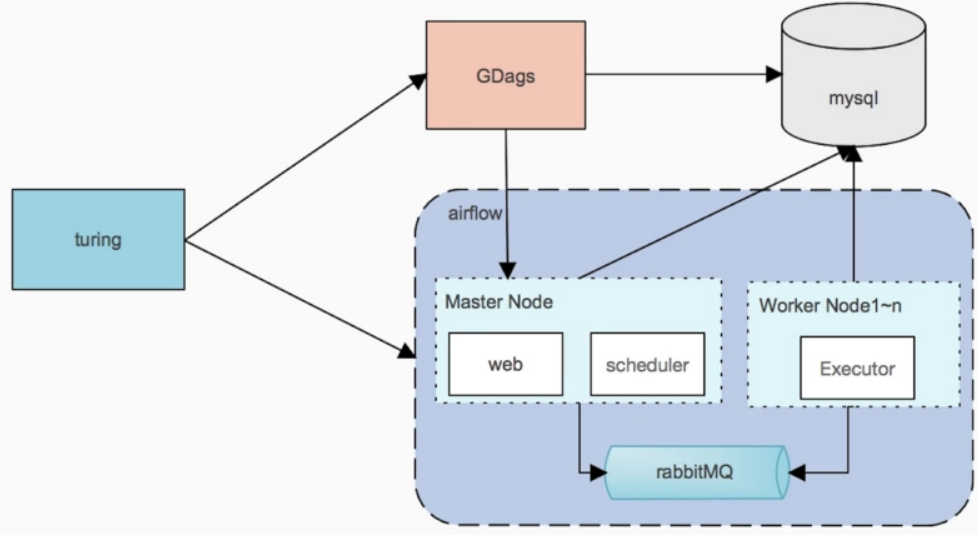
Airflow is a platform to programmatically author, schedule and monitor workflows.
Use airflow to author workflows as directed acyclic graphs (DAGs) of tasks. The airflow scheduler executes your tasks on an array of workers while following the specified dependencies. Rich command line utilities make performing complex surgeries on DAGs a snap. The rich user interface makes it easy to visualize pipelines running in production, monitor progress, and troubleshoot issues when needed.
When workflows are defined as code, they become more maintainable, versionable, testable, and collaborative.
airflow是一个可以通过python代码来编排、调度和监控工作流的平台;工作流是一系列task的dag(directed acyclic graphs,有向无环图);
1 集群角色
webserver
web server 使用 gunicorn 服务器,通过airflow.cfg中workers配置并发进程数;
scheduler
The Airflow scheduler monitors all tasks and all DAGs, and triggers the task instances whose dependencies have been met. Behind the scenes, it spins up a subprocess, which monitors and stays in sync with a folder for all DAG objects it may contain, and periodically (every minute or so) collects DAG parsing results and inspects active tasks to see whether they can be triggered.
worker
四种Executor:SequentialExecutor、LocalExecutor、CeleryExecutor、MesosExecutor:
1)Airflow uses a sqlite database, which you should outgrow fairly quickly since no parallelization is possible using this database backend. It works in conjunction with the SequentialExecutor which will only run task instances sequentially.
2)LocalExecutor, tasks will be executed as subprocesses;
3)CeleryExecutor is one of the ways you can scale out the number of workers. For this to work, you need to setup a Celery backend (RabbitMQ, Redis, …) and change your airflow.cfg to point the executor parameter to CeleryExecutor and provide the related Celery settings.
broker_url = amqp://guest:guest@rabbitmq_server:5672/
broker_url = redis://$redis_server:6379/0
4)MesosExecutor allows you to schedule airflow tasks on a Mesos cluster.
[mesos]
master = localhost:5050
SequentialExecutor搭配sqlite库使用,LocalExecutor使用子进程来执行任务,CeleryExecutor需要依赖backend执行(比如RabbitMQ或Redis),MesosExecutor会提交任务到mesos集群;
2 概念
DAG
In Airflow, a DAG – or a Directed Acyclic Graph – is a collection of all the tasks you want to run, organized in a way that reflects their relationships and dependencies.
dag是一系列task的集合按照依赖关系组织成有向无环图,相当于workflow;
Operator
An operator describes a single task in a workflow. Operators are usually (but not always) atomic, meaning they can stand on their own and don’t need to share resources with any other operators. The DAG will make sure that operators run in the correct certain order; other than those dependencies, operators generally run independently. In fact, they may run on two completely different machines.
operator描述了工作流中的一个task,是一个抽象的概念,相当于抽象task定义;
Task
Once an operator is instantiated, it is referred to as a “task”. The instantiation defines specific values when calling the abstract operator, and the parameterized task becomes a node in a DAG.
operator实例化(构造函数)之后成为task,task是一个具体的概念,作为dag的一部分;
DAG Run
A DAG Run is an object representing an instantiation of the DAG in time.
dag run是一个dag的实例对象,相当于workflow instance;
Task Instance
A task instance represents a specific run of a task and is characterized as the combination of a dag, a task, and a point in time. Task instances also have an indicative state, which could be “running”, “success”, “failed”, “skipped”, “up for retry”, etc.
task每次执行都会生成一个task instance,每个task instance都有状态,比如running、success、failed等;
二 安装
ambari安装
详见:https://www.cnblogs.com/barneywill/p/10284804.html
docker安装
详见:https://www.cnblogs.com/barneywill/p/10397260.html
手工安装
1 检查python
# python --version
2 安装pip
# curl https://bootstrap.pypa.io/get-pip.py -o get-pip.py
# python get-pip.py
pip is already installed if you are using Python 2 >=2.7.9 or Python 3 >=3.4 downloaded from python.org
3 安装airflow
# pip install apache-airflow
1)如果报错:
Complete output from command python setup.py egg_info:
Traceback (most recent call last):
File "<string>", line 1, in <module>
File "/tmp/pip-install-xR3O9b/apache-airflow/setup.py", line 394, in <module>
do_setup()
File "/tmp/pip-install-xR3O9b/apache-airflow/setup.py", line 259, in do_setup
verify_gpl_dependency()
File "/tmp/pip-install-xR3O9b/apache-airflow/setup.py", line 49, in verify_gpl_dependency
raise RuntimeError("By default one of Airflow's dependencies installs a GPL "
RuntimeError: By default one of Airflow's dependencies installs a GPL dependency (unidecode). To avoid this dependency set SLUGIFY_USES_TEXT_UNIDECODE=yes in your environment when you install or upgrade Airflow. To force installing the GPL version set AIRFLOW_GPL_UNIDECODE----------------------------------------
Command "python setup.py egg_info" failed with error code 1 in /tmp/pip-install-xR3O9b/apache-airflow/
需要设置环境变量
# export SLUGIFY_USES_TEXT_UNIDECODE=yes
2)如果报错:
psutil/_psutil_linux.c:12:20: fatal error: Python.h: No such file or directory
#include <Python.h>
^
compilation terminated.
error: command 'gcc' failed with exit status 1----------------------------------------
Command "/bin/python -u -c "import setuptools, tokenize;__file__='/tmp/pip-install-v4aq0G/psutil/setup.py';f=getattr(tokenize, 'open', open)(__file__);code=f.read().replace('\r\n', '\n');f.close();exec(compile(code, __file__, 'exec'))" install --record /tmp/pip-record-2jrZ_B/install-record.txt --single-version-externally-managed --compile" failed with error code 1 in /tmp/pip-install-v4aq0G/psutil/
需要安装
# yum install python-devel
4 设置环境变量
# export AIRFLOW_HOME=/path/to/airflow
默认在 /usr/local/airflow
5 验证
# whereis airflow
airflow: /usr/bin/airflow# airflow version
____________ _____________
____ |__( )_________ __/__ /________ __
____ /| |_ /__ ___/_ /_ __ /_ __ \_ | /| / /
___ ___ | / _ / _ __/ _ / / /_/ /_ |/ |/ /
_/_/ |_/_/ /_/ /_/ /_/ \____/____/|__/
v1.10.1
自动创建$AIRFLOW_HOME/airflow.cfg
6 修改数据库配置
$AIRFLOW_HOME/airflow.cfg
修改如下配置
# The SqlAlchemy connection string to the metadata database.
# SqlAlchemy supports many different database engine, more information
# their website
sql_alchemy_conn = mysql://airflow:airflow@localhost:3306/airflow# The executor class that airflow should use. Choices include
# SequentialExecutor, LocalExecutor, CeleryExecutor, DaskExecutor
executor = LocalExecutor# Default timezone in case supplied date times are naive
# can be utc (default), system, or any IANA timezone string (e.g. Europe/Amsterdam)
default_timezone = Asia/Shanghai
修改sql_alchemy_conn为mysql或postgres连接串,同时将executor改为LocalExecutor
7 初始化db
# airflow initdb
8 常用命令
# airflow -h
如果报错
No handlers could be found for logger "airflow.logging_config"
Traceback (most recent call last):
File "/usr/bin/airflow", line 21, in <module>
from airflow import configuration
File "/usr/lib/python2.7/site-packages/airflow/__init__.py", line 36, in <module>
from airflow import settings
File "/usr/lib/python2.7/site-packages/airflow/settings.py", line 229, in <module>
configure_logging()
File "/usr/lib/python2.7/site-packages/airflow/logging_config.py", line 71, in configure_logging
raise e
ValueError: Unable to configure handler 'task': Cannot resolve 'airflow.utils.log.file_task_handler.FileTaskHandler': cannot import name UnrewindableBodyError
重装urllib3
# pip uninstall urllib3
# pip install urllib3
如果还有问题,重装chardet、idna、urllib3
三 使用
1 dag
dag示例:
from datetime import timedelta, datetime

import airflow

from airflow import DAG

from airflow.operators.bash_operator import BashOperator

from airflow.operators.python_operator import PythonOperator

from airflow.operators.dummy_operator import DummyOperator

default_args = {

    'owner': 'www',

    'depends_on_past': False,

    'start_date': datetime(2019, 1, 25),

    'email': ['test@cdp.com'],

    'email_on_failure': False,

    'email_on_retry': False,

    'retries': 1,

    'retry_delay': timedelta(minutes=5),

}

dag = DAG(

    'hello_dag',

    default_args=default_args,

    description='hello world DAG',

    schedule_interval='*/5 * * * *'

)

start_operator = DummyOperator(task_id='start_task', dag=dag)

sh_hello_operator = BashOperator(

    task_id='sh_hello_task',

    depends_on_past=False,

    bash_command='echo "hello {{ params.p }} : "`date` >> /tmp/test.txt',

    params={'p':'world'},

    dag=dag

)

def print_hello():

    return 'Hello world!'

py_hello_operator = PythonOperator(

    task_id='py_hello_task',

    python_callable=print_hello,

    dag=dag)

start_operator >> sh_hello_operator

sh_hello_operator >> py_hello_operator
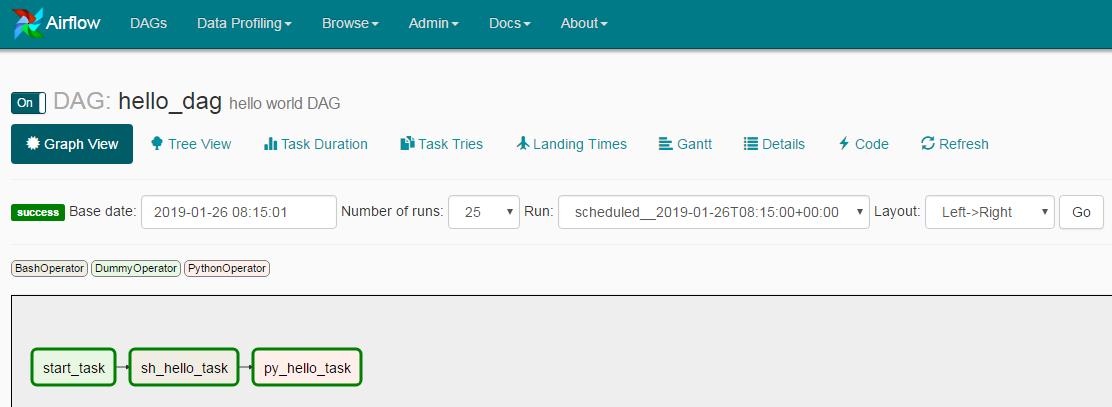
示例dag中包含常用的BashOperator和PythonOperator,以及task之间的依赖关系
页面上看起来是这样的
Airflow Python script is really just a configuration file specifying the DAG’s structure as code. The actual tasks defined here will run in a different context from the context of this script. Different tasks run on different workers at different points in time, which means that this script cannot be used to cross communicate between tasks.
People sometimes think of the DAG definition file as a place where they can do some actual data processing - that is not the case at all! The script’s purpose is to define a DAG object. It needs to evaluate quickly (seconds, not minutes) since the scheduler will execute it periodically to reflect the changes if any.
airflow的python脚本只是定义dag的结构,实际执行时每个task都会在不同的worker或者不同的context下执行,所以不要在脚本中传递变量或者执行实际业务逻辑,脚本会被scheduler定期执行来刷新dag;
Airflow leverages the power of Jinja Templating and provides the pipeline author with a set of built-in parameters and macros. Airflow also provides hooks for the pipeline author to define their own parameters, macros and templates.
dag脚本中支持jinja模板,jinja模板详见:http://jinja.pocoo.org/docs/dev/api/
参考:http://airflow.apache.org/tutorial.html#it-s-a-dag-definition-file
2 本地测试dag及task执行
Time to run some tests. First let’s make sure that the pipeline parses. Let’s assume we’re saving the code from the previous step in tutorial.py in the DAGs folder referenced in your airflow.cfg. The default location for your DAGs is ~/airflow/dags.
# test your code without syntax error
# python ~/airflow/dags/$dag.py# print the list of active DAGs
# airflow list_dags# prints the list of tasks the dag_id
airflow list_tasks $dag_id# prints the hierarchy of tasks in the DAG
airflow list_tasks $dag_id --tree# test your task instance
# airflow test $dag_id $task_id 2015-01-01# run your task instance
# airflow run $dag_id $task_id 2015-01-01# get the status of task
# airflow task_state $dag_id $task_id 2015-01-01# trigger a dag run
# airflow trigger_dag $dag_id 2015-01-01# get the status of dag
# airflow dag_state $dag 2015-01-01# run a backfill over 2 days
# airflow backfill $dag_id -s 2015-01-01 -e 2015-01-02
airflow run|test 都可以执行task,区别是run会进行很多检查,比如:
dependency 'Trigger Rule' FAILED: Task's trigger rule 'all_success' requires all upstream tasks to have succeeded, but found 1 non-success(es).
dependency 'Task Instance State' FAILED: Task is in the 'success' state which is not a valid state for execution. The task must be cleared in order to be run.
执行task之后日志位于~/airflow/logs/$dag_id/$task_id/下;
3 启动服务器
# start the web server, default port is 8080
airflow webserver -p 8080# start the scheduler
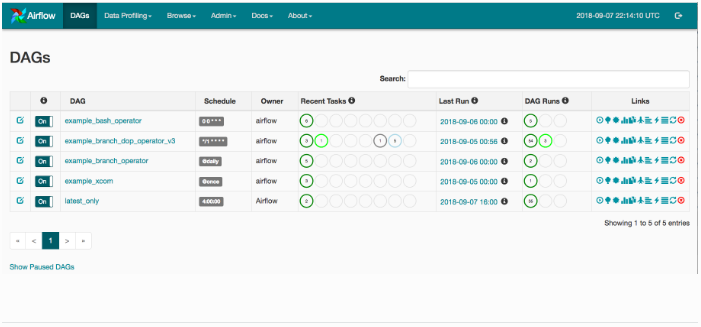
airflow scheduler# visit localhost:8080 in the browser and enable the example dag in the home page
将定义dag的py文件拷贝到$AIRFLOW_HOME/dags/目录下,scheduler会自动发现和加载,日志位于$AIRFLOW_HOME/logs/$dag_id/$task_id/目录下,airflow会定期从dags目录加载dag
[2019-03-01 03:20:39,174] {{models.py:273}} INFO - Filling up the DagBag from /usr/local/airflow/dags
访问 http://$server_ip:8080/admin/
4 高可用集群
airflow中web server和worker都可以启动多个,但是scheduler只能启动一个,这样造成了airflow的单点,目前已经有第三方开源方案来解决这个问题:
Airflow Scheduler Failover Controller
地址:https://github.com/teamclairvoyant/airflow-scheduler-failover-controller
实现原理
The Airflow Scheduler Failover Controller (ASFC) is a mechanism that ensures that only one Scheduler instance is running in an Airflow Cluster at a time. This way you don't come across the issues we described in the "Motivation" section above.
You will first need to startup the ASFC on each of the instances you want the scheduler to be running on. When you start up multiple instances of the ASFC one of them takes on the Active state and the other takes on a Standby state. There is a heart beat mechanism setup to track if the Active ASFC is still active. If the Active ASFC misses multiple heart beats, the Standby ASFC becomes active.
The Active ASFC will poll every 10 seconds to see if the scheduler is running on the desired node. If it is not, the ASFC will try to restart the daemon. If the scheduler daemons still doesn't startup, the daemon is started on another node in the cluster.
安装
# git clone https://github.com/teamclairvoyant/airflow-scheduler-failover-controller
# cd airflow-scheduler-failover-controller
# pip install -e .
报错
Collecting airflow>=1.7.0 (from scheduler-failover-controller==1.0.1)
Could not find a version that satisfies the requirement airflow>=1.7.0 (from scheduler-failover-controller==1.0.1) (from versions: 0.6)
No matching distribution found for airflow>=1.7.0 (from scheduler-failover-controller==1.0.1)
查看
# vi setup.py
install_requires=[
'airflow>=1.7.0',
'kazoo>=2.2.1',
'coverage>=4.2',
'eventlet>=0.9.7',
],# pip list|grep airflow
apache-airflow 1.10.0
需要将setup.py中airflow改为apache-airflow,安装之后启动
# scheduler_failover_controller -h
会报错
pkg_resources.ContextualVersionConflict: (Flask-Login 0.2.11 (/usr/lib64/python2.7/site-packages), Requirement.parse('Flask-Login<0.5,>=0.3'), set(['flask-appbuilder']))
重装Flask-Login
# pip uninstall Flask-Login
# pip install Flask-Login
重装之后是Flask-Login 0.4.1,满足要求,但是又会报错
apache-airflow 1.10.0 has requirement flask-login==0.2.11, but you'll have flask-login 0.4.1 which is incompatible.
所以Airflow Scheduler Failover Controller和airflow1.10.0不兼容;
【原创】大数据基础之Airflow(1)简介、安装、使用的更多相关文章
- 【原创】大数据基础之Airflow(2)生产环境部署airflow研究
一 官方 airflow官方分布式部署结构图 airflow进程 webserver scheduler flower(非必须) worker airflow缺点 scheduler单点 通过在sch ...
- 大数据基础环境--jdk1.8环境安装部署
1.环境说明 1.1.机器配置说明 本次集群环境为三台linux系统机器,具体信息如下: 主机名称 IP地址 操作系统 hadoop1 10.0.0.20 CentOS Linux release 7 ...
- 【原创】大数据基础之Zookeeper(2)源代码解析
核心枚举 public enum ServerState { LOOKING, FOLLOWING, LEADING, OBSERVING; } zookeeper服务器状态:刚启动LOOKING,f ...
- CentOS6安装各种大数据软件 第八章:Hive安装和配置
相关文章链接 CentOS6安装各种大数据软件 第一章:各个软件版本介绍 CentOS6安装各种大数据软件 第二章:Linux各个软件启动命令 CentOS6安装各种大数据软件 第三章:Linux基础 ...
- 大数据应用日志采集之Scribe 安装配置指南
大数据应用日志采集之Scribe 安装配置指南 大数据应用日志采集之Scribe 安装配置指南 1.概述 Scribe是Facebook开源的日志收集系统,在Facebook内部已经得到大量的应用.它 ...
- 【原创】大数据基础之Impala(1)简介、安装、使用
impala2.12 官方:http://impala.apache.org/ 一 简介 Apache Impala is the open source, native analytic datab ...
- 【原创】大数据基础之Benchmark(2)TPC-DS
tpc 官方:http://www.tpc.org/ 一 简介 The TPC is a non-profit corporation founded to define transaction pr ...
- 【原创】大数据基础之词频统计Word Count
对文件进行词频统计,是一个大数据领域的hello word级别的应用,来看下实现有多简单: 1 Linux单机处理 egrep -o "\b[[:alpha:]]+\b" test ...
- 大数据基础知识:分布式计算、服务器集群[zz]
大数据中的数据量非常巨大,达到了PB级别.而且这庞大的数据之中,不仅仅包括结构化数据(如数字.符号等数据),还包括非结构化数据(如文本.图像.声音.视频等数据).这使得大数据的存储,管理和处理很难利用 ...
随机推荐
- 老牌开源Office操作组件NPOI现已支持.NET Core
昨天在微信群里听到老牌Excel开发利器NPOI的作者瞿总说4.6.1版本的NPOI已经支持.NET Standard 2.0了,这也就意味着你可以在.NET Core中使用NPOI了. 作者:依乐祝 ...
- 安装VM-tools
win10系统 VMware12 Ubuntu64位安装VM-tools时所遇到的提示信息: open-vm-tools are available from the OS vendor and VM ...
- 转:Flutter动画一
1. 动画介绍 动画对于App来说,非常的重要.很多App,正是因为有了动画,所以才会觉得炫酷.移动端的动画库有非常的多,例如iOS上的Pop.web端的animate.css.Android端的An ...
- map遍历性能记录
map遍历可以通过keySet或者entrySet方式. 性能上:entrySet略胜一筹,原因是keySet获取到key后再根据key去获取value,在查一遍,所以慢一些. keySet: //先 ...
- params.success && params.success(res.data)
params.success && params.success(res.data) 只有success 为真,才执行后边的代码
- 在Ubuntu上使用离线方式快速安装K8S v1.11.1
在Ubuntu上使用离线方式快速安装K8S v1.11.1 0.安装包文件下载 https://pan.baidu.com/s/1nmC94Uh-lIl0slLFeA1-qw v1.11.1 文件大小 ...
- fzyzojP1635 -- 平均值
做法大概有两种: 1.二分平均值,每个值减去平均值,求有没有一个区间的总和大于等于0 (类比,中位数是二分之后,比mid大的为1,小的为0,看有没有区间大于等于0这样) 最值问题——判定问题 单调队列 ...
- 洛谷P4719 动态dp
动态DP其实挺简单一个东西. 把DP值的定义改成去掉重儿子之后的DP值. 重链上的答案就用线段树/lct维护,维护子段/矩阵都可以.其实本质上差不多... 修改的时候在log个线段树上修改.轻儿子所在 ...
- JSP总结(三)——JSP中九大内置对象(汇总)
注:后缀为汇总的基本上是整理一些网上的. 一.九大内置对象分类: 1. request 请求对象 类型 javax.servlet.ServletRequest 作用域 Request ...
- jdbc增删改查进行封装
jdbc封装 1 dao (代码分层) com.aaa.dao 存放dao相关的类型 例如 StudentDAOImpl 处理 数据库的链接 存取数据 com.aaa.servlet 存放servle ...