
Linux 下Nginx 运行Vue
首相基础的安装Node.js npm
先建个目录把 /node/www
然后在这个目录下
wget https://nodejs.org/dist/v8.11.1/node-v8.11.1-linux-x86.tar.xz
解压
tar xf node-v8.11.1-linux-x86
然后创建软链接
#ln -s /node/node-v8.11.1-linux-x86/bin/node   /usr/local/bin/node          前面的路径是你下载然后解压后的文件路径

#ln -s /node/node-v8.11.1-linux-x86/bin/npm    /usr/local/bin/npm
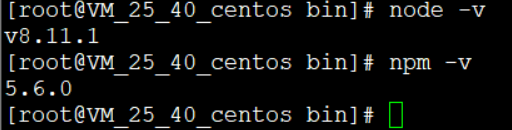
如果这样就木有问题了
然而在Centos6.9下就有点GG了
错误1
当在CentOS .2下执行某些命令时,有缺少共享库的报错:

error while loading shared libraries: libstdc++.so.: cannot open shared object file: No such file or directory

yum whatprovides libstdc++.so.

yum install libstdc++-4.4.-.el6.i686     后面这个根据出来的换掉
错误2
bash: /usr/local/bin/rar: /lib/ld-linux.so.: bad ELF interpreter: No such file or directory

yum install glibc.i686

可能又报错了

error while loading shared libraries: libstdc++.so.: cannot open shared object file: No such file or directory

yum install libstdc++.so.
然后就开始安装Vue
npm install -g vue-cli
然后还是创建软链接
sudo ln -s /node/node-v8.11.1-linux-x86/bin/vue /usr/local/bin/vue
然后就开始

然后就按照Vue 官网的安装步骤就OK了
# 创建一个基于 webpack 模板的新项目

$ vue init webpack my-project

# 安装依赖,走你

$ cd my-project

$ npm run dev
跑成功的话会出现 localhost:8080 Ctrl+C关掉
然后我们就开始配置Nginx 了
yum install nginx
对了先cd my-project 进入我的项目
然后编译 -----Vue真的牛逼Js还带编译
npm run build
配置Nginx 的站点
vim /etc/nginx/nginx.conf
只要把端口改一下 然后root 的路径
  server {

        listen        default_server;

        listen       [::]: default_server;

        server_name  _;

        root        /node/www/my-project/dist;

        # Load configuration files for the default server block.

        include /etc/nginx/default.d/*.conf;

        location / {

        }

        error_page 404 /404.html;

            location = /40x.html {

        }

        error_page 500 502 503 504 /50x.html;

            location = /50x.html {

        }

    }
保存重启
systemctl restart nginx
然后打开的服务器的IP :8080

Vue牛逼
OK!
Linux 下Nginx 运行Vue的更多相关文章
- VMware Linux 下 Nginx 安装配置 - nginx.conf 配置 [负载两个 Tomcat] (三)
首先启动Nginx 1. 相关浏览 两个 Tomcat 配置: VMware Linux 下 Nginx 安装配置 - Tomcat 配置 (二) Nginx 安装配置启动: VMware Linu ...
- Linux下nginx编译安装教程和编译参数详解
这篇文章主要介绍了Linux下nginx编译安装教程和编译参数详解,需要的朋友可以参考下 一.必要软件准备1.安装pcre 为了支持rewrite功能,我们需要安装pcre 复制代码代码如下: # y ...
- 【转】Linux下nginx配置https协议访问的方法
一.配置nginx支持https协议访问,需要在编译安装nginx的时候添加相应的模块--with-http_ssl_module 查看nginx编译参数:/usr/local/nginx/sbin/ ...
- VMware Linux 下 Nginx
负载 VMware Linux 下 Nginx 安装配置 - nginx.conf 配置 [负载两个 Tomcat] (三) Weiseditor 2014-11-26 23:42 阅读:1 评论 ...
- linux下编译运行驱动
linux下编译运行驱动 嵌入式linux下设备驱动的运行和linux x86 pc下运行设备驱动是类似的,由于手头没有嵌入式linux设备,先在vmware上的linux上学习驱动开发. 按照如下方 ...
- linux安装nodejs运行vue程序
linux安装nodejs运行vue程序 1.与node官网下载安装包 https://nodejs.org/zh-cn/download/ 6.上传到服务器,并解压 tar -xvf node-v1 ...
- linux 下 tomcat 运行报错 Broken pipe
linux 下 tomcat 运行报错 Broken pipe 感谢:http://hi.baidu.com/liupenglover/blog/item/4048c23ff19f1cd67d1e71 ...
- VMware Linux 下 Nginx 安装配置 - Tomcat 配置 (二)
准备工作 相关浏览: VMware Linux 下 Nginx 安装配置 (一) 1. 选在 /usr/local/ 下创建 softs 文件夹,通过 ftp 命令 把 apache-tomcat-7 ...
- linux下编译运行TIGL Viewer步骤
linux下编译运行TIGL Viewer步骤(仅为了正确编译安装的话直接跳到步骤3) 1. linux发行版选择:由于linux发行版众多,不同版本包含的库版本可能存在差别,因此需要选择正确的版本. ...
随机推荐
- 打印机无法使用且无法重新安装,提示spooler service is not running
使用场景:之前安装好的打印服务今天突然无法使用,列表里面找不到打印机,于是重新安装,得到以下错误: The local print spooler service is not running. Pl ...
- R 语言赋值运算符:`<-` , `=`, `<<-`
<- 与 = 间的区别 <- 与 = 在大部分情况下是应该可以通用的.并且,相对于 <<- 运算符,它们的赋值行为均在它们自身的环境层(environment hierarch ...
- 从云主机上下载文件到本地+获取外网地址(linux & Windows)
云主机上下载有集中方法,腾讯论坛有一遍文章:向云服务器上传下载文件方法汇总 货比三家,最终还是选择了rsync 下载代码如下 rsync ubuntu@123.207.251.217:/var/www ...
- Spring字符编码过滤器
1 <filter> 2 <filter-name>characterEncodingFilter</filter-name> 3 <filter-class ...
- 一个工程实例来学习 Makefile
March 3, 2015 8:19 PM Makefile 文件的编写 学习前的准备 需要准备的工程目录结构如下: . ├── add │ ├── add_float.c │ ├── add ...
- Oracle Stream配置详细步骤
1 引言 Oracle Stream功能是为提高数据库的高可用性而设计的,在Oracle 9i及之前的版本这个功能被称为Advance Replication.Oracle Stream利用高级队列技 ...
- mybatis参数
分是不是用@Param注解的这两种情况, 1,使用@Param注解,就不用理parameterType xml文档直接用 字符串的值,若是一个类,class.property 2, 不使用@Param ...
- 获取微信用户openid
获取微信用户openid http://blog.csdn.net/qq_24800377/article/details/53437040 easywechat 简易演示php代码 http://w ...
- 获取设备 ID 和名称
获取设备 ID 和名称 .NET Framework 3.5 其他版本 更新:2007 年 11 月 要获取设备的名称,请使用 Dns.GetHostName 属性.通常情况下,默认名称为“P ...
- erlang分布式例子
抄袭自 http://www.blogjava.net/killme2008/archive/2007/06/29/127099.html 简单的说,就是 主机上需要同时启用短节点名,或者长节点名 保 ...