
qml demo分析(rssnews-常见新闻布局)
一、效果展示
今儿来分析一篇常见的ui布局,完全使用qml编写,ui交互效果友好,如图1所示,是一个常见的客户端新闻展示效果,左侧是一个列表,右侧是新闻详情。

图1 新闻效果图
二、源码分析
首先先来总体分析下该示例代码的工程目录,如图2所示,总共有6个qml文件。其中BusyIndicator和ScrollBar组件是qml已经存在的组件,NewsDelegate组件是新闻详情页中的一项,CategoryDelegate组件是左侧列表中的一项,RssFeeds组件是左侧新闻列表数据源,rssnews文件是主程序文件。
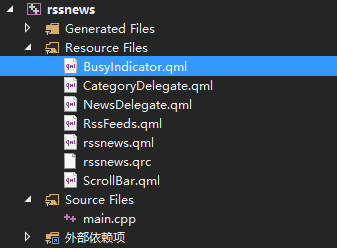
图2 工程目录
结合图1看程序工程目录,是不是觉着一目了然。NewsDelegate组件和CategoryDelegate组件是两个绘制代理,RssFeeds组件提供一个视图数据源,其中还有一个视图的数据源在rssnews.qml文件内部定义。接下来我主要分析下主程序文件rssnews.qml和NewsDelegate绘制代理
1、主程序文件
主程序文件代码如下,程序中关键的地方都有注释,相比于之前的文章注释少了许多,大多都是一些常见的属性没有了注释。
 import QtQuick 2.2

 import QtQuick.XmlListModel 2.0

 import QtQuick.Window 2.1

 import "./content"

 Rectangle {

     id: window

     width:

     height:

     property string currentFeed: rssFeeds.get().feed//get方法为ListModel内置方法,返回指定索引item

     property bool loading: feedModel.status === XmlListModel.Loading//是否是加载中。。。

     property bool isPortrait: Screen.primaryOrientation === Qt.PortraitOrientation

     onLoadingChanged: {

         if (feedModel.status == XmlListModel.Ready)

             list.positionViewAtBeginning()

     }

     RssFeeds { id: rssFeeds }

     XmlListModel {

         id: feedModel

         source: "http://" + window.currentFeed

         query: "/rss/channel/item[child::media:content]"

         namespaceDeclarations: "declare namespace media = 'http://search.yahoo.com/mrss/';"

         XmlRole { name: "title"; query: "title/string()" }

         // Remove any links from the description

         XmlRole { name: "description"; query: "fn:replace(description/string(), '\<a href=.*\/a\>', '')" }

         XmlRole { name: "image"; query: "media:content/@url/string()" }

         XmlRole { name: "link"; query: "link/string()" }

         XmlRole { name: "pubDate"; query: "pubDate/string()" }

     }

     ListView {//左侧新闻列表

         id: categories

         property int itemWidth:

         width: isPortrait ? parent.width : itemWidth

         height: isPortrait ? itemWidth : parent.height

         orientation: isPortrait ? ListView.Horizontal : ListView.Vertical

         anchors.top: parent.top

         model: rssFeeds

         delegate: CategoryDelegate { itemSize: categories.itemWidth }

         spacing:

     }

     ScrollBar {

         id: listScrollBar

         orientation: isPortrait ? Qt.Horizontal : Qt.Vertical

         height: isPortrait ?  : categories.height;

         width: isPortrait ? categories.width :

         scrollArea: categories;//关联滚动的区域

         anchors.right: categories.right//锚点定位

     }

     ListView {//右侧新闻详情  由多个项NewsDelegate组成

         id: list

         anchors.left: isPortrait ? window.left : categories.right

         anchors.right: closeButton.left

         anchors.top: isPortrait ? categories.bottom : window.top

         anchors.bottom: window.bottom

         anchors.leftMargin:

         anchors.rightMargin:

         clip: isPortrait

         model: feedModel

         footer: footerText//页脚  视图最底部的修饰

         delegate: NewsDelegate {}

     }

     ScrollBar {

         scrollArea: list

         width:

         anchors.right: window.right

         anchors.top: isPortrait ? categories.bottom : window.top

         anchors.bottom: window.bottom

     }

     Component {

         id: footerText

         Rectangle {

             width: parent.width

             height: closeButton.height

             color: "lightgray"

             Text {

                 text: "RSS Feed from Yahoo News"

                 anchors.centerIn: parent

                 font.pixelSize:

             }

         }

     }

     Image {//关闭按钮  点击退出程序

         id: closeButton

         source: "content/images/btn_close.png"

         scale: 0.8

         anchors.top: parent.top

         anchors.right: parent.right

         anchors.margins:

         opacity: (isPortrait && categories.moving) ? 0.2 : 1.0

         Behavior on opacity {

             NumberAnimation { duration: ; easing.type: Easing.OutSine }

         }

         MouseArea {

             anchors.fill: parent

             onClicked: {

                 Qt.quit()

             }

         }

     }

 }
footer属性指定页脚,就像word文件的页脚一样,位于ListView最低端,如图1中第一帧的RSS Feed from Yahoo News字段,其实每个页面都有这个字段,只是都位于ListView内容最低端。
2、新闻详情页中项
如图1所示,该NewsDelegate绘制代理是右侧页面中的一条新闻项,右侧页面是一个ListView,内部有许多项组成,每一项都是由该代理绘制。
 //新闻详情中的一条

 import QtQuick 2.2

 Column {

     id: delegate

     width: delegate.ListView.view.width

     spacing:

     // Returns a string representing how long ago an event occurred

     function timeSinceEvent(pubDate) {

         var result = pubDate;

         // We need to modify the pubDate read from the RSS feed

         // so the JavaScript Date object can interpret it

         var d = pubDate.replace(',','').split(' ');

         if (d.length != )

             return result;

         var date = new Date([d[], d[], d[], d[], d[], 'GMT' + d[]].join(' '));

         if (!isNaN(date.getDate())) {

             var age = new Date() - date;

             var minutes = Math.floor(Number(age) / );

             if (minutes < ) {

                 if (minutes < )

                     result = qsTr("Just now");

                 else if (minutes < )

                     result = '' + minutes + ' ' + qsTr("minutes ago")

                 else if (minutes < )

                     result = qsTr("1 hour ago");

                 else

                     result = '' + Math.floor(minutes/) + ' ' + qsTr("hours ago");

             }

             else {

                 result = date.toDateString();

             }

         }

         return result;

     }

     Item { height: ; width: delegate.width }

     Row {

         width: parent.width

         spacing:

         Column {

             Item {//占位

                 width:

                 height: titleText.font.pixelSize /

             }

             Image {

                 id: titleImage

                 source: image//image对应模型中的字段

             }

         }

         Text {

             id: titleText

             text: title//image对应模型中的字段

             width: delegate.width - titleImage.width

             wrapMode: Text.WordWrap

             font.pixelSize:

             font.bold: true

         }

     }

     Text {//距离新闻发布时间+带有link字样的超链接

         width: delegate.width

         font.pixelSize:

         textFormat: Text.RichText

         font.italic: true

         text: timeSinceEvent(pubDate) + " (<a href=\"" + link + "\">Link</a>)"

         onLinkActivated: {

             Qt.openUrlExternally(link)//link对应模型中的字段

         }

     }

     Text {

         id: descriptionText

         text: description//对应模型中的字段

         width: parent.width

         wrapMode: Text.WordWrap//换行模式 字不能拆分

         font.pixelSize: //字号

         textFormat: Text.StyledText//支持一些基本的文本样式标记

         horizontalAlignment: Qt.AlignLeft//水平靠左

     }

 }
三、小节
看了有一些qml示例代码,也一直主要在分析qml代码,本小节插播一段个人总结吧,也算是小小感慨下。
不同于以往的QWidget窗口程序,qml写界面非常简洁,从以往的示例中就能感觉的到,在友好交互方面qml比QWidget做的好,比如List下拉到头时的弹簧效果、完美的加载中展示和远程图片加载等等。qml是声明性语言,即不在像C++那样需要编译后才能运行,在代码编写时只需要关注ui,可以根据需要自己封装组件,把需要外界使用的属性使用导出的方式暴露给外界,每一个组件属性都有OnPropertyChanged槽,当属性发生变化时该槽随即执行。
可能是由于一直从事C++相关的工作,没有声明性语言的基础,在阅读qml代码时总是感觉有一种代码散乱无处整理的感觉,现在小小的示例代码亦是如此,等到正真做起项目来不知道会是怎样一番场景。比如说绘制代理在访问一些属性时,直接访问的是模型中的字段,如果字段名称写错,这种错误只能到运行时异常后才能慢慢排查,类似于这样的代码其实有很多,突然之间就跳出一句无厘头的代码,这在C++中根本不可能出现。。。呵呵呵。。。
qml demo分析(rssnews-常见新闻布局)的更多相关文章
- qml demo分析(threadedanimation-线程动画)
一.效果预览 使用过qml的同学都知道,使用qml做动画效果是非常简单的,再也不需要像QWidget那样,自己模拟一个动画,费时又费力,往往还达不到效果.今天我们就来分析下qml的两种动画实现方式,如 ...
- qml demo分析(maskedmousearea-异形窗口)
一.效果展示 如本文的标题所示,这篇文章分析的demo是一个异形窗口,主要展示鼠标在和异形区域交互的使用,效果如图1所示,当鼠标移动到白云或者月亮上时,相应的物体会高亮,当鼠标按下时,物体会有一个放大 ...
- qml demo分析(maroon-小游戏)
1.效果展示 这篇文章我还是分析一个qt源码中的qml程序,程序运行效果如下图所示. 图1 游戏开始 图2 游戏中 2.源码分析 这个游戏的源码文件比较多,为了能更清楚的了解整个代码,我先整体分析 ...
- qml demo分析(externaldraganddrop-拖拽)
一.效果展示 客户端程序拖拽是一个很常见的需求,对于QWidget程序来说,需要重写如图1这么几个方法,通过重写这几个方法的逻辑,我们就可以控制鼠标拖拽的逻辑,糟糕的是QDrag执行exec后是一个阻 ...
- qml demo分析(text-字体展示)
上一篇文章分析了一个小游戏,使用qml编写界面+js进行复杂逻辑控制,算是一个比较完整的qml示例代码了,今天就不那么继续变态啦,来看一个简单的字体示例程序吧,该示例代码比较简单,主要是展示了几个简单 ...
- qml demo分析(samegame-拼图游戏)
一.效果展示 相信大家都玩儿过连连看游戏,而且此款游戏也是闲时一款打发时间的趣事,那么接下来我将分析一款类似的游戏,完全使用qml编写界面,复杂逻辑使用js完成.由于此游戏包含4种游戏模式,因此本篇文 ...
- qml demo分析(abstractitemmodel-数据分离)
一.概述 qt5之后qml也可以被用于桌面程序开发,今天我就拿出qt demo中的一个qml示例程序进行分析.这个demo主要是展示了qml数据和展示分离的使用方式,qml只专注于快速高效的绘制界面, ...
- qml demo分析(threading-线程任务)
一.关键类说明 qml内置了WorkerScript组件,该组件有一个source属性,可以加载js文件,含有一个名为message的信号,意味着他有一个默认的onMessage槽函数,除此之外他还有 ...
- qml demo分析(photosurface-图片涅拉)
阅读qml示例代码已有一小段时间,也陆续的写了一些自己关于qml示例代码的理解,可能由于自己没有大量的qml开发经验,总感觉复杂的ui交互qml处理起来可能会比较棘手,但事实总是会出人意料,今天我们就 ...
随机推荐
- python之分析decode、encode、unicode编码转换
decode()方法使用注册编码的编解码器的字符串进行解码.它默认为默认的字符串编码.decode函数可以将一个普通字符串转换为unicode对象.decode是将普通字符串按照参数中的编码格式进行解 ...
- Java Script 学习笔记 (一) 基础
1. 设置变量 const: 赋常量,不可更改. let :设置可更改变量. ES6 中推荐使用let 而不是var. Let 和var的区别 : let 将变量的作用域限定在当前{}中, var 定 ...
- Java 读书笔记 (十七) Java 重写(Override)与重载(Overload)
重写(Override) 重写是子类对父类的允许访问的方法的实现过程重新编写,返回值和形参都不能改变,即外壳不变,核心重写. // 如果重写不是相当于重新定义了一个方法?那为什么不直接写,还要exte ...
- SpringCloud实战8-Bus消息总线
好了现在我们接着上一篇的随笔,继续来讲.上一篇我们讲到,我们如果要去更新所有微服务的配置,在不重启的情况下去更新配置,只能依靠spring cloud config了,但是,是我们要一个服务一个服务的 ...
- 在Mybatis-spring上基于注解的数据源实现方案
一.遇到的痛点 最近在学习Spring-boot过程中,涉及到操作数据库.按照DOC引入mybatis-spring-boot-starter,然后按照套路配置application.properti ...
- Docker系列之swarm集群搭建
学习Docker很久了,今天分享一下Docker的swarm集群的搭建过程很简单 首先第一步是 每台机器上面都要安装docker 本人使用的是centos7操作系统,使用3太虚拟机,3太虚拟机必须网络 ...
- Flash与EEPROM
网上找的,感觉说的不错 FLASH 和EEPROM的最大区别是FLASH按扇区操作,EEPROM则按字节操作,二者寻址方法不同,存储单元的结构也不同,FLASH的电路结构较简单,同样容量占芯片面积较小 ...
- MySQL - 高可用性:少宕机即高可用?
我们之前了解了复制.扩展性,接下来就让我们来了解可用性.归根到底,高可用性就意味着 "更少的宕机时间". 老规矩,讨论一个名词,首先要给它下个定义,那么什么是可用性? 1 什么是可 ...
- Caffe源码理解2:SyncedMemory CPU和GPU间的数据同步
目录 写在前面 成员变量的含义及作用 构造与析构 内存同步管理 参考 博客:blog.shinelee.me | 博客园 | CSDN 写在前面 在Caffe源码理解1中介绍了Blob类,其中的数据成 ...
- Java异常处理最佳实践及陷阱防范
前言 不管在我们的工作还是生活中,总会出现各种“错误”,各种突发的“异常”.无论我们做了多少准备,多少测试,这些异常总会在某个时间点出现,如果处理不当或是不及时,往往还会导致其他新的问题出现.所以我们 ...