
CentOS7安装部署jumpserver0.5
组件说明
Jumpserver为管理后台,管理员可以通过Web页面进行资产管理、用户管理、资产授权等操作;
Coco为SSH Server和Web Terminal Server.用户可以通过使用自己的账户登录SSH或者Web Terminal直接访问被授权的资产,不需要知道服务器的账户密码;
Luna为Web Terminal Server前端页面,用户使用Web Terminal方式登录所需要的组件;
Guacamole为Windows组件,这里暂不安装.
1.准备环境
现在生产环境大多使用的是0.3.2版本,其文档较全,安装也较简易,本篇博客将部署jumpserver0.5版.
系统:CentOS7.4、CentOS7.6都行

CentOS Linux release 7.6.1810 (Core)

# 关闭selinux、防火墙

setenforce 0

systemctl stop iptables.service

systemctl stop firewalld.service

# 安装依赖包

yum -y install zlib-devel bzip2-devel openssl-devel ncurses-devel sqlite-devel \

readline-devel tk-devel gdbm-devel db4-devel libpcap-devel xz-devel gcc gcc-c++

yum -y install git automake autoconf vim sshpass lrzsz

yum -y install python36 python36-devel

# 修改字符集,否则可能报input/output error的问题,因为日志里打印了中文

localedef -c -f UTF-8 -i zh_CN zh_CN.UTF-8

export LC_ALL=zh_CN.UTF-8

echo 'LANG="zh_CN.UTF-8"' > /etc/locale.conf

# 建立 Python 虚拟环境

cd /opt

python3.6 -m venv py3-jumpserver5

source /opt/py3-jumpserver5/bin/activate
2.安装Jumpserver
以后运行Jumpserver都要先运行以上source命令,以下所有命令均在该虚拟环境中运行
cd /opt/

git clone --depth=1 https://github.com/jumpserver/jumpserver.git

# 安装依赖RPM包

cd /opt/jumpserver/requirements

yum -y install $(cat rpm_requirements.txt)

# 安装Python库依赖

pip install --upgrade pip setuptools -i https://mirrors.aliyun.com/pypi/simple/

pip install -r requirements.txt -i https://mirrors.aliyun.com/pypi/simple/

# 安装Redis,Jumpserver使用Redis做cache和celery broke

yum -y install redis

systemctl enable redis

systemctl start redis

# 使用mariadb做后端存储

yum -y install mariadb mariadb-devel mariadb-server

systemctl enable mariadb

systemctl start mariadb

# 创建数据库Jumpserver并授权

DB_PASSWORD=`cat /dev/urandom | tr -dc A-Za-z0-9 | head -c 24`  # 生成随机数据库密码

echo -e "\033[31m 你的数据库密码是 $DB_PASSWORD \033[0m"  # 237RcqZYul8nLjfIlJoSRz7W

mysql -uroot -e "create database jumpserver default charset 'utf8'; grant all on jumpserver.* to 'jumpserver'@'127.0.0.1' identified by '$DB_PASSWORD'; flush privileges;"

# 修改Jumpserver配置文件

cp config_example.yml config.yml

SECRET_KEY=`cat /dev/urandom | tr -dc A-Za-z0-9 | head -c 50`

echo "SECRET_KEY=$SECRET_KEY" >> ~/.bashrc

BOOTSTRAP_TOKEN=`cat /dev/urandom | tr -dc A-Za-z0-9 | head -c 16`

echo "BOOTSTRAP_TOKEN=$BOOTSTRAP_TOKEN" >> ~/.bashrc

sed -i "s/SECRET_KEY:/SECRET_KEY: $SECRET_KEY/g" /opt/jumpserver/config.yml

sed -i "s/BOOTSTRAP_TOKEN:/BOOTSTRAP_TOKEN: $BOOTSTRAP_TOKEN/g" /opt/jumpserver/config.yml

sed -i "s/# DEBUG: true/DEBUG: false/g" /opt/jumpserver/config.yml

sed -i "s/# LOG_LEVEL: DEBUG/LOG_LEVEL: ERROR/g" /opt/jumpserver/config.yml

sed -i "s/# SESSION_EXPIRE_AT_BROWSER_CLOSE: false/SESSION_EXPIRE_AT_BROWSER_CLOSE: true/g" /opt/jumpserver/config.yml

sed -i "s/DB_PASSWORD: /DB_PASSWORD: $DB_PASSWORD/g" /opt/jumpserver/config.yml

echo -e "\033[31m 你的SECRET_KEY是 $SECRET_KEY \033[0m"

echo -e "\033[31m 你的BOOTSTRAP_TOKEN是 $BOOTSTRAP_TOKEN \033[0m"

# 运行 Jumpserver

./jms start all -d  # 后台运行使用 -d 参数./jms start all -d

gunicorn is running: 12578

celery is running: 12594

beat is running: 12596
3.安装SSH Server和WebSocket Server:Coco
cd /opt

git clone --depth=1 https://github.com/jumpserver/coco.git

cd /opt/coco/requirements

yum -y install $(cat rpm_requirements.txt)

pip install -r requirements.txt -i https://mirrors.aliyun.com/pypi/simple/

cd /opt/coco/

cp config_example.yml config.yml

sed -i "s/BOOTSTRAP_TOKEN: <PleasgeChangeSameWithJumpserver>/BOOTSTRAP_TOKEN: $BOOTSTRAP_TOKEN/g" /opt/coco/config.yml

sed -i "s/# LOG_LEVEL: INFO/LOG_LEVEL: ERROR/g" /opt/coco/config.yml

./cocod start -d
4.安装Web Terminal前端:Luna
Luna已改为纯前端,需要Nginx来运行访问

cd /opt && wget https://demo.jumpserver.org/download/luna/1.4.10/luna.tar.gz

tar xf luna.tar.gz

chown -R root:root luna

端口说明

Jumpserver:默认端口为 8080/tcp,配置文件在 jumpserver/config.yml;

Coco:默认SSH端口为 2222/tcp,默认Web Terminal端口为 5000/tcp,配置文件在coco/config.yml;

Guacamole:默认端口为 8081/tcp;

Nginx:默认端口为 80/tcp;

Redis:默认端口为 6379/tcp;

Mysql:默认端口为 3306/tcp.
5.配置Nginx整合各组件
yum install yum-utils

vi /etc/yum.repos.d/nginx.repo

[nginx-stable]

name=nginx stable repo

baseurl=http://nginx.org/packages/centos/$releasever/$basearch/

gpgcheck=1

enabled=1

gpgkey=https://nginx.org/keys/nginx_signing.key

yum makecache fast

yum install -y nginx

rm -rf /etc/nginx/conf.d/default.conf

systemctl enable nginx

vi /etc/nginx/conf.d/jumpserver.conf

server {

    listen 80;  # 代理端口, 以后将通过此端口进行访问, 不再通过8080端口

    # server_name demo.jumpserver.org;  # 修改成你的域名或者注释掉

    client_max_body_size 100m;  # 录像及文件上传大小限制

    location /luna/ {

        try_files $uri / /index.html;

        alias /opt/luna/;  # luna 路径, 如果修改安装目录, 此处需要修改

    }

    location /media/ {

        add_header Content-Encoding gzip;

        root /opt/jumpserver/data/;  # 录像位置, 如果修改安装目录, 此处需要修改

    }

    location /static/ {

        root /opt/jumpserver/data/;  # 静态资源, 如果修改安装目录, 此处需要修改

    }

    location /socket.io/ {

        proxy_pass       http://localhost:5000/socket.io/;  # 如果coco安装在别的服务器, 请填写它的ip

        proxy_buffering off;

        proxy_http_version 1.1;

        proxy_set_header Upgrade $http_upgrade;

        proxy_set_header Connection "upgrade";

        proxy_set_header X-Real-IP $remote_addr;

        proxy_set_header Host $host;

        proxy_set_header X-Forwarded-For $proxy_add_x_forwarded_for;

        access_log off;

    }

    location /coco/ {

        proxy_pass       http://localhost:5000/coco/;  # 如果coco安装在别的服务器, 请填写它的ip

        proxy_set_header X-Real-IP $remote_addr;

        proxy_set_header Host $host;

        proxy_set_header X-Forwarded-For $proxy_add_x_forwarded_for;

        access_log off;

    }

    location / {

        proxy_pass http://localhost:8080;  # 如果jumpserver安装在别的服务器, 请填写它的ip

        proxy_set_header X-Real-IP $remote_addr;

        proxy_set_header Host $host;

        proxy_set_header X-Forwarded-For $proxy_add_x_forwarded_for;

    }

}

#运行 Nginx

nginx -t   # 确保配置没有问题

systemctl start nginx
6.开始使用Jumpserver
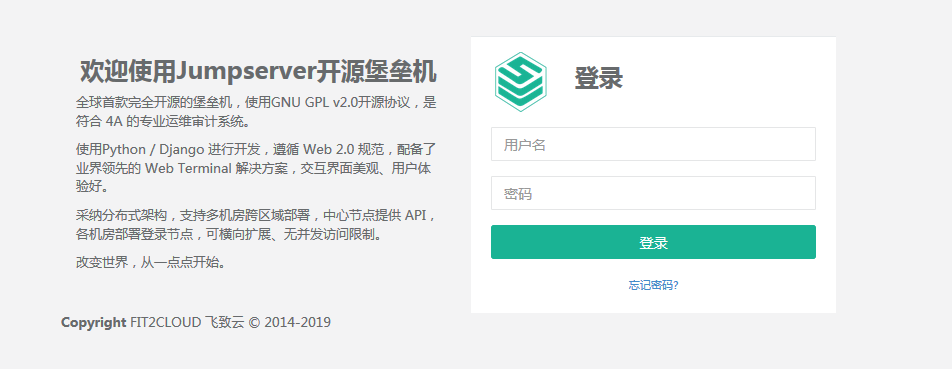
服务全部启动后,访问http://10.0.0.66,访问nginx代理的端口,不要再通过8080端口访问,默认账号: admin,密码: admin
参考博文:http://docs.jumpserver.org/zh/docs/setup_by_centos.html
参考博文:https://blog.csdn.net/gx_1_11_real/article/details/79433128
CentOS7安装部署jumpserver0.5的更多相关文章
- CentOS7安装部署zabbix3.4操作记录
CentOS7安装部署zabbix3.4操作记录 1.安装前准备 1.1 查看centos的系统版本 [root@zabbix ~]# cat /etc/redhat-release CentOS L ...
- centos7 安装部署运行 Redis5
原文:centos7 安装部署运行 Redis5 Redis5 下载与解压(官网: https://redis.io/download ) 下载命令:wget http://download.redi ...
- 容器centos7安装部署ansible
容器centos7安装部署ansible centos镜像版本及ansible版本 centos:centos7.5.1804 ansible:2.9.11 启动容器并进入容器 docker run ...
- Centos7安装部署搭建gitlab平台、汉化
Centos7安装部署搭建gitlab平台.汉化 安装环境要求:内存不要小于4G,否则后期web界面可能会报错 一.准备工作 1.1 查看系统版本 首先查询系统版本,下载Gitlab的对应版本 [ro ...
- centos7安装部署opentsdb2.4.0
写在前面 安装HBase 在HBase中创建表结构 安装配置并启动opentsdb 写在前面 最近因为项目需要在读opentsdb的一部分源码,后面会做个小结分享出来.本人是不大喜欢写这种安装部署的文 ...
- centos7 安装部署 Jenkins
Jenkins 安装部署 1. 安装资源下载 Jenkin镜像地址: http://mirrors.jenkins-ci.org/status.html 选择清华大学镜像地址下载rpm https:/ ...
- centos7安装部署SVN
SVN介绍 SVN是个自由.开源的版本控制系统,绝大多数开源软件都使用SVN作为代码版本管理软件. SVN的官方网站http://subversion.apache.org/.目前SVN在开源社区 ...
- Centos7 安装部署Kubernetes(k8s)集群
目录 一.系统环境 二.前言 三.Kubernetes 3.1 概述 3.2 Kubernetes 组件 3.2.1 控制平面组件 3.2.2 Node组件 四.安装部署Kubernetes集群 4. ...
- jumpserverv0.5.0 基于 CentOS7安装部署
基于 CentOS 7 一步一步安装 Jumpserver 0.5.0 环境 系统: CentOS 7 IP: 192.168.244.144 关闭 selinux和防火墙 # CentOS 7 $ ...
随机推荐
- 怎么把myeclipse项目导入IDEA中
先把myeclipse下的项目拷贝到IDEA的部署目录中,把一些不用的配置文件删除,只留下一个干净的项目 打开IDEA,点击import Project,引入一个项目,选择IDEA部署目录下刚拷贝过去 ...
- mongoTemplate学习笔记
mongoTemplate的andExpression表达式 Aggregation<Post> agg = Aggregation.newAggregation( Record.clas ...
- Java JVM 内存空间解析
运行时数据区: 运行时数据区主要分五块,分别是Method Area , VM Stack , Native Method Stack , Heap , program Counter Registe ...
- Python 操作 SQLite 数据库
写在之前 SQLite 是一个小型的关系型数据库,它最大的特点在于不需要单独的服务.零配置.我们在之前讲过的两个数据库,不管是 MySQL 还是 MongoDB,都需要我们安装.安装之后,然后运行起来 ...
- Leetcode 517.超级洗衣机
超级洗衣机 假设有 n 台超级洗衣机放在同一排上.开始的时候,每台洗衣机内可能有一定量的衣服,也可能是空的. 在每一步操作中,你可以选择任意 m (1 ≤ m ≤ n) 台洗衣机,与此同时将每台洗衣机 ...
- redis linux 集群
redis集群:官方教程 步骤: 1.安装redis 2.修改配置文件redis.conf(集群所需基础配置) port 7000 cluster-enabled yes cluster-config ...
- 软工实践第八次作业——UML设计
本次作业博客 团队组成 临时组长:何裕捷 组员:蔡子阳,陈德斌,胡青元,李麒,高裕翔,王焕仁,黄培鑫 UML 用例图 描述的部分: 1 这里是用户个人管理系统的用例图 面临的问题: 1 面临用户登录注 ...
- PAT 甲级 1047 Student List for Course
https://pintia.cn/problem-sets/994805342720868352/problems/994805433955368960 Zhejiang University ha ...
- 【bzoj1415】[Noi2005]聪聪和可可 期望记忆化搜索
题目描述 输入 数据的第1行为两个整数N和E,以空格分隔,分别表示森林中的景点数和连接相邻景点的路的条数. 第2行包含两个整数C和M,以空格分隔,分别表示初始时聪聪和可可所在的景点的编号. 接下来E行 ...
- vNS12 MySQL Performance
vNS12 MySQL Performance vNS12(192.168.195.91): 2vCPU + 2GBMemMySQL1(192.168.185.73): 2vCPU + 1GBMemM ...