
利用Web服务生成产品编号 执行添加操作
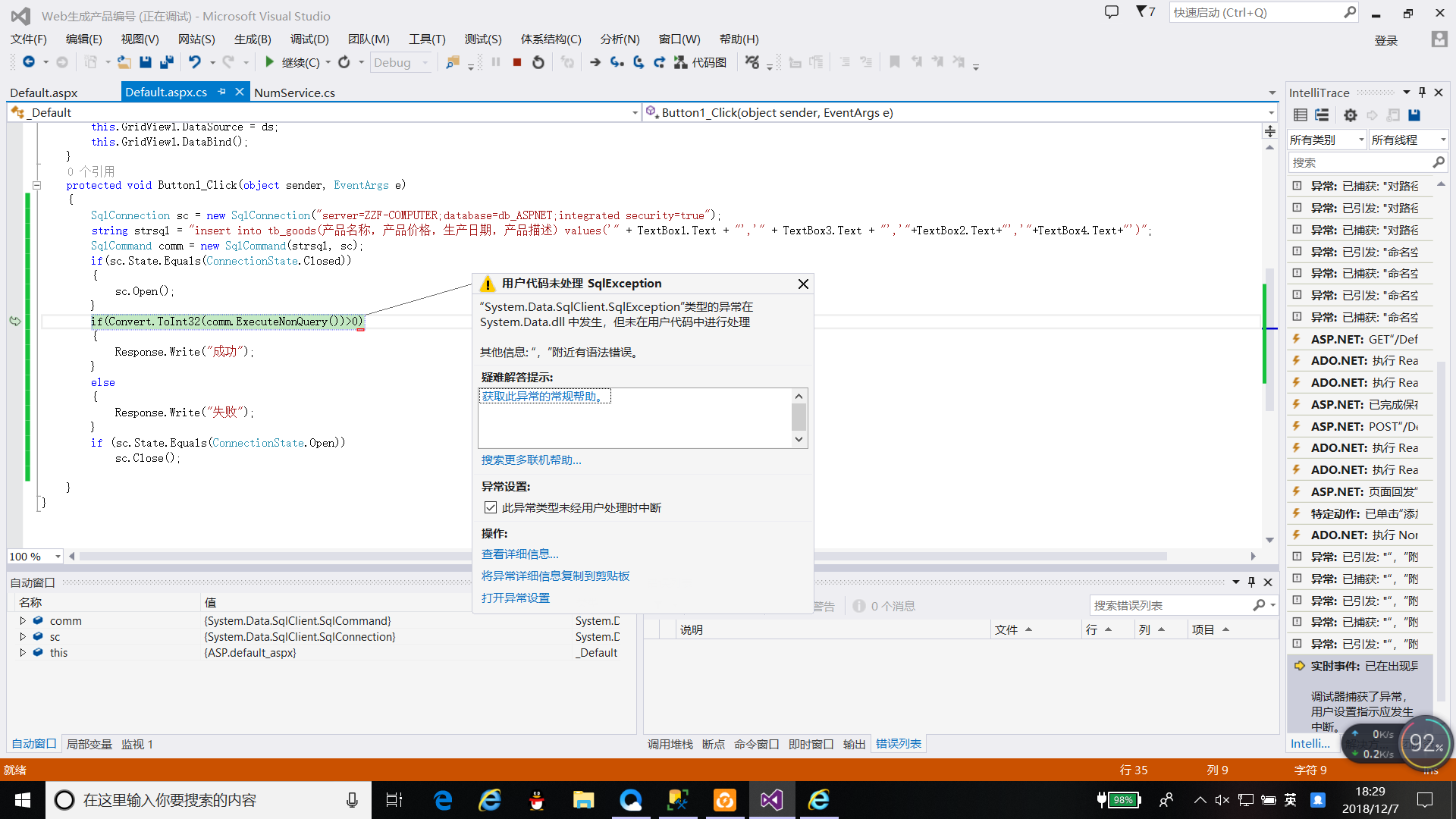
为什么我想要执行添加操作,却添加不成功,系统提示我comm.ExecuteNonQuery有错误
已找到原因
在
string strsql = "insert into tb_goods(产品编号,产品名称,产品价格,生产日期,产品描述) values('"+Label1.Text+"','" + TextBox1.Text + "','"+TextBox3.Text +"','"+TextBox2.Text +"','"+TextBox4.Text+"')";
这行代码里,第一个括号里的“,”用的不是英文的,改为英文的就好了
现在已经好使了
using System;
using System.Collections.Generic;
using System.Linq;
using System.Web;
using System.Web.UI;
using System.Web.UI.WebControls;
using System.Data;
using System.Data.SqlClient;
public partial class _Default : System.Web.UI.Page
{
protected void Page_Load(object sender, EventArgs e)
{
SqlConnection sc = new SqlConnection("server=ZZF-COMPUTER;database=db_ASPNET;integrated security=true");
string cc = "server=ZZF-COMPUTER;database=db_ASPNET;integrated security=true";
NumService num = new NumService();
string cmdtxt = "select * from tb_goods";
string Numstr = num.ProNum(cc, cmdtxt);
this.Label1.Text = Numstr;
SqlDataAdapter Da = new SqlDataAdapter(cmdtxt, new SqlConnection(cc));
DataSet ds = new DataSet();
Da.Fill(ds);
this.GridView1.DataSource = ds;
this.GridView1.DataBind();
}
protected void Button1_Click(object sender, EventArgs e)
{
SqlConnection sc = new SqlConnection("server=ZZF-COMPUTER;database=db_ASPNET;integrated security=true");
string strsql = "insert into tb_goods(产品编号,产品名称,产品价格,生产日期,产品描述) values('"+Label1.Text+"','" + TextBox1.Text + "','"+TextBox3.Text +"','"+TextBox2.Text +"','"+TextBox4.Text+"')";
SqlCommand comm = new SqlCommand("proc_Insert", sc);
if(sc.State.Equals(ConnectionState.Closed))
{
sc.Open();
}
if(Convert.ToInt32(comm.ExecuteNonQuery())>0)
{
Response.Write("成功");
}
else
{
Response.Write("失败");
}
if (sc.State.Equals(ConnectionState.Open))
sc.Close();
}
}
using System;
using System.Collections.Generic;
using System.Linq;
using System.Web;
using System.Web.Services;
using System.Data;
using System.Data.SqlClient;
/// <summary>
/// NumService 的摘要说明
/// </summary>
[WebService(Namespace = "http://tempuri.org/")]
[WebServiceBinding(ConformsTo = WsiProfiles.BasicProfile1_1)]
// 若要允许使用 ASP.NET AJAX 从脚本中调用此 Web 服务,请取消注释以下行。
// [System.Web.Script.Services.ScriptService]
public class NumService : System.Web.Services.WebService {
public NumService () {
//如果使用设计的组件,请取消注释以下行
//InitializeComponent();
}
[WebMethod]
public string HelloWorld() {
return "Hello World";
}
[WebMethod]
public string ProNum(string ConnectionString, string Cmdtxt)
{
SqlConnection Con = new SqlConnection(ConnectionString);
Con.Open();
SqlDataAdapter Da = new SqlDataAdapter(Cmdtxt, Con);
DataSet ds = new DataSet();
Da.Fill(ds);
int Num = ds.Tables[0].Rows.Count;
return "NO" + DateTime.Now.ToString("yyyyMMdd") + "BH" + Convert.ToString(Num + 1);
}
}
using System;using System.Collections.Generic;using System.Linq;using System.Web;using System.Web.UI;using System.Web.UI.WebControls;using System.Data;using System.Data.SqlClient;
public partial class _Default : System.Web.UI.Page{ protected void Page_Load(object sender, EventArgs e) { SqlConnection sc = new SqlConnection("server=ZZF-COMPUTER;database=db_ASPNET;integrated security=true"); string cc = "server=ZZF-COMPUTER;database=db_ASPNET;integrated security=true"; NumService num = new NumService(); string cmdtxt = "select * from tb_goods"; string Numstr = num.ProNum(cc, cmdtxt); this.Label1.Text = Numstr; SqlDataAdapter Da = new SqlDataAdapter(cmdtxt, new SqlConnection(cc)); DataSet ds = new DataSet(); Da.Fill(ds); this.GridView1.DataSource = ds; this.GridView1.DataBind(); } protected void Button1_Click(object sender, EventArgs e) { SqlConnection sc = new SqlConnection("server=ZZF-COMPUTER;database=db_ASPNET;integrated security=true"); string strsql = "insert into tb_goods(产品名称,产品价格,生产日期,产品描述) values('" + TextBox1.Text + "','" + TextBox3.Text + "','"+TextBox2.Text+"','"+TextBox4.Text+"')"; SqlCommand comm = new SqlCommand("proc_Insert", sc); if(sc.State.Equals(ConnectionState.Closed)) { sc.Open(); } if(Convert.ToInt32(comm.ExecuteNonQuery())>0) { Response.Write("成功"); } else { Response.Write("失败"); } if (sc.State.Equals(ConnectionState.Open)) sc.Close(); }}
利用Web服务生成产品编号 执行添加操作的更多相关文章
- 利用STM32CubeMX来生成USB_HID_Mouse工程【添加ADC】(1)
现在原来的基础上添加ADC的功能. 现在(利用STM32CubeMX来生成USB_HID_Mouse工程)基础上新增硬件 JoyStick Shield 游戏摇杆扩展板 与STM32F103C8的连接 ...
- Web服务器之Nginx详解(操作部分)
大纲 一.前言 二.Nginx 安装与配置 三.Nginx 配置文件详解 四.Nginx 命令参数 五.配置Nginx提供Web服务 六.配置Nginx的虚拟主机 七.配置Nginx的用户认证 八.配 ...
- hibernate for循环执行添加操作出错问题
操作数据库使用hibernate框架 hibernate插入对象的时候,对于id唯一,数据库设置为自增的时候执行完操作后会将id赋予该对象 再次插入就会出现问题. 由于session缓存,得再研究下.
- 利用spring实现服务启动就自动执行某些操作的2种方式
第一种方式,用bean的init-method属性 <bean class="com.emax.paycenter.log.LogBridge" init-method=&q ...
- 利用STM32CubeMX来生成USB_HID_Mouse工程【添加ADC】(2)【非dma和中断方式】
上回讲到怎么采集一路的adc的数据,这次我们来采集两路的数据. 现在直接修改原先的代码 /* Private variables ----------------------------------- ...
- 利用js实现进入页面首先执行刷新操作,且只刷新一次
让页面进行刷新,可以使用location.reload()方法,但是这种方法会让页面一直不断的刷新,这是因为当页面加载完成以后,我们让它刷新一次,那么浏览器就会重新向服务器请求数据, 界面会重新加载, ...
- 基于 REST 的 Web 服务:基础
代表性状态传输(Representational State Transfer,REST)在 Web 领域已经得到了广泛的接受,是基于 SOAP 和 Web 服务描述语言(Web Services D ...
- GO.Web服务
Web基础 Web服务器的一般工作原理可以简单地归纳为: 客户机浏览器通过TCP/IP协议建立到服务器的TCP连接 客户端向服务器发送HTTP协议请求包,请求服务器里的资源文档 服务器向客户机发送HT ...
- 25.C# 异步调用Web服务
1.创建Web服务 1.1VS新建ASP.Net空Web应用程序 1.2添加Web服务新建项 1.3添加GetWeather方法和相关类 using System; using System.Coll ...
随机推荐
- leetcode题目解答报告(1)
Remove Element 题目: Given an array and a value, remove all instances of that value in place and retur ...
- accessor mothod mutator mothod 更改器方法 访问器方法 类的方法可以访问类的任何一个对象的私有域!
LocalDate.plusDate String.toUpperCase GregorianCalendar.add import java.time.*; public class Calenda ...
- 什么是 CAS 机制?
1.Synchronized关键字 Synchronized关键字会让没有得到锁资源的线程进入BLOCKED状态,而后在争夺到锁资源后恢复为RUNNABLE状态,这个过程中涉及到操作系统用户模式和内核 ...
- Struts2中的redirect参数传递
在Action之间传递参数有如下方法: (方法一): Xml代码 1. <result name="topic" type="redirect">f ...
- UVA10129 Play on Words —— 欧拉回路
题目链接:https://vjudge.net/problem/UVA-10129 代码如下: // UVa10129 Play on Words // Rujia Liu // 题意:输入n个单词, ...
- 人生苦短之Python类的一二三
在Python中,类也是以class开头定义的.我们定义一个动物类,它有名字和年龄,在java变量有实例变量和局部变量,方法内的变量是局部变量,类里面的变量是实例变量.那么在Python中的类及其属性 ...
- 动态负载均衡(Nginx+Consul+UpSync)环境搭建
首先 安装好 Consul upsync 然后: 1.配置安装Nginx 需要做配置,包括分组之类的,创建目录,有些插件是需要存放在这些目录的 groupadd nginx useradd -g ng ...
- 渗透模型 Percolation Models(一个物理模型的广泛应用)
转自:http://mooc.guokr.com/note/15357/ http://mooc.guokr.com/user/0298406005/note/ 模型思想: 有水流下来,是否会渗入地面 ...
- windows下的host文件在哪里,有什么作用?
在Window系统中有个Hosts文件(没有后缀名),在Windows98系统下该文件在Windows目录,在Windows2000/XP系统中位于C:\Winnt\System32\Drivers\ ...
- blog.codedream.ren
博客将转到 CodeDream ,新的链接是 http://blog.codedream.ren