
IOS UITableView删除功能
UITbableView作为列表展示信息,除了展示的功能,有时还会用到删除,比如购物车等。删除功能可以直接使用系统自带的删除功能,当横向轻扫cell时,右侧出现红色的删除按钮,点击删除当前cell。
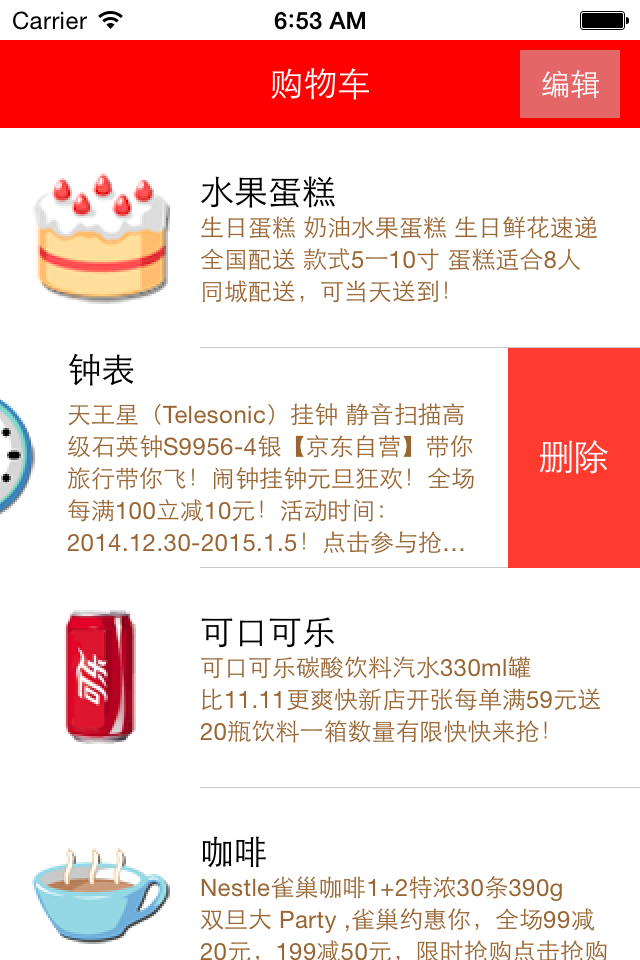
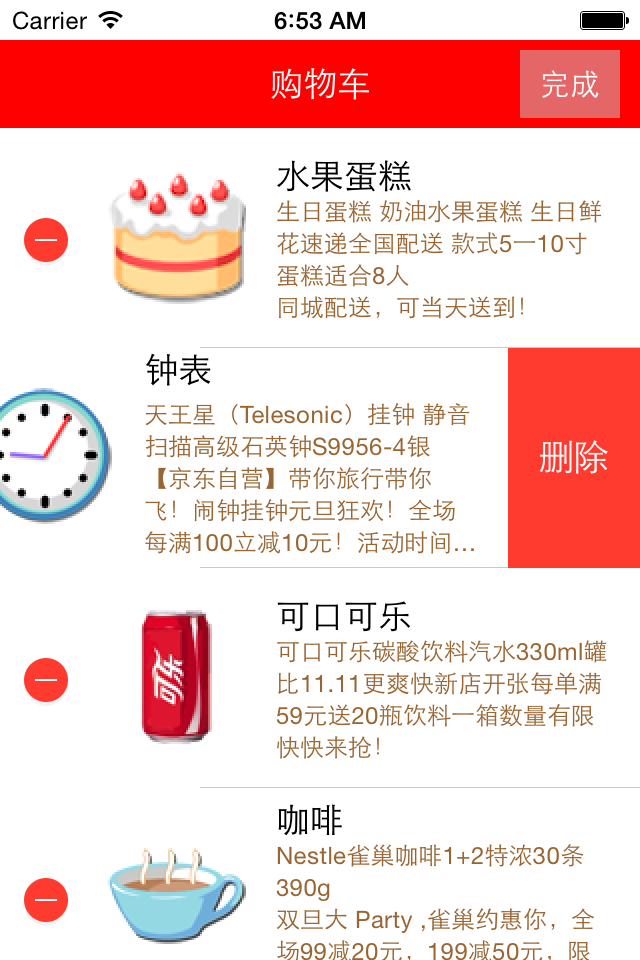
使用系统自带删除功能的步骤:
1、让tableView进入编辑状态,也就是设置它的editing为YES
2、返回编辑模式,也就是实现UITableViewDelegate中的tableview:editingStyleForRowAtIndexPath:方法,在里面返回删除模式。如果不实现,默认返回的就是删除模式
3、提交删除操作,也就是实现tableview:commitEditingStyle:editing StyleForRowAtIndexPath:方法。只要实现此方法,就默认实现了系统横扫出现删除按钮的删除方法
4、如果想把删除按钮改为中文,可以实现tableView:titleForDeleteConfirmationButtonForRowAtIndexPath方法
代码:
//  ViewController.m

//  JRTableView删除

//

//  Created by jerehedu on 15/6/11.

//  Copyright (c) 2015年 jerehedu. All rights reserved.

//

#import "ViewController.h"

#import "Goods.h"

@interface ViewController ()<UITableViewDataSource, UITableViewDelegate>

{

    UITableView *_tableView; //列表

    NSMutableArray *_goodsAry; //商品数组

    UIButton *_editBtn; //编辑按钮

}

@end

@implementation ViewController

- (void)viewDidLoad {

    [super viewDidLoad];

    //添加标题

    UILabel *titleLabel = [[UILabel alloc] initWithFrame:CGRectMake(, , self.view.frame.size.width, )];

    titleLabel.text = @"购物车";

    titleLabel.textAlignment = NSTextAlignmentCenter;

    titleLabel.backgroundColor = [UIColor redColor];

    titleLabel.textColor = [UIColor whiteColor];

    [self.view addSubview:titleLabel];

    //添加编辑按钮

    _editBtn = [UIButton buttonWithType:UIButtonTypeCustom];

    _editBtn.frame = CGRectMake(self.view.frame.size.width-, , , );

    [_editBtn setTitle:@"编辑" forState:UIControlStateNormal];

    [_editBtn setTitle:@"完成" forState:UIControlStateSelected];

    _editBtn.titleLabel.font = [UIFont systemFontOfSize:];

    _editBtn.backgroundColor = [UIColor colorWithRed:0.8 green:0.8 blue:0.8 alpha:0.5];

    [self.view addSubview:_editBtn];

    [_editBtn addTarget:self action:@selector(clickEditBtn:) forControlEvents:UIControlEventTouchUpInside];

    //添加tableview

    _tableView = [[UITableView alloc] initWithFrame:CGRectMake(, , self.view.frame.size.width, self.view.frame.size.height-)];

    _tableView.dataSource = self;

    _tableView.delegate = self;

    [self.view addSubview:_tableView];

    //取数据

    NSArray *ary = [NSArray arrayWithContentsOfFile:[[NSBundle mainBundle] pathForResource:@"ShoppingGoodsList" ofType:@"plist"]];

    //把数据存到模型对象中,然后把对象存到数组中

    _goodsAry = [NSMutableArray array];

    for (int i=; i<ary.count; i++) {

        Goods *good = [Goods goodsWithDic:ary[i]];

        [_goodsAry addObject:good];

    }

}

#pragma mark 数据源  返回有几行

-(NSInteger)tableView:(UITableView *)tableView numberOfRowsInSection:(NSInteger)section

{

    return _goodsAry.count;

}

#pragma mark 每行显示内容

-(UITableViewCell*)tableView:(UITableView *)tableView cellForRowAtIndexPath:(NSIndexPath *)indexPath

{

    static NSString *idGood = @"goods";

    UITableViewCell *cell = [tableView dequeueReusableCellWithIdentifier:idGood];

    if (cell==nil) {

        cell = [[UITableViewCell alloc] initWithStyle:UITableViewCellStyleSubtitle reuseIdentifier:idGood];

    }

    Goods *good = _goodsAry[indexPath.row];

    cell.imageView.image = [UIImage imageNamed:good.icon];

    cell.textLabel.text = good.name;

    cell.detailTextLabel.text = good.details;

    cell.detailTextLabel.numberOfLines = ;

    cell.detailTextLabel.textColor = [UIColor brownColor];

    return cell;

}

#pragma mark 选中行

-(void)tableView:(UITableView *)tableView didSelectRowAtIndexPath:(NSIndexPath *)indexPath

{

    //取消选中状态

    [tableView deselectRowAtIndexPath:indexPath animated:YES];

}

#pragma mark 设置行高

-(CGFloat)tableView:(UITableView *)tableView heightForRowAtIndexPath:(NSIndexPath *)indexPath

{

    return ;

}

#pragma mark 点击编辑按钮

- (IBAction)clickEditBtn:(UIButton *)sender {

    //设置tableview编辑状态

    BOOL flag = !_tableView.editing;

    [_tableView setEditing:flag animated:YES];

    _editBtn.selected = flag;

}

#pragma mark 返回编辑模式,默认为删除模式

-(UITableViewCellEditingStyle)tableView:(UITableView *)tableView editingStyleForRowAtIndexPath:(NSIndexPath *)indexPath

{

     //    return UITableViewCellEditingStyleNone;

    //    return UITableViewCellEditingStyleInsert;

    return UITableViewCellEditingStyleDelete;

}

#pragma mark 提交编辑操作

-(void)tableView:(UITableView *)tableView commitEditingStyle:(UITableViewCellEditingStyle)editingStyle forRowAtIndexPath:(NSIndexPath *)indexPath

{

    //只要实现这个方法,就实现了默认滑动删除!!!!!

    if (editingStyle != UITableViewCellEditingStyleDelete)

        return;

    //删除数据模型

    [_goodsAry removeObjectAtIndex:indexPath.row];

    //刷新界面

//    [_tableView reloadData];

    [_tableView deleteRowsAtIndexPaths:@[indexPath] withRowAnimation:UITableViewRowAnimationFade];

}

#pragma mark 删除按钮中文

-(NSString *)tableView:(UITableView *)tableView titleForDeleteConfirmationButtonForRowAtIndexPath:(NSIndexPath *)indexPath

{

    return @"删除";

}

@end

//

//  Goods.h

//  购物车表格删除

//

//  Created by jerei on 15-1-7.

//  Copyright (c) 2015年 jerei. All rights reserved.

//

#import <Foundation/Foundation.h>

@interface Goods : NSObject

@property (nonatomic, copy) NSString *icon;

@property (nonatomic, copy) NSString *name;

@property (nonatomic, copy) NSString *details;

-(id)initWithDic:(NSDictionary*)dic;

+(id)goodsWithDic:(NSDictionary*)dic;

@end

#import "Goods.h"

@implementation Goods

-(id)initWithDic:(NSDictionary *)dic

{

    if (self = [super init]) {

        self.icon = [dic objectForKey:@"icon"];

        self.name = [dic objectForKey:@"name"];

        self.details = [dic objectForKey:@"details"];

    }

    return self;

}

+(id)goodsWithDic:(NSDictionary *)dic

{

    Goods *good = [[Goods alloc] initWithDic:dic];

    return good;

}

@end
疑问咨询或技术交流,请加入官方QQ群: (452379712)
出处:http://www.cnblogs.com/jerehedu/
本文版权归烟台杰瑞教育科技有限公司和博客园共有,欢迎转载,但未经作者同意必须保留此段声明,且在文章页面明显位置给出原文连接,否则保留追究法律责任的权利。
IOS UITableView删除功能的更多相关文章
- iOS UITableView删除cell分割线
UITableView是UITableViewStylePlain风格的,这样整个TableView都会被分割线分隔开,不管有没有数据,非常丑. 为了可以自定义cell的分割线: 解决方案: 将UIT ...
- iOS - UITableView 单选功能实现
#import <UIKit/UIKit.h> @interface TestCell : UITableViewCell @property(nonatomic,copy)NSStrin ...
- IOS UITableView多选删除功能
UITbableView作为列表展示信息,除了展示的功能,有时还会用到删除,比如购物车.收藏列表等. 单行删除功能可以直接使用系统自带的删除功能,当横向轻扫cell时,右侧出现红色的删除按钮,点击删除 ...
- iOS UITableView划动删除的实现
标签:划动删除 iphone 滑动删除 ios UITableView 原创作品,允许转载,转载时请务必以超链接形式标明文章 原始出处 .作者信息和本声明.否则将追究法律责任.http://rainb ...
- MUI - H5实现ios长按图标后进入图标排序及删除功能的效果
html5实现ios长按图标后进入图标排序及删除功能的效果 我们知道在ios(国产定制安卓系统基本都有)设备上按下图标,图标就会不停的抖动,并且可以随心拖动排序和删除. 那么问题来了,我们怎么通过ht ...
- IOS UITableView NSIndexPath属性讲解
IOS UITableView NSIndexPath属性讲解 查看UITableView的帮助文档我们会注意到UITableView有两个Delegate分别为:dataSource和deleg ...
- tableView左滑删除功能
实现三个代理方法即可 -(NSString *)tableView:(UITableView *)tableView titleForDeleteConfirmationButtonForRowAtI ...
- tableView删除功能小记
由于项目需要,做一个UITableView来实现删除功能. 效果如图: 功能思路其实不难: 交代一下,我自己要实现的效果: 1.TableView是分组的. 2.点击删除按钮后,某行被删除. 写完 ...
- iOS-分组UITableView删除崩溃问题(当删除section中最后一条数据崩溃的情况)
错误: The number of sections contained in the table view after the update (1) must be equal to the num ...
随机推荐
- ArrayList or LinkedList
ArrayList or LinkedList import java.util.*; public class TestArrayLinked { public static void main(S ...
- redis优化方案
流水线(pipelined) 批量提交redis命令,减少通信次数 事务 mulit,事务的开始 exec,执行事务快内的命令 discard,放弃事务快内的命令 watch,监视key,如果key改 ...
- JS模拟PHP的sleep
function sleep(n) { var start = new Date().getTime(); while(true) { if(new Date().getTime() - start ...
- 解决ubuntu解压windows生成的zip文件时乱码问题
在windows上压缩的文件,是以系统默认编码中文来压缩文件.由于zip文件中没有声明其编码,所以linux上的unzip一般以默认编码解压,中文文件名会出现乱码. 虽然2005年就有人把这报告为bu ...
- socketserver用法列子
socketserver socketserver内部使用IO多路复用以及“多线程”和“多进程”,从而实现并发处理多个客户端请求的scoket服务端.即,每个客户端请求连接到服务器时,socket服务 ...
- 高并发编程之ReentrantLock
上文学习jvm提供的同步方法synchronized的用法,一些常见的业务类型以及一道以前阿里的面试题,从中学习到了一些并发编程的一些规则以及建议,本文主要学习jdk提供的同步方法reentrantL ...
- jquery.rotate.js实现旋转动画
1.页面引入jquery.rotate.js文件, 下载地址:https://files.cnblogs.com/files/zhoujl-5071/jquery.rotate.js(打开这个网址,c ...
- [APIO2018]铁人两项 --- 圆方树
[APIO2018] 铁人两项 题目大意: 给定一张图,问有多少三元组(a,b,c)(a,b,c 互不相等)满足存在一条点不重复的以a为起点,经过b,终点为c的路径 如果你不会圆方树 ------- ...
- [CodeForces-375E]Red and Black Tree
题目大意: 给你一棵带边权的树,每个结点可能是红色或者黑色,你可以交换若干个点对使得任意一个红点到达与其最近的黑点的距离小于等于m. 思路: 动态规划. f[i][j][k]表示以i为根的子树中,连向 ...
- zoj 3329 概率dp
题意:有三个骰子,分别有k1,k2,k3个面.每个面值为1--kn每次掷骰子,如果三个面分别为a,b,c则分数置0,否则加上三个骰子的分数之和.当分数大于n时结束.求游戏的期望步数.初始分数为0 链接 ...