
OpenCV使用FLANN进行特征点匹配
使用FLANN进行特征点匹配
目标
在本教程中我们将涉及以下内容:
- 使用 FlannBasedMatcher 接口以及函数 FLANN 实现快速高效匹配( 快速最近邻逼近搜索函数库(Fast Approximate Nearest Neighbor Search Library) )
理论
代码
这个教程的源代码如下所示。你还可以从 以下链接下载得到源代码
#include <stdio.h>

#include <iostream>

#include "opencv2/core/core.hpp"

#include "opencv2/features2d/features2d.hpp"

#include "opencv2/highgui/highgui.hpp"

using namespace cv;

void readme();

/** @function main */

int main( int argc, char** argv )

{

  if( argc != 3 )

  { readme(); return -1; }

  Mat img_1 = imread( argv[1], CV_LOAD_IMAGE_GRAYSCALE );

  Mat img_2 = imread( argv[2], CV_LOAD_IMAGE_GRAYSCALE );

  if( !img_1.data || !img_2.data )

  { std::cout<< " --(!) Error reading images " << std::endl; return -1; }

  //-- Step 1: Detect the keypoints using SURF Detector

  int minHessian = 400;

  SurfFeatureDetector detector( minHessian );

  std::vector<KeyPoint> keypoints_1, keypoints_2;

  detector.detect( img_1, keypoints_1 );

  detector.detect( img_2, keypoints_2 );

  //-- Step 2: Calculate descriptors (feature vectors)

  SurfDescriptorExtractor extractor;

  Mat descriptors_1, descriptors_2;

  extractor.compute( img_1, keypoints_1, descriptors_1 );

  extractor.compute( img_2, keypoints_2, descriptors_2 );

  //-- Step 3: Matching descriptor vectors using FLANN matcher

  FlannBasedMatcher matcher;

  std::vector< DMatch > matches;

  matcher.match( descriptors_1, descriptors_2, matches );

  double max_dist = 0; double min_dist = 100;

  //-- Quick calculation of max and min distances between keypoints

  for( int i = 0; i < descriptors_1.rows; i++ )

  { double dist = matches[i].distance;

    if( dist < min_dist ) min_dist = dist;

    if( dist > max_dist ) max_dist = dist;

  }

  printf("-- Max dist : %f \n", max_dist );

  printf("-- Min dist : %f \n", min_dist );

  //-- Draw only "good" matches (i.e. whose distance is less than 2*min_dist )

  //-- PS.- radiusMatch can also be used here.

  std::vector< DMatch > good_matches;

  for( int i = 0; i < descriptors_1.rows; i++ )

  { if( matches[i].distance < 2*min_dist )

    { good_matches.push_back( matches[i]); }

  }

  //-- Draw only "good" matches

  Mat img_matches;

  drawMatches( img_1, keypoints_1, img_2, keypoints_2,

               good_matches, img_matches, Scalar::all(-1), Scalar::all(-1),

               vector<char>(), DrawMatchesFlags::NOT_DRAW_SINGLE_POINTS );

  //-- Show detected matches

  imshow( "Good Matches", img_matches );

  for( int i = 0; i < good_matches.size(); i++ )

  { printf( "-- Good Match [%d] Keypoint 1: %d  -- Keypoint 2: %d  \n", i, good_matches[i].queryIdx, good_matches[i].trainIdx ); }

  waitKey(0);

  return 0;

 }

 /** @function readme */

 void readme()

 { std::cout << " Usage: ./SURF_FlannMatcher <img1> <img2>" << std::endl; }
解释
结果
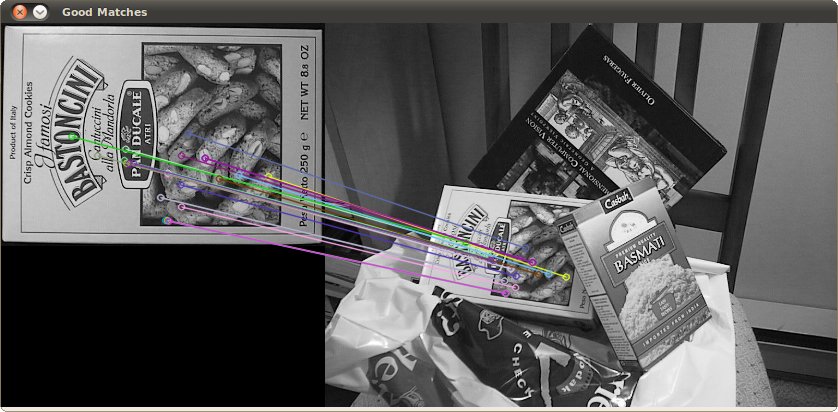
这里是第一张图特征点检测结果:
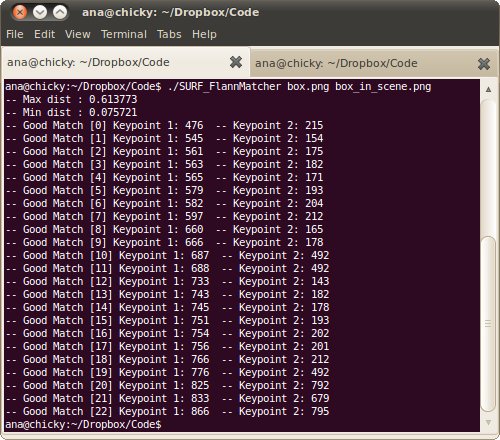
此外我们通过控制台输出FLANN匹配关键点结果:
翻译者
Shuai Zheng, <kylezheng04@gmail.com>, http://www.cbsr.ia.ac.cn/users/szheng/
from: http://www.opencv.org.cn/opencvdoc/2.3.2/html/doc/tutorials/features2d/feature_flann_matcher/feature_flann_matcher.html#feature-flann-matcher
OpenCV使用FLANN进行特征点匹配的更多相关文章
- OpenCV 使用FLANN进行特征点匹配
#include <stdio.h> #include <iostream> #include "opencv2/core/core.hpp" #inclu ...
- 《opencv学习》 之 特征检测与匹配
这几天学习SURF特征检测,直接看的视频和书本有点吃不消,现在是基本看懂了,如果写博客记录没有必要,因为网上都差不多,笔记都在书上了,以下是个人认为比较浅显易懂的文章,当然海有很多好文章我没看到. 看 ...
- sift、surf、orb 特征提取及最优特征点匹配
目录 sift sift特征简介 sift特征提取步骤 surf surf特征简介 surf特征提取步骤 orb orb特征简介 orb特征提取算法 代码实现 特征提取 特征匹配 附录 sift si ...
- Opencv中使用Surf特征实现图像配准及对透视变换矩阵H的平移修正
图像配准需要将一张测试图片按照第二张基准图片的尺寸.角度等形态信息进行透视(仿射)变换匹配,本例通过Surf特征的定位和匹配实现图像配准. 配准流程: 1. 提取两幅图像的Surf特征 2. 对Sur ...
- Opencv Sift和Surf特征实现图像无缝拼接生成全景图像
Sift和Surf算法实现两幅图像拼接的过程是一样的,主要分为4大部分: 1. 特征点提取和描述 2. 特征点配对,找到两幅图像中匹配点的位置 3. 通过配对点,生成变换矩阵,并对图像1应用变换矩阵生 ...
- 第二篇 特征点匹配以及openvslam中的相关实现详解
配置文件 在进入正题之前先做一些铺垫,在openvslam中,配置文件是必须要正确的以.yaml格式提供,通常需要指明使用的相机模型,ORB特征检测参数,跟踪参数等. #==============# ...
- 【macOS】 在OpenCV下训练Haar特征分类器
本教程基于以下环境 macOS 10.12.6,OpenCV 3.3.0,python 3.6.由于网上基于masOS系统的教程太少,想出一篇相关教程造福大家-本文旨在学习如何在opencv中基于ha ...
- OpenCV教程(47) sift特征和surf特征
在前面三篇教程中的几种角检测方法,比如harris角检测,都是旋转无关的,即使我们转动图像,依然能检测出角的位置,但是图像缩放后,harris角检测可能会失效,比如下面的图像,图像放大之前可 ...
- opencv surf特征点匹配拼接源码
http://blog.csdn.net/huixingshao/article/details/42672073 /** * @file SURF_Homography * @brief SURF ...
随机推荐
- WP SMTP插件为啥我一直设置的不对?
我也是摸索好久才搞定的,如果你是万网空间先去修改一下参数在万网后台设置PHP.ini参数设置,因为万网阿里云免费虚拟主机禁用了WordPress默认使用的PHP mail()发信函数,而 stream ...
- mac环境下使用brew安装kafka
1.安装kafka brew install kafka note: ·kafka使用zookeeper管理,安装过程会自动安装zookeeper ·安装目录:/usr/local/Cellar/ka ...
- MINIBASE源代码阅读笔记之DB
DB 管理数据库的类 file_entry:dir page的元素,保存不同文件对应的page directory_page:dir page的专用结构体,里面有个初始长度为0的variable si ...
- python中调用cmd
1. 使用os.system("cmd") 这是最简单的一种方法,特点是执行的时候程序会打出cmd在linux上执行的信息.使用前需要import os. os.system(&q ...
- 【LOJ】#2017. 「SCOI2016」围棋
题解 考虑到状态数比较复杂,其实我们需要轮廓线dp-- 我们设置\(f[x][y][S][h][k]\)为考虑到第(x,y)个格子,S是轮廓线上的匹配状态,是二进制,如果一位是1表示这一位匹配第一行匹 ...
- Robot Framework Selenium学习博客
http://blog.csdn.net/tulituqi/article/details/21888059
- CodeForces 811B Vladik and Complicated Book
离线,树状数组. 数据范围好像有点小,直接暴力可以过的. 我直接上了$n,Q≤100000$的做法:只需要判断区间上比$x$小的数字有几个即可,可以对询问进行离线操作,从左到右一个一个数字插入到树状数 ...
- react篇章-React 组件-复合组件
<!DOCTYPE html> <html> <head> <meta charset="UTF-8" /> <title&g ...
- python每天定时发送短信脚本
最近业务上需要每天解析txt文本或者excel文件,读取内容发送短信,发送的时间段可控,用python实现 安装pip依赖 pip install -r requirement.txt xlrd Py ...
- 【概率】【找规律】hdu6229 Wandering Robots
题意:一个机器人在正方形迷宫的左上角,迷宫里有些格子有障碍物,每一步机器人会等概率地向能走的格子转移(包含自身).问你无限长的时间之后,机器人处于矩形对角线的右下方的概率. 无限长时间意味着,起点没有 ...